

Tandem: Language exchange
- 5.41K
- 4.1
- Installs
- 10.00M
- Price
- Free

Screenshots


Analysis by Reviewed
I find that language exchange apps can be harder to use than they first appear: the learning depends on another person having time, finding a shared topic, and being willing to keep a conversation going. Tandem: Language Exchange is most rewarding when I treat it as a place to practise real communication, not as a course that will organize every step for me. That distinction helps set fair expectations before starting.
Where a conversation can stall
The first hurdle is often not the language itself but the opening message. A broad “Hi, how are you?” can leave both people with little to build on, especially when each is still learning. I get more out of an exchange when I bring one small, specific subject: a meal I cooked, a film I watched, or a phrase I heard that day. It gives the other person something concrete to respond to and makes corrections easier to understand in context.
Conversation partners also have different schedules and levels of commitment. A promising chat may slow down simply because someone is busy, so I would not treat one quiet exchange as proof the app is failing. It is sensible to keep expectations modest, make a few thoughtful attempts, and focus on people whose language goals and availability seem compatible with yours.
Make the first session easier
Before reaching out, I would make my learning goal clear and prepare a few questions that invite more than a yes-or-no answer. For example, asking what people usually eat on a weekday gives a beginner a manageable topic while leaving room for a natural conversation. If you are nervous about writing, a short message is enough; there is no need to produce a perfect introduction before you begin.
For a useful routine, I like to separate conversation from review. During a chat, I can keep the exchange moving; afterward, I can revisit a correction and write down one example sentence. That small follow-up turns a friendly conversation into practice I can remember, without trying to turn every message into a formal lesson. It also helps me notice recurring mistakes rather than collecting corrections I never use.
Connecting Cultures, One Chat at a Time
At its core, Tandem: Language Exchange is all about fostering connections between people from different corners of the world. It's like having a pen pal, but way cooler and more interactive. The app pairs you with native speakers of the language you're learning, and in return, you help them with a language you speak fluently. It's a win-win situation!
The Magic of Real Conversations
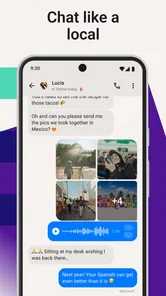
One of the things I absolutely love about this app is the opportunity to engage in real conversations. Forget those boring grammar drills and repetitive vocabulary lists! With Tandem, you dive straight into chatting with native speakers. This immersive experience not only improves your language skills but also gives you a taste of the culture behind the language.
More From Our News Desk

 Gmail
GmailGmail in a Busy Inbox: Who Benefits Most?
From first account to crowded workday, Gmail earns its place through dependable search and flexible sorting—but its best fit depends on how much inbox maintenance you can tolerate.

 Prime Video
Switching to Prime Video: What Changes in Your Viewing Routine
Prime Video can make a compelling second home for streaming, but switching means learning a different catalog, rental layer, and route from browsing to playback.

 Universal TV Remote Control
Universal TV Remote Control Works Best as a Reliable Backup
A phone remote earns its place through quick setup and reliable habits. Here is how to get more from Universal TV Remote Control—and where its limits show.

 Weather - By Xiaomi
Weather by Xiaomi Review: Clear at a Glance, Less Clear Up Close
Xiaomi’s weather app makes everyday forecasts quick to scan, but its calm surface can leave useful details and recovery paths harder to find than they should be.

 X
XX Under Pressure: Can It Recover When Posting Goes Wrong?
A resilience-focused review of X, examining setup, mistaken posts, interruptions, weak connections, and the gaps that matter when recovery needs to be dependable.

 Clash of Clans
Clash of Clans Is Won Between the Battles
Its raids are quick; its community is a long-term project of coordination, teaching, rivalry, and shared responsibility—with all the friction that entails.
Latest News



Whether it's discussing your favorite movies, sharing travel stories, or just talking about your day, these interactions make learning fun and relatable. Plus, there's something genuinely rewarding about helping someone else learn your language too. It's like a mutual exchange of knowledge and goodwill.
Use the tools with a little intention
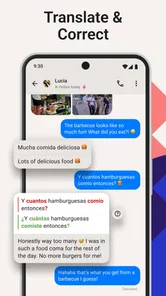
The correction feature is most helpful when I ask for a particular kind of feedback. If I want to sound more natural, I can ask whether a phrase feels conversational; if I am practising a basic structure, I can focus on that instead. Otherwise, a corrected sentence may be technically useful but leave me unsure what to learn from it. I also try to give my partner clear, kind corrections in return, rather than rewriting every message.
Community topics can take pressure off the first one-to-one exchange. I can browse a subject that already interests me and use it to find a starting point, rather than inventing a conversation from nothing. This is especially useful on days when I have only a few minutes: I can read how people discuss a familiar topic and pick up expressions before committing to a longer chat. It is still social practice, not a substitute for a structured explanation of grammar.
A realistic everyday routine
Imagine having a short break after work and wanting to practise without setting aside a full study session. I might choose a topic such as weekend plans, send a focused message, then return later to look at a correction and try the improved wording in my next exchange. If a live conversation suits both people, a video call can make the practice feel more immediate; if not, text is a practical way to fit language use around a busy day.
This flexible rhythm is a genuine strength, but it also creates a trade-off: progress depends on showing up and making use of the conversations. Someone who wants a fixed daily lesson, automatic sequence, or quiet solo practice may prefer a conventional language-learning course. Tandem suits learners who already know what language they want to practise and are willing to take some initiative with people.
How it compares with courses and tutors
Compared with a standard course app, this experience is less controlled but more personal. A course can reliably guide you through vocabulary and grammar in a planned order; conversation with another person gives you unpredictable phrasing, follow-up questions, and cultural context. I see the two approaches as complementary: use structured study to build foundations, then use exchanges to test whether you can actually express an idea.
It is also different from booking a tutor. A language exchange is based on mutual help, so it can be a better fit if you want informal practice and are happy to support someone learning your language. If you need a teacher to diagnose recurring errors, plan lessons, or keep you accountable, a tutor or course is the clearer choice. Tandem’s value lies in the human back-and-forth, not in replacing those other forms of instruction.
User-Friendly Interface and Features
Navigating through the app is a breeze. The user-friendly interface makes it easy to find language partners, start conversations, and even schedule video calls for a more personal touch. Additionally, Tandem offers a built-in correction feature, allowing partners to correct each other's messages. This is a fantastic way to learn from mistakes in a supportive environment.
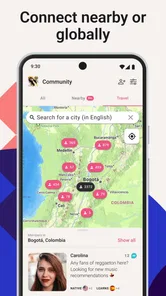
Another feature worth mentioning is the ability to join community topics. This is perfect for those moments when you're feeling shy or don't know how to start a conversation. Jump into a discussion about music, food, or current events and watch your vocabulary expand effortlessly. The community is vibrant and welcoming, making it a safe space for learners at any level.
When a technical snag may have another cause
If a chat or call does not go as expected, I would first check the basics: whether the connection is stable, whether the app is current, and whether the other person is available. A message that gets no reply is not necessarily a technical problem, and a call that is awkward may simply reflect nerves or different conversation styles. Keeping a text-based fallback and trying again at a mutually convenient time can be more useful than abandoning a promising exchange straight away.
For device compatibility, the app’s current version is 6.9.0 and its minimum OS requirement is 8.0. Tandem is free to install, with in-app purchases ranging from $1.49 to $180.00 per item. I would start with the free experience and decide whether any paid option is worthwhile only after I know how often I will use the app. It is rated for Teen audiences, so younger users and families should consider that context when deciding whether it is appropriate.
Safety and Privacy
Safety is a top priority for Tandem, and the app includes several measures to ensure a secure experience. From profile verification to reporting inappropriate behavior, you can rest assured that you're in good hands. The app's developers have done an excellent job in creating a trustworthy platform for language enthusiasts.
In a world where privacy concerns are rampant, it's comforting to know that Tandem respects your data and personal information. This attention to user safety enhances the overall experience, allowing you to focus on what truly matters: learning and connecting.
Still, I treat any social language app with ordinary care. I keep early conversations focused on language practice, share personal details gradually, and use reporting tools if someone behaves inappropriately. Those habits are useful even when an app offers safety measures, because a respectful exchange depends on both the platform and the people using it.
Who will get the most from it
The app is a strong match for someone who has a language goal, enjoys meeting people, and can tolerate the uneven pace of real conversation. It can also help travellers prepare for everyday interactions, or heritage learners who want to become more comfortable speaking with people who use the language naturally. Beginners can take part, but they may find it easier if they bring a few prepared phrases and use structured study alongside their chats.
I would skip it if I strongly prefer learning alone, need guaranteed corrections from a professional, or feel uncomfortable with social interaction. It is also not the best answer when the immediate need is a carefully sequenced grammar course or a quick translation. For those situations, a textbook-style app, class, or dictionary is likely to be more direct and predictable.
Small adjustments that make exchanges more useful
One practical choice is to agree on a narrow focus before a longer conversation: perhaps spending part of the exchange on your target language and part helping your partner. Without a shared plan, one person can end up doing most of the talking or correction. I find it helpful to keep the arrangement flexible, though; if a topic is flowing naturally, forcing a strict lesson format can make the exchange feel stiff.
It also pays to distinguish a correction from a preference. A partner may offer a more natural alternative, but that does not mean your original sentence was impossible to understand. I would ask what sounds more usual and save the example with its context, rather than memorizing a replacement without knowing why it fits. This is especially useful when two people use different regional expressions.
If you are deciding whether to use text or a call, match the format to the task. Text gives you time to reread a sentence and respond thoughtfully; speaking is better practice when your goal is to react without drafting first. You do not have to make every exchange a call to get value from the app. A few purposeful written conversations can help you build confidence before trying a live discussion.
When a technical snag may have another cause
If a chat or call does not go as expected, I would first check the basics: whether the connection is stable, whether the app is current, and whether the other person is available. A message that gets no reply is not necessarily a technical problem, and a call that is awkward may simply reflect nerves or different conversation styles. Keeping a text-based fallback and trying again at a mutually convenient time can be more useful than abandoning a promising exchange straight away.
For device compatibility, the app’s current version is 6.9.0 and its minimum OS requirement is 8.0. Tandem is free to install, with in-app purchases ranging from $1.49 to $180.00 per item. I would start with the free experience and decide whether any paid option is worthwhile only after I know how often I will use the app. It is rated for Teen audiences, so younger users and families should consider that context when deciding whether it is appropriate.
Safety and Privacy
Safety is a top priority for Tandem, and the app includes several measures to ensure a secure experience. From profile verification to reporting inappropriate behavior, you can rest assured that you're in good hands. The app's developers have done an excellent job in creating a trustworthy platform for language enthusiasts.
In a world where privacy concerns are rampant, it's comforting to know that Tandem respects your data and personal information. This attention to user safety enhances the overall experience, allowing you to focus on what truly matters: learning and connecting.
Still, I treat any social language app with ordinary care. I keep early conversations focused on language practice, share personal details gradually, and use reporting tools if someone behaves inappropriately. Those habits are useful even when an app offers safety measures, because a respectful exchange depends on both the platform and the people using it.
Who will get the most from it
The app is a strong match for someone who has a language goal, enjoys meeting people, and can tolerate the uneven pace of real conversation. It can also help travellers prepare for everyday interactions, or heritage learners who want to become more comfortable speaking with people who use the language naturally. Beginners can take part, but they may find it easier if they bring a few prepared phrases and use structured study alongside their chats.
I would skip it if I strongly prefer learning alone, need guaranteed corrections from a professional, or feel uncomfortable with social interaction. It is also not the best answer when the immediate need is a carefully sequenced grammar course or a quick translation. For those situations, a textbook-style app, class, or dictionary is likely to be more direct and predictable.
My practical verdict
Tandem is an education app from Tripod Technology GmbH, and its appeal is the chance to turn language study into an exchange between people rather than a series of isolated exercises. It has a 4.1 average from around 401,000 ratings, with over 10 million installs, which gives a sense of its broad reach without guaranteeing that every match will suit every learner. It was released on September 13, 2016, and has accumulated around 5,200 written reviews.
In conclusion, if you're serious about learning a new language and want to enjoy the process, Tandem: Language Exchange is the app for you. It's engaging, educational, and, most importantly, fun! So why not give it a try and open the door to a world of linguistic possibilities?
Tandem: Language exchange Frequently Asked Questions
Can I use Tandem to practice speaking as well as writing?
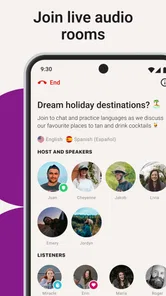
Yes. Tandem supports language practice through text, voice, and video calls, so you can choose a format that suits your confidence and goals. Text can be a comfortable way to begin, while voice or video gives you a chance to work on spoken communication. You can use these options to practice with native speakers.
What does Tandem cost, and are there optional purchases?
Tandem is free to download, and its core language-exchange experience is available without paying. The app also offers optional in-app purchases, with listed prices ranging from $1.49 to $180.00 per item. Those purchases are not required just to try language practice, so you can start with the free experience and decide whether any paid options suit you.
Is Tandem suitable for beginners who are just starting a language?
Yes. Tandem is designed for language practice with native speakers, so beginners can use it to start having real conversations and build confidence over time. You can choose a language and connect with people who speak it, then practice through text, voice, or video calls. As with any language exchange, it helps to be clear about your level and what you hope to practice.
What is Tandem: Language Exchange?
Tandem: Language Exchange is a mobile application designed to connect users with native speakers around the world for language practice. It provides a platform for users to engage in meaningful conversations through text, voice, and video calls, allowing them to improve their language skills in an immersive environment.
How does Tandem ensure user safety and privacy?
Tandem prioritizes user safety and privacy by implementing robust security measures. The app includes an in-app reporting system for any inappropriate behavior, and users must verify their profiles to ensure authenticity. Additionally, Tandem adheres to strict data protection policies, ensuring personal information is kept confidential.
Pros
- Interactive and fun language learning.
- Connects you with native speakers globally.
- Free basic features available.
- User-friendly interface.
- Customizable learning goals.
Cons
- Limited free content access.
- Some users report technical issues.
- In-app purchases can be pricey.
- Requires stable internet connection.
- Profile verification can be slow.











