Tampa Bay Buccaneers Mobile
- 2.09K
- 4.6
- Installs
- 100.00K
- Price
- Free

Screenshots
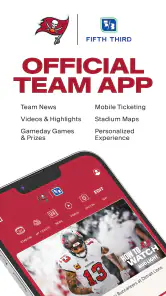
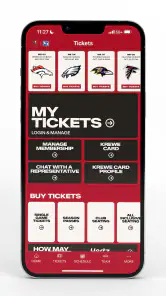
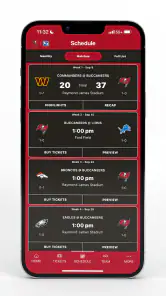
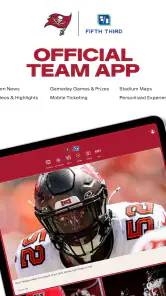
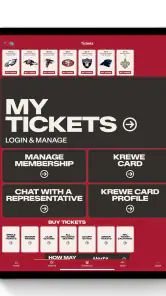
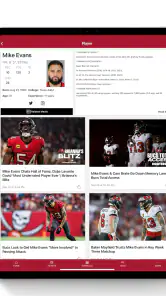
Analysis by Reviewed
Following the Tampa Bay Buccaneers is easy when I only want a quick team update, but the official mobile app becomes more useful when I treat it as a focused companion for the club rather than a complete replacement for every sports service. I used it as a sports app for checking Buccaneers information, moving through team-focused content, and keeping the experience centered on Tampa Bay instead of sorting through a league-wide feed. That narrow purpose is its biggest strength and also the first thing to understand before installing it.
Tampa Bay Buccaneers Mobile is free, aimed at everyone, and developed by YinzCam, Inc. It has been available since August 17, 2011, and the current release is version 3.7.9 for devices running operating system 10 or later. The app has built a solid audience, with more than one hundred thousand installs, an average score of 4.6 from roughly seven thousand ratings, and about two thousand written reviews. Those figures suggest that it has become a familiar tool for fans, although a high rating should not be mistaken for proof that every screen will suit every user or every phone.
How clearly the app works for different fans
Readable team information without a league-wide distraction
The most comfortable way to use this app is to approach it with a specific Buccaneers-related task in mind. I might open it to see what is new around the team, look for a particular piece of coverage, or check the app during a game-day routine. Because the product is the official Tampa Bay Buccaneers app, its identity is clear from the start. I do not have to decide which team page belongs to Tampa Bay inside a broad sports platform, and that reduces the mental effort for someone who wants one club rather than an entire competition.
That focus also helps readers who find busy sports apps tiring. A general sports application often mixes scores, alerts, headlines, video, standings, fantasy material, advertisements, and unrelated teams in one stream. Here, the subject is much more defined. I find that useful when I am already watching a game or discussing the Buccaneers with friends and want information connected to the team without repeatedly filtering a large national feed.
Still, a focused app is not automatically a simple app. Official team applications can contain several content areas, and the amount of information may feel greater than someone expects from a basic score checker. My practical advice is to spend a few minutes learning where the sections you use most often are located. That small investment makes later visits quicker, especially if you tend to open the app with one purpose, such as checking team news before work.
For readers who rely on strong visual organization, the key question is whether the screen feels calm enough for extended browsing. I would use the app in short sessions first rather than assuming it will be comfortable for long reading. Short visits are a natural fit: open it, find the relevant Buccaneers item, read or watch what matters, and leave. If you prefer a single, highly condensed score line with almost no surrounding content, a dedicated scores app may feel more direct.
Navigation habits that reduce effort
I get better results when I separate “quick check” use from “explore” use. For a quick check, I avoid opening several sections at once and look for the most direct route to the information I need. For exploration, I allow more time to browse because official team content is more valuable when I am in the mood to follow the broader story around Tampa Bay. This distinction matters for people with attention-related fatigue: the same app can feel manageable when used in small, intentional visits and overwhelming when every section is opened at once.
More From Our News Desk

Clash of Clans Is Won Between the Battles

Android Auto Makes the Case for Quieter Car Software

MobiOffice: Transforming Mobile Productivity with Seamless Integration

EA SPORTS FC™ Mobile Soccer: Redefining Mobile Sports Gaming

How Microsoft OneDrive Became a Mobile Productivity Giant

How Google Translate Breaks Language Barriers Effortlessly
Another useful habit is to keep expectations realistic about what the app is for. It is not my first choice when I want a neutral comparison of several teams, a deep historical database, or a broad sports dashboard. Its navigation makes more sense when the Buccaneers are the starting point. Fans who already know that will likely find the structure easier to understand than users who install it hoping for a universal sports center.
The app’s free price removes a common access barrier. I can try it without making a financial commitment, which is especially helpful for occasional fans, families sharing a device, or someone deciding whether an official team app deserves space on a phone. The everyone content rating also makes it suitable for a broad household audience, although individual comfort with reading, motion, audio, and notification-heavy experiences can still vary.
Motor and sensory considerations during real use
Motor access is often less about whether an app has a particular control and more about how much repeated tapping, scrolling, and precision it demands. I would not recommend rushing through the interface with one hand while walking or carrying something. A team app is easier to use when I can pause, hold the phone securely, and select content deliberately. That is a small but meaningful distinction for users with limited dexterity, tremor, or hand fatigue.
During a busy game, I also prefer a simple routine: open the app, choose the area I need, and avoid switching rapidly between multiple content types. Repeated navigation can become tiring, particularly when attention is divided between the phone and the live action. Someone with motor limitations may find it more comfortable to use the app before kickoff or during a break rather than trying to operate it continuously while following every play.
For sensory needs, the app should be judged as a mixed media team experience rather than as plain text alone. I would approach video, imagery, and live-game material carefully if bright movement, changing screens, or sound can cause discomfort. The safest workflow is to begin with the quieter, text-oriented parts of the experience and add richer content only when it feels comfortable. That way, the app remains useful even if some presentation styles are not a good fit.
Audio is another practical consideration. If I am in a quiet office, on public transport, or sharing a room, I would not assume that every piece of content is best consumed aloud. Headphones can help, but they are not suitable for everyone, and some users may prefer reading instead. The app works best when I treat media as optional rather than making the entire visit depend on sound.
People with low vision may also want to adjust their phone’s display settings before deciding whether the app is comfortable. Larger system text, increased contrast, or screen magnification can improve the experience where the operating system and app cooperate well. I would test the most important route first: opening the app, locating current Buccaneers content, and returning to the main area. If that basic path is difficult, changing settings may not solve every problem.
Situational access on game day
The clearest everyday use case is a fan preparing for a game while doing something else. Imagine I am leaving home, checking my phone between errands, and want a Tampa Bay update without opening a general sports service. The official app gives me a team-specific place to start. I can make a brief visit, get oriented, and return to my day instead of sorting through stories about clubs I do not follow.
It is also useful for a fan who watches games with family members. One person may follow the live action closely while another wants occasional context about the Buccaneers. The app can serve the second person without requiring them to learn a large sports platform. For older relatives or younger fans, the clear team identity and everyone rating may make the app less intimidating than a service filled with league-wide categories.
On the other hand, game-day conditions can expose weaknesses that are invisible at home. Poor lighting, glare, one-handed use, background noise, crowded transport, and a weak connection can all make a mobile sports experience harder. I would prepare before leaving: open the app in a comfortable setting, learn the route to the sections I care about, and avoid depending on it as my only source of information. A radio broadcast, television coverage, or a separate score service may be better when the phone is difficult to read or operate.
For users with hearing differences, text-based team information is likely to be more practical than relying on audio alone, but I would still choose content based on how it is presented on the individual device. For users with visual sensitivities, a short visit focused on essential information is more realistic than continuous browsing through every media item. These are not reasons to dismiss the app; they are reasons to use it selectively.
Where the experience can still create barriers
The main limitation is that official team focus does not guarantee universal flexibility. A fan looking for one compact, low-distraction screen may find the broader content experience less efficient than a specialist score tool. A fan who follows several sports may also prefer a single service that combines all teams and competitions. In those cases, Tampa Bay Buccaneers Mobile is a companion app, not the whole solution.
There is also a trade-off between rich team coverage and cognitive simplicity. More content can help a dedicated supporter feel connected, but it can make quick visits less predictable. If I am tired, distracted, or using the app under time pressure, I value a direct path more than a large choice of material. Users with cognitive disabilities may want to decide in advance which parts matter to them and ignore the rest rather than attempting to explore everything.
Small-screen use can be another source of friction. Even when text is readable, dense pages, changing content, or media controls may require more concentration than a desktop screen. I would not choose the app as my primary way to study long-form sports information. A larger screen or another service may be more comfortable for extended reading, while the phone app is better for quick, team-specific checks.
Device compatibility matters too. The minimum operating system is version 10, so anyone using an older phone should check compatibility before planning around the app. For people who depend on older hardware because newer devices are difficult to afford or operate, this requirement can be a genuine barrier. The free download helps financially, but it does not remove the need for a compatible device.
Finally, official apps can be most valuable to fans who already have a strong reason to return. If I rarely follow Tampa Bay, the narrow focus may not justify another installation. A general sports app is more sensible for someone who wants broad coverage, comparisons, or one place for multiple teams. Choosing the alternative is not a criticism of this app; it is simply matching the tool to the person’s routine.
Useful ways to decide whether it fits
I would recommend trying the app in three situations before forming a final opinion. First, use it at home with comfortable lighting and check whether the navigation feels understandable. Second, use it during a short, distracted moment and see whether you can reach the information you want without repeated searching. Third, test it with your preferred phone display settings and decide whether text, images, and media are comfortable for your eyes and ears.
That trial also answers an important question: does the app save time compared with your current alternative? If you already use a league-wide service, compare the number of steps needed to reach Buccaneers information. If the official app gets you there more naturally, its team focus is doing real work. If the general service is faster because it already combines all your teams, keeping both may be unnecessary.
I would also treat notifications and media as part of a personal attention budget. The best setup is the one that lets you stay informed without making the phone feel demanding. Check the phone’s notification controls and the app’s available settings, then keep only what supports your routine. This is especially useful for people who are sensitive to interruptions or who need a predictable device environment.
For families, I would show a less experienced user the basic route rather than handing over the phone with no explanation. A short demonstration can make the official team focus feel welcoming instead of confusing. For someone with motor limitations, placing the phone on a stable surface and using both hands may be more comfortable. For someone with sensory sensitivities, beginning with text and avoiding unnecessary media is a sensible first step.
My strongest recommendation is to use it as a focused Buccaneers companion, not as an all-purpose sports replacement. That framing makes the benefits clearer and prevents disappointment. It is free to try, familiar enough for a wide audience, and most useful when Tampa Bay is the team you want to follow closely.
My inclusive verdict for Buccaneers supporters
After using it as a team-centered sports app, I see Tampa Bay Buccaneers Mobile as a practical choice for fans who want an official place to keep up with the club. The developer, YinzCam, Inc., has delivered a product with a clear identity and a substantial user base, and its strong average rating reflects that many supporters find value in it. I like the way the team focus reduces the noise found in broader sports platforms.
Its accessibility story is more nuanced. The app can fit different abilities and situations when I use short sessions, adjust my phone’s display, choose text when audio or motion is uncomfortable, and avoid depending on it in difficult environments. Those are useful strategies, but they are not the same as a guarantee that every screen will work equally well for every person. Anyone with specific visual, hearing, motor, or cognitive requirements should test the exact tasks they plan to perform.
I would choose it for a Buccaneers fan who wants convenient team-specific updates, a free starting point, and a mobile experience built around Tampa Bay. I would skip it, or pair it with another service, if my priority were comprehensive multi-sport coverage, a minimal score-only interface, long reading sessions, or reliable access on an older device. For the right fan, it earns a place on the phone because it keeps the club close without forcing the user through an entire sports universe.
Tampa Bay Buccaneers Mobile Frequently Asked Questions
Who develops Tampa Bay Buccaneers Mobile, and is it the official team app?
Tampa Bay Buccaneers Mobile is the official app for the team, developed by YinzCam, Inc. It is a sports app focused on Buccaneers fans, bringing team-related information and fan resources together on a mobile device. If you are looking for the club’s own app rather than a general NFL news app, this is the one identified as the official Tampa Bay Buccaneers mobile app.
What devices can I use to install Tampa Bay Buccaneers Mobile?
The app is available for Android and iOS devices, with a minimum operating system requirement of version 10. Before downloading, check your phone’s operating system version and make sure you have enough free storage for the installation and future updates. Keeping the device software current can also help the app run smoothly and ensure you can access its features.
What is the Tampa Bay Buccaneers Mobile app used for?
Tampa Bay Buccaneers Mobile is the team’s official companion app for fans who want news, schedules, scores, game updates, videos, photos, and other club information in one place. It can also provide access to team announcements, player content, ticket-related information, and stadium resources, making it useful both during the NFL season and on game day.
Can I watch live Tampa Bay Buccaneers games in the app?
The app may offer live game updates, play-by-play information, highlights, interviews, and other video content, but it is not necessarily a complete replacement for a television provider or NFL streaming service. Live game availability depends on broadcasting rights, your location, the type of event, and any required subscription or account. Check the current in-app details before relying on it for live viewing.
Does Tampa Bay Buccaneers Mobile provide tickets and Raymond James Stadium information?
Yes, the app is designed to help fans with game-day planning and may include ticket access, mobile ticket management, stadium directions, parking information, entry guidance, maps, and venue policies. Available features can vary by event and ticket type. Users should sign in with the appropriate account and confirm ticket instructions before arriving at Raymond James Stadium.
Pros
- Official source for Buccaneers news
- team updates
- and announcements.
- Provides the latest schedule
- scores
- and game information in one place.
- Useful roster section for checking player details and team lineup.
- Includes team content and media for fans who follow the season closely.
- Convenient access to official tickets
- merchandise
- and team resources.
Cons
- Some features may depend on location or current NFL season availability.
- Notifications can become frequent during games and breaking team news.
- Ticket and merchandise links may redirect to external services.
- Content is focused on Buccaneers fans
- limiting its broader usefulness.
- Performance and loading times may vary with network connection quality.
- Category
- Sports
- Version
- 3.7.9





