Green Bay Packers
- 4.35K
- 4.5
- Installs
- 1.00M
- Price
- Free

Screenshots
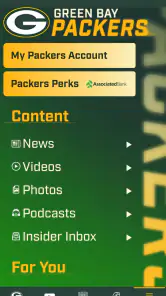
Analysis by Reviewed
I found the official Green Bay Packers app most useful when I treated it as a focused companion for following the team, rather than as a complete replacement for every sports service on my phone. It is a free sports app from YinzCam, Inc., made for Packers fans who want team-specific information in one place. After spending time with it, my strongest impression is that its value depends on context: on an ordinary day it can be a convenient reference, while around a game it becomes much more relevant.
That focus also shapes its accessibility. A dedicated team app can reduce the need to search across general sports platforms, but it may still ask users to move through several content areas, handle changing information, and read under less-than-ideal conditions. I would recommend it to Packers supporters who want an official mobile source, while being more cautious for anyone who needs highly adjustable presentation, minimal motion, or a single interface that works equally well for every sports team.
How clearly the app presents Packers information
Readability and navigation in everyday use
The clearest advantage is its narrow purpose. Instead of opening a broad sports app and filtering through leagues, teams, headlines, and unrelated scores, I can approach this app with one question: what is happening with Green Bay? That makes the starting point easier to understand, especially for a fan who does not want a crowded multi-sport dashboard.
The official identity matters here. The app is not a generic Packers-themed news reader; it is the team’s official mobile app. That gives it a more direct role than a general score service, even though a general service may still be better when I want to compare several teams or follow multiple competitions at once.
In my experience, readability is strongest when I use it for short visits. Checking a team update, looking for game-related information, or returning to a familiar section feels more manageable than trying to consume everything in one sitting. The design approach suits fans who already understand the basic language of football and know what kind of information they are looking for.
For a new or occasional fan, the experience can be less immediately obvious. Team apps often contain several kinds of content that sit close together: news, game material, media, and fan-oriented information. Even when each area makes sense on its own, the overall choice can feel less direct if I arrive without a specific goal. My practical advice is to decide what I want before opening the app. “I want the latest team update” is a better starting point than browsing without direction.
The current version is 3.8.7, and it supports operating systems from version 10 onward. That is useful to know before installing, particularly if I am using an older phone that still works well for other tasks. The app is also rated for Everyone, which makes it a reasonable option for households where younger fans use the same device, although an age rating does not automatically mean every screen will be equally easy for every reader.
More From Our News Desk

Clash of Clans Is Won Between the Battles

Android Auto Makes the Case for Quieter Car Software

MobiOffice: Transforming Mobile Productivity with Seamless Integration

EA SPORTS FC™ Mobile Soccer: Redefining Mobile Sports Gaming

How Microsoft OneDrive Became a Mobile Productivity Giant

How Google Translate Breaks Language Barriers Effortlessly
Text, contrast, and the effort of scanning
Sports information is usually consumed quickly, so visual clarity has practical importance. I tend to scan rather than read every item from beginning to end. Short headlines and recognizable team context help me decide what deserves attention, while dense pages or rapidly changing content require more concentration.
The most accessible workflow is deliberate, short, and goal-based. I open the app when I know whether I am checking a team story, preparing for a game, or catching up after being away from my phone. That reduces the amount of visual searching and makes the experience less tiring than continuously scrolling through a large feed.
Users with low vision should consider how comfortable they are with the phone’s own display settings and text enlargement tools. System-level adjustments can improve legibility, but they may not make every layout equally comfortable. Enlarging text can also increase scrolling, and a screen that looks fine at home may feel cramped when I am outdoors or moving between places.
I would not judge the app solely by its store rating, but the public response is encouraging: it holds a 4.5 average from around 18 thousand ratings, with roughly 4.3 thousand written reviews. Those figures suggest that many fans find the core experience worthwhile, though they do not tell me whether the interface suits a particular visual, motor, or cognitive need.
Navigation for different levels of familiarity
A long-time Packers fan will probably need less explanation from the interface because team names, recurring sections, and football terminology are already familiar. Someone discovering the sport may need to pause and interpret what each area is for. I would personally introduce the app to a new fan by using one section at a time instead of opening every available area during the first visit.
This is also where the app differs from a general sports alternative. A broad score app normally wins for quick cross-team comparisons, league-wide schedules, and a compact overview of many sports. The Packers app wins when I want the team itself to remain the center of attention. That trade-off can make navigation feel simpler for one purpose and less flexible for another.
Using it with different abilities and in different situations
Motor considerations and one-handed use
On a phone, sports apps are often used while standing, holding a drink, commuting, or watching television. That makes one-handed interaction more important than it might seem. I prefer workflows that involve a few predictable taps and limited typing. If I am trying to find something while a game is already underway, a complicated search or long sequence of menus quickly becomes frustrating.
The app’s team-specific focus helps reduce the need for repeated typing. I am not constantly entering the Packers’ name to filter a general database, which can be helpful for users who find keyboard input difficult. It also makes accidental searches less likely because the app begins with a defined subject.
However, a focused app is not automatically effortless for every motor profile. Small controls, closely spaced items, or content that moves as the screen updates can still create problems for users with limited dexterity or tremors. I would use the phone’s touch accommodations where available and give myself extra time rather than trying to navigate hurriedly during a live moment.
There is a useful trade-off between speed and control. A fan who wants instant access may appreciate a compact path to current information, while someone who needs larger targets and more time may prefer to open the app before the game and prepare the relevant screen. That preparation is one of my more practical tips: check the important material ahead of time instead of waiting until the busiest part of the event.
Sensory needs and the viewing environment
Not every fan uses the app in a quiet room with a bright, stable display. I might check it in a noisy kitchen, under strong outdoor light, or while a television is already competing for my attention. In those conditions, I rely more on clear visual hierarchy and less on audio cues. A user who is deaf or hard of hearing may find a text-centered team app more practical than an experience built mainly around sound, but the usefulness of any individual media area depends on how its information is presented.
For users who are sensitive to motion or visual stimulation, I would approach media-heavy areas carefully and use the device’s own motion and display settings when appropriate. I would not assume that every screen has the same sensory profile. A text update is a different experience from a video or a fast-changing game screen, so choosing the calmer route can make the app easier to tolerate.
Brightness is another everyday issue. A dark display can be hard to read outside, while a bright screen can be uncomfortable in a dark room. Adjusting the phone before opening the app is simple, but it makes a noticeable difference. I also prefer to enlarge the phone’s interface only as much as necessary, because excessive enlargement can turn a quick check into a longer scrolling task.
Situational access: a realistic Packers game day
Imagine I am preparing dinner before a Packers game. My phone is on the counter, I have only one hand free, and I want a quick team update without getting pulled into a general sports feed. This is where the app makes sense. I can open a team-specific source, scan for the information that matters, and return to what I was doing. The limited scope is an advantage because I am less likely to lose time among unrelated scores.
At home, I would use it as a second screen rather than the main event. The television provides the live viewing experience, while the phone helps me catch up on team material or check something during a break. That division is more comfortable than trying to watch a game and read every item on a small display simultaneously.
On public transport, the same app can be useful in shorter bursts. I may have only a few minutes and an unreliable viewing angle, so a team-focused interface is preferable to a sprawling sports portal. Still, I would avoid depending on any mobile sports app for critical information when my connection, battery, or attention is limited. A phone used in motion is also a poor setting for small controls and fast-changing content.
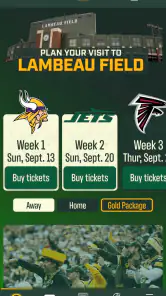
For fans attending a game, the app’s official team focus may feel more relevant than a general sports tool, especially when I want to stay connected to Packers material. Yet I would prepare before entering a crowded venue. Glare, noise, weak connectivity, and one-handed use can all make last-minute navigation harder. The best experience comes from knowing which area I intend to open rather than exploring the whole app in the middle of a busy moment.
Who will benefit most, and who may prefer another option
This app is a strong fit for a dedicated Packers supporter who wants a free, team-centered companion and does not need a broad sports database. It is also suitable for families sharing an interest in the team, since its Everyone content rating makes it approachable for general audiences. The developer, YinzCam, Inc., has built the product around the needs of a specific fan base rather than around a universal sports dashboard.
I would be less enthusiastic about it for someone who follows many teams and wants one app to compare schedules, scores, and news across a wide range of sports. A general sports app will usually be more efficient for that purpose. I would also suggest caution for users who depend on extensive accessibility controls inside the app itself, because a phone’s built-in settings may not solve every issue with dense layouts, moving content, or media presentation.
Another consideration is attention. Team apps can encourage frequent checking, which is helpful when I want updates but distracting when I am trying to limit screen time. I use it more effectively when I set a purpose for each visit. That turns it into a reference tool instead of an endless feed.
Remaining barriers and practical workarounds
The main barrier is not the subject matter; it is the variable effort required by different screens and situations. A page that is comfortable on a large, bright phone may be less usable on an older or smaller device. A quick glance at home may become difficult outdoors. A user with steady hands may have no trouble with touch navigation, while another user may need more time or device-level assistance.
There is also a difference between being officially focused and being fully comprehensive. The app gives Packers fans a direct destination, but I would not expect it to replace a dedicated live-score service, a broad news reader, or a platform selected specifically for advanced accessibility options. Choosing the right tool matters more than forcing one app to handle every need.
My workflow is to keep visits purposeful, adjust display settings before important events, and use the app alongside—not instead of—other tools when I need wider sports coverage. I also avoid judging the experience during a rushed moment. If a section is difficult to scan while multitasking, I return to it when I can give it proper attention.
Storage and compatibility are straightforward considerations. The app is free to install, has surpassed one million installs, and requires operating system version 10 or newer. Those details make it accessible to many current phones, but anyone using an older device should check compatibility first. The absence of a purchase price lowers the risk of trying it, which is helpful when I am testing whether the navigation suits my needs.
An inclusive verdict for Packers fans
After using it as a fan-focused sports companion, I see Green Bay Packers as a practical choice for people who want the team—not the entire sports world—to be the starting point. Its strongest accessibility quality is its clear purpose: I know why I opened it, and I can avoid the clutter of unrelated teams. That is valuable for quick checks, shared family use, and game-day preparation.
Its limitations are equally important. The experience may demand more visual scanning, touch precision, or attention than some users can comfortably provide, particularly in bright, noisy, crowded, or hurried settings. Device-level accessibility tools and a prepared workflow can help, but they do not turn every screen into a universally comfortable one.
With around one million installs and a 4.5 average, it has clearly found an audience, and I understand why. I would install it if I primarily follow the Packers and want a free official destination. I would skip it in favor of a broader sports service if my priority were multi-team coverage, or choose another tool if I needed highly specialized accessibility controls. For the right fan, though, its focused design is its most useful feature: it keeps the Packers close without asking me to sort through the whole sports universe first.
Green Bay Packers Frequently Asked Questions
Is the Green Bay Packers app available in my country?
The Green Bay Packers app is a team-focused sports app for fans who want official Packers content on a mobile device. Availability can vary by region and app store, so check the listing for your country before downloading. If you travel, some content or services may also depend on your location, particularly where video or other media access is involved.
Can I use the Green Bay Packers app without being at Lambeau Field?
Yes. The app is a mobile companion for following the team, so its news, schedules, scores, and other Packers content can be useful whether you are at the stadium or watching from elsewhere. Game-day resources and stadium details may be especially helpful in person, while fans at home can use the app to keep up with team updates and activity.
Who publishes the Green Bay Packers app, and is it the official team app?
Yes. The Green Bay Packers app is the official mobile app of the team, and it is published by YinzCam, Inc. That makes it a direct destination for Packers-focused news, team information, and other official content rather than a general football app. If you want a team-specific companion on your phone, this is the app to consider.
What is the Green Bay Packers app used for?
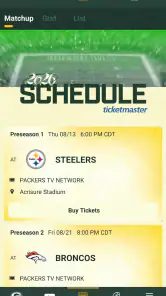
The Green Bay Packers app is designed for fans who want quick access to team news, schedules, scores, rosters, videos, statistics, and official announcements. It can also provide game-day information, ticket-related resources, stadium details, and links to Packers content. The exact features may vary depending on the season, location, and app updates.
Can I watch Green Bay Packers games through the app?
The app may offer live game updates, play-by-play information, scores, highlights, press conferences, and selected video content, but it does not necessarily provide live broadcasts of every Packers game. Streaming availability usually depends on broadcast rights, your country, your television provider, and any required subscription. Check the current in-app options before downloading if live viewing is important to you.
Pros
- Official team news
- schedules
- scores
- and updates in one place.
- Useful for following Packers games
- roster moves
- and team announcements.
- Clean design makes core information easy to find.
- Includes content for fans who want more than basic score updates.
- Free to download and convenient for Packers supporters on the go.
Cons
- Some features may require location access or additional permissions.
- Video and live content can consume significant mobile data.
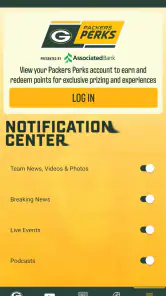
- Notifications may feel excessive unless carefully customized.
- Coverage is focused on the Packers
- with limited broader NFL content.
- Certain live features may vary by region
- game rights
- or season.

- Category
- Sports
- Version
- 3.8.7