Pittsburgh Steelers
- 3.96K
- 3.8
- Installs
- 1.00M
- Price
- Free

Screenshots

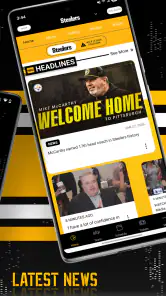
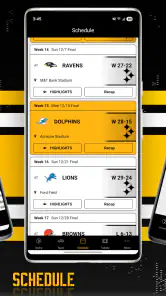
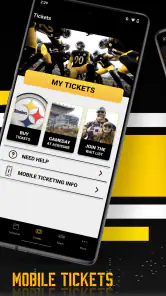
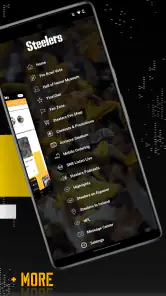
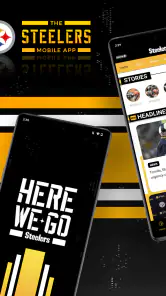
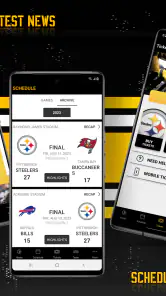
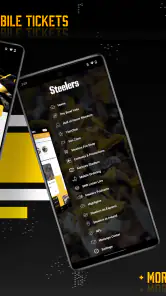
Analysis by Reviewed
I approached Pittsburgh Steelers as a practical companion for following the team rather than as an app that tries to replace every sports service on my phone. It is the official Pittsburgh Steelers app, developed by YinzCam, Inc., and its main appeal is straightforward: it puts team-focused information in one place for supporters who would rather not sort through a general sports app filled with unrelated clubs and leagues.
That focus matters on a busy game day. A broad sports application can be excellent for comparing scores across the whole league, but it also makes the Steelers one item among many. Here, the experience is centered on Pittsburgh from the moment I open it. That makes it easier to build a simple routine around the team, especially if I want a dedicated place to check in before, during, or after a game.
The app is free, carries an Everyone content rating, and has passed the one-million-install mark. Its average rating is 3.8 from roughly sixteen thousand ratings, with about four thousand written reviews, so the public response looks useful but not flawless. I read that combination as a sign that the app can be valuable for committed fans while still leaving room for occasional technical irritation or uneven experiences.
Getting past the first points of friction
What I would check before blaming the app
The first thing I would do after installing it is confirm that the phone meets the basic requirement. The current release is version 4.2.7 and requires operating system 10 or later. That requirement is easy to overlook, particularly when an older phone still runs other sports apps without trouble. If installation is unavailable or the app closes immediately, checking the operating system is a more sensible first step than repeatedly reinstalling it.
I would also make sure the installation has completed cleanly and that the phone has enough free space for normal updates. I would not treat the app as broken simply because a download pauses on an unstable connection. Switching between a reliable Wi-Fi connection and mobile data, then trying again, is a safe first check. If the store page itself refuses to install the app, the device version and account region are worth checking before spending time inside the app.
Once it opens, I would give the first launch a moment rather than tapping rapidly through every screen. Team apps often need to load current content after installation, and a slow first refresh can look like a frozen interface. Closing other demanding apps, reopening Pittsburgh Steelers, and waiting for the opening screen to finish are simple steps that avoid creating a second problem through impatient tapping.
My most useful setup habit is to test the app before kickoff, not during the opening minutes. That gives me time to discover whether the phone is connected properly, whether the current content has loaded, and whether the version on the device is current. It also prevents the familiar game-day mistake of trying to troubleshoot while simultaneously watching the action.
More From Our News Desk

Clash of Clans Is Won Between the Battles

Android Auto Makes the Case for Quieter Car Software

MobiOffice: Transforming Mobile Productivity with Seamless Integration

EA SPORTS FC™ Mobile Soccer: Redefining Mobile Sports Gaming

How Microsoft OneDrive Became a Mobile Productivity Giant

How Google Translate Breaks Language Barriers Effortlessly
How I would make the app fit a real fan routine
I would start with one clear purpose instead of trying to explore every available area at once. For me, that means opening it before a Steelers game, checking the current team information, and then returning after the game for follow-up details. This approach makes it easier to notice whether the app is serving my needs without confusing a temporary loading issue with a missing feature.
If the app asks me to allow notifications, I would decide based on how closely I want to follow the team. A fan who wants timely reminders may find them worthwhile, while someone who dislikes frequent alerts can keep a quieter setup and open the app manually. I would not grant every permission automatically. I would read each request and allow only what makes sense for the way I plan to use the app.
There is also a practical battery decision. During a long game day, I would avoid leaving several sports apps open and refreshing in the background. Using Pittsburgh Steelers for team-specific checks while keeping a general score service available only when needed creates a cleaner division of labor. It reduces duplicate alerts and makes it clearer which app I should open for which question.
One subtle advantage of a dedicated team app is mental organization. Instead of searching the team name repeatedly in a general news feed, I can use this app as my Steelers starting point. That does not necessarily make it the best source for every piece of sports information, but it gives the team a distinct home on my phone. For a supporter who follows one club closely, that small reduction in searching can make the routine feel less scattered.
Recovering when a page seems stuck
If a screen does not update, I would first test whether the rest of the phone can reach the internet. Opening another ordinary webpage or app is enough for a basic comparison. If nothing else connects, the problem is probably the network rather than Pittsburgh Steelers. If other services work, I would close the app completely, reopen it, and try the same action once more instead of repeatedly pressing the same control.
When content appears old, I would check the time and connection before assuming the team information is wrong. A weak signal can leave an app showing previously loaded material while a newer request waits in the background. Moving to a stronger connection, reopening the app, and allowing the refresh to finish is a reasonable recovery sequence. I would avoid changing several phone settings at once because that makes it difficult to know what actually helped.
If the application closes unexpectedly, I would restart it and then restart the phone if the problem continues. After that, I would check for an available update and confirm that the operating system still meets the requirement. Reinstalling would be my later step, not my first one, because it can erase local state and forces me to repeat the setup process. Before reinstalling, I would make sure I know the account details or preferences I may need again.
Android and iOS can also handle background activity differently, so a delayed alert does not automatically mean the app failed. Battery-saving modes, restricted background activity, or a temporary loss of connectivity can interrupt timely delivery. I would inspect the phone’s own battery and notification settings before concluding that the team app is unreliable. Those checks are especially important when the app works normally after being opened manually.
A game-day workflow that avoids unnecessary stress
My preferred workflow is deliberately simple. Before the game, I open the app on a dependable connection and let the current content settle. I then decide whether I want notifications active for that period. During the game, I use the app for Steelers-specific information and keep my expectations realistic if the network becomes congested or the phone is switching between connections.
After the game, I reopen it rather than assuming a screen left open for hours is still current. This is a small but useful habit: a page loaded before kickoff may not refresh just because it remained visible. A fresh launch or manual refresh gives the app a better chance to present current material, while also making it easier to distinguish a stale screen from a broader service problem.
For a realistic everyday example, imagine that I am commuting home on a Sunday and cannot watch the entire game. I would open Pittsburgh Steelers when I have a stable signal, use it to reconnect with the team’s current situation, and then return to a broader sports app only if I need league-wide comparisons. The dedicated app is useful in that scenario because it keeps my attention on Pittsburgh instead of asking me to filter through every other result.
A second scenario is planning a conversation with friends before a game. I would use the app as a quick team-focused reference, then close it rather than leaving several feeds running. That workflow is less about discovering hidden complexity and more about using the application for what it does best: giving a Steelers supporter a focused place to begin.
When another service is the better tool
I would not make this my only sports app if I regularly follow several teams, need extensive league-wide comparisons, or want one unified view of many sports. A general score application is usually more efficient for scanning multiple games at once. A news reader may also be better for collecting reporting from different publications. Pittsburgh Steelers has a narrower purpose, and that narrowness is both its strength and its boundary.
I would also skip relying on it as my sole source if my main interest is deep statistical analysis. A specialist sports statistics service may offer more flexible comparisons and historical exploration. Likewise, if I mainly watch live video, I would choose a service built specifically around the broadcasts I am entitled to access rather than assuming a team app should replace it. The official label does not automatically mean it is the best answer for every type of fan.
There is a trade-off between identity and breadth here. The dedicated design can feel more relevant than a generic sports dashboard, but it may feel limited to someone who wants a complete sports command center. I prefer it when I want to follow Pittsburgh without distraction. I would pair it with another service when I need broader context, rather than expecting one app to handle every sports task equally well.
What the public response tells me
The 3.8 average suggests a middle-ground experience rather than universal satisfaction. With around sixteen thousand ratings and roughly four thousand written reviews, there is enough public feedback to show that people use it seriously, but the score also tells me to keep expectations measured. I would install it for focused team access, not because I expect every update or notification to behave perfectly in every phone and network situation.
The app’s long presence also gives it a recognizable role for Steelers supporters. It was released in September 2010, and the current version shows that it remains maintained as a team-focused product. I do not read longevity as a guarantee of smoothness, but it does make the app feel more established than a short-lived fan utility. The important question is whether that established role matches my habits.
For me, the answer is yes when I want a dedicated Steelers space and am willing to perform basic troubleshooting when a connection, notification setting, or outdated device gets in the way. The answer is no if I want a single app for every team, sport, statistic, and viewing need. That distinction is more useful than simply calling the app good or bad.
My practical verdict for Steelers supporters
I recommend Pittsburgh Steelers to fans who want an official, team-centered sports app at no cost and who prefer a focused experience over a crowded multi-team feed. Its Everyone rating makes it suitable for a broad audience, and the one-million-plus install count shows that it has reached a substantial fan base. I especially like it as a companion app: open it for Pittsburgh-specific attention, then use a broader service when the question extends beyond the team.
I would install it before an important game, verify that the phone runs operating system 10 or later, and test the connection ahead of time. If an alert is late or a page looks stale, I would check network access, battery restrictions, notification settings, and the app version before reinstalling. Those steps address the most likely friction without making risky changes to the phone.
The strongest reason to keep it is not that it replaces every alternative. It is that it gives a Steelers fan a clear starting point and a more focused daily habit. The main limitation is equally clear: fans seeking broad sports coverage or deep analysis will probably need another app beside it. As a dedicated Pittsburgh companion, it earns a place on my phone; as an all-purpose sports replacement, it does not.
That is the honest balance I would share with a friend. Install it if your attention begins with Pittsburgh and you value a team-specific home. Pair it with a wider sports source if your interests move across the league. With that expectation, the app feels useful, manageable, and worth trying rather than disappointing simply because it was asked to do a job it was never meant to handle.
Pittsburgh Steelers Frequently Asked Questions
Can I follow Steelers news without creating an account?
The Pittsburgh Steelers app is built around team-focused updates, including news, schedules, scores, statistics, rosters, and videos. Whether a particular feature asks you to sign in can depend on the service and content you choose. You can install the app and explore its available sections, then decide whether any account prompt is relevant to the features you want to use.
Will the app help me keep track of games while I’m away from home?
The app may be useful when you cannot watch a game, since it can provide scores, live updates, play-by-play information, statistics, and highlights. These features let fans follow developments from a phone, though they are not a substitute for a live broadcast. What appears can vary by location and season, so check the app’s game coverage for the match you want to follow.
Who publishes the Pittsburgh Steelers app, and is it the official team app?
The Pittsburgh Steelers app is the official app of the team, published by YinzCam, Inc. It is intended for fans looking for Steelers-focused information and features in one place. When downloading, check the publisher name in your device’s app store to make sure you have selected the official app rather than an unrelated result with a similar title.
What is the Pittsburgh Steelers app used for?
The Pittsburgh Steelers app is designed for fans who want quick access to official team news, game schedules, scores, statistics, rosters, videos, and other club updates. It can also provide information about tickets, stadium events, promotions, and merchandise. The exact features may vary depending on your location, device, and the current NFL season, so some content may not be available everywhere.
Can I watch live Pittsburgh Steelers games through the app?
The app may offer live game updates, play-by-play information, scores, statistics, highlights, and selected video content, but it does not necessarily provide live streaming of every Steelers game. Live broadcasts are usually controlled by the NFL and its regional or subscription-based broadcast partners. Availability can depend on your country, television provider, subscription, and local blackout restrictions.
Pros
- Official Steelers news
- scores
- schedules
- and team updates in one place.
- Useful push notifications help fans follow games and breaking team news.
- Clean black-and-gold design feels authentic to the Steelers brand.
- Roster and player information make it easy to follow the current squad.
- Convenient access to team content for fans on the go.
Cons
- Some content may require an internet connection to load properly.
- Frequent notifications can feel excessive unless carefully customized.
- Video and media availability may vary by location or broadcast rights.
- The app is mainly useful to Steelers fans
- limiting its broader appeal.
- Live scores may experience delays compared with dedicated sports apps.

- Category
- Sports
- Version
- 4.2.7