Chiefs Mobile
- 1.38K
- 4.1
- Installs
- 500.00K
- Price
- Free

Screenshots
Analysis by Reviewed
I approached Chiefs Mobile as a daily companion for following the Kansas City Chiefs rather than as a replacement for every sports app on my phone. That distinction matters. The app is the official mobile app for the team, developed by YinzCam, Inc., and its value comes from putting Chiefs-focused information in one place instead of making me search across general sports services.
My first impression was that it makes the most sense for someone whose main interest is the Chiefs themselves. A broad sports app may be better when I want scores from several leagues, fantasy tools, or a highly customizable news dashboard. This app has a narrower purpose, and that focus is both its biggest strength and its clearest limitation. If I want team-centered access and a more direct connection to Chiefs coverage, it is a sensible free download. If I only check a score occasionally, a web search may be enough.
What the Chiefs-focused experience is really good at
The app sits in the sports category and carries an Everyone content rating, so it is positioned as a general audience product rather than something aimed at a restricted age group. It first appeared on September 10, 2013, and the current release is version 3.9.2. Those details give useful context: this is an established team app with an ongoing release history, not a one-off companion built for a single event.
Its audience is also substantial. The Android listing shows more than 500 thousand installs, with an average rating of 4.1 from roughly 4.8 thousand ratings and about 1.4 thousand written reviews. I would not treat those figures as proof that every fan will enjoy it, but they do suggest that the app has found a real audience beyond the team’s most occasional followers.
The free price removes the main barrier to trying it. I can install it without making a purchase decision first, which is especially useful for fans who want to test whether a dedicated team app adds anything beyond the sports tools they already use. The minimum operating-system requirement is Android 10, so owners of older devices should check compatibility before planning around it.
In everyday use, I would keep it for moments when team context matters more than league-wide coverage. For example, on a workday I might open it before leaving home to see what is happening around the Chiefs, then return during a break when I want a more focused check than the mixed alerts from a general sports app. On game day, that focused habit becomes more useful because I am not sorting through unrelated teams to find Kansas City information.
The practical advantage is concentration, not endless breadth. A general sports application usually wins on customization, cross-league comparison, and tools built for people following many teams. Chiefs Mobile wins when I want the Chiefs to be the starting point every time I open the app. That is a meaningful difference, but it is not a reason to uninstall every other sports service.
More From Our News Desk

Clash of Clans Is Won Between the Battles

Android Auto Makes the Case for Quieter Car Software

MobiOffice: Transforming Mobile Productivity with Seamless Integration

EA SPORTS FC™ Mobile Soccer: Redefining Mobile Sports Gaming

How Microsoft OneDrive Became a Mobile Productivity Giant

How Google Translate Breaks Language Barriers Effortlessly
Why official identity matters, and where it stops
Using an official team application gives the experience a clear identity. I am not trying to identify which of several similarly named fan apps is current or deciding whether a third-party feed is really centered on the Chiefs. The developer is named as YinzCam, Inc., and the app’s purpose is plainly tied to Kansas City’s team presence.
That official positioning is useful for trust, but I still separate branding from privacy confidence. A familiar team name can make an app feel safe, yet it does not by itself explain every permission, data practice, or account setting. I would judge those areas through the permission prompts, privacy information, and choices visible on my own device rather than assuming that official status answers them.
That is also why I would avoid granting optional access automatically. If the app asks for notifications, location, or another device capability, I would read the prompt and decide whether that particular function is worth it. A fan may want timely team updates but not want every available alert. Someone who installs it only to check occasional information may prefer a quieter setup from the start.
I found this approach more useful than treating permissions as an all-or-nothing trust test. The right question is not simply whether the app is official; it is whether the access requested matches what I plan to do with it. I would review the operating system’s permission manager after installation and revisit it if my usage changes.
Notifications need deliberate handling
Sports apps can become noisy quickly, especially around games and major team developments. My recommendation is to begin with the minimum notification choices that serve a real purpose. If I mainly want reminders or important updates, I do not need every available alert category. If I am following a game closely, I can temporarily allow more interruptions and reduce them again afterward.
This is one of the less obvious ways to improve the experience. Many people install a team app, accept every prompt, and then blame the app when their phone becomes distracting. A better workflow is to treat notifications as a personal filter: enable what helps me follow the Chiefs, silence what turns the app into background noise, and use the phone’s notification controls when I need a break.
I would also consider battery and attention together. A dedicated sports app is most valuable when it reduces the effort of keeping up, not when it demands constant checking. On a busy day, I would open it at planned times instead of leaving every alert active. During a game, I might use it as a focused second screen, but I would not expect it to replace live viewing, radio coverage, or a broader score service for every situation.
Account choices and personal control
Whether I need an account would be one of the first things I would examine during setup. If the app lets me browse useful team information without signing in, I would start there and only create an account if a particular feature clearly requires it. If sign-in is offered, I would use a password I do not reuse elsewhere and check what profile controls are available before adding more personal details.
This is not a criticism of Chiefs Mobile specifically; it is a sensible way to use any official sports app. A fan may want convenience, but convenience should not mean handing over more information than necessary. I would look for visible settings related to notifications, marketing choices, connected services, and account management. If I stop using the app, I would remove permissions I no longer need and use any available account controls rather than leaving an unused profile untouched.
The important point is that user agency should remain part of the review. I can choose whether the app belongs on my phone, whether it can interrupt me, and whether I want to participate in account-based features. Those choices make a bigger difference to my comfort than the team branding alone.
Where privacy-sensitive moments appear
The most sensitive moments are usually not the ordinary act of opening a team page. They are the points where the app asks for access, requests sign-in, sends an alert, or presents a data-related choice. I would slow down at those moments instead of tapping through automatically. The operating system’s permission dialog is especially important because it shows the access being requested at that time.
I would also check the app’s privacy information from the store or inside the app before creating an account. I would look for an explanation of what information is collected, why it is used, how long it is retained, and whether there are controls for managing it. If the wording is difficult to understand, I would keep my setup minimal and avoid optional details until I know they are necessary.
That cautious approach does not prevent me from using the app. It simply keeps the decision proportional. A fan who wants occasional Chiefs updates may need fewer permissions and less personalization than someone who wants every available team interaction. The app should fit the user’s purpose, rather than the user accepting every possible data request just because the app is free.
I would apply the same care to links or embedded material that may open outside the app. If a page asks for credentials, payment information, or additional permissions, I would verify where it leads before continuing. The app’s free price does not mean every destination reached through it should be treated casually.
How it compares with familiar alternatives
A league-wide sports app is usually the better choice for someone who follows several teams, wants a single scoreboard, or needs a wider range of sports information. It can reduce the number of apps installed and make comparisons easier. The trade-off is that the Chiefs may become just one item among many, while a dedicated team app keeps Kansas City at the center.
Social platforms are faster for discovering reactions, fan discussion, and informal commentary. They are also noisier and less controlled. I may see useful updates there, but I also have to sort through speculation, repetition, and unrelated posts. Chiefs Mobile is more appropriate when I want a team-specific destination rather than an open-ended conversation stream.
The team’s website can be the better option for a one-time visit, especially if I do not want another installed app or if my phone cannot meet the Android 10 requirement. A browser is also convenient on a shared device. The app becomes more attractive when I expect to return often and want a dedicated place in my regular sports routine.
That comparison helped me define the right user. I would recommend it to a committed Chiefs follower, a fan preparing for the season, or someone who wants team information separated from general sports noise. I would be less enthusiastic for a casual viewer who checks one score per week, a person following many teams equally, or anyone who strongly prefers not to manage another source of notifications and account prompts.
Small habits that make the app more useful
My first tip is to set it up for the way I actually follow the team, not for an imagined ideal fan. I would decide whether I am a daily reader, a game-day checker, or an occasional visitor, then adjust notifications and permissions accordingly. This prevents the common mistake of allowing a full stream of interruptions for an app I only open once in a while.
My second tip is to use it alongside, rather than instead of, the tools that solve different problems. I might rely on a broader sports app for league-wide scores, a browser for quick searches, and Chiefs Mobile for team-centered checking. Keeping those roles separate makes it easier to recognize what the dedicated app adds and whether it is earning its place on my phone.
My third tip is to review settings after the first week. Initial setup often reflects curiosity rather than long-term needs. After using the app through a normal workday and a game-related period, I would turn off alerts that did not help, remove permissions that proved unnecessary, and decide whether an account still made sense. This is a more reliable evaluation than judging the app after the first five minutes.
A fourth useful habit is to avoid confusing official access with complete coverage. Even a team-specific app may not be the best source for every need I have, such as comparing multiple live scores or following unrelated sports. I would keep my expectations narrow and judge it by how efficiently it serves Chiefs-focused use, not by whether it replaces an entire sports ecosystem.
Who should install it now
I think Chiefs Mobile is worth trying if the Kansas City Chiefs are the team I check first and I want a free, dedicated sports app rather than a general-purpose feed. Its official identity, focused purpose, and established presence make it a reasonable addition for regular fans. The Everyone rating also makes it suitable for a broad household audience.
I would install it before a period when I expect to follow the team more closely, then spend a few minutes making the notification and permission choices fit my routine. That setup time is important. The app will feel much better when it is configured as a quiet information tool than when it is allowed to compete with every other alert on the phone.
I would skip it if my needs are mostly cross-sport, if I want intensive fantasy or statistical tools from one place, or if I only need a single score that a search engine can provide instantly. In those cases, a general sports service or the mobile web may be more efficient. The free download makes experimentation easy, but free does not automatically mean necessary.
My cautious verdict is positive: this is a focused team app that makes sense for fans who want Kansas City at the center of their sports routine. I trust it most when I treat its official status as useful context rather than a substitute for checking permissions and data choices. Use the app deliberately, keep access and alerts limited to what you need, and it becomes a practical Chiefs companion instead of another noisy app on your phone.
Chiefs Mobile Frequently Asked Questions
Will Chiefs Mobile work on my phone or tablet?
Chiefs Mobile is available for Android and iOS devices, with its current version listed as 3.9.2. Check that your device meets the app’s minimum operating-system requirement before downloading; the minimum OS is version 10. The app is categorized as Sports and is rated Everyone, making it suitable for a general audience.
Who develops Chiefs Mobile, and is it the official team app?
Chiefs Mobile is the official mobile app for fans of the Kansas City Chiefs, and it is developed by YinzCam, Inc. Its focus is following the team and accessing Chiefs-related content in one place. The app is free to download, so fans can try its basic experience without paying for the initial download.
What is Chiefs Mobile?
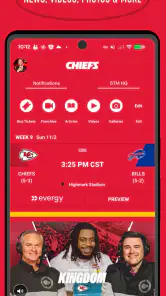
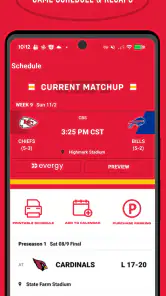
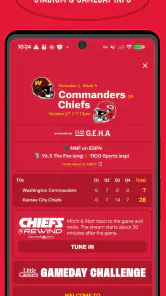
Chiefs Mobile is the official mobile app for fans of the Kansas City Chiefs. It brings team news, game information, schedules, scores, videos, articles, and other club-related content together in one place. After installing it, fans can use the app as a convenient way to follow the team during the regular season, playoffs, offseason, and important events.
What features does Chiefs Mobile offer?
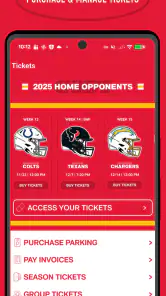
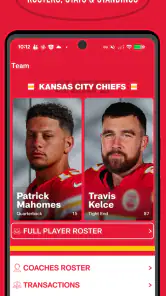
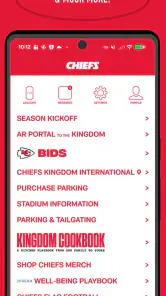
The app typically includes breaking news, team announcements, schedules, live scores, standings, rosters, player information, statistics, videos, photos, and social updates. Depending on the season and your location, it may also provide game-day content, radio or audio coverage, ticket information, merchandise links, promotions, and notifications designed to keep supporters updated without visiting several different websites.
Does Chiefs Mobile provide live game streaming?
Chiefs Mobile may offer live updates, play-by-play information, scores, commentary, and links to available broadcasts, but it should not automatically be considered a complete live-streaming service. Streaming rights depend on the NFL, broadcasters, subscription plans, and your geographic location. Before downloading, check the current app description and in-app options to confirm which live audio or video features are available.
Pros
- Quick matches fit well into short gaming sessions.
- Simple controls make it easy for new players to get started.
- Team-building adds variety and encourages strategic choices.
- Regular events can provide fresh objectives and rewards.
- The mobile format works well for playing on the go.
Cons
- Progress may slow down without frequent play or extra resources.
- Online features depend heavily on a stable internet connection.
- Some upgrades and rewards can require considerable grinding.
- The small screen may make detailed management less comfortable.
- Competitive play can feel repetitive after extended sessions.

- Category
- Sports
- Version
- 3.9.2