Denver Broncos
- 3.06K
- 4.2
- Installs
- 500.00K
- Price
- Free

Screenshots

Analysis by Reviewed
I think the clearest reason to try the Denver Broncos app is also its main constraint: it keeps the focus on one team. When I want to catch up on Denver without wading through league-wide headlines, that narrow focus is useful. When I want a broad view of the NFL, it is less convenient. That difference matters more than any single feature, because it shapes what the app is good for every time I open it.
A Broncos-first way to follow the team
For me, a team-specific sports app works best as a reliable starting point, not as a replacement for every other way of following football. I can come to it with a simple question—when is the next game, what is happening now, or how did a player perform—and stay within Denver coverage. That saves the small but repeated effort of filtering a general sports feed.
The app is free and developed by YinzCam, Inc. Its 4.2 average from around 12,000 ratings suggests that many users appreciate having a dedicated place for Broncos coverage. I would judge its value less by how many different subjects it covers and more by whether Denver is a team I check on regularly.
How I would use it during an ordinary week
On a weekday, I might open it during a short break to check the schedule or catch up on team news, then close it rather than turning a quick check into a long browse. Before a game, the schedule gives me a point of reference; if I cannot watch, live updates offer a way to follow progress; afterward, player stats give me something more specific to examine than the final score alone.
That sequence is a practical way to get value without expecting the app to do everything. I would not treat a quick update as a substitute for watching the action, because a score and a stat line cannot show every detail of how a play developed. If I want video coverage or a comparison across several teams, I would turn to a broadcast or a broader sports service instead.
All Things Broncos
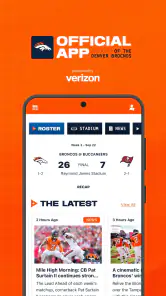
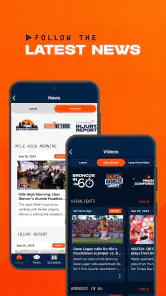
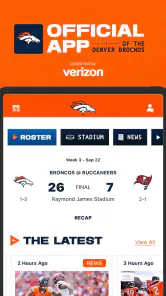
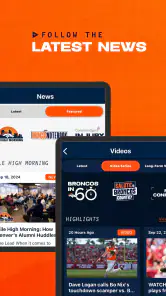
The Denver Broncos app brings together team news, schedules, player stats, game updates, and behind-the-scenes content. I like the idea of a single Broncos-focused destination because it gives each visit a clear purpose: I am there for Denver, rather than sorting through coverage of the whole league before finding what I came for.
For a quick check, that focus is more useful than trying to make one app serve every sports interest. It is also a trade-off: the more often I follow other teams, the more likely I am to keep a general sports app nearby. I see this one as a companion for team coverage, not a complete NFL reference desk.
More From Our News Desk

Clash of Clans Is Won Between the Battles

Android Auto Makes the Case for Quieter Car Software

MobiOffice: Transforming Mobile Productivity with Seamless Integration

EA SPORTS FC™ Mobile Soccer: Redefining Mobile Sports Gaming

How Microsoft OneDrive Became a Mobile Productivity Giant

How Google Translate Breaks Language Barriers Effortlessly
User Interface and Experience
The interface is clean, intuitive, and easy to navigate. Its colors echo the team’s identity, and the layout makes it straightforward to look for the material I came to see. I value that most when I only have a minute: a team app should make a quick check feel direct, rather than asking me to navigate a maze of unrelated coverage.
A small but useful habit is to decide what I want before opening it: a schedule, a score update, a news check, or a player line. That helps keep a short visit focused, especially on a busy day when it is easy to keep browsing. If I am commuting or taking a work break, I use it as a companion to the game rather than imagining that a stream of updates will provide the same context as watching.
Following a game when I cannot watch
Live game updates are the feature I would rely on when plans clash with kickoff. If I am out running errands or stuck at work, I can check how the game is progressing without needing to keep a video stream open. Later, player stats offer a more focused way to think about individual performances.
There is a useful distinction here: updates help me stay oriented, while watching helps me understand how the game unfolded. Stats can prompt questions about a player’s contribution, but they do not explain every tactical decision or turning point. I would use the app to fill gaps in my attention, not to make claims about the whole performance from numbers alone.
What the fan conversation adds
The app also offers a community angle where fans can share reactions and talk about the team. I can see the appeal after a close game, when part of the fun is finding out how other Broncos supporters are responding. It can make following a result feel more social than checking a score in isolation.
I would keep that conversation separate from neutral reporting. Fan reactions are personal, and emotions can run high after a disappointing finish or a big win. For me, that is not a flaw so much as a reason to use the community for shared enthusiasm and turn to news or stats when I want a calmer account.
When another sports app is the better choice
The usual alternative is a general sports app that covers many teams and competitions. That kind of service makes more sense if I want league-wide scores, frequent comparisons, or a single place for several sports interests. The Broncos app has the opposite strength: less breadth, but a clearer destination when Denver is the team I care about.
I would skip it if I follow the Broncos only occasionally and mainly want a quick NFL score among many other results. In that case, opening a broader sports app may be faster than maintaining a separate team destination. I would also choose a broadcast option when the point is to watch the game itself, and a general sports source when I want a wider range of league coverage. The team app is most convincing when the team focus is a benefit rather than a limitation.
Small choices that make a team app more useful
One practical approach is to use different parts of the app at different moments instead of expecting one visit to satisfy every interest. I would check the schedule before making plans, use live updates only when I cannot watch, and return to player stats afterward if I want a more detailed follow-up. Keeping those purposes distinct makes the app easier to fit around a normal day.
I would also be cautious about reading too much into a single stat or a brief update. A number can point me toward a performance worth discussing, but it is not a complete account of a player’s role. That is a useful trade-off for a fan who wants quick access: the app can make information easy to find, while interpretation still takes context and, sometimes, watching the game.
If I am helping a less dedicated fan follow Denver, I would start with the schedule and live updates rather than asking them to explore everything at once. That gives them a simple way to know when the team is playing and what is happening if they cannot sit down to watch. A more committed supporter may get additional value from revisiting stats and joining fan conversation, while someone seeking only occasional scores may prefer not to add a team-specific app to their routine.
Who gets the most from it
This is a natural fit for Broncos supporters who want team news and game information close at hand, especially those who sometimes miss live coverage. It may also suit someone who is getting more interested in Denver and wants a focused place to build a simple game-day routine. The free price makes trying it straightforward, but the real question is whether I will return often enough for a dedicated team app to earn a place on my phone.
The age rating is Everyone, and the app supports operating systems from version 10 onward. It has passed 500,000 installs, and its current version is 3.6.8. Those details help me decide whether it fits a device and household, but they do not change the central choice: this is for people who want Broncos-first coverage, not people who need the broadest possible sports service.
My recommendation
I would recommend the app to a friend who follows Denver closely or wants a convenient way to keep up when work and errands get in the way of watching. I would describe it as a focused companion: useful for team-oriented checks, but not a replacement for broadcasts or general sports coverage. If the Broncos are only one small part of your sports interests, a broader app may suit you better.
Hey there, fellow app explorer! Let’s dive into the world of the Denver Broncos app today. Whether you're a die-hard Broncos fan or just someone who loves keeping tabs on the NFL, this app might just be your new best buddy. Trust me, I’ve spent some time playing around with it, and here’s the lowdown.
For me, the central appeal is having a team-focused place to follow Denver rather than piecing updates together from general sports coverage. That focus changes the experience: when I want Broncos news, schedules, player stats, and game updates, I don’t have to sort through stories about every other team first. It is a free sports app from YinzCam, Inc., and its 4.2 average from around 12,000 ratings suggests plenty of fans find that focused approach useful.
First off, the Denver Broncos app is like your personal gateway to all things Broncos. It’s got everything from the latest news, game schedules, player stats, and even some behind-the-scenes content that you won't find anywhere else. Opening the app feels like stepping into the Broncos stadium, minus the chilly Denver weather!
The practical benefit is less about replacing every sports source and more about making a quick check worthwhile. Before a game, I’d use the schedule to orient myself, then look at team coverage; during play, live updates help me keep track when watching isn’t possible. If I’m following a player’s contribution, stats offer a more focused angle than a score alone. I’d still use a broad sports app when comparing several NFL teams, but for Broncos-first browsing, this app keeps the subject clear.
A routine that stays manageable
Let’s talk about the user interface for a sec. The app is clean, intuitive, and super easy to navigate. It’s like the developers knew exactly what we wanted and delivered it on a silver platter. The colors are vibrant, echoing the team's spirit, and the layout makes it easy to find whatever you’re looking for without any fuss.
A useful habit is to decide what you came to check before opening it: a schedule, a score update, or a player line. That keeps a short visit short, especially on a busy day when team coverage can tempt you into browsing longer than planned. On a commute or during a work break, I’d treat it as a quick companion rather than a substitute for watching a full game; concise updates are handy, but they cannot provide the same context as seeing the action.
One of my favorite features has to be the live game updates. Whether I’m stuck at work or running errands, I can always rely on real-time updates to keep me in the loop. And if you’re someone who loves to analyze the game, the detailed player stats and game analytics will be right up your alley.
That makes the app especially useful when plans clash with kickoff. I can check how a game is progressing between errands without needing to keep a video stream open, then look at stats when I have a moment to think about what the numbers say. The trade-off is that stats are a complement to the game, not a full explanation of every tactical choice or turning point. Anyone who wants play-by-play viewing or broad league analysis may be better served by a dedicated broadcast or general sports app.
Another cool feature is the way it connects fans. There’s a community vibe where you can interact with other fans, share your thoughts, or even just rant about the last game. It’s like having a mini Broncos fan club right in your pocket.
That social angle is best when I want the reaction around a result, not when I’m looking for neutral reporting. Fan conversation can add excitement and a sense of shared ritual, but opinions are naturally personal and can run hot after a close game. I’d read it as a place to join the mood, while checking news and stats separately when I want a calmer view.
In a realistic game-day routine, I’d check the schedule earlier, open live updates if I’m away from a screen, and return to player stats afterward to make sense of the performance. That workflow is more practical than repeatedly searching the web for the same team information. Still, a casual NFL follower who mainly wants league-wide scores may find a general sports app more efficient, while someone who rarely follows Denver may not get enough value from a team-specific destination.
The app has been available since December 16, 2011, and its current version is 3.6.8, with support for operating systems from version 10 onward. It has passed 500,000 installs and is rated for Everyone, so it is a straightforward option for fans across age groups. Those details make it easy to assess whether it fits your device and household, though the strongest reason to keep it is simply how often you want Broncos-centered updates.
In conclusion, the Denver Broncos app is more than just an app; it’s an experience. Whether you’re following the team religiously or just checking in occasionally, it offers something for everyone. So go ahead, give it a try, and join the Broncos community. Who knows, you might just love it as much as I do!
Denver Broncos Frequently Asked Questions
Does the Denver Broncos app require an account, and what can I use it for without signing in?
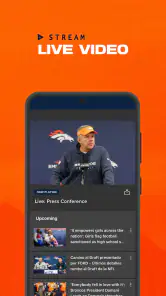
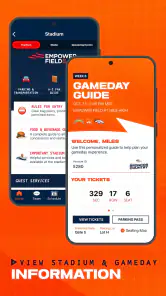
The Denver Broncos app is the official mobile app for following the team, with game updates, team news, videos, podcasts, and ticket and merchandise sections. Signing in may be useful for account-related services, but you can use the app to browse its general team content. If you plan to buy tickets or merchandise, check the relevant section for any account or checkout steps.
Will the Denver Broncos app work on my phone or tablet?
The app is available for Android and iOS, so it can suit fans using either type of device, including smartphones and tablets. Its current version is 3.6.8, and the minimum operating-system requirement is version 10. Before downloading, check that your device meets the relevant requirement and has enough available storage for the app.
Is the Denver Broncos app suitable for younger fans?
The Denver Broncos app is rated Everyone, making it suitable for a broad audience, including younger fans. It focuses on Broncos-related sports content such as team news, game information, videos, and podcasts. Parents may still want to review the app’s sections and any purchase flows with children, particularly if they plan to explore ticketing or official merchandise.
What features does the Denver Broncos app offer?
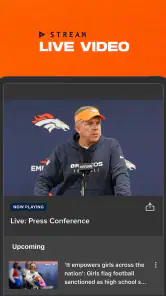
The Denver Broncos app offers a variety of features including live game updates, real-time statistics, and play-by-play information. Fans can also access exclusive videos, team news, and podcasts. The app includes a section for purchasing game tickets and official merchandise. Moreover, users can customize notifications for game alerts and team news.
Is the Denver Broncos app free to download and use?
Yes, the Denver Broncos app is free to download on both Android and iOS platforms. While the app provides a wide range of free features, there may be additional content or services, such as exclusive videos or merchandise, that may require in-app purchases or additional subscriptions.
Pros
- User-friendly interface for all ages.
- Comprehensive team history and stats.
- Real-time game updates and scores.
- Exclusive content and interviews.
- Customizable notifications for fans.
Cons
- Requires stable internet connection.
- Limited content for non-fans.
- Occasional app crashes reported.
- High battery consumption.
- Ads can be intrusive.

- Category
- Sports
- Version
- 3.6.8