Sygic GPS Navigation & Maps
- 39.36K
- 4.2
- Installs
- 50.00M
- Price
- Free
Screenshots


Analysis by Reviewed
I use Sygic GPS Navigation & Maps most when the drive will take me somewhere unfamiliar and I would rather not depend on a steady mobile connection. Its offline-map approach is the capability that shapes the experience: prepare the area before leaving, then use the map for guidance even when coverage is weak. That is especially useful on a trip through rural roads, in a foreign city, or anywhere a dead zone could turn a routine turn into a stressful guess.
Why offline maps change the trip
Offline navigation is not just a travel extra. It changes when I can plan and what I need to worry about once I set off. If I know the destination, I can download its map while I have a reliable connection rather than waiting until I am already on the road. That gives me a practical fallback when mobile data is unreliable and helps avoid relying on roaming data for map access. I still treat a downloaded map as preparation, not a substitute for checking the route before driving.
Sygic is a free maps and navigation app from Sygic, and it has been available since November 5, 2010. It has a 4.2 average from around 1.9 million ratings, and more than 50 million installs. The age rating is Everyone. Optional in-app purchases range from $0.99 to $74.99 per item, so I would check what a paid option includes before spending money rather than assuming every navigation feature is part of the free experience.
Preparing and using a route
Before a longer drive, I would open the app while connected, find the destination area, and make sure the relevant map is downloaded. That small step matters most when the route crosses different towns or the destination is outside a familiar coverage area. It is also worth checking that the planned route makes sense before setting off: offline access can keep the map available, but it does not remove the need to pay attention to road signs and changing conditions.
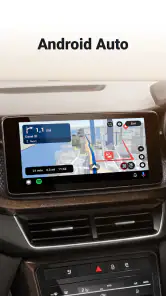
In everyday use, I find voice guidance useful because it lets me keep my attention on driving instead of repeatedly glancing down. The 3D map view can make complicated junctions and landmarks easier to interpret, although I would not rely on a visual display alone when lane markings or temporary signs tell a different story. Sygic is compatible with Android Auto, which gives drivers with a compatible setup another way to follow navigation on the car display. I would set the route before moving and avoid handling the phone while driving.
Where the trade-offs show
Offline maps are most valuable when I plan ahead. If I forget to download the right area, the feature cannot rescue that preparation mistake once I have lost connectivity. Map downloads also take storage, so I would keep only the regions I need for an upcoming trip and remove them when they are no longer useful. For spontaneous local errands in places with dependable data, a familiar online maps app may feel simpler because there is less to prepare.
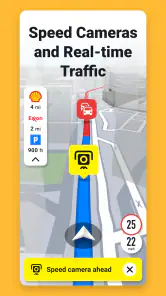
There is also a distinction between the map working offline and every live service being available offline. Traffic information depends on current conditions, so I would not treat it as a guaranteed benefit when my phone has no connection. The same practical caution applies to rerouting: the app can be useful when conditions change, but I would expect connected features to be more helpful when the phone can receive current information. That makes Sygic a stronger fit for planned journeys than for someone expecting every function to behave identically without a signal.
More From Our News Desk

Weather by Xiaomi Review: Clear at a Glance, Less Clear Up Close

X Under Pressure: Can It Recover When Posting Goes Wrong?

Clash of Clans Is Won Between the Battles

Android Auto Makes the Case for Quieter Car Software

MobiOffice: Transforming Mobile Productivity with Seamless Integration

EA SPORTS FC™ Mobile Soccer: Redefining Mobile Sports Gaming
A realistic reason to choose it
Imagine driving to a rented place outside a city after a long day, with the final stretch passing through areas where reception comes and goes. I would download the destination map before leaving, start guidance while connected, and use the offline map to follow the later turns. If the route changes or a road is closed, I would still check signs and use a connection if one is available rather than blindly trusting an old plan. That is the useful balance: preparation reduces dependence on signal, but does not make a driver independent of judgement.
Compared with the usual online-first map apps, Sygic’s clearest reason to consider it is having maps ready for weak-coverage travel. If most of my driving is familiar and well connected, I may prefer the convenience of an app I already use and do not need to prepare. If I travel beyond reliable coverage, or want the reassurance of a locally stored map, Sygic deserves a place alongside that everyday option. I would choose based on the trip, not assume one app has to replace every other map.
First Impressions and Usability
Jumping straight into the app, I was greeted by a sleek and intuitive interface. Sygic GPS Navigation & Maps is designed with user-friendliness in mind. The main menu is straightforward, and navigating through different options is a breeze. It’s like the app just gets me, you know? Whether you're tech-savvy or a total newbie, you'll feel right at home here.
Features Galore
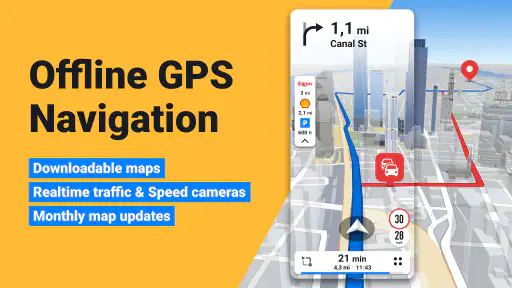
Now, let’s talk features. This app is packed with them! From offline maps to real-time traffic updates, everything you need is right at your fingertips. The offline maps are a game-changer, especially when you're traveling abroad and don’t want to rack up those pesky roaming charges. Just download the map of your destination beforehand, and you're good to go!
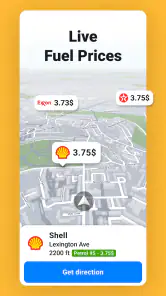
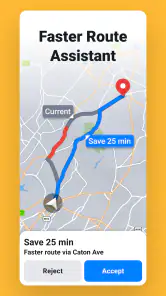
The real-time traffic updates are spot-on. I tested it during rush hour, and the app accurately suggested the fastest route, saving me a ton of time. Plus, the voice-guided navigation is super clear, so you won't miss a turn. It's like having a local guide sitting right next to you.
Navigation Experience
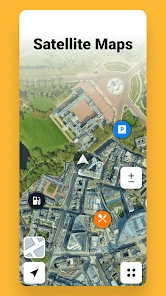
Navigating with Sygic feels incredibly smooth. The maps are detailed, and the 3D view adds a nice touch, making it easier to recognize landmarks and intersections. The app even suggests parking spots, which is a lifesaver when driving in crowded areas.
One thing I noticed is how the app adjusts the route based on current road conditions. Stuck in traffic? No worries, Sygic will reroute you in a jiffy, ensuring you reach your destination as quickly as possible.
Subscription and Pricing
While the app is free to download, some features are locked behind a premium subscription. It's a bit of a bummer, but considering the value it offers, it might just be worth it. The premium version provides access to more advanced features like dashcam functionality and head-up display, turning your phone into a complete navigation powerhouse.
All in all, Sygic GPS Navigation & Maps is a solid choice for anyone looking to enhance their driving experience. With its comprehensive features and user-friendly design, it’s like having a personal navigator right in your pocket. Whether you're a frequent traveler or just need reliable navigation for your daily commute, this app has got you covered. Give it a whirl and see for yourself!
Who benefits most from keeping it installed
I would recommend Sygic most to drivers who take occasional long trips, cross borders, or travel through places where mobile reception is unpredictable. It is less compelling for someone who only needs turn-by-turn directions on a familiar commute and already has an online map they trust. Android Auto compatibility is a practical advantage for drivers who use that setup, while the free download makes it possible to explore the app before deciding whether any optional purchase suits their needs.
My main advice is to try the preparation workflow on a low-stakes trip first: download the area, plan a destination, and learn how the map and voice instructions feel before depending on them somewhere unfamiliar. That reveals whether the interface works for you and whether the offline-map benefit is worth the storage and planning. For the right driver, that preparation is a small effort for a genuinely useful backup; for a data-connected city commute, it may be more app than the trip requires.
Make the download work for your route
One useful habit is to think about the map in terms of the whole journey, not only the final address. If I am driving across several towns, I would check that the downloaded coverage includes the roads between them as well as the destination. That is more reliable than assuming a map of the endpoint will cover every detour or stop. I would also open the app before departure to confirm the map is available locally and the route is ready, rather than trying to troubleshoot after the signal has dropped.
For a trip with a planned overnight stop, I would prepare both destination areas before setting out, then remove maps I no longer need once I am back. This keeps offline storage purposeful instead of letting a collection of old regions accumulate. It is a small housekeeping task, but it makes the feature easier to trust: I know which places are saved and can avoid discovering mid-trip that I prepared the wrong area.
When an online-first map is the better tool
For a short trip across a city I know well, I would probably reach for the navigation app I already use, especially if I want current local information and do not need offline coverage. The familiar option can be quicker to open and plan with because there is no separate map-preparation step. Sygic makes more sense when being able to keep a map on the device is central to the journey, rather than a feature I might never use.
I would also avoid treating any navigation app as a substitute for a driver’s attention. A suggested route is a useful plan, not permission to ignore a closed road, a temporary diversion, or a sign that conflicts with the screen. In unfamiliar areas, I like to review the route before moving so I have a rough sense of the major turns. That is particularly helpful if a connection disappears and I need to make a calm decision instead of reacting to a last-second instruction.
Simple checks before relying on it
If you are deciding whether to pay for an optional feature, I would first identify the specific job you want it to do and check the current in-app offer. The app is free to download, but purchases vary in price, and the value depends on whether you will actually use what is included. A driver who mainly wants offline maps should not assume that every extra is necessary; I would test the basic navigation workflow first and spend only if a paid addition solves a real need.
Another practical question is whether the app suits your car setup. Android Auto compatibility is helpful if you use Android Auto, but it is not a reason by itself to switch if your current navigation routine already works well. I would try a familiar route with the car display before depending on it for a demanding trip. That lets you see whether the directions are easy to follow in your own vehicle and whether you prefer the display or voice guidance.
My recommendation for the right kind of driver
The strongest case for Sygic is not that it must replace every map app; it is that offline maps give me another dependable way to prepare for a particular kind of journey. I would keep it installed if I regularly drive beyond strong coverage, travel somewhere new, or want a locally stored map as a backup. Someone whose driving stays within a well-connected area and who values effortless, spontaneous planning may be happier with an online-first alternative.
That distinction is why I see it as a practical travel tool rather than an automatic choice for every commute. Prepare the relevant region, set the route while connected, and keep normal attention on road signs and conditions. If those steps fit the way you travel, the offline capability can make an unfamiliar drive feel more manageable. If you rarely lose coverage and do not want to plan ahead, its main advantage may simply go unused.
Sygic GPS Navigation & Maps Frequently Asked Questions
Can I use Sygic GPS Navigation & Maps without an internet connection?
Yes. Sygic GPS Navigation & Maps includes 3D offline maps, so it can be useful for route guidance when you are travelling somewhere with limited connectivity. Download the maps you need before setting off, then check that they are available on your device. Offline use can also help reduce reliance on mobile data while navigating.
Does Sygic GPS Navigation & Maps work with Android Auto?
Yes. Sygic GPS Navigation with 3D offline maps is compatible with Android Auto, making it an option for drivers who want to use navigation on a compatible in-car display. The app belongs to the Maps & Navigation category, and its combination of offline maps and navigation is useful when planning a drive. You can also use it directly on your phone.
What features does Sygic GPS Navigation & Maps offer?
Sygic GPS Navigation & Maps provides a comprehensive suite of features including offline maps, real-time traffic information, speed limit warnings, and advanced safety features. Users can enjoy turn-by-turn voice-guided navigation, lane assistance, and even pedestrian navigation. The app also offers integration with Apple CarPlay and Android Auto for a seamless in-car experience.
Is Sygic GPS Navigation & Maps available for free?
Sygic GPS Navigation & Maps offers a free version with basic features, such as offline maps and basic navigation. However, to access premium features like real-time traffic updates, head-up display, and dashcam functionality, users need to opt for a paid subscription. Various pricing plans are available to cater to different needs and preferences. The app is free to download, with optional in-app purchases.
How accurate is the offline map feature in Sygic GPS Navigation & Maps?
The offline map feature in Sygic GPS Navigation & Maps is highly accurate and regularly updated, ensuring users have access to the latest road information. This feature is particularly useful when traveling in areas with poor internet connectivity, as it allows for seamless navigation without relying on mobile data. Users can download maps for countries worldwide.
Pros
- Highly detailed offline maps available.
- Real-time traffic updates enhance navigation.
- Route planning with alternative options.
- Voice-guided navigation is clear.
- Regular updates improve app features.
Cons
- Some features require in-app purchases.
- Occasional GPS signal loss issues.
- Interface can be complex for new users.
- Battery consumption is relatively high.
- Limited customization for map display.
- Category
- Maps & Navigation
- Version
- Varies with device












