

Sweet Hearts Watch Face
- 1.00
- 4.5
- Installs
- 500.00
- Price
- $1.15
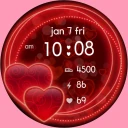
Screenshots
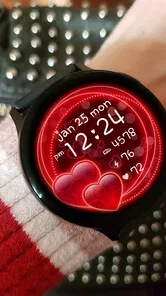
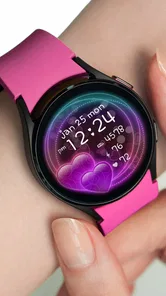
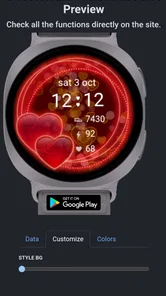

Analysis by Reviewed
I treat a watch face as something I glance at dozens of times, so its design has to feel pleasant without getting in the way. Sweet Hearts Watch Face takes a romantic, decorative approach rather than aiming for a stripped-back, businesslike look. That makes it an easy choice for someone who wants their wrist to feel a little more personal, especially around Valentine’s Day, but a less natural fit if they prefer a neutral display that blends into every outfit and setting.
What to expect when opening it
This is a paid Lifestyle app from Talex Watch Faces, priced at $1.15. Its Everyone age rating makes the theme suitable for a broad audience, and the current version is 1.0.2. It has a 4.5 average from 11 ratings, with 500+ installs, so I’d read that reception as a small but positive signal rather than proof of broad compatibility or long-term support. It was released on Jan 11, 2022; for a watch face, the more practical question is whether it suits your device and taste today.
In speed terms, a watch face should be ready when you raise your wrist, not feel like an app you need to wait for. I’d expect this kind of focused visual customization to be quick to browse and set up, though the experience can depend on the watch and its software. The real test is the everyday glance: can you read the time quickly, then enjoy the decoration without having to stop and study the screen?
First Impressions Matter
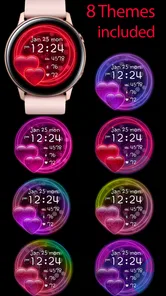
From the get-go, the Sweet Hearts Watch Face captivates with its visually appealing design. It's not just about telling time; it's about an experience. The app offers a plethora of customization options that let you tweak everything from the color scheme to the style of the hearts. It's like having a mini art project right on your wrist! Whether you’re into bold reds or soft pastels, there's something here to suit every taste.
User Interface: Simple Yet Effective
I’ve tried my fair share of watch face apps, and let me tell you, a user-friendly interface is a big deal! Thankfully, this app nails it. Navigating through its settings is a breeze, even if tech isn't your forte. The intuitive layout ensures that you spend less time fumbling around and more time admiring your snazzy new watch face.
A useful way to choose among the color and heart styles is to test legibility in the places you actually check the time: outdoors, under indoor lighting, and during a quick glance while walking. A shade that looks lovely when you are selecting it may be less distinct in bright surroundings. I’d start with a contrast that makes the hands or time easy to pick out, then add softer colors if readability still feels effortless.
Features That Stand Out
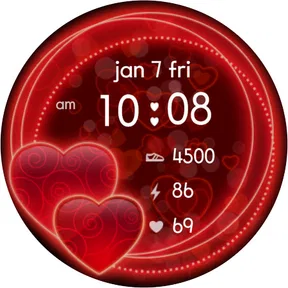
Now, let's talk features. One thing that really caught my eye was the real-time heart animation. It’s not just static hearts we're talking about—the app breathes life into them. As your day progresses, the hearts pulsate gently, adding a lively touch to your routine. And for those of you who love a bit of flair, there are seasonal themes that let you change things up for holidays or special occasions.
More From Our News Desk

 Gmail
GmailGmail in a Busy Inbox: Who Benefits Most?
From first account to crowded workday, Gmail earns its place through dependable search and flexible sorting—but its best fit depends on how much inbox maintenance you can tolerate.

 Prime Video
Switching to Prime Video: What Changes in Your Viewing Routine
Prime Video can make a compelling second home for streaming, but switching means learning a different catalog, rental layer, and route from browsing to playback.

 Universal TV Remote Control
Universal TV Remote Control Works Best as a Reliable Backup
A phone remote earns its place through quick setup and reliable habits. Here is how to get more from Universal TV Remote Control—and where its limits show.

 Weather - By Xiaomi
Weather by Xiaomi Review: Clear at a Glance, Less Clear Up Close
Xiaomi’s weather app makes everyday forecasts quick to scan, but its calm surface can leave useful details and recovery paths harder to find than they should be.

 X
XX Under Pressure: Can It Recover When Posting Goes Wrong?
A resilience-focused review of X, examining setup, mistaken posts, interruptions, weak connections, and the gaps that matter when recovery needs to be dependable.

 Clash of Clans
Clash of Clans Is Won Between the Battles
Its raids are quick; its community is a long-term project of coordination, teaching, rivalry, and shared responsibility—with all the friction that entails.
Latest News



That motion is the main trade-off to consider. If you enjoy a small animated detail each time you glance down, it gives the face more character than a plain static design. If you keep your display active for long stretches or find movement distracting, a still, minimal face may suit you better. I’d also treat the seasonal styling as an occasional refresh rather than a reason to change the face every day: a look you enjoy beyond a single holiday is more likely to feel worth the purchase.
For a realistic use case, imagine checking the time between errands or during a coffee break: the hearts make the watch feel cheerful without requiring you to open a separate app or interrupt what you are doing. It can also be a thoughtful choice if you want a playful accessory for a date or a gift-season outfit. By contrast, someone who uses their watch primarily as a practical work tool may prefer a conventional face that emphasizes a restrained appearance over decoration.
Battery Life: A Pleasant Surprise
We all know how frustrating it can be when an app drains your battery faster than you can say "watch face." Luckily, this isn’t the case here. The Sweet Hearts Watch Face is surprisingly light on power consumption. It’s optimized to ensure that your smartwatch doesn’t run out of juice halfway through the day, which is a relief for those of us who rely on our gadgets to keep us on track.
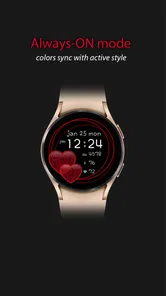
Battery use is still worth judging on your own watch rather than assuming every model behaves alike. Screen settings and how often the display is active can shape the result, so if you notice a change after switching faces, compare it across an ordinary day with your usual setup. That practical check is more useful than trying to infer battery performance from the animation alone.
Reliability matters in a subtler way here: the face should remain a dependable choice when you glance at it, not just look appealing in a preview. If it behaves unexpectedly after a watch software change, selecting the face again or restarting the watch are sensible first steps for a watch-face issue; I would avoid treating that as a guaranteed fix. If consistency is your priority, a basic built-in face is the safer alternative, while this one makes sense when its distinctive style is the point.
Who will enjoy it—and who may not
I’d recommend it to someone who wants a heart-themed watch face, likes choosing between visual styles, and is happy to pay a small one-time price for a more expressive look. It is less compelling for people who want a strictly utilitarian display, dislike animation, or need a watch face chosen mainly for workday neutrality. Before buying, make sure the watch supports the face and that you are comfortable with its decorative focus; that saves disappointment more effectively than relying on the attractive preview alone.
Compared with the usual alternatives, the choice is straightforward: built-in faces tend to be the sensible option when familiarity and a plain presentation matter most, while this design offers a more affectionate, themed personality. It is not a replacement for a general-purpose watch app; its value is the visual change on your wrist. The customization is useful because you can tune the mood, but anyone expecting a deep set of practical tools should look elsewhere.
Making the look work in everyday routines
The strongest reason to choose a themed face is that you will enjoy seeing it repeatedly, not just admire it once in the setup screen. I’d try the style with the clothes and settings where I wear my watch most. A bright heart pattern may feel right for weekends and casual plans, while a softer color choice could be easier to keep on through an ordinary workweek. If neither feels comfortable in your regular routine, the theme may be better as an occasional change than your permanent display.
There is also a useful way to think about the customization before settling on a favorite: make one choice for quick reading and another for mood, then compare them during the same part of the day. When you are rushing out the door, glance speed matters more than subtle decorative differences. During a relaxed evening, the animation and color can become the point. Choosing for both situations helps avoid a face that looks attractive but proves tiring to use.
For someone who shares a watch with different outfits or changes their look for a special occasion, the seasonal angle offers a small reason to revisit the design. I would keep a preferred everyday configuration in mind rather than repeatedly changing every available option. That makes it easier to return to a version that reads well, and keeps experimentation from turning into a chore.
What to check before paying
A watch face is unusually dependent on the device it lands on, so I would confirm compatibility through the watch’s own face-selection process before building expectations around the preview. Screen size, display behavior, and software can affect how a design feels in use. The same layout may look more spacious on one watch and busier on another, which is why a quick on-device check is more valuable than judging solely from a phone screen.
It is also reasonable to wonder whether this is a standalone timekeeping tool. I would approach it as a visual watch-face choice, not as a broader lifestyle service: its appeal is the heart styling and the ability to adjust its appearance. If you are shopping for reminders, health tracking, or other practical functions, compare those needs separately and keep the face decision focused on how you want the watch to look and read.
The price is modest, but that does not make it an automatic buy for everyone. Think about how often you would wear a romantic design and whether you enjoy animated decoration over time. If your watch already has a face you like and you rarely change it, a purchase may add little. If personalizing the wrist display matters to you, the low-cost, focused nature of this app is easier to justify.
Speed, stability, and device limits
Because this is a watch face rather than a large utility app, my expectation is a compact setup experience and a quick return to the time display. That expectation is not a promise about every watch: the device’s own software and the way it handles faces will shape the result. I would judge responsiveness by ordinary use—whether the display is ready when I raise my wrist and whether the time stays easy to read—rather than by assuming that decoration automatically means sluggishness.
Heavy-use moments are less about opening the face repeatedly and more about living with it through a full day: frequent glances, changes between lighting conditions, and periods when the watch display is active. The animation may be pleasant in short looks but less appealing if you are sensitive to movement or keep checking the screen. If you want to conserve attention as well as battery, a still face is a fairer comparison; if you like a little motion, the hearts are part of the appeal.
For a simple reliability check after setup, use it through a normal day before deciding whether it suits you. Notice whether the time remains readable in your usual environments and whether the watch behaves as expected after the face is selected. If an issue appears, switching away and back or restarting the watch may be worth trying, but a built-in face remains the sensible fallback when dependable familiarity matters more than a themed look.
That is also why I would avoid making a broad claim about resource demands from the design alone. Animation and screen behavior interact with the watch, and battery results can vary with settings and use. If battery life is already tight on your device, compare the face with your normal choice over similar days rather than relying on a general impression. If you see no meaningful difference and enjoy the style, that is the most relevant result for your own routine.
In conclusion, if you're on the hunt for a watch face that combines functionality with a touch of whimsy, the Sweet Hearts Watch Face might just be your perfect match. It’s got that rare mix of style and substance that’s sure to bring a smile to your face every time you check the time. So why not give it a try and let your smartwatch reflect a bit more of your personality?
My performance verdict is measured: the simple purpose suggests a straightforward experience, but speed, stability, and battery impact ultimately depend on the watch it runs on. I’d choose it for a personal, animated look rather than for advanced utility, and keep a familiar standard face handy if reliability or a no-frills display matters more than charm.
Sweet Hearts Watch Face Frequently Asked Questions
Who makes Sweet Hearts Watch Face, and what kind of app is it?
Sweet Hearts Watch Face is a lifestyle app from Talex Watch Faces, created for people who want a romantic, Valentine’s Day-inspired look on their smartwatch. Its short description is simply “Sweet Hearts,” while its main appeal is a watch face with a special seasonal style. The app is suitable for everyone, so its theme is decorative rather than intended for a particular age group.
What features does the Sweet Hearts Watch Face offer?
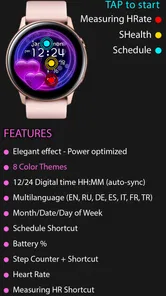
The Sweet Hearts Watch Face offers a variety of customizable features designed to enhance your smartwatch experience. Users can enjoy multiple heart-themed designs, color options, and widgets that display vital information such as time, date, and battery life. It also supports interactive elements that allow you to access other smartwatch functions directly from the watch face.
Is the Sweet Hearts Watch Face compatible with all smartwatches?
The Sweet Hearts Watch Face is primarily designed for Android Wear OS devices. However, compatibility may vary depending on the specific model of your smartwatch. It is recommended to check the app details on the Google Play Store to ensure that your device is supported before downloading the application.
How customizable is the Sweet Hearts Watch Face?
The Sweet Hearts Watch Face is highly customizable. Users can choose from a variety of heart-themed designs and color palettes to suit their personal style. Additionally, it allows for the inclusion of widgets which can display information like weather, steps, and notifications, making it not just a decorative but also a functional watch face.
Does the Sweet Hearts Watch Face consume a lot of battery?
The Sweet Hearts Watch Face is designed to be battery-efficient. While any watch face will consume some battery, the developers have optimized it to ensure that it uses minimal power. This means you can enjoy the beautiful and interactive designs without significantly impacting your smartwatch's battery life.
Pros
- Customizable heart designs
- Real-time heart rate display
- Battery efficient
- Compatible with many devices
- Easy to install
Cons
- Limited free features
- Occasional lag in updates
- Requires Wear OS
- High battery consumption with specific settings
- Ads in free version











