

Super Music - MP3 Downloader
- 3.69K
- 4.4
- Installs
- 500.00K
- Price
- Free

Screenshots

Analysis by Reviewed
I tried Super Music - MP3 Downloader as a straightforward way to search for music, play it, and keep tracks available for later listening. It sits in the Music & Audio category, and its focus is refreshingly narrow: it is not trying to become a full social network, a podcast platform, or an elaborate streaming service. The app is free to install, although some optional purchases range from $2.99 to $12.99 per item.
That simple purpose is also the main reason to consider it. If I want a compact music tool rather than a large subscription ecosystem, the idea is appealing. In everyday use, though, a downloader needs to be judged on more than the promise of finding songs. Search quality, playback behavior, saved-file organization, and the amount of friction between opening the app and hearing something all matter. My experience is that this app can be useful for casual listeners, but it is best approached as a practical utility rather than a complete replacement for every music service.
How Super Music feels in its current form
I look at the app’s current form as a focused search-and-save tool, so this section considers where that approach is useful and where it asks for a little extra care. The same trade-off matters more when several people share a device: convenience depends on agreeing whose searches and saved tracks belong in the collection.
A focused music workflow instead of a crowded platform
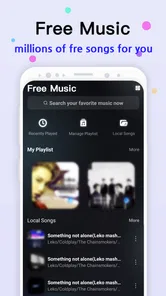
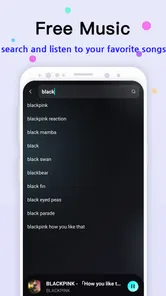
The basic journey is easy to understand. I search for a track, choose a result, play it, and decide whether I want to save it. That sequence makes the app approachable for someone who does not want to spend time learning a complicated interface. The emphasis on MP3 music also gives it a more file-oriented character than services built mainly around online playlists and recommendations.
I found that distinction important. A conventional streaming app usually wants me to remain inside its catalog, while a downloader is more useful when I already have a specific song or artist in mind. Super Music works best in that situation: I know what I want, I search directly, and I use the result for listening later. It is less convincing when I expect an intelligent discovery system to constantly surprise me with polished recommendations.
The app is developed by Superb Tools For Android, and its current version is 1.0.19. That version detail matters because users who already installed an earlier build should think of the experience as an evolving product rather than a finished, feature-heavy music suite. The app was released on January 5, 2023, so it has had time to establish its basic direction, but its appeal still depends on whether that focused workflow matches the way I personally listen.
What the public response suggests
Super Music has an average rating of 4.4 from around 14 thousand ratings, with roughly 3.7 thousand written reviews. It has also passed 500 thousand installs. Those figures do not prove that every search or download will work perfectly, but they do suggest that the central concept is understandable and useful to a substantial group of Android listeners.
More From Our News Desk

 Gmail
GmailGmail in a Busy Inbox: Who Benefits Most?
From first account to crowded workday, Gmail earns its place through dependable search and flexible sorting—but its best fit depends on how much inbox maintenance you can tolerate.

 Prime Video
Switching to Prime Video: What Changes in Your Viewing Routine
Prime Video can make a compelling second home for streaming, but switching means learning a different catalog, rental layer, and route from browsing to playback.

 Universal TV Remote Control
Universal TV Remote Control Works Best as a Reliable Backup
A phone remote earns its place through quick setup and reliable habits. Here is how to get more from Universal TV Remote Control—and where its limits show.

 Weather - By Xiaomi
Weather by Xiaomi Review: Clear at a Glance, Less Clear Up Close
Xiaomi’s weather app makes everyday forecasts quick to scan, but its calm surface can leave useful details and recovery paths harder to find than they should be.

 X
XX Under Pressure: Can It Recover When Posting Goes Wrong?
A resilience-focused review of X, examining setup, mistaken posts, interruptions, weak connections, and the gaps that matter when recovery needs to be dependable.

 Clash of Clans
Clash of Clans Is Won Between the Battles
Its raids are quick; its community is a long-term project of coordination, teaching, rivalry, and shared responsibility—with all the friction that entails.
Latest News



I would read that response as encouragement for casual use, not as a guarantee of a premium streaming experience. Ratings often reflect whether an app solves a narrow problem, and this one can feel worthwhile when that problem is “find a track and keep it handy.” Someone expecting flawless catalog coverage, advanced library management, or the same polish as a major subscription service should set more cautious expectations.
Where it fits in a normal day
A realistic example is a commute or a workout in a place where I do not want to depend entirely on an active connection. I can search for music before leaving, save the tracks I expect to use, and return to them later instead of repeating the same search. That workflow is especially convenient for a small personal selection: a few albums, a short exercise mix, or songs for a trip.
The useful habit is to prepare the collection before I need it. Searching one track at a time while already outside is less comfortable than doing it at home, when I can check titles and avoid saving the wrong result. I also prefer to test a saved track immediately after obtaining it. That quick check catches confusing results early and prevents discovering during a commute that the item I expected is not the one I selected.
The practical difference between playing and saving
One of the more important trade-offs is that playing a result and saving it are not the same decision. For a quick listen, immediate playback is enough. Saving makes more sense for tracks I expect to revisit, but it also creates a library that can become untidy if I download every search result without checking names, versions, or duplicates.
My advice is to treat the save function selectively. I would first play a result, confirm that it is the intended song, and only then keep it. This is a small step, but it makes the app much more useful over time. A downloader can become inconvenient when it turns into a pile of vaguely named files, so a little discipline matters more here than it would in a service that automatically maintains a polished catalog.
What changes mean for people already using it
For existing users, the move to version 1.0.19 is best viewed as a reason to keep the app updated and reassess the day-to-day workflow. I would not assume that a version number alone transforms the product into a different kind of music service. The core identity remains a search, playback, and saving tool. The practical question is whether the current build feels stable enough for the way you use those three actions.
If an older installation already handles your usual searches well, updating should be approached with a simple check afterward: search for a familiar artist, play a known result, and verify that saved music remains easy to access. That is a sensible routine for any app that handles a personal listening collection. It also helps separate genuine improvements in the current build from expectations based only on a newer version label.
Strengths that become clearer with regular use
The first strength is directness. I do not have to navigate through several content areas before reaching the main task. The second is flexibility: the app is useful both for immediate playback and for building a smaller offline-oriented selection. The third is that it can suit listeners who dislike being tied to a large platform with many unrelated features.
Another advantage is the low entry barrier. It is free to start, supports Android 7.0 and later, and carries a Teen content rating. That combination makes it accessible to many Android users, although the age label is still a reminder that families should make their own judgment about how the app is used and what search results may appear.
I also like the distinction between a temporary listen and a saved favorite. That sounds basic, but it encourages a more intentional library. Instead of automatically adding everything to a permanent collection, I can decide which tracks deserve space. For people who prefer a small, controllable set of music, this can be more comfortable than the endless-library feeling of a streaming platform.
Where the experience can become frustrating
The biggest limitation is that a search-based downloader depends heavily on the quality and clarity of its results. A familiar song may appear in several versions, and a title alone may not tell me whether I have selected the recording I wanted. That means I need to inspect results rather than tapping the first option automatically. Users who want a perfectly curated catalog may find this extra judgment tiring.
There is also a management cost. Once I save more music, organization becomes part of the experience. A streaming service normally handles artwork, artist pages, albums, playlists, and synchronized history as one connected system. A focused downloader may feel faster for individual tracks, but it does not automatically remove the work of deciding what belongs in my collection.
The free model is another consideration. The app costs nothing to install, yet optional in-app purchases are available from $2.99 to $12.99 per item. I would use the free experience first and decide whether the app earns any additional spending. That is particularly important for occasional listeners, because a person who only needs a few saved tracks may not receive enough extra value from paid options to justify them.
Finally, I would not choose this app if my main priority is a deeply integrated listening ecosystem. People who rely on synchronized playlists across several devices, editorial recommendations, podcasts, lyrics, or a broad subscription catalog will probably be happier with a mainstream streaming alternative. Super Music has a more specific purpose, and its simplicity is a benefit only when that purpose is exactly what I need.
Three habits that make it more useful
My first practical tip is to search using the most identifying information available, such as the artist together with the song title. Short searches can produce ambiguous results, while a more precise query reduces the chance of saving an unrelated track. I would also play a result before saving it, especially when several entries look similar.
Second, I would build the library in small batches. Saving a handful of confirmed tracks, testing them, and then continuing is safer than starting a large download session and sorting everything afterward. This approach also makes it easier to notice whether a particular search pattern is producing results I do not want.
Third, I would separate “music I am testing” from “music I expect to keep” in my own routine. The app’s save function is most valuable when it contains deliberate choices. If I use it as a temporary holding area for every possible result, the convenience of quick access gradually disappears under clutter.
Who should use it and who should skip it
I would recommend Super Music to an Android listener who wants a simple way to search for individual music tracks, play them, and save favorites without committing immediately to a large subscription service. It is also a reasonable fit for people who prefer preparing a compact listening selection for commutes, workouts, or travel.
I would be more hesitant to recommend it to someone who wants music discovery to happen automatically. It is not the best match for listeners who judge an app by rich playlists, sophisticated recommendations, cross-device continuity, or a polished album-centered library. In those cases, a conventional streaming app is likely to feel more complete, even if it is less direct for saving individual tracks.
Parents and younger users should also pay attention to the Teen content rating. That does not tell me how every search will look in practice, but it does mean the app should not be treated as an automatically child-focused environment. The same applies to anyone who wants a tightly controlled catalog: a focused search tool requires the user to take more responsibility for what is selected.
What I would watch as the app continues to evolve
The most meaningful future progress would be anything that reduces the work around saved music while preserving the app’s directness. Clearer result identification, dependable playback after saving, and easier collection management would have a noticeable effect on regular use. Those are the areas I would pay attention to rather than judging progress only by a new version number.
I would also watch how the balance between the free experience and optional purchases develops. The app’s strongest argument is that it is easy to try, so the initial workflow should remain useful without making occasional listeners feel pushed toward spending. If paid features add convenience without getting in the way of basic search and playback, they may suit frequent users; otherwise, the free tier will remain the more relevant test for most people.
My final view is positive but specific: Super Music is most successful as a focused MP3 music utility, not as a universal replacement for streaming services. I like its direct search-and-save idea, and the current version gives Android users a free way to explore that workflow on devices running Android 7.0 or newer. I would install it for practical, personal listening, prepare tracks in advance, and keep the saved library selective.
At the same time, I would not expect it to remove every inconvenience associated with finding and organizing music. The need to verify results, manage saved tracks, and decide whether optional purchases are worthwhile remains part of the experience. If that trade-off sounds acceptable, Super Music can be a handy companion for a smaller music collection. If I wanted a full catalog, automatic discovery, and seamless multi-device organization, I would choose a more established streaming alternative instead.
Overall, I see Super Music - MP3 Downloader as a useful app for listeners who value control and direct access more than a feature-packed platform. Its 4.4 average and more than 500 thousand installs show that the approach has found an audience, while the app’s real value still depends on using it thoughtfully. Search carefully, verify before saving, and keep the collection intentional; under those conditions, it is much easier to appreciate what this small music tool does well.
Super Music - MP3 Downloader Frequently Asked Questions
Who developed Super Music - MP3 Downloader, and what kind of app is it?
Super Music - MP3 Downloader is a Music & Audio app developed by Superb Tools For Android. Its main purpose is to help users search for, play, and save music. If you are comparing music apps, consider whether those basic tasks match what you want from a downloader and review the app’s features before installing.
Does Super Music - MP3 Downloader cost anything to download?
The app is free to install, though in-app purchases are available and individual items range from around three to thirteen dollars. Before making a purchase, check what the item offers and whether it is optional for the way you plan to use the app. You can also review the current purchase details in the app store before downloading.
What does the app’s name and description promise about music features?
Super Music - MP3 Downloader is presented as an app for searching, playing, and saving favorite music. That gives you a straightforward idea of its intended use, but it does not mean every song will necessarily be available to download. Check the app’s details and any applicable restrictions before relying on it for a particular track or listening setup.
What devices and operating systems can run Super Music - MP3 Downloader?
Super Music - MP3 Downloader is an Android app in the Music & Audio category, developed by Superb Tools For Android. It requires Android 7.0 or later, so check your device’s software version before downloading. If you use an iPhone or iPad, confirm availability in the relevant app store rather than assuming the Android app can be installed on iOS.
Who is Super Music - MP3 Downloader intended for, and is it suitable for younger users?
The app is aimed at people who want to search for, play, and save music. Its content rating is Teen, so it may not be appropriate for every child or family. Parents and guardians should review the app’s store page and any content a user can access, then decide whether it fits their household’s age guidelines.
Pros
- Simple interface makes music discovery quick and easy.
- Supports background playback while using other apps.
- Built-in search helps locate tracks without complicated menus.
- Lightweight design uses little storage space on most devices.
- Useful playlists make it easier to organize downloaded songs.
Cons
- Download availability can vary by region and music catalog.
- Audio quality may differ between available versions of a song.
- Some features may be restricted behind ads or in-app purchases.
- Downloaded files may not transfer easily to other music players.
- Copyright rules should be checked before saving or sharing tracks.











