

Sumio: Net Worth Tracker
- 5.00
- 3.8
- Installs
- 10.00K
- Price
- Free

Screenshots
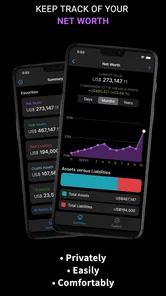
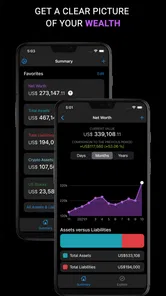
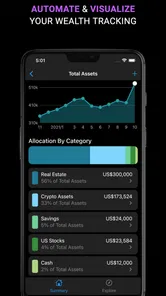
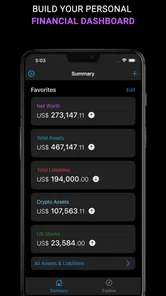
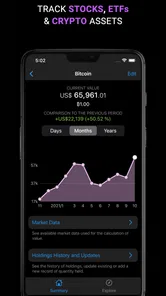
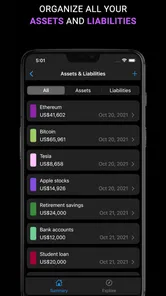
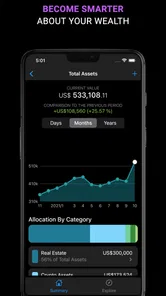
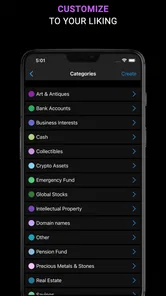
Analysis by Reviewed
I found Sumio: Net Worth Tracker most useful when I treated it as a calm financial snapshot rather than a complete replacement for a bank or brokerage app. Its purpose is straightforward: bring your assets, investments, stocks, funds, and overall net worth into one place so you can see the direction of your finances without jumping between several accounts. After spending time with it, my view is positive but specific. It is a good fit for people who want a simple overview and are willing to keep their information organized, while users expecting automatic, highly detailed financial management may find it too limited.
That distinction matters because many finance apps promise a single view of everything, but the real value usually comes from how quickly that view helps you make a decision. Sumio is strongest when I use it to answer questions such as, “Am I building wealth over time?” or “How much of my money is tied up in investments rather than available cash?” It is less convincing if I need the app to replace the detailed tools offered directly by a broker, bank, tax platform, or professional portfolio service.
How Sumio turns scattered finances into a clearer picture
The app comes from Fiduciary and sits in the finance category. It is free to install, with optional in-app purchases ranging from $2.99 to $29.99 per item. The basic appeal is easy to understand: instead of looking at a savings account in one app, shares in another, and funds somewhere else, I can use one place to think about the total picture. That is a more useful starting point than focusing on one account balance in isolation.
I especially like the net-worth perspective because it encourages a longer view. A bank balance can look healthy while debts, investments, property, or other assets tell a different story. Sumio is designed around bringing those parts together. Even if I only check it occasionally, the act of recording and reviewing the whole picture can make financial progress feel more concrete than watching a single account fluctuate.
The strongest workflow is to begin with a clean inventory. I would add the accounts and assets that matter, separate investments from ordinary cash, and then decide how often I want to review the result. The important habit is consistency. If I update one category regularly but leave another untouched, the total can create a false sense of precision. The app can organize the information I give it, but it cannot make an incomplete financial record accurate.
That leads to one of the more useful, less obvious ways to use it: treat the app as a personal balance-sheet checkpoint. Rather than opening it whenever markets move, I would review it after a meaningful change such as moving savings, buying an investment, paying down a large debt, or receiving a major payment. This reduces the temptation to react to every short-term fluctuation and keeps the focus on changes that actually affect financial position.
A practical household scenario
Imagine I am preparing for a move and have money spread across a current account, an emergency fund, a retirement investment, and a few individual stocks. Each service may show its own balance clearly, but none gives me an immediate sense of how much I own in total or how concentrated my investments have become. Sumio can serve as the meeting point for that review. I can look at the combined picture, compare the amount invested with readily available cash, and notice whether a large purchase would leave my safety cushion uncomfortably thin.
More From Our News Desk

 Gmail
GmailGmail in a Busy Inbox: Who Benefits Most?
From first account to crowded workday, Gmail earns its place through dependable search and flexible sorting—but its best fit depends on how much inbox maintenance you can tolerate.

 Prime Video
Switching to Prime Video: What Changes in Your Viewing Routine
Prime Video can make a compelling second home for streaming, but switching means learning a different catalog, rental layer, and route from browsing to playback.

 Universal TV Remote Control
Universal TV Remote Control Works Best as a Reliable Backup
A phone remote earns its place through quick setup and reliable habits. Here is how to get more from Universal TV Remote Control—and where its limits show.

 Weather - By Xiaomi
Weather by Xiaomi Review: Clear at a Glance, Less Clear Up Close
Xiaomi’s weather app makes everyday forecasts quick to scan, but its calm surface can leave useful details and recovery paths harder to find than they should be.

 X
XX Under Pressure: Can It Recover When Posting Goes Wrong?
A resilience-focused review of X, examining setup, mistaken posts, interruptions, weak connections, and the gaps that matter when recovery needs to be dependable.

 Clash of Clans
Clash of Clans Is Won Between the Battles
Its raids are quick; its community is a long-term project of coordination, teaching, rivalry, and shared responsibility—with all the friction that entails.
Latest News



That does not turn the app into a financial adviser, and I would not use one displayed total as permission to spend. Its value is in making the trade-off visible. A purchase may be affordable when I look only at total assets but unwise when I consider how little cash would remain afterward. A net-worth tracker is most helpful when it prompts that second question.
Another useful approach is to record assets that are easy to overlook. People often remember their main account and investments but forget smaller holdings, savings pots, or items they mentally classify as separate from “finance.” Bringing those into the same review can make the total more realistic. I would still avoid assigning a value to something casually unless I had a sensible way to update it, because an old estimate can make the trend look better or worse than it really is.
Where the investment view helps, and where it stops
Sumio’s focus on stocks, funds, and investment portfolios makes it more relevant to someone who wants to see investments as part of a wider financial plan. I find that more useful than a portfolio-only screen because investment performance is not the same thing as financial health. A portfolio can rise while cash reserves remain weak, or fall while regular saving and debt reduction are improving the broader situation.
The trade-off is that a consolidated overview is not automatically a detailed analysis. I would still use the original investment provider for exact transactions, execution, official statements, and any decision that depends on precise account information. Sumio is better suited to reflection and comparison than to acting as the final authority for a trade.
For that reason, I would avoid checking it compulsively during a volatile market session. A daily total can be interesting, but it can also encourage emotional reactions to movements that do not change a long-term plan. My preferred routine would be to use the app for periodic reviews, then open the relevant provider only when I need transaction-level detail or want to make a change.
The main friction: organization depends on the user
The meaningful weakness is not the idea; it is the maintenance burden that comes with any personal net-worth tracker. A single dashboard feels convenient only while its entries remain current and clearly labeled. If I change an account, move money, add an investment, or update an asset elsewhere, I need a reliable routine for reflecting that change here. Otherwise the app may look tidy while quietly becoming outdated.
This is also where expectations matter. Someone looking for a fully automatic financial hub may prefer an alternative that connects directly to banks and investment providers, where available. Someone who wants advanced charting, tax reporting, detailed allocation analysis, or trade execution may also be better served by specialized tools. Sumio’s appeal is its broad personal overview, not the depth of every individual financial service.
I would also be careful with the word “net worth.” It sounds definitive, but the result is only as dependable as the categories and values entered into the app. Cash is usually easy to understand; investments change; personal assets may be subjective; and liabilities can be forgotten if I focus only on what I own. The best practice is to keep a note of the date of each review and update the parts that materially changed, rather than pretending the figure is permanently exact.
The optional purchase model is another point to consider before committing to a long-term routine. The app itself is free, but some items cost between $2.99 and $29.99. I would first use the free experience to decide whether the tracking method fits my habits. Paying for an enhancement makes sense only if it removes a real obstacle in my workflow, rather than simply adding another financial subscription that I rarely open.
Who will get the most from it
I think Sumio is a strong match for a person who has begun collecting money in several places and wants a less fragmented view. It can suit a new investor who wants to understand how investments fit beside savings, a household managing several asset types, or anyone trying to build a regular wealth-review habit without opening a spreadsheet every time.
It is also useful for people who prefer a manual, deliberate approach. Entering or checking information yourself can feel slower than automatic synchronization, but it forces me to notice what I am counting and why. That can be valuable for someone who wants to understand their finances rather than simply accept a generated total.
On the other hand, I would skip it if my main goal is day-to-day spending control. A budgeting app with transaction categories and spending alerts would be a better fit for tracking where money goes each week. I would also choose a brokerage or investment-analysis service if my priority were placing trades, comparing funds in depth, or monitoring technical market information. Sumio makes more sense between those activities, as a personal overview layer.
Families should think about their process before using it together. A shared financial picture can be helpful, but unclear ownership and stale values can create confusion. I would agree on which accounts and assets belong in the total, decide who updates them, and review the result at a predictable time. That simple agreement is more important than adding every possible item immediately.
Everyday habits that make the tracker more reliable
My first tip is to create a baseline review instead of entering items randomly. Start with the accounts that define your financial position, then add investments and other assets in a consistent order. This makes later reviews faster and helps reveal which part of the total is changing. If the first setup is rushed, every later comparison becomes harder to interpret.
My second tip is to separate “available soon” from “valuable eventually” in your own thinking, even if both contribute to the total. An investment portfolio may be worth a certain amount, but it is not the same as emergency cash. Looking at the overall number is useful, yet decisions about rent, bills, or an unexpected repair should be based on accessible money rather than the headline figure.
Third, I would use a change log outside the app if I were tracking a complicated situation. A brief note saying that a balance changed because of a transfer, purchase, or valuation update prevents me from misreading a sudden jump. This is particularly helpful when reviewing progress after several weeks or months, because it separates genuine saving from money that merely moved between categories.
Finally, I would review the portfolio in context rather than celebrating every increase. If a rise comes from one stock becoming a much larger share of the total, the number may be improving while the risk is becoming less comfortable. Sumio can help me notice the size of the combined investment position, but the judgment about diversification still requires care and, when appropriate, a more specialized source.
What the app’s public footprint suggests
Sumio has an average rating of 3.8 from around 78 ratings, with five written reviews, and it has passed 10K installs. I read that as a modest but real user footprint rather than proof that it will suit everyone. The rating suggests a mixed experience is possible, which fits my view: the concept is useful, but the value depends heavily on how much information a person wants to maintain and how much detail they expect from a finance tool.
It is marked for Everyone, which makes the subject matter broadly approachable, though financial responsibility still matters regardless of age. The current version is 1.9.18 and requires Android 7.0 or later. Those details are worth checking before installing on an older device, especially if I plan to make the app part of a long-running record rather than use it for a quick experiment.
I would also remember that a finance app’s convenience should not replace sensible privacy habits. I would avoid entering more personal detail than necessary, keep my device protected, and treat the app as a planning aid rather than the official record for accounts or investments. The safest workflow is to use it for an overview while retaining statements and authoritative information with the institutions that provide them.
My final recommendation
Sumio works because it addresses a real problem: financial information is often scattered, while financial decisions depend on the whole picture. Its net-worth and portfolio focus gives me a useful way to step back from individual balances and see whether my overall position is moving in the direction I want. The best results come from regular, thoughtful updates rather than constant checking.
I would recommend it to someone who wants a straightforward personal finance overview, enjoys taking ownership of their records, and does not need advanced banking, trading, or tax features in the same tool. I would point a heavy investor, detailed budgeter, or person seeking automatic account aggregation toward a more specialized alternative instead.
For me, the clear thesis is simple: Sumio is a useful financial mirror, not a complete financial command center. If that distinction matches what you need, the free starting point is worth trying. Give it a careful baseline, keep the entries current, and use its totals to ask better questions about your money rather than treating them as the answer to every financial decision.
Sumio: Net Worth Tracker Frequently Asked Questions
Can I use Sumio on my phone, and what operating system does it require?
Sumio: Net Worth Tracker is a finance app for tracking your financial position on a mobile device. Before downloading, check that your device meets its minimum operating-system requirement: Android 7.0 or later. The app is free to download, and its Everyone content rating makes it suitable for a broad audience. The current version is 1.9.18.
Who makes Sumio, and how well is it rated by users?
Sumio is developed by Fiduciary and is focused on helping people calculate and track net worth, investments, stocks, funds, and other assets. It has an average rating of 3.8 from 78 ratings, alongside five written reviews. Those figures offer a quick snapshot, but it is still worth considering whether its approach to tracking finances suits your own needs before installing.
What is Sumio: Net Worth Tracker, and what can I use it for?
Sumio: Net Worth Tracker is a personal finance app designed to help you monitor your overall financial position in one place. You can record assets such as bank balances, investments, property, and cryptocurrency, then subtract debts and liabilities to estimate your net worth. It is useful for tracking progress over time, reviewing financial habits, and setting longer-term money goals.
Do I need to connect my bank accounts to use Sumio?
No, connecting a bank account is not necessarily required to use Sumio. Depending on the available features and your region, you may be able to enter balances and transactions manually, which can be preferable for privacy or for accounts that are not supported. Automatic synchronization, if offered, may depend on third-party providers, participating institutions, and the permissions you grant.
Is Sumio: Net Worth Tracker free to download and use?
Sumio can generally be downloaded at no initial cost, but some tools or advanced features may require a subscription or in-app purchase. The app is listed as free, with in-app purchases ranging from $2.99 to $29.99 per item. Before relying on a premium function, check the current pricing, trial conditions, renewal terms, and cancellation process shown in the App Store or Google Play. Availability and plan options may vary by platform and location.
Pros
- Tracks assets
- debts
- and net worth in one organized dashboard.
- Supports manual entries for users who prefer not to connect bank accounts.
- Clear charts make changes in wealth easier to understand over time.
- Useful budgeting and financial overview tools for personal planning.
- Clean interface is approachable for beginners and experienced users.
Cons
- Manual updates can become time-consuming when accounts change frequently.
- Some advanced features may require a paid subscription.
- Limited value for users seeking detailed investment analysis or trading tools.
- Financial data accuracy depends on consistent and correct user input.
- Privacy-conscious users may hesitate to store sensitive information in the app.











