

Suitable
- 43.00
- 4.8
- Installs
- 50.00K
- Price
- Free

Screenshots
Analysis by Reviewed
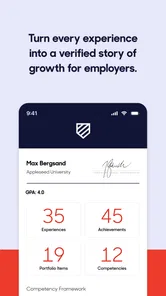
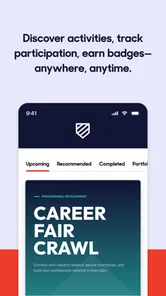
I approached Suitable as an education app for the part of learning that happens beyond lessons, grades, and homework. Its central idea is practical: help people take part in activities outside the classroom and present those accomplishments in a way that can be shared with the wider world. That makes it different from a normal study tool. I would not open it to revise a chapter or complete a quiz; I would use it to make extracurricular experience easier to organize, explain, and show.
That distinction matters because achievements outside school often become scattered across memory, messages, certificates, club activities, volunteering, creative work, and personal projects. Suitable, developed by Suitable, is aimed at giving that wider experience a more deliberate place. It is free, rated for Everyone, and belongs to the education category, but its usefulness is especially clear for students who want their efforts to feel visible rather than incidental.
After spending time with it, my opinion is positive but specific. I see it as a companion for documenting and presenting personal development, not as a replacement for a learning platform, a professional portfolio builder, or a social network. Its value depends on whether you are willing to keep your accomplishments organized and think about how to describe them. If you only want instant content with no preparation, the experience may feel less rewarding.
Where Suitable fits in everyday learning
The most useful way to understand Suitable is to think of it as a bridge between participation and presentation. Joining a club, helping at an event, practicing a skill, completing a personal project, or taking responsibility in a group can all be meaningful. The problem is that these experiences are easy to forget or difficult to explain later. An app focused on accomplishments gives those moments a place in a broader personal record.
I like that this approach recognizes learning as something larger than classroom performance. A student may be developing communication skills through a club, reliability through volunteering, creativity through a project, or leadership by organizing peers. Those qualities do not always appear clearly in a school report. Suitable is most interesting when it encourages the user to notice that connection and present it with more confidence.
At the same time, I would not treat every activity as automatically impressive just because it is entered into an app. The quality of the result still depends on the details the user provides. A vague note such as “helped with an event” says very little. A clearer account of the responsibility, the challenge, and the result is far more useful. My first practical tip is to record the specific contribution while it is still fresh, rather than waiting until an application or conversation makes the information urgent.
The app has been available since March 21, 2016, and its current version is 1.46.0. That history suggests a product with a long presence rather than a newly launched experiment. The audience is also not limited to older students: the Everyone age rating makes it approachable for a broad range of users, although the best results will depend on the maturity and purpose of the person using it.
More From Our News Desk

 Gmail
GmailGmail in a Busy Inbox: Who Benefits Most?
From first account to crowded workday, Gmail earns its place through dependable search and flexible sorting—but its best fit depends on how much inbox maintenance you can tolerate.

 Prime Video
Switching to Prime Video: What Changes in Your Viewing Routine
Prime Video can make a compelling second home for streaming, but switching means learning a different catalog, rental layer, and route from browsing to playback.

 Universal TV Remote Control
Universal TV Remote Control Works Best as a Reliable Backup
A phone remote earns its place through quick setup and reliable habits. Here is how to get more from Universal TV Remote Control—and where its limits show.

 Weather - By Xiaomi
Weather by Xiaomi Review: Clear at a Glance, Less Clear Up Close
Xiaomi’s weather app makes everyday forecasts quick to scan, but its calm surface can leave useful details and recovery paths harder to find than they should be.

 X
XX Under Pressure: Can It Recover When Posting Goes Wrong?
A resilience-focused review of X, examining setup, mistaken posts, interruptions, weak connections, and the gaps that matter when recovery needs to be dependable.

 Clash of Clans
Clash of Clans Is Won Between the Battles
Its raids are quick; its community is a long-term project of coordination, teaching, rivalry, and shared responsibility—with all the friction that entails.
Latest News



Why connectivity changes the experience
Connectivity is important here because the app’s purpose involves moving information beyond a private moment. When you are connected, it is easier to work with an accomplishment while the context is still available in your mind, refine the wording, and prepare it for sharing or presenting. A network connection can also make the transition from personal record to visible achievement feel immediate.
That does not mean every useful moment happens at a desk with a reliable signal. Imagine a student helping at a community activity, attending a club meeting, or finishing a project while traveling between school and home. The best time to remember the details may be immediately afterward, when the experience is vivid. If the connection is weak at that moment, the user may postpone the entry and later forget the small details that make it meaningful.
For that reason, I would build a simple habit around the app rather than depending on spontaneous use. Keep a short private note of the activity, the role you played, and one result. Then open Suitable when the connection is stable and turn that rough reminder into a polished accomplishment. This workflow respects real mobile life without assuming that the app provides an offline mode.
That is one of the less obvious trade-offs of a connected achievement tool: immediacy is helpful, but it can also encourage rushed writing. I would rather capture the facts quickly and edit them later than publish an unclear description simply because the moment feels important. Suitable works best when connectivity supports reflection instead of replacing it.
Using it between school, activities, and home
Suitable makes the most sense for people whose schedules are divided between formal education and other commitments. A student might move from class to rehearsal, from a lesson to volunteering, or from schoolwork to a personal project. These transitions create many useful experiences, but they also make organization difficult. A dedicated place for accomplishments can prevent those experiences from disappearing into a calendar or a collection of unrelated files.
I can imagine using it at the end of a busy week. Rather than trying to reconstruct everything months later, I would review the week and choose the activities that show growth, responsibility, initiative, or a new skill. The important point is selectivity. A record becomes easier to understand when it highlights meaningful examples instead of treating every minor action as equally important.
There is also a benefit for users who are not naturally comfortable talking about themselves. Writing down an accomplishment privately can be less intimidating than explaining it aloud. Over time, those entries can become a source of language for a conversation with a teacher, mentor, family member, or future evaluator. I would use the app as a rehearsal space for describing what I have done without exaggerating it.
My second practical tip is to write entries from the point of view of evidence. Instead of starting with a broad claim such as “I became a better leader,” describe what you actually did: coordinated people, solved a problem, completed a task, or supported a group. This makes the accomplishment more credible and gives the app a clearer educational purpose.
The mobile setting does create friction, though. Small screens are convenient for quick updates but not always ideal for careful editing. If you are trying to write a thoughtful account after a long day, it may feel easier to jot down a brief reminder and return to the wording later. Users who expect the speed of a social feed may find the reflective side slower, but that slower pace is also what can make the final record more useful.
What happens when the connection is unreliable
Any experience that involves sharing or presenting information can be interrupted by a poor network. A page may take longer to load, an action may not appear to finish, or a user may be unsure whether an update went through. I would approach Suitable cautiously in those moments and avoid repeatedly tapping buttons out of frustration. The safest habit is to pause, check the visible state, and confirm the result once the connection is steady.
This is especially important when working from a school building, public transport, a crowded event, or a place with inconsistent coverage. Those are exactly the environments where a person may remember an accomplishment and want to record it quickly. If the app does not respond as expected, the failure is not just technical inconvenience; it can interrupt the chain of memory between doing something and explaining it.
My recovery method would be simple. First, keep the activity details in a temporary note. Second, reopen the app when the connection improves rather than assuming the earlier attempt was saved. Third, review the entry for duplicated or incomplete information before treating it as finished. This is not glamorous advice, but it prevents a small connectivity problem from becoming a missing achievement or a messy record.
I also recommend separating capture from presentation. During an activity, record only the essential reminder elsewhere if necessary. Later, when the app is responsive, shape the entry into something another person can understand. This two-step process reduces pressure and avoids turning a weak signal into a reason to abandon the habit altogether.
Compared with a paper notebook, Suitable can offer a more direct path from personal reflection to sharing, but paper is more dependable in places where a phone connection is unreliable. Compared with a general notes app, Suitable is more purpose-built for accomplishments, while a notes app may be faster for rough capture. Compared with a full portfolio service, Suitable appears better suited to the ongoing educational journey than to producing a highly designed professional presentation. Choosing between them depends on whether your priority is structure, speed, or visual control.
Keeping mobile data under control
Because this is a connected app, I would be sensible about when and how I use it on mobile data. The most data-conscious approach is to avoid repeatedly reopening screens just to check whether an action has completed. Prepare the wording before submitting it, use a stable connection when possible, and reserve heavier browsing or extended editing for a trusted network.
This is not only about saving data. Fewer repeated attempts also reduce confusion. If a user submits the same accomplishment several times because the network is slow, the resulting record may need cleanup. A deliberate workflow is better: draft, review, submit once, and verify later. That approach is particularly useful for younger users or families managing limited mobile plans.
My third tip is to maintain a small weekly routine rather than making many scattered updates throughout the day. At the end of the week, gather the activities that genuinely matter, choose the strongest examples, and write them clearly. This limits unnecessary network use while improving consistency. It also helps the app become a record of development instead of a stream of hurried fragments.
There is a balance to find here. Waiting too long can make details fade, but updating constantly can turn reflection into administration. I would capture a short reminder soon after an activity and complete the polished version during a connected review session. That gives the user the best of both approaches without claiming that the app itself handles offline work.
Who will benefit most from it
Suitable is a strong match for students who participate in several activities and want a clearer way to connect them with personal growth. It may also help someone preparing for a conversation about interests, strengths, or future plans, because a written history makes it easier to remember specific examples. Families and educators could find the concept useful when encouraging a young person to recognize learning outside ordinary lessons.
It is particularly valuable for users who underestimate their own progress. Someone may think that occasional volunteering, a creative hobby, or helping organize a group is “just something they do.” Recording those experiences can reveal patterns: increasing responsibility, persistence through difficulty, or a growing ability to work with others. The app’s educational value is strongest when it prompts that kind of self-awareness.
On the other hand, I would skip it if you want a conventional course platform with lessons, tests, grades, or live instruction. It is also not the best first choice for a polished employment portfolio where design, custom layouts, and extensive project presentation are the main priorities. A general notes tool may be better for someone who only needs private reminders, while a dedicated portfolio product may suit a user ready to present detailed work to a professional audience.
Another limitation is personal motivation. An accomplishment record does not become useful automatically. Users need to add meaningful details, revisit older entries, and decide what deserves attention. If that process feels like unnecessary paperwork, the app may not become part of a lasting routine. I would recommend starting with a small number of important activities rather than trying to document an entire history at once.
How it compares with familiar alternatives
Traditional school records usually emphasize academic outcomes, attendance, and formal participation. Suitable addresses a different layer: the story around what a person does beyond the classroom. That can make it more personal and more flexible, although it also means the user has more responsibility for choosing and explaining the evidence.
A paper journal offers freedom and works without depending on a phone connection, but it is harder to search, revise, or present consistently. A notes app is quick and familiar, yet it does not necessarily encourage the user to think in terms of accomplishments and development. Social platforms make sharing easy, but they are designed for public interaction rather than careful educational reflection. Suitable sits between these options, with a more focused purpose than notes and a more reflective tone than social media.
The trade-off is that a specialized tool may feel narrower. If your needs change from tracking extracurricular growth to managing deadlines, storing large project files, or building a professional showcase, you may need another app alongside it. I would not see that as a failure; it simply clarifies the role Suitable should play. It is most effective as a focused record of experience, not as an all-purpose digital life organizer.
What the rating and access tell me
The app has an average rating of 4.8 from around 570 ratings and has passed 50 thousand installs. Those figures indicate that it has found a receptive audience, while the number of ratings still suggests a more focused community than a mass-market social or productivity app. I would take that as encouraging, but I would still judge it by whether its accomplishment-centered approach matches my needs.
Since it is free, the barrier to trying it is low. That matters for students and families who may not want another subscription simply to organize extracurricular experience. The minimum operating system is 8.1, so compatibility should be considered before installing on an older device. The current version, 1.46.0, is the one I would look for when checking that the app is up to date.
The free price does not remove the need to invest time. The real cost is attention: deciding what matters, writing accurately, and returning to the record. For me, that is reasonable when the app helps turn vague memories into concrete examples. For someone who wants a completely automatic profile built from existing activity, it may feel too hands-on.
My connectivity verdict
Suitable is worth considering when your goal is to make learning outside school more visible and easier to explain. Its strongest contribution is not a single dramatic feature; it is the habit of treating activities, responsibilities, and personal projects as part of a wider educational story. That makes it useful for reflective students and for anyone who needs a clearer record of growth.
Connectivity shapes that experience in both directions. A stable connection can make editing and sharing more convenient, while weak service can interrupt the moment when an accomplishment is easiest to remember. I would use a short-note-then-review workflow, keep mobile submissions deliberate, and avoid relying on the app as the only place where fresh details exist.
My final recommendation is therefore measured: try it if you want a focused education app for organizing accomplishments beyond lessons, especially if you are willing to write with detail and revisit your progress. Skip it if you need formal coursework, a fully private scratchpad, or a highly designed professional portfolio. For the right user, Suitable turns overlooked experiences into a clearer personal record, and that is a meaningful role for a free app in the education category.
Suitable Frequently Asked Questions
What is Suitable used for in education?
Suitable is an education app from Suitable. Its short description is “Suitable,” and its store summary says it helps users get involved outside the classroom and promote their accomplishments to the world. It is intended for sharing and highlighting achievements beyond classroom activities, making it relevant to learners who want to present their accomplishments.
What is Suitable, and what can I use it for?
Suitable is an app designed to help users discover and evaluate options that match their needs, preferences, or personal circumstances. Depending on the feature you use, it may help organize information, compare alternatives, or make everyday decisions more easily. Before downloading, check the current App Store or Google Play description to confirm the exact tools and supported use cases available in your region.
Who can download Suitable, and what devices does it support?
Suitable is rated for Everyone and is available for Android devices that meet its minimum operating-system requirement. The current version is 1.46.0, and the app was released on March 21, 2016. Before installing, check your device’s operating-system version and the relevant app store to make sure Suitable is compatible with your phone or tablet.
Is Suitable free to download and use?
Suitable is free to download. Suitable may be available as a free download, but some functions can require in-app purchases, a subscription, or an account. The free version may include limited access to certain features, content, or recommendations. I recommend reviewing the pricing section on the official store page before installing, especially if you plan to use advanced tools or continue beyond a possible free trial.
Is Suitable easy to use for first-time users?
Suitable is generally intended to be accessible to new users, with an onboarding process that introduces the main features and may ask for preferences or personal information. The experience can vary depending on the device and app version. Take a moment to review permission requests and settings during setup, and avoid entering sensitive information unless it is clearly necessary for the service.
Pros
- Simple interface makes the app easy to navigate.
- Useful tools are accessible without a steep learning curve.
- Runs smoothly on most modern Android and iOS devices.
- Settings provide enough flexibility for different user preferences.
- Helpful for users seeking a focused
- straightforward experience.
Cons
- Some advanced features may require a subscription or extra payment.
- The free version may include advertisements or usage limitations.
- Performance can vary on older phones and tablets.
- Certain functions may depend on an active internet connection.
- Support and update frequency may differ between platforms.











