

Subscription Manager - ReSubs
- 39.00
- 3.6
- Installs
- 50.00K
- Price
- Free

Screenshots
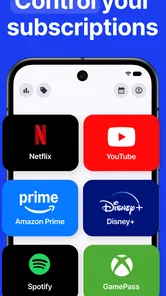
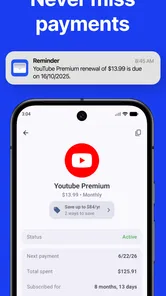
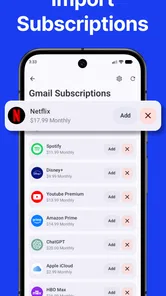
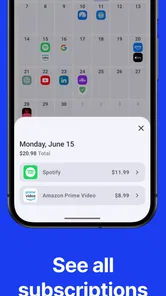
Analysis by Reviewed
Managing subscriptions sounds simple until several small charges begin hiding among everyday spending. I tested Subscription Manager - ReSubs as a finance app from Christian Krueger, and I found its appeal in the way it turns scattered recurring payments into something I can inspect and act on. It is aimed at people who want to remember what they are paying for, spot services they no longer use, and make cancellation decisions before another billing cycle arrives.
The app is free to install, although in-app purchases range from $1.99 to $49.99 per item. It is rated for Everyone, works on Android 8.0 and later, and its current version is 1.37.0. With a 3.6 average from around 958 ratings and more than 50K installs, it has a real user base but also a mixed reception. That feels fair to me: the idea is useful, yet the value depends heavily on how carefully I maintain my subscription information.
How ReSubs fits into everyday money management
The first thing I noticed is that ReSubs is not a replacement for a bank app. It does not become my complete spending history or automatically turn every financial decision into a one-tap action. Its role is narrower and, in my view, more practical: it gives recurring commitments a dedicated place where I can review them instead of searching through bank statements, email receipts, and app-store screens.
That distinction matters. A banking application is better when I want to investigate a transaction, check my balance, or verify whether a payment actually went through. ReSubs is more useful before that point, when I am asking, “Which services am I still choosing to keep?” I can use it as a subscription calendar and review list rather than treating it as an authoritative record of my account.
The main work is entering and maintaining subscriptions. That requires a little honesty from the user. If I add a service but forget to update its price, billing interval, or status after making a change, the overview gradually becomes less trustworthy. This is one of the app’s most important trade-offs: it can make recurring expenses visible, but it cannot replace my responsibility to keep the entries accurate.
I would recommend starting with a short audit rather than trying to record every service in one sitting. I would check the last few bank or card statements, list recurring charges, then add only the subscriptions I recognize. After that, I would compare the app’s overview with the original payment source. This workflow avoids a common mistake: assuming that a neat list is automatically a complete list.
Where connectivity changes the experience
Because subscription management often involves checking outside information, connectivity can shape the experience even when the basic task feels personal and local. I may need a network connection to inspect a provider’s current account page, confirm a renewal notice, open a cancellation screen, or compare an unfamiliar charge with an email receipt. ReSubs can organize my decision, but the final evidence may live elsewhere.
More From Our News Desk

 Gmail
GmailGmail in a Busy Inbox: Who Benefits Most?
From first account to crowded workday, Gmail earns its place through dependable search and flexible sorting—but its best fit depends on how much inbox maintenance you can tolerate.

 Prime Video
Switching to Prime Video: What Changes in Your Viewing Routine
Prime Video can make a compelling second home for streaming, but switching means learning a different catalog, rental layer, and route from browsing to playback.

 Universal TV Remote Control
Universal TV Remote Control Works Best as a Reliable Backup
A phone remote earns its place through quick setup and reliable habits. Here is how to get more from Universal TV Remote Control—and where its limits show.

 Weather - By Xiaomi
Weather by Xiaomi Review: Clear at a Glance, Less Clear Up Close
Xiaomi’s weather app makes everyday forecasts quick to scan, but its calm surface can leave useful details and recovery paths harder to find than they should be.

 X
XX Under Pressure: Can It Recover When Posting Goes Wrong?
A resilience-focused review of X, examining setup, mistaken posts, interruptions, weak connections, and the gaps that matter when recovery needs to be dependable.

 Clash of Clans
Clash of Clans Is Won Between the Battles
Its raids are quick; its community is a long-term project of coordination, teaching, rivalry, and shared responsibility—with all the friction that entails.
Latest News



I found it helpful to separate planning from verification. When I have time and a reliable connection, I can review each entry, confirm the next billing details through the provider, and then decide whether the subscription stays. Later, in a rushed situation, I can use ReSubs as a reminder of what deserves attention instead of trying to reconstruct the whole story from memory.
That separation also prevents overconfidence. A reminder inside a manager is not proof that a cancellation succeeded. After cancelling a service, I would still check for a confirmation message and watch the next relevant statement. If the provider requires a browser, a separate app, or an account password, ReSubs cannot remove those steps. It can help me remember them.
Network interruptions are most frustrating when I am already trying to act quickly. A weak connection can delay a provider page, interrupt a sign-in flow, or leave me uncertain whether a cancellation request was submitted. My advice is to avoid treating the moment of opening ReSubs as the whole cancellation process. Use it to identify the target, then allow enough time to complete and verify the action through the service itself.
Useful routines on a phone
ReSubs makes the most sense in short mobile sessions. I can review it while waiting for transport, during a monthly budget check, or after noticing a renewal notification. The phone format suits this kind of maintenance because subscriptions are usually discovered through mobile notifications, app receipts, and card alerts in the first place.
Still, small-screen convenience can encourage shallow reviews. I might see a familiar service name and keep it without asking whether I still use it. I get better results when I treat each entry as a prompt for a quick decision: use regularly, use occasionally, replace with a cheaper option, or cancel. That simple classification turns a list into a practical review process.
A realistic example is a streaming service I joined for one series. After finishing it, I might continue paying simply because the charge is small and familiar. ReSubs gives me a place to notice that recurring commitment during a broader money check. I can then open the provider’s account page, confirm the renewal terms, cancel if appropriate, and keep a note of the confirmation outside the app if I need a record.
Another useful situation is travel. Before leaving home, I could review subscriptions that may be unnecessary during a long trip, such as a service I rarely use or a temporary tool bought for a project. Connectivity becomes important here because I may need to reach each provider, but the manager helps me prepare the list before I start switching between accounts.
I would not use it as my only financial tool if I manage subscriptions for a family, a small business, or several payment methods. In those cases, ownership and reimbursement details can become more complicated than a personal overview. A spreadsheet or dedicated expense system may offer better collaboration and record-keeping, while ReSubs remains useful as a personal reminder layer.
What happens when information is incomplete
The most valuable test is not adding a perfectly known subscription. It is dealing with an unclear charge. A bank statement may show a shortened merchant name, a payment processor, or a charge that does not immediately reveal which service created it. ReSubs can help once I identify the subscription, but it does not eliminate the detective work required beforehand.
My preferred recovery method is cautious and sequential. I compare the charge date with email receipts, search the provider’s account history, and check whether another household member made the purchase. Only then do I create or update the relevant entry. This avoids turning a guess into a false record, which could lead me to cancel the wrong service or overlook the real one.
If an entry becomes outdated, I would correct it immediately rather than waiting for a large cleanup session. Small corrections are easier to trust than a dramatic annual audit. When a price changes, a plan is upgraded, or a billing interval shifts, updating the manager at that moment keeps later decisions grounded in reality.
Cancellation also needs a recovery plan. If the provider’s page fails to load, I would not assume the subscription is cancelled. I would retry on a stronger connection, use the provider’s official account route, and look for a confirmation afterward. If the service is billed through an app marketplace, I would check the marketplace’s subscription controls rather than searching only inside the service’s own application. ReSubs can point me toward the task, but the billing channel determines where the task is completed.
This is where the app differs from an automatic subscription detector. A detector that reads transaction data may discover charges with less manual effort, but it can also produce ambiguous matches or depend on access to financial accounts. ReSubs asks for more input, which is slower at the beginning but gives me direct control over what appears in the list. For privacy-conscious users, that trade-off may be worthwhile; for people who want zero setup, it may feel like too much work.
Using it without wasting mobile data
Subscription reviews do not usually require a long session, so I would use ReSubs in a data-conscious routine. I would first review the entries already in the app, then open only the provider pages that need verification. There is little benefit in repeatedly jumping between every account when I already know which subscriptions require a decision.
When connected to dependable Wi-Fi, I would handle the more involved cleanup: checking receipts, confirming account details, and reviewing several providers in one sitting. On mobile data, I would keep the task focused on a few specific entries. This is not because ReSubs promises a particular offline or online behavior; it is simply a sensible way to avoid unnecessary network activity while using a phone.
I would also avoid refreshing information just for reassurance. A subscription’s details should be checked when something has changed, when a renewal is approaching, or when a charge looks unfamiliar. Repeatedly opening pages without a decision creates the feeling of progress without actually reducing expenses.
There is another data-related consideration: financial information deserves careful handling. I would enter only what I need to recognize a subscription and avoid putting sensitive payment credentials into notes or labels. The app’s purpose is organization, not storing card numbers. I would also review any purchase prompts carefully, especially because the app is free to install but offers paid items. The free starting point makes it easy to try, while the optional spending means I should understand what I am unlocking before confirming a purchase.
Strengths, limitations, and the right kind of user
My favorite quality is focus. ReSubs does not ask me to rebuild my entire budget before I can see which recurring services deserve attention. That makes it approachable for someone who has noticed subscription creep but does not want a complex financial platform.
It is particularly suitable for people with several entertainment, productivity, storage, fitness, or learning services who pay through different providers. It can also help anyone who tends to forget temporary subscriptions after a trial or project ends. The key benefit is not a magical saving figure; it is creating a deliberate pause before recurring charges become invisible.
The limitations are equally important. Manual organization takes discipline. If I expect automatic discovery, automatic cancellation, or guaranteed synchronization with every billing source, I am likely to be disappointed. The app also cannot decide whether a subscription is worthwhile because that depends on usage, alternatives, family needs, and cancellation terms.
Compared with a spreadsheet, ReSubs is more convenient for quick phone reviews and less flexible for custom financial analysis. Compared with a bank app, it is more focused on recurring commitments and less useful for investigating all spending. Compared with a fully automated subscription service, it may require more effort but can feel more controlled because I choose what to record. The better option depends on whether I value speed, breadth, privacy, or hands-on accuracy most.
I would skip it if I have only one or two subscriptions and already review them reliably through my bank or marketplace account. I would also look elsewhere if I need shared household management, detailed cash-flow forecasting, or formal business expense records. In those cases, ReSubs may become another list to maintain rather than the central tool I need.
My connectivity verdict
After using Subscription Manager - ReSubs, I see it as a practical organizer for people who want to regain visibility over recurring payments without adopting a full budgeting system. Its usefulness is strongest when I pair it with a regular review habit and verify important actions through the original provider.
Connectivity does not define the app’s entire value, but it affects the moments that matter most: identifying an unfamiliar charge, checking current account details, completing a cancellation, and confirming that the change worked. I would prepare my subscription list in the manager, use a stable connection for provider checks, and never treat a reminder as proof of a completed billing change.
The free installation makes trying it low-risk, and the Everyone rating keeps it accessible to a broad audience. The average rating of 3.6 suggests that expectations should remain realistic rather than assuming a flawless automated experience. For me, the right mindset is to use ReSubs as a focused checklist and decision aid.
My final recommendation is simple: try it if recurring charges are easy for you to forget and you are willing to maintain a small amount of financial information yourself. Start with a statement review, verify each entry, and use the app during a monthly money routine. If you want a hands-off system that discovers and cancels everything automatically, a different kind of finance service will suit you better. If you want a clear mobile place to question the subscriptions you already have, ReSubs is worth considering.
Subscription Manager - ReSubs Frequently Asked Questions
Does Subscription Manager - ReSubs send renewal reminders?
Reminders can be useful for avoiding unexpected renewals, so check the app’s settings after installation to see which alerts are available and how they can be configured. If you use reminders, keep each subscription’s billing date accurate and allow the relevant notifications on your device. For important renewals, it is sensible to also rely on the provider’s own notices or your calendar.
Who makes Subscription Manager - ReSubs, and what should I know before installing it?
Subscription Manager - ReSubs is a finance app developed by Christian Krueger. It is rated for Everyone and is free to download, with in-app purchases available. The app has an average rating of 3.6 from around 1,000 ratings, so it may be helpful to read recent user feedback and check the purchase options before deciding whether it suits your needs.
What is Subscription Manager - ReSubs used for?
Subscription Manager - ReSubs is designed to help you organize and monitor recurring subscriptions in one place. You can add services such as streaming platforms, software plans, memberships, and other regular payments, then review their prices, billing intervals, and renewal dates. It is especially useful if you have several subscriptions and want a clearer overview of your monthly or yearly spending.
Can Subscription Manager - ReSubs automatically detect my subscriptions and cancel them for me?
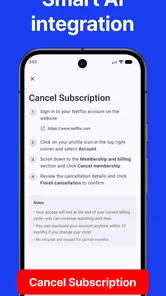
The app should not be treated as a bank account monitor or an automatic cancellation service unless those functions are specifically supported in your version. In most cases, you need to enter subscription details manually and keep them updated when prices or billing dates change. Cancellation normally has to be completed through the provider’s website, app store, or customer support, so always verify the process before relying on the app.
Does Subscription Manager - ReSubs support recurring payments in different currencies?
Currency support can be important if you subscribe to services billed in different countries. Subscription Manager - ReSubs may allow you to record prices using a selected currency, but users should check the available settings because exchange-rate conversion and automatic currency updates may not be included. For accurate budgeting, enter the amount exactly as it appears on your provider’s invoice and review totals regularly.
Pros
- Tracks recurring subscriptions and renewal dates in one place.
- Supports custom billing cycles beyond monthly and yearly plans.
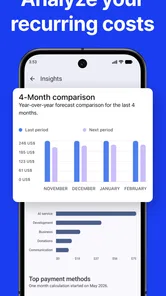
- Helps estimate upcoming expenses and total subscription spending.
- Useful reminders can reduce the risk of unwanted renewals.
- Simple interface makes adding and reviewing subscriptions quick.
Cons
- Some advanced features may require a premium upgrade.
- Manual entry can be time-consuming for users with many subscriptions.
- No guarantee that every service or currency is supported.
- Reminder accuracy depends on correctly entered billing information.
- Data backup or syncing options may be limited depending on the platform.











