

Subscription Manager: Reko
- 10.00
- 4.2
- Installs
- 10.00K
- Price
- Free

Screenshots

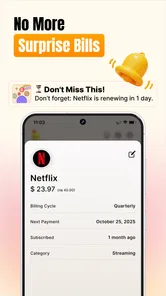

Analysis by Reviewed
Keeping track of subscriptions sounds simple until several small charges are spread across different services, renewal dates, and free trials. I tested Subscription Manager: Reko as a finance app from Playground Studio LLC, focusing less on its short store label and more on the practical question: does it make recurring spending easier to understand and control? My answer is a qualified yes. It is most useful when your main problem is remembering what renews and when, rather than building a complete household budget.
The app is free to install and is rated for Everyone, which makes it approachable for people who want a straightforward place to organize recurring payments. It has reached over ten thousand installs and holds a 4.2 average from hundreds of ratings, so there is enough public use to suggest that the basic idea is resonating. Still, I would not treat those figures as proof that it suits every financial routine. The real decision depends on whether you want a dedicated subscription overview or a broader money-management system.
What I looked for before recommending it
My first decision criterion was setup effort. A subscription tracker only helps if entering information is quicker than searching through bank statements every month. I looked at how naturally a person can record a service, identify its billing cycle, and return later to see upcoming renewals. I also considered whether the app makes a useful distinction between a subscription, a one-time bill, and a trial that might become a paid plan.
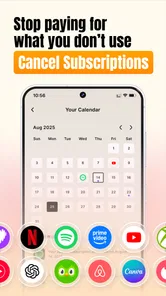
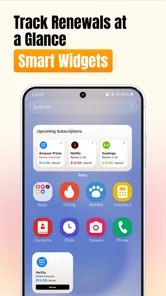
The second criterion was visibility. A list of services is not enough on its own. The useful question is whether I can glance at the app and understand which payments are approaching, which ones are easy to forget, and how recurring commitments fit into my monthly spending. Reko is aimed at that specific problem: finding subscriptions, organizing bills, and keeping renewals and trials in view.
The third criterion was control. Remembering a renewal is valuable, but it does not automatically cancel anything. I paid attention to the boundary between what the app can help me monitor and what I still need to do directly with the service provider or through the relevant app store. That distinction matters because a reminder tool should not create the false impression that tapping inside it ends a contract.
Finally, I considered the alternatives. A phone calendar can handle renewal reminders, a spreadsheet can record costs, and a bank app may show recurring transactions. Those options can be perfectly adequate. Reko needs to offer enough structure to justify using a dedicated app instead of adding another row to a spreadsheet or another event to a calendar.
Getting a useful overview without turning finance into homework
The strongest part of the experience is its narrow focus. Instead of asking me to categorize every purchase, the app concentrates on recurring commitments. That makes it easier to think about the subscriptions I actually want to review: entertainment, cloud storage, software, memberships, and trials that I may have forgotten after signing up.
More From Our News Desk

 Gmail
GmailGmail in a Busy Inbox: Who Benefits Most?
From first account to crowded workday, Gmail earns its place through dependable search and flexible sorting—but its best fit depends on how much inbox maintenance you can tolerate.

 Prime Video
Switching to Prime Video: What Changes in Your Viewing Routine
Prime Video can make a compelling second home for streaming, but switching means learning a different catalog, rental layer, and route from browsing to playback.

 Universal TV Remote Control
Universal TV Remote Control Works Best as a Reliable Backup
A phone remote earns its place through quick setup and reliable habits. Here is how to get more from Universal TV Remote Control—and where its limits show.

 Weather - By Xiaomi
Weather by Xiaomi Review: Clear at a Glance, Less Clear Up Close
Xiaomi’s weather app makes everyday forecasts quick to scan, but its calm surface can leave useful details and recovery paths harder to find than they should be.

 X
XX Under Pressure: Can It Recover When Posting Goes Wrong?
A resilience-focused review of X, examining setup, mistaken posts, interruptions, weak connections, and the gaps that matter when recovery needs to be dependable.

 Clash of Clans
Clash of Clans Is Won Between the Battles
Its raids are quick; its community is a long-term project of coordination, teaching, rivalry, and shared responsibility—with all the friction that entails.
Latest News



I found the most effective approach was to enter services in batches rather than trying to build a perfect record in one sitting. I would check recent payment notifications or account pages, add the recurring items I recognized, and then return to fill in anything uncertain. This workflow reduces the common problem of abandoning a finance app because the initial setup feels like a full accounting project.
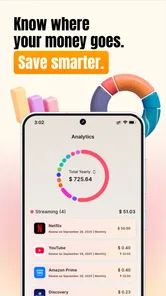
There is also a useful mental shift here. A normal expense list tells me what I already spent. A subscription manager encourages me to look forward. That forward-looking view is particularly valuable for annual renewals, where a payment can feel unexpected simply because it happens infrequently. Even if I still confirm the exact charge elsewhere, having a dedicated place to remember the commitment makes it less likely to surprise me.
The app is most valuable as a renewal-awareness tool, not as a replacement for checking the original billing account. I would use it to maintain a personal map of recurring expenses, then verify details with the provider whenever a cancellation, refund, or billing dispute matters.
Practical workflows that make Reko more useful
One of my favorite ways to use it is during a subscription cleanup session. I start with services I actively use, then look for forgotten trials, duplicate plans, and memberships that overlap in purpose. The important insight is that cancellation decisions are easier when the full group is visible together. A service that seems inexpensive alone can look less necessary when several similar services are viewed as one recurring commitment.
A second workflow is preparing for a busy month. Before a holiday, move, or large planned purchase, I can review upcoming renewals and decide whether any optional service should be paused or canceled before the charge arrives. This is more useful than reacting after the payment has already left the account. Reko does not need to manage the entire budget to support that small but meaningful planning habit.
A third use is trial management. When I start a trial, I would record it immediately instead of trusting memory. I can then treat the entry as a decision point: either keep the service because I use it, or revisit the provider before the trial changes into a paid plan. The practical tip is to add the trial on the same day it begins, while the terms are still fresh, rather than waiting until the end.
For shared households, I would use the app as a discussion aid rather than pretending it is a complete shared-accounting platform. One person can collect the recurring services they know about, then compare the list with another household member. This can uncover subscriptions paid from separate accounts or services that one person assumed the other was already tracking.
Where the app wins over familiar alternatives
Compared with a calendar, Reko keeps recurring financial commitments in one dedicated context. A calendar is excellent for a single reminder, but a long list of renewal events can become noisy. Reko is better suited to reviewing the subscriptions as a group, especially when the goal is deciding what to keep rather than simply remembering one date.
Compared with a spreadsheet, the app feels more immediate for someone who does not enjoy maintaining formulas, columns, and formatting. A spreadsheet can be more flexible, particularly for people who want detailed household analysis, custom categories, or historical comparisons. Reko wins when the priority is a focused list that I am more likely to open and update.
Compared with a bank app, the advantage is intention. Bank transactions show what happened, but they may not clearly explain whether a charge is a trial conversion, an annual renewal, or a service I no longer use. Reko gives me a place to record the meaning behind the payment. That context is often what disappears when I rely only on transaction history.
It also occupies a different space from a full budgeting app. A broad budget is better if I need income planning, debt tracking, savings goals, category limits, or shared financial reporting. Reko is more appealing when recurring services are the specific source of confusion and I want to solve that problem without configuring an entire financial system.
Where another option may fit better
I would not choose Reko as my only finance tool if I need a detailed record of every purchase. Its focused purpose is a strength for subscription cleanup, but it can also feel limited when my main question is where all of my money goes. In that situation, a spreadsheet or comprehensive budgeting app may provide a more complete picture.
I would also be cautious if I expect automatic cancellation. The app can help me identify and organize subscriptions, but I would still follow the provider’s own cancellation process. Depending on how a service was purchased, that might involve an app marketplace, a website, or an account settings page. The safest habit is to use Reko as the reminder and checklist, then confirm the cancellation at the original source.
People who already have a reliable calendar system may not gain much from switching. If every trial and renewal is already recorded with clear reminders, a separate app can add maintenance rather than remove it. Reko becomes more compelling when the current system is scattered across email, notes, bank statements, and memory.
There is also a trade-off for users who dislike manual organization. A dedicated tracker still depends on accurate entries and occasional updates. If a price, billing interval, or status changes, I need to keep the record current. No app can make an incomplete list trustworthy simply by displaying it neatly.
Free access, optional purchases, and the real switching cost
Because the app is free, trying it does not require an upfront purchase. Optional in-app items range from $4.49 to $8.99 each, so I would begin with the free experience and only consider spending after deciding whether the workflow genuinely saves me time. The important test is not whether the interface looks organized on the first day, but whether I still return to it when a renewal is approaching.
The bigger cost of switching is not money; it is rebuilding trust in the list. I would start by entering only active subscriptions and known trials, then compare the result with recent bank or card activity. After that, I would add less frequent renewals and household services. This staged method prevents an early mistake from making the entire tracker feel unreliable.
Before moving away from a calendar or spreadsheet, I would keep the old system temporarily and compare the two during one renewal cycle. That gives me a chance to see whether Reko makes dates easier to understand or merely duplicates existing reminders. Once I am confident that the entries are complete, I can remove duplicate alerts and avoid receiving the same notification from multiple places.
The current version is 3.0.11, and the listed minimum operating-system requirement is Android 7.0. That makes the app accessible on many older Android devices, although I would still check how comfortably it runs on a particular phone before building my entire tracking routine around it. The app is presented as an Android finance tool, so iPhone users should look for the appropriate platform availability before planning a switch.
A realistic everyday example
Imagine I sign up for a video service trial while also paying for cloud storage, a music plan, and a fitness membership. None of those charges is difficult to recognize individually. The problem appears when the trial ends near an annual storage renewal and a monthly membership charge. Without a central view, I might remember the trial but overlook the annual payment, or keep paying for the fitness service during a month when I am not using it.
With Reko, I would record each recurring commitment as soon as I notice it, mark the trial as something to review, and use the upcoming renewal view to plan a short cleanup session. I would then open the original accounts to confirm the billing terms and cancel only the services I no longer want. The app does not make the decision for me, but it puts the decisions in the same place and gives them a clearer timeline.
That example also shows the app’s limitation. If I enter the wrong date or forget a service paid through another account, the overview can be incomplete. I would therefore treat the first setup as an audit, not a one-minute download-and-fix solution. The payoff comes after the list is accurate enough to support future decisions.
Who should use it and who should skip it
I recommend trying Reko if you regularly wonder which subscriptions are still active, forget annual renewals, or start trials and later struggle to remember their end dates. It is also a good fit for someone who wants a focused finance tool without committing to a full budgeting system. The narrow purpose can make it easier to maintain than a larger app with many sections I never use.
I would point students, families, and careful spenders toward it when recurring services are the specific issue they want to solve. It can support a monthly review habit, help prepare for upcoming charges, and make a conversation about shared subscriptions more concrete. The app is also suitable for general audiences because it carries an Everyone content rating.
I would skip it if I need automatic bank-level transaction analysis, detailed income and expense reports, debt planning, or a complete shared budget. I would also skip it if my current calendar or spreadsheet already gives me a dependable, low-effort system. In those cases, switching may create duplicate work without adding enough insight.
My recommendation after using it
My overall view is positive, with the right expectations. Reko solves a specific and common problem: turning scattered recurring payments into a list I can review before they renew. Its best qualities are focus, a forward-looking use case, and the ability to support practical cleanup routines instead of only recording past spending.
I would recommend installing it for a short trial of your own routine, beginning with a careful subscription audit rather than entering random services whenever you remember them. Add active plans, trials, and infrequent renewals; verify the important dates with the providers; then return before the next group of charges is due. That process reveals quickly whether the app reduces mental clutter.
Playground Studio LLC has positioned this as a dedicated subscription and bill tracker rather than an all-purpose financial command center. That is exactly why it can work well for one type of user and feel insufficient for another. If recurring payments are the gap in your current money routine, Reko is worth trying; if you need a complete budget, choose a broader tool instead.
For me, the deciding benefit is not that it eliminates financial work. It makes one neglected part of that work visible enough to act on. Used as a reminder and review workspace, it can help prevent forgotten trials and surprise renewals. Used as a substitute for checking provider accounts or managing a full budget, it will disappoint. That distinction makes the recommendation clear: free to start, practical for subscription control, and best for people who want a focused companion rather than an entire financial system.
Subscription Manager: Reko Frequently Asked Questions
Is Subscription Manager: Reko available for my device, and what age rating does it have?
Subscription Manager: Reko is a finance app with an Everyone content rating. Its minimum operating system requirement is version 7.0, so check your device’s system version before downloading. The app is available on Android and iOS, and the current version is 3.0.11. Keeping your device’s operating system updated can also help with compatibility and security.
Who makes Reko, and what do users think of it?
Reko is developed by Playground Studio LLC. It has an average rating of 4.2 from around 275 ratings, with 10 reviews, and has been installed over 10,000 times. Those figures offer a quick sense of its reception, but they cannot tell you whether its workflow suits your needs. Reading recent user feedback can help you judge how the app performs for the features you care about.
What is Subscription Manager: Reko, and what can I use it for?
Subscription Manager: Reko is designed to help you organize and monitor recurring subscriptions in one place. You can use it to record services such as streaming platforms, software plans, memberships, and other regular payments. The app can make it easier to review upcoming charges, understand your monthly or yearly spending, and identify subscriptions you may no longer use. It is primarily a management and tracking tool rather than a replacement for your bank or payment provider.
Does Subscription Manager: Reko automatically detect subscriptions or connect to my bank account?
Before downloading, users should check the app’s current permissions and supported integrations, because automatic detection and bank connectivity can vary by version, country, and platform. If Reko does not offer a compatible financial connection, subscriptions may need to be added manually with details such as the service name, price, billing cycle, and renewal date. This manual approach provides control, but it also means the information must be updated whenever a plan changes or is canceled.
Can I use Reko to cancel subscriptions directly?
Subscription Manager: Reko can help you remember renewal dates and keep cancellation information organized, but tracking a subscription is not necessarily the same as canceling it. In most cases, cancellation must be completed through the service provider, Apple App Store, Google Play, or the website where the subscription was purchased. Always verify the cancellation confirmation with the provider, especially when a renewal date is approaching, because deleting an entry from Reko alone may not stop future charges.
Pros
- Tracks recurring subscriptions and upcoming payments in one place.
- Supports custom billing cycles beyond monthly and yearly plans.
- Helps identify unused services before the next renewal date.
- Clean interface makes adding and reviewing subscriptions straightforward.
- Useful reminders can reduce the risk of unexpected automatic charges.
Cons
- Some advanced features may require a paid upgrade or subscription.
- Manual entry can be time-consuming if many services need to be added.
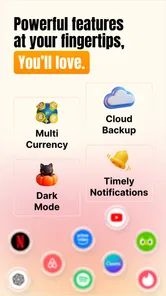
- Currency and regional payment support may vary by location.
- Reminder accuracy depends on keeping prices and billing dates updated.
- It may not automatically detect every subscription from your bank account.











