Stretch Fall - Watch face
- 2.00
- 5.0
- Installs
- 1.00K
- Price
- $0.99
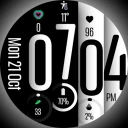
Screenshots
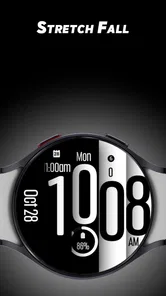
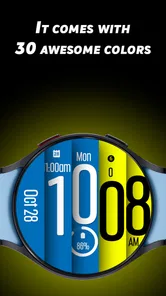
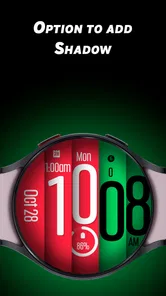
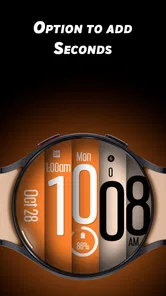
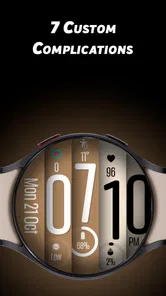
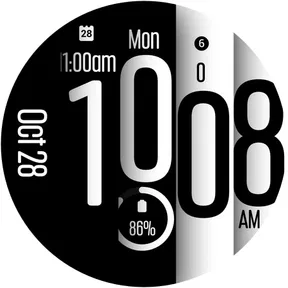
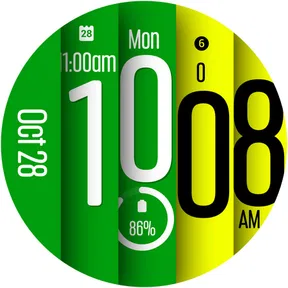
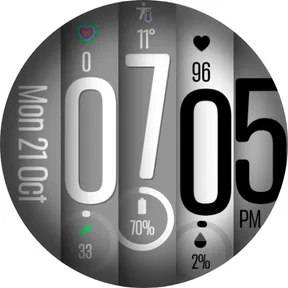
Analysis by Reviewed
I think a watch face earns its place when it makes checking the time feel a little more personal without getting in the way of the day. Stretch Fall - Watch face is aimed at Wear OS users who want a colorful, animated look rather than another plain dial. Its appeal is visual first: it gives the watch a playful character, while asking you to decide whether that livelier style suits the way you actually use your wrist.
Where the look fits into a real day
I can see this watch face working best for someone who treats a watch as a small personal accessory, not just a place to check the time. A bright, animated design can make a quick glance feel less utilitarian, especially when a phone is tucked away during a commute or a walk. If you prefer a restrained display that disappears into the background, though, a conventional, static face will probably suit you better.
There is a practical trade-off in choosing an expressive face: the display has to remain easy to read at a glance. Before settling on a color combination, I’d check it in the lighting where I use my watch most, rather than choosing a palette solely because it looks striking in a settings screen. That small check matters when the watch is being used outdoors or during a busy day.
A useful way to judge the design is to try it during the routine when you most often check the time: walking to a meeting, waiting for a bus, or glancing down while carrying something. If the movement catches your eye but makes the time harder to pick out, I’d simplify the colors or choose a quieter face for that stretch of the day. The watch face is most successful when its personality is a bonus, not a distraction.
The Unique Charm of Stretch Fall
What sets Stretch Fall - Watch face apart from the myriad of other watch faces available? It's all about the interactivity and customization. Imagine having a watch face that responds to your touch, expanding and contracting in a fluid, almost mesmerizing fashion. It’s like having a mini lava lamp right on your wrist! The app offers a variety of themes and colors, allowing you to match your watch face to your mood or outfit effortlessly.
Customization at Its Best
One of the standout features of this app is its extensive customization options. You can tweak everything from the background color to the animation speed, making it truly your own. The user interface is straightforward and intuitive, so you don't need to be a tech wizard to navigate through the settings. Just a few taps and swipes, and you're good to go!
My useful tip here is to make one change at a time and then check the result on the watch itself. A background that looks attractive on a phone can feel too busy or reduce contrast on a smaller display. I’d start with a color choice that makes the time easy to spot, then adjust the animation speed to match how much visual movement I want during ordinary checks.
More From Our News Desk

Weather by Xiaomi Review: Clear at a Glance, Less Clear Up Close

X Under Pressure: Can It Recover When Posting Goes Wrong?

Clash of Clans Is Won Between the Battles

Android Auto Makes the Case for Quieter Car Software

MobiOffice: Transforming Mobile Productivity with Seamless Integration

EA SPORTS FC™ Mobile Soccer: Redefining Mobile Sports Gaming
That approach also helps when choosing between this animated style and the usual alternatives. A static face is often the simpler choice for someone who wants the least visual movement; a more information-heavy layout may be better if quick access to extra details matters more than appearance. This design makes more sense when its lively look is the point.
I’d also treat customization as a short, deliberate setup task rather than something to keep revisiting. Pick a starting palette, check it on the actual watch, and only then change the motion. That order makes it easier to tell which adjustment improved readability and which merely looked appealing on a larger screen. It is a small workflow, but it avoids ending up with a busy combination simply because several settings were changed at once.
Ease of Use
Downloading and installing Stretch Fall - Watch face is a breeze. Available for both Android and iOS, the app ensures compatibility with a wide range of devices. Once installed, you’ll find it integrates seamlessly with your smartwatch. The app doesn’t hog your device’s resources either, so you can enjoy the animations without worrying about draining your battery.
In a typical day, I’d set the appearance at home, then use the watch for quick time checks while carrying groceries or walking between errands. If I wanted to change the look before meeting friends, I’d make that adjustment when I had a moment to focus rather than trying to navigate settings while moving. This is a small but useful distinction: customization is enjoyable when it is deliberate, while the watch face itself should remain glanceable during the parts of the day when attention is elsewhere.
It’s a Wear OS watch face, so I would make sure my watch runs the right platform before paying. The app is listed at $0.99, is rated for Everyone, and comes from SP Watches. Its average rating is 5.0 from 17 ratings, with 2 written reviews and 1K+ installs. Those figures suggest a small audience rather than broad adoption, so I’d treat them as context, not as proof that it will suit every watch or personal preference.
The price is modest, but I would still decide based on the watch I intend to use it on, not just the appealing preview. A watch face is something I see repeatedly, so a design that feels charming for a few minutes can become tiring if the contrast or movement does not suit my habits. I’d ask myself whether I want this particular animated look for regular time checks, rather than buying it on the assumption that more customization automatically means a better daily display.
The developers have done a commendable job ensuring that the app runs smoothly, with no noticeable lag or glitches. This means you can enjoy the animations without worrying about draining your battery.
Connectivity, data, and getting back on track
Because the main experience is a watch face, the everyday moment I care about most is whether the chosen look is ready when I raise my wrist. I would handle selection and appearance changes while the watch and phone are in their normal connected setup, then check the result on the watch before heading out. A phone connection can matter during setup or changes, but I wouldn’t choose this app on the assumption that every part of setup works without one.
In practical terms, I would make the initial choice somewhere calm, with both devices close by and enough time to confirm what the watch is showing. That is more reliable than trying to sort out a face while leaving home or switching looks in the middle of a commute. Once it is set, the important test is not how the phone screen looks; it is whether the watch face feels clear and comfortable in the places where I actually use it.
If a change doesn’t appear right away, I’d first give the watch a moment, then reopen the face selection on the watch and confirm the chosen face there. If needed, I’d check that the phone and watch are connected before trying the adjustment again. This is a sensible recovery routine for a companion watch-face workflow, without assuming that a particular connection method or syncing feature is guaranteed.
I’d avoid making several changes in quick succession if the display seems slow to reflect an adjustment. Waiting briefly and checking which face is active can prevent needless repeated taps and make it clearer whether the issue is a delayed update or simply a selection that did not take. If the same problem continues, I’d return to a known, readable face first, then try the setup again when I can give it my attention.
For data-conscious users, the practical point is to make settings changes when convenient rather than repeatedly opening the phone app just to compare colors. Once the look is settled, ordinary time checks don’t require constant tinkering. If you avoid extra phone use or prefer to manage everything directly from a watch, check how the setup feels on your own device before deciding whether the app’s customization is worth the small purchase.
That distinction matters if you are careful about connectivity or phone use. I would not treat a watch-face purchase as a reason to keep a companion app open or repeatedly adjust the display. Settle on a version that is legible, leave it in place for a normal day, and then decide whether you genuinely miss having more options. For me, that is a better test of value than spending the first evening cycling through every possible color.
Choosing it over familiar watch faces
The usual built-in faces often win on familiarity: they are easy to recognize, and many are designed around quick access to information. Stretch Fall takes a different route by making color and animation central to its appeal. I’d choose it when I want the watch to look distinctive, not when I need the face to act as a compact dashboard. If your first priority is reading more at a glance, a simpler or more information-focused option is the safer choice.
There is also a middle ground between a default face and a highly expressive one. You can keep a familiar face for workdays or situations where discretion matters, and use this one when you want a more playful look. That is not a special feature of the app; it is simply a sensible way to decide whether its style belongs in your routine without expecting one design to suit every context.
Perfect for Every Occasion
Whether you’re heading to a formal event or just lounging at home, Stretch Fall - Watch face has a theme that fits. The app’s wide selection of styles ensures that you can always find something appropriate for any occasion. Plus, with seasonal updates and new themes being added regularly, there's always something fresh to look forward to.
I’d be more cautious about recommending it to someone who relies on a watch face for dense information or wants an understated look for work. In those cases, a familiar built-in face or a layout focused on readable details may be a better everyday fit. For someone who likes changing the visual mood of a watch and is happy to prioritize style, this is a more appealing choice.
It is also a less obvious fit for anyone who dislikes motion on a small display, or who wants to install a face and never think about its appearance again. The animation is part of the character, but personal preference can change after repeated glances. I’d give myself a normal day to judge it rather than deciding from a quick first impression; the right choice is the one that remains comfortable after the novelty has worn off.
In essence, Stretch Fall - Watch face is more than just a time display; it's a reflection of your personality and style. It's a conversation starter, a mood lifter, and a testament to how far we’ve come in personalizing our tech gadgets.
If you’re someone who loves to add a touch of flair to your tech, or if you simply want a watch face that’s as dynamic as your lifestyle, then this app is definitely worth checking out. Trust me, once you try it, you’ll wonder how you ever settled for a static watch face before!
My recommendation is more measured: I’d consider it a good choice for a Wear OS owner who values a colorful, animated face, enjoys tuning its appearance, and is comfortable making the choice in a connected phone-and-watch setup. I would skip it if my priority were a quiet look, dense at-a-glance information, or a setup experience that I expect to manage entirely from the watch. For everyone else, the best test is straightforward: choose a readable combination, wear it through an ordinary day, and see whether the personality still feels welcome every time you check the time.
Stretch Fall - Watch face Frequently Asked Questions
What should I know about the price before downloading Stretch Fall - Watch Face?
Stretch Fall - Watch Face costs $0.99. It is a paid app, so check the purchase details shown for your device before completing the download. The app is a Lifestyle watch face from SP Watches, intended for Wear OS watches. Its bold time display and colors are the focus, making it worth considering if you want a distinctive look for your watch.
What is the main objective of Stretch Fall - Watch Face?
Stretch Fall - Watch Face is designed to provide a unique and customizable watch face experience for smartwatches. The main objective is to offer users an engaging and interactive watch face that not only tells time but also allows them to personalize their smartwatch with various themes, colors, and widgets, enhancing both aesthetics and functionality.
Is Stretch Fall - Watch Face compatible with all smartwatch models?
Stretch Fall - Watch Face is primarily designed for smartwatches running on Wear OS. Users should ensure that their smartwatch supports third-party watch face installations and is running the latest version of Wear OS for optimal performance. Compatibility with other operating systems like Apple's watchOS is not guaranteed, so it's advisable to check the app's specifications before downloading.
How customizable is the Stretch Fall - Watch Face?
Users can extensively customize the Stretch Fall - Watch Face to suit their preferences. The app offers a variety of themes, color options, and widget placements, allowing users to create a watch face that truly reflects their style. Additionally, users can adjust the layout and add information such as weather updates, fitness stats, and calendar events directly on the watch face.
Does Stretch Fall - Watch Face consume a lot of battery?
The developers of Stretch Fall - Watch Face have optimized it to minimize battery consumption. While any watch face app will use some power, this app is designed to be efficient, ensuring that it doesn't significantly drain the smartwatch's battery. Users are advised to monitor their battery usage and adjust the settings as needed to optimize battery life.
Pros
- Customizable watch face designs.
- Smooth integration with Android Wear.
- Battery-efficient performance.
- User-friendly interface.
- Frequent updates with new features.
Cons
- Limited compatibility with older devices.
- Occasional lag on low-end models.
- Some features require paid version.
- Limited third-party app integration.
- No offline mode available.












