Pixel Pro 2 - Watch face
- 1.00
- 4.1
- Installs
- 10.00K
- Price
- $0.99
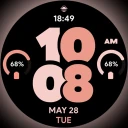
Screenshots
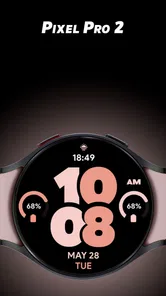
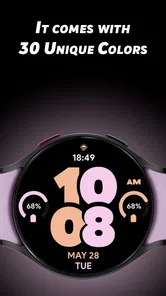
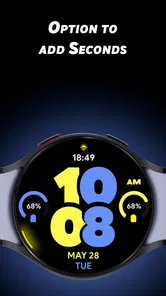
Analysis by Reviewed
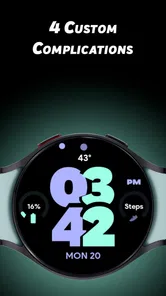
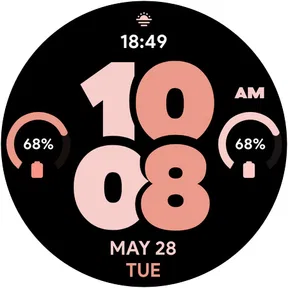
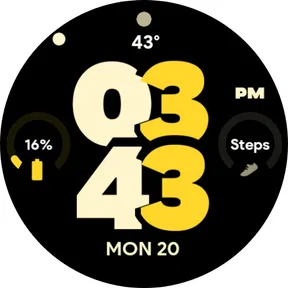
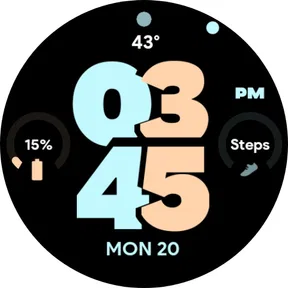
I approach Pixel Pro 2 - Watch face as a small, focused Lifestyle app rather than a full smartwatch companion. Its appeal is the look it brings to a Wear OS watch: a bold, Material You-inspired style intended to make the display feel more personal. That focus matters when deciding whether it is worth adding to your setup. A watch face is something you glance at repeatedly, so readability and visual fit count more than a long list of extras.
What to expect from its speed
A watch face is not the same kind of app as a game or a navigation tool, and I would judge its speed by how readily the watch shows the time and how comfortable the layout is to read at a glance. The design direction here favors a prominent, bold presentation, which can suit quick checks between tasks. It is also a style choice: people who prefer a very restrained dial or delicate typography may find the emphasis too strong, even if they like the overall idea.
I would keep expectations practical. The point is to change the appearance of the watch, not to make the watch itself faster or add a new layer of phone-like functionality. When choosing a face, I find it useful to think about the moments I actually look at my wrist: checking the time while carrying something, taking a brief look during a walk, or glancing down in a meeting. A design that reads clearly in those moments is more valuable than one that looks impressive only when studied up close.
How it fits into a busy day
Wear OS users often switch between a few familiar approaches: sticking with a built-in face, choosing a more elaborate third-party design, or keeping the screen deliberately simple. Pixel Pro 2 - Watch face occupies the visual-customization side of that choice. It makes the most sense if you want a bolder, Material You-influenced look without turning the watch into a project you have to manage throughout the day.
A realistic use case is changing your face to suit how you use the watch that week. You might want a strong, easy-to-spot appearance during a busy commute, then prefer something less visually assertive when you are dressing for a formal occasion. If a face gives you the options you need, that kind of adjustment can make the watch feel better matched to the moment. The trade-off is that a bold visual identity will not be everyone’s idea of versatile: someone who wants the same quiet, low-distraction dial in every setting may be happier with a simpler built-in option.
Reliability and sensible expectations
For a watch face, reliability is mostly about whether the design remains usable as part of your normal Wear OS routine. I would not treat any aesthetic change as a substitute for checking that it suits your particular watch and habits. A face can look appealing in a preview and still feel too crowded, too prominent, or simply less comfortable to read on your own wrist. Taking a moment to judge the finished appearance on the watch is a better test than deciding from a small phone-screen image alone.
That is also why I would not assume a visual choice improves battery life, makes an older watch feel newer, or changes the responsiveness of other apps. Those are different questions from whether you like the face. If you are careful about watch resources or want the most conservative setup possible, a built-in face is a sensible comparison point. For everyday use, the best choice is the one that stays legible and pleasant without making you think about the display every time you check it.
More From Our News Desk

Weather by Xiaomi Review: Clear at a Glance, Less Clear Up Close

X Under Pressure: Can It Recover When Posting Goes Wrong?

Clash of Clans Is Won Between the Battles

Android Auto Makes the Case for Quieter Car Software

MobiOffice: Transforming Mobile Productivity with Seamless Integration

EA SPORTS FC™ Mobile Soccer: Redefining Mobile Sports Gaming
SP Watches is the developer, and the app costs $0.99. It has a 4.2 average from around 80 ratings and has been installed over 5,000 times. It is rated for Everyone and was released on May 20, 2024. That gives you a quick sense of its place in the catalog, though I would put more weight on whether its look suits your watch than on popularity alone. The modest price makes it a considered purchase rather than a major commitment, but it is still worth checking that you want a dedicated watch-face app before paying.
Customization Galore
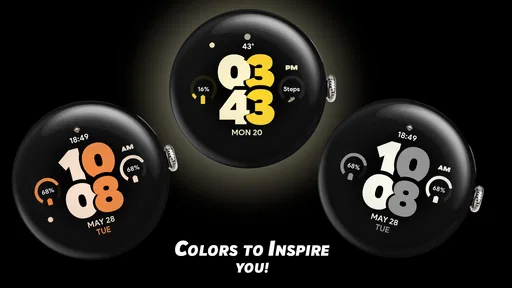
One of the first things you'll notice about Pixel Pro 2 - Watch face is its extensive customization options. Seriously, it feels like the possibilities are endless! Whether you’re into minimalist designs or prefer something more vibrant and flashy, this app has got you covered. You can tweak everything from the colors and fonts to the information displayed on your watch face. This level of customization ensures that your smartwatch truly reflects your personal style and preferences.
Ease of Use
Setting up your watch face with Pixel Pro 2 - Watch face is a breeze. The app's interface is intuitive and straightforward, making it accessible even for those who aren’t tech-savvy. Within a few taps, you can have a brand-new watch face up and running. Plus, the app provides a handy preview feature, so you can see exactly what your watch face will look like before committing to it. This saves time and ensures you get the perfect look every time.
Functional Features
Beyond aesthetics, Pixel Pro 2 - Watch face offers a variety of functional features that enhance the usability of your smartwatch. You can integrate widgets that display important information such as weather updates, step count, and calendar events right on your watch face. This means you can stay informed without having to dig through different apps. The ability to customize these widgets also means you can prioritize the information that matters most to you.
Performance and Compatibility
In terms of performance, the app runs smoothly without any noticeable lags or crashes, which is crucial for maintaining the seamless operation of your smartwatch. It’s also compatible with a wide range of smartwatch brands, so you don’t have to worry about whether it will work with your device. This broad compatibility is a significant plus, making it a versatile choice for many users.
Making the customization useful
To get more from the customization than a quick color change, I would start by deciding what I need to read without stopping. If I mainly check the time, I would keep the visual hierarchy focused on that. If I regularly glance at activity or appointments, I would give those details a clear place and avoid filling every available area simply because customization allows it. The useful test is not how many elements fit, but whether I can identify the one I came for in a brief glance.
There is a small but important trade-off between personal style and practical legibility. A bright palette can make the face feel lively, while a strong contrast between the time and surrounding details can help it remain readable in changing light. Conversely, a busy combination of colors and information may look fun at first but become tiring during repeated checks. I would preview a couple of restrained arrangements before settling on a more elaborate one, especially if the watch is worn all day.
Widgets are most valuable when they answer a question I ask often. A step count can make sense for someone who checks activity throughout the day; calendar information is more useful when appointments shape the schedule. Weather can be handy before leaving home, but it is not worth crowding the face if I rarely look at it there. Matching the visible information to a real habit is a better way to personalize the display than trying to use every option at once.
Choosing it over the usual alternatives
The clearest comparison is with the watch faces already available on a Wear OS device. A built-in face is often the straightforward choice if you value familiarity, want to avoid paying for another design, or prefer the least complicated route. A dedicated face like this has more appeal when the default selection does not give you the look you want and you are specifically drawn to a bold, Material You-inspired presentation. It is not automatically a better choice; it is a more focused one.
Compared with highly decorative third-party faces, the visual idea here is easier to understand: a strong, prominent style rather than a promise of endless novelty. That can be a plus if you want a face that gives the watch a distinct identity without making customization your hobby. If you enjoy frequently changing complicated layouts or need a particular arrangement for a specialized routine, compare the available choices carefully before buying. A striking appearance alone does not guarantee that a design will suit the way you use your watch.
I would also separate “customizable” from “perfect for every wrist.” The same design can feel balanced on one display and crowded on another, depending on the watch’s size and how much information its user prefers to see. If you tend to keep the screen minimal, the key question is whether the bold look still feels calm enough once worn. If you want a highly detailed dashboard, your priority should be checking whether its information options line up with what you actually need, rather than assuming a stylish face covers every use case.
When I would skip it
I would pass on this app if the built-in faces already look good to me, if I do not want to pay for a cosmetic change, or if my priority is improving battery life or overall watch speed. A new face should be bought for its appearance and everyday readability, not as a performance upgrade. I would also skip it if a large, bold visual treatment clashes with my preference for subtle watch styling. Those are not faults that customization can necessarily solve; they are reasons to choose a different design.
It may also be the wrong pick for someone who expects a watch face to replace opening dedicated apps for detailed information. A wrist display is useful for quick checks, but it is not always the best place to inspect a full schedule or study a longer set of data. I would treat any glanceable details as a shortcut, not as a substitute for the app that provides them. That expectation keeps the face in its proper role and makes it easier to judge whether its layout earns space on the watch.
A practical setup and buying check
Before committing to a final layout, I would use the preview as a filter, then look at the face on the watch during ordinary moments: indoors, outdoors, and while moving between tasks. The preview helps narrow down the design, but the wrist is where readability matters. I would check whether the time stands out immediately, whether any extra details are too small for a quick glance, and whether the colors feel comfortable after repeated use. This simple routine is more revealing than choosing solely from a first impression.
If I were setting it up for a typical workday, I would prioritize the time and only one or two pieces of information I genuinely check, such as an upcoming calendar item or activity progress. For a weekend walk, I might value a different balance, but I would still resist treating the screen as a miniature phone. The practical benefit of a customizable face is that I can shape what I notice first; the practical limit is that a watch display has finite space and should stay easy to scan.
The $0.99 purchase is easiest to justify when I already know I want this particular visual direction and expect to wear it regularly. If I am uncertain, I would first compare it with the faces included on my watch and decide what those options fail to provide. That turns the purchase into a clear choice about style rather than an attempt to solve a vague dissatisfaction with the device. A modest one-time cost is still a cost, and the face is most worthwhile when its look keeps feeling right after the novelty wears off.
Who is likely to enjoy it
Pixel Pro 2 - Watch face should suit Wear OS owners who like a bold dial, want a more personal look, and value having useful information visible without opening another screen. It is also a reasonable option for someone who enjoys small, reversible changes to their watch setup: trying a palette, adjusting what appears, and keeping the arrangement that makes daily checks easier. The app’s Lifestyle category fits that personal-use role, and its Everyone age rating makes it broadly suitable rather than aimed at a narrow age group.
My recommendation is conditional rather than automatic. SP Watches has made a focused choice around appearance and glanceable utility, and that is enough if the design matches your taste. The app has a 4.2 average, but I would not let that number decide for me; a watch face is unusually personal because it sits on your wrist and becomes part of your routine. I would choose it when I want this specific bold style, and stick with a built-in alternative when simplicity, cost, or a quieter display matters more.
In conclusion, Pixel Pro 2 - Watch face is more than just an app for customizing your watch face; it’s a tool that enhances the overall functionality and aesthetic of your smartwatch. With its user-friendly interface, extensive customization options, and practical features, it’s no wonder this app is gaining popularity among smartwatch users. So if you’re looking to breathe new life into your smartwatch and personalize it to fit your lifestyle, Pixel Pro 2 - Watch face is definitely worth checking out. Trust me, once you start customizing, you’ll find it hard to stop!
Pixel Pro 2 - Watch face Frequently Asked Questions
What watches and phones do I need to use Pixel Pro 2 - Watch Face?
Pixel Pro 2 - Watch Face is made for Wear OS watches, so check that your smartwatch runs Wear OS before downloading. The watch face is intended to be used on the watch rather than as a general phone app, and a compatible phone may be needed to install or manage it. If your watch uses another operating system, this app may not be suitable.
What features does Pixel Pro 2 - Watch Face offer?
Pixel Pro 2 - Watch Face offers a range of customizable features that enhance your smartwatch experience. Users can personalize the watch face with different color themes, styles, and complications. The app supports various widgets such as weather updates, step counts, and battery status, making it both stylish and functional. Additionally, it offers smooth animations and a user-friendly interface for ease of use.
Is Pixel Pro 2 - Watch Face compatible with all smartwatches?
Pixel Pro 2 - Watch Face is designed to be compatible with most Android Wear OS smartwatches. However, it's essential to check the compatibility with your specific device model before downloading. Some older models or non-Wear OS devices might not support all features of the app, so verifying compatibility ensures a seamless experience.
How does the app impact battery life?
Pixel Pro 2 - Watch Face is optimized to minimize battery consumption, offering efficient performance without significant drain. The app includes features to adjust brightness levels and update frequencies to help conserve battery life. Users can enjoy the aesthetic and functional benefits without worrying about excessive battery usage.
Can I customize the appearance of the watch face?
Yes, Pixel Pro 2 - Watch Face allows extensive customization to suit individual preferences. Users can choose from various themes, colors, and design elements to create a personalized look. The app provides options to adjust font styles, widget placements, and background visuals, enabling a unique and tailored smartwatch interface.
Pros
- Highly customizable watch face options.
- Sleek and modern design aesthetics.
- Supports multiple smartwatch brands.
- Battery-friendly performance.
- User-friendly interface.
Cons
- Limited free features.
- Occasional sync issues with some devices.
- Some designs require in-app purchases.
- May not support older smartwatch models.
- Limited customer support availability.












