Streamlabs: Live Streaming
- 5.69K
- 3.4
- Installs
- 10.00M
- Price
- Free

Screenshots
Analysis by Reviewed
When I want to broadcast from my phone without building a desktop setup, Streamlabs: Live Streaming is the kind of app I consider first. It puts mobile streaming tools in one place, which can make going live feel less intimidating. I’d treat it as a convenient starting point rather than a guarantee of a flawless show: a phone, a reliable connection and a little rehearsal still matter.
Where a phone-based studio fits
Streamlabs is a free video-streaming app from Logitech Europe S.A., rated for Everyone. Its current version is 3.16.0, and it has been available since July 26, 2017. The app has an average rating of 3.4 from around 115,000 ratings, with more than 10 million installs. Those figures suggest a well-known option, though the mixed rating is a reminder that a familiar name does not mean every setup will feel effortless.
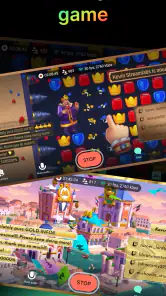
I find the mobile-first approach most useful for a creator who wants to start a casual broadcast quickly: a short gaming session, a live chat, or a camera stream from somewhere other than a desk. A computer-based streaming setup usually gives you more room for detailed scene management and fine control; a phone app trades some of that flexibility for portability and a shorter path from idea to broadcast. If precise production is the priority, I would compare desktop tools before committing to a mobile workflow.
Getting Started with Streamlabs
First things first, downloading and setting up Streamlabs is a breeze. It’s available for both Android and iOS, and you can snag it from the usual app stores. Once you’ve got it installed, the real fun begins. The app welcomes you with an intuitive interface that even a newbie can navigate without scratching their head. Trust me, I’ve been there!
Features Galore
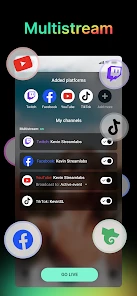
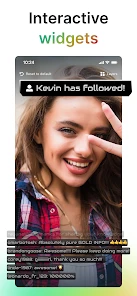
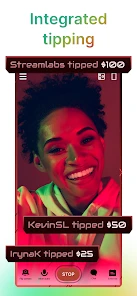
The feature set is where this app truly shines. You can stream directly to multiple platforms like Twitch, YouTube, or Facebook with just a couple of taps. The multi-streaming capability is a game-changer if you're looking to broaden your audience reach. Plus, customizing your stream is super easy. You can add overlays, alerts, and widgets that make your stream not just a show but an experience.
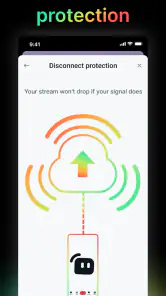
One of the standout features is the widget support. Imagine being able to add chat boxes, donation goals, or even sponsor banners right into your stream. It’s all about keeping your audience engaged and making your stream an interactive playground. Plus, the app lets you monitor your stream’s health, so you can ensure everything is running smoothly.
Making a mobile broadcast easier to manage
For a practical first test, I’d set up the destination and visual layout before inviting anyone to watch. A brief private run-through lets you check that the camera framing, sound and on-screen elements make sense together. That matters especially with widgets: a chat panel or goal display can help viewers follow along, but too many elements can crowd the picture on a small screen. I prefer to add only what supports the session rather than treating every available overlay as essential.
More From Our News Desk

Weather by Xiaomi Review: Clear at a Glance, Less Clear Up Close

X Under Pressure: Can It Recover When Posting Goes Wrong?

Clash of Clans Is Won Between the Battles

Android Auto Makes the Case for Quieter Car Software

MobiOffice: Transforming Mobile Productivity with Seamless Integration

EA SPORTS FC™ Mobile Soccer: Redefining Mobile Sports Gaming
Multi-platform broadcasting is appealing when your audience is split between services, but it also makes the show harder to monitor. If you are reading chat while playing or demonstrating something, decide in advance which conversations you can realistically follow. For a relaxed one-off stream, a single destination may be easier; for a planned event where reach matters, sending the broadcast to more than one service can be worth the extra attention. I would test that workflow before a time-sensitive announcement rather than discovering its demands live.
Performance and Usability
In my view, the most useful performance question is not whether a phone can stream in every situation, but whether your particular device and connection can handle the broadcast you have planned. A simple camera session puts different demands on a phone than streaming a game while keeping chat and visual elements on screen. I would treat the first few broadcasts as tests, keep an eye on the stream-health indicators, and simplify the layout if anything feels unreliable.
Usability is another tick in the plus column. The app is user-friendly, with a clean and simple layout. Even if you’re not tech-savvy, setting up your stream is straightforward. And if you ever get stuck, there are plenty of tutorials and support available to guide you through.
What to weigh before going live
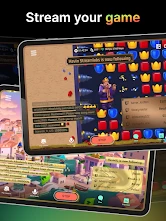
My most useful everyday scenario is a short gaming session after work: I would choose the game, check the broadcast destination, arrange only the chat or alert elements I actually need, and do a quick audio and framing check before starting. A phone makes this sort of spontaneous stream easier than assembling a full computer setup. The trade-off is that the same device is doing the broadcasting and running the activity, so I would close distractions, keep the session simple and avoid assuming that a busy mobile game will leave plenty of headroom.
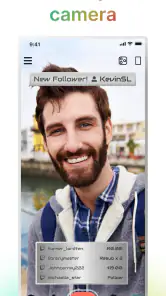
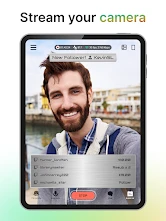
For a camera-based stream, think about the room as part of the setup. A quiet spot with steady lighting is more useful than a complicated overlay when viewers need to see and hear you clearly. If you are moving around, check the connection and framing before the main conversation begins. These small preparations do not require production expertise, but they can prevent the most distracting problems from becoming the focus of the broadcast.
The app is a good fit for beginners who want a guided route into mobile streaming, and for experienced creators who need a portable option for simpler sessions. It is less suitable if you want meticulous audio routing, layered scenes or a production workflow built around several separate devices. In that case, desktop streaming software is usually the more sensible choice; for recording a polished video that will be edited later, a dedicated camera or video editor may suit the job better than a live-broadcast app.
There is also a cost distinction worth keeping in mind. The app is free to install, while in-app purchases range from $0.99 to $189.99 per item. I would begin with the basic workflow and decide whether any paid extras solve a real need before spending. A new overlay does not fix unclear audio or a poor connection, so I’d prioritize the essentials of the broadcast first.
What its established track record means
Because Streamlabs has been around since 2017 and now sits at version 3.16.0, it is not a brand-new experiment. That history can be reassuring for someone choosing a tool to learn, but a version number alone does not tell me which specific changes have arrived or how they affect an individual phone. I would check the current app experience on my own device, especially before depending on it for a scheduled broadcast.
For existing users, the sensible approach is to keep a familiar stream layout and destination in mind when updating, then verify that the key controls still behave as expected before an important session. New users can avoid needless complexity by starting with one destination and a clean screen, then adding widgets only after they know what viewers need. That gradual approach makes it easier to tell whether a change improves the broadcast or merely adds another thing to manage.
Planning a stream that fits the phone
A useful habit is to decide what the audience should be watching before opening the broadcast controls. If the point is a quick conversation, a clear camera view and readable chat matter more than decorative panels. If the stream is about a game, viewers need to see the action without overlays covering important parts of the screen. I would sketch the layout in plain terms first—camera, game, perhaps one alert—and resist adding elements just because they are available.
There is also a practical difference between streaming while stationary and streaming on the move. At home, you can choose a spot, place the phone securely and check the picture before starting. Outside, changing light, background noise and an inconsistent connection can all make the same setup feel less predictable. For an important conversation or demonstration, I would favor a stable location and a short test over trying to make a complicated mobile setup work anywhere.
Another small but worthwhile step is to decide how you will handle chat. Reading messages from the same screen that carries the broadcast can split your attention, especially during gameplay or a demonstration. If the audience is likely to ask questions, set a pace that gives you moments to glance at messages instead of trying to respond continuously. A stream that is easy for the creator to manage tends to feel more natural than one overloaded with simultaneous interactions.
How it compares with other ways to stream
Compared with going live directly from a social or video platform, Streamlabs is most appealing when you want a more tailored broadcast with overlays, alerts or widgets in the mix. A platform’s own simpler live option can be the better choice for an occasional, no-frills update: fewer setup decisions mean less to check when you only need to share something quickly. I would choose the app when its extra presentation tools serve a purpose, not merely because a separate streaming app sounds more advanced.
Compared with desktop broadcasting software, the phone approach favors convenience over depth. A computer is generally easier to build into a larger production with separate sources and careful control, while a mobile app is better suited to spontaneous sessions and camera broadcasts where portability matters. Neither route is automatically better. If I were hosting a carefully produced, scheduled show, I would lean toward a desktop workflow; if I wanted to share a short session without setting up a desk, I would consider Streamlabs.
For someone deciding whether the app is worth trying, the key question is how often they will actually stream from a phone. A creator who already broadcasts regularly from a computer may only need the mobile option for occasional remote sessions. A beginner who wants to test the idea of streaming can benefit from starting with a small, low-pressure broadcast rather than investing time in a full production setup. In both cases, the app makes most sense when the convenience is part of the goal.
Remaining friction and sensible expectations
Mobile streaming asks one device to handle several jobs at once, and that is the central limitation I would plan around. The screen is also the control panel, the preview and often the place where chat appears, so a busy interface can be harder to manage than it looks while setting up. Before a longer stream, I would check that the phone can stay in a comfortable position and that the controls I need are easy to reach without interrupting what viewers see.
Multi-streaming deserves a careful decision rather than an automatic yes. Reaching people on several services may be useful, but the creator still has to manage the broadcast and its conversations. If answering viewers is a big part of the show, spreading attention across destinations can make interaction less personal. A single platform is often the calmer choice for a first attempt, while sending a stream to multiple places is more sensible when you have a clear reason to do so and have rehearsed the workflow.
New users may also wonder whether they need to pay to make the app useful. I would start without buying anything and see whether the available setup supports the kind of broadcast I actually want to make. The range of optional purchases is broad, so it pays to identify a specific need before spending. If the problem is poor sound, unreliable connectivity or a confusing layout, an extra visual item is unlikely to solve it.
Final Thoughts
So, is Streamlabs: Live Streaming worth your time? I think it is worth considering if you want to go live from a phone and value having presentation tools available in the same workflow. Its mix of broadcast destinations and optional on-screen elements gives casual creators room to shape a stream without starting with a desktop setup. The appeal is strongest when the session is simple enough for a phone to manage comfortably.
In a nutshell, Streamlabs offers a mobile route into streaming, but I would not call it a replacement for every kind of production. Its usefulness depends on the device, connection and level of control you need. I would try it with a short broadcast, keep the layout focused and decide from that experience whether it earns a place in my routine.
My recommendation
I’d recommend trying it if mobile broadcasts are genuinely part of your routine, rather than choosing it simply because it has a lot of options. Start with a short, low-pressure stream, note which controls you use, and keep the layout uncluttered. That gives you a fair sense of whether the phone-based workflow suits your style before you build a more involved setup around it.
The main thing I would watch for over time is whether the app remains comfortable on your particular device and whether its current tools match the way you want to stream. The 3.4 average rating shows that user experiences are not uniformly glowing, so I would not promise a perfect result for every creator. My take is more practical: Streamlabs can be a useful, approachable mobile broadcasting choice, provided you test your setup and accept that a phone-first studio is not a substitute for every kind of production.
Streamlabs: Live Streaming Frequently Asked Questions
Which streaming platforms can I broadcast to with Streamlabs?
Streamlabs is made for broadcasting games or camera content to services such as Twitch, YouTube, Facebook, and more. That makes it useful if you already have an audience on one of those platforms or want to choose where to share a stream. Before downloading, consider which service you plan to use and whether it fits the kind of content you want to broadcast.
Can I use Streamlabs for both gameplay and camera broadcasts?
Yes. Streamlabs is intended for broadcasting either games or camera content, so you can choose a gameplay-focused stream or appear on camera, depending on what you want to share. This flexibility is helpful if you want to try more than one streaming style from the same app. Its focus on mobile broadcasting also makes it a practical option to explore from a phone.
Is Streamlabs: Live Streaming free to download?
Streamlabs: Live Streaming is free to download, so you can try its mobile broadcasting tools without paying upfront. The app also offers in-app purchases, with items ranging from $0.99 to $189.99, so check the purchase details before confirming anything. Its free starting point makes it easier to explore streaming from a phone before deciding whether any paid options suit your needs.
What platforms does Streamlabs: Live Streaming support?
Streamlabs: Live Streaming is compatible with both Android and iOS devices. It allows users to stream content directly from their mobile devices to platforms like Twitch, YouTube, and Facebook Live. The app is designed to provide a seamless streaming experience on both operating systems, making it accessible to a broad range of users.
Can I stream games as well as use my phone camera?
Yes. Streamlabs is intended for broadcasting either games or camera content, which makes it useful for different kinds of mobile streams. You can choose a gameplay-focused broadcast or appear on camera, depending on what you want to share. This flexibility is helpful if you want to try more than one streaming style from the same app.
Pros
- User-friendly interface for beginners
- Supports multiple streaming platforms
- Customizable alert templates
- Real-time chat interaction feature
- Extensive widget options available
Cons
- Limited free version features
- Occasional app crashes
- High CPU usage on older devices
- Requires stable internet connection
- Advanced features need subscription
- Category
- Video Players & Editors
- Version
- 3.16.0











