StoryGraph
- 1.24K
- 4.6
- Installs
- 1.00M
- Price
- Free

Screenshots
Analysis by Reviewed
I tend to reach for a book when I have a little spare time, then spend longer than I’d like trying to remember what I started, what I finished, and what I meant to read next. StoryGraph is built for that in-between space: it gives me a place to keep my reading life organized and helps narrow down choices when my mood matters as much as the genre. It’s a free Books & Reference app from The StoryGraph, rated Teen, and the basic idea is easy to grasp even if you aren’t someone who enjoys managing lists.
Starting with the book already in your hands
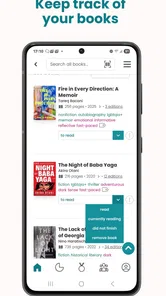
My most useful routine is simple: when I start a book, I log it as currently reading; when I finish, I mark it complete; and when a title catches my eye but I’m not ready for it, I put it on my TBR list. That small habit makes the app more useful over time. Instead of relying on memory, I have a record to return to when I’m deciding what to pick up next.
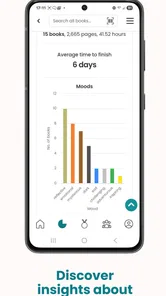
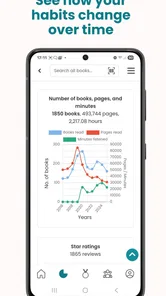
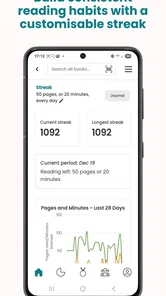
That record can also help me notice patterns in my reading. The app offers statistics about habits such as books and pages read, which I find more useful as a personal snapshot than as a target to chase. If numbers motivate you, they can make a reading routine feel visible; if they make reading feel like homework, you can treat them as background and focus on keeping your list current.
A workable routine for busy weeks
What makes this setup stick for me is keeping updates tied to moments that already happen. I add a book when I begin it, rather than trying to reconstruct a month of reading later, and I mark it complete when I put it down for the last time. If I pause a title, I try to distinguish that from finishing it; otherwise my history becomes a less useful account of what I actually read.
For someone juggling a paperback at home and an ebook on the train, the key question is not whether every page is logged perfectly. It is whether the record helps you resume your reading without a mental inventory. A quick status update after a reading session is enough for that purpose. If you enjoy tracking more closely, the statistics can reward that extra care, but I wouldn’t let precision become another chore that competes with the book itself.
Discovering the Magic of StoryGraph
First things first, the interface of StoryGraph is nothing short of delightful. It’s clean, intuitive, and just plain pretty to look at. Navigating through the app feels like flipping through the pages of your favorite novel—smooth and satisfying. Whether you’re a tech wizard or someone who gets flustered at the sight of a new app, you’ll find StoryGraph to be user-friendly and welcoming.
Track Your Reading Journey
One of the standout features for me is the reading tracking capability. You can easily log the books you’re currently reading, mark them as finished, or add them to your ever-growing TBR (To Be Read) list. The app provides detailed statistics about your reading habits, which is a godsend for data nerds like me. Want to know how many books you’ve read this year or how many pages you’ve devoured? StoryGraph has got you covered!
More From Our News Desk

Weather by Xiaomi Review: Clear at a Glance, Less Clear Up Close

X Under Pressure: Can It Recover When Posting Goes Wrong?

Clash of Clans Is Won Between the Battles

Android Auto Makes the Case for Quieter Car Software

MobiOffice: Transforming Mobile Productivity with Seamless Integration

EA SPORTS FC™ Mobile Soccer: Redefining Mobile Sports Gaming
Personalized Recommendations
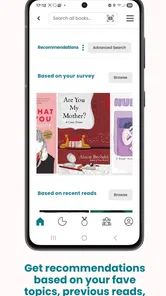
Now, let’s talk about recommendations. We all know how overwhelming it can be to choose the next book to read. StoryGraph takes the guesswork out by offering personalized recommendations based on your reading history and preferences. Whether you’re in the mood for a heart-pounding thriller or a cozy romance, this app suggests options that are tailored just for you. It’s like having a personal book concierge!
Making a shortlist instead of obeying a feed
In practice, I get the most from recommendations when I treat them as a shortlist, not a verdict. I check whether a suggested title fits the kind of reading experience I want that day, then save the promising options rather than expecting the first result to be perfect. A useful trick is to keep the TBR list honest: remove books that no longer appeal, so older curiosity does not drown out what you actually feel like reading now.
For example, if I finish a demanding book during a busy week, I can look for something that feels lighter instead of choosing solely by subject. That mood-led approach is a meaningful difference from a basic reading log, which mainly records what I have already read. It also keeps recommendations personal without taking the decision away from me.
Putting a recommendation to use
My practical approach is to open recommendations when I have a real decision to make, not just when I’m idly scrolling. If I know I want something short, gentle, or absorbing, that preference gives me a better starting point than a vague search for “something good.” I save only the options I can imagine reading soon, then revisit them when I finish my current book. This turns discovery into a handoff: the app offers possibilities, but I decide which one fits the time and attention I have.
That distinction matters if you usually browse a bookseller’s bestseller pages. Those pages are useful when popularity or buying options are the priority, while a mood-led reading tool is more helpful when you already have access to books and need to choose among them. I wouldn’t use any recommendation as a substitute for checking whether the subject and tone suit me; the app can help me narrow the field, but my own judgment still matters.
Sharing the reading process
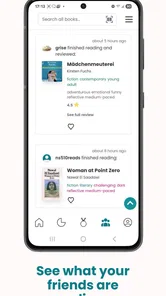
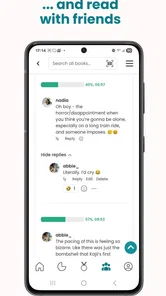
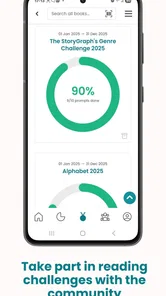
When I want another perspective, StoryGraph’s community features give me a way to share reviews, take part in reading challenges, and see what other readers say about a title. I like that this can be a handoff between private tracking and social discovery: I can use my own list to stay organized, then browse other opinions when I’m unsure about a book.
Social reading without losing your own pace
I find the social side most useful as a second opinion rather than a requirement to perform. A review can surface a reaction I had not considered, and a challenge can give a loose shape to a reading month. But I don’t need to join a challenge to get value from my own log, and I wouldn’t choose books just to keep pace with other readers. If you prefer a quiet, private record, you can focus on tracking; if you want conversation around books, community activity gives you another route into a title.
For a realistic weekday example, imagine finishing a chapter on the bus and realizing the book is not right for the mood you’ll have over the weekend. I can update my reading status then, browse a few suggestions later, and save one or two candidates rather than making a rushed choice. If a friend or another reader has discussed one of those titles, that outside perspective can help me decide whether to start it. The useful result is not an elaborate plan; it is having a next step ready when I have time to read.
Who gets the most from it
I’d recommend it to readers who move between several books, enjoy looking back at their habits, or often choose their next read by mood. It can also help someone rebuilding a regular reading routine: logging a book and seeing progress accumulate gives the habit a gentle sense of continuity. A reader who prefers paper notes, wants no account-based tracking, or simply reads occasionally without caring about lists may find the extra organizing unnecessary.
Choosing it over a notebook or a general book community
The choice depends on what you want your reading record to do. A notebook is better if writing a few personal lines by hand is the pleasure, and it never asks you to maintain an app-based list. A general social reading space may be preferable if the main goal is following friends and talking about books. StoryGraph sits between those habits: I use it to keep my own reading history and discover a next title, then turn to other readers when their opinions add something.
It’s particularly well suited to someone whose reading changes with their energy. After work, I might want a quick, easy read; on a free afternoon, I may be happy to try something more absorbing. Keeping a short, actively maintained TBR helps me make that choice without starting from scratch. Readers who want a simple catalog of books they own, with no interest in mood-based discovery or reading patterns, may find a dedicated collection tool more direct.
Where the routine can snag
The app works best when I remember to keep it updated. If I leave books unlogged or let the TBR grow without reviewing it, the record becomes less helpful and recommendations have less useful context. There is also a trade-off between tracking and reading: detailed stats can be satisfying, but I would not let a streak or a yearly total dictate what I read. For users who mainly want a large bookseller catalog or a straightforward social feed, a store app or a general reading community may suit them better; StoryGraph’s appeal is the blend of personal tracking and mood-aware discovery.
When the system needs a lighter touch
The friction is mostly self-created: the more information I expect myself to maintain, the easier it is to turn leisure into administration. If I have been away from the app for a while, I’d rather update the book I’m reading now than spend an evening rebuilding a perfect timeline. A reading log is most helpful when it reduces the effort of remembering, not when it becomes a project of its own.
Recommendations also depend on the trail I leave behind. If I have only logged a few books, or my saved list reflects tastes I no longer have, the suggestions may not feel as personal as I want. I can improve the signal by keeping the TBR selective and recording finished books, but that takes a small, recurring bit of attention. Anyone who wants suggestions without maintaining any reading history may prefer browsing an editorial list or asking a bookseller for a one-off recommendation.
Practical details before you begin
StoryGraph is free to download, with optional in-app purchases ranging from $4.99 to $49.99 per item. It has a 4.5 average from around 5.8 thousand ratings, and readers have left around one thousand reviews. It has passed one million installs, launched on June 22, 2021, and its current version is 1.27, with Android 8.0 as the minimum operating system. Those details make it easy to judge whether it fits your device and budget; the optional purchases are worth checking before you commit to anything beyond the free experience.
If you’re wondering whether you need to pay to try it, the free download gives you a way to begin without making an upfront purchase. I’d start by logging a few books and testing whether the tracking and discovery routine suits you before considering optional purchases. The listed purchase range is broad, so I would check the item details in the app and decide based on what you actually want, rather than assuming every extra is essential.
It is also worth thinking about the kind of reading history you want to keep. If you care about seeing books and pages accumulate, the statistics can make that history feel concrete. If you mainly want to remember a title for later, a small TBR list may be all you need. The app can serve both approaches, but it is more satisfying when you decide which parts of the record matter to you instead of trying to use every feature at once.
Knowing when another tool is better
I wouldn’t choose this as my main destination when the task is purchasing a book, comparing editions, or managing a personal library as a collection of owned copies. A bookseller is more suited to the buying step; a paper notebook is better for free-form reflections; and a social network may be more rewarding if conversation is the whole point. StoryGraph earns its place when I want those separate reading decisions—what I’m reading, what I’ve finished, and what might fit next—kept in one reading-focused routine.
That makes it a good fit for readers who want more than a basic list but less pressure than a goal-tracking program. I can use the statistics as a look back, recommendations as prompts, and community features when I want a wider view. None of those needs to dictate how much I read or what counts as a worthwhile book. The best use of the app is the one that supports reading on your terms.
Join a Community of Readers
Reading can be a solitary activity, but it doesn’t have to be. With StoryGraph, you can connect with a vibrant community of readers. Share your reviews, join reading challenges, or simply browse what others are saying about a book you’re interested in. It’s a fantastic way to feel part of a larger bookish family.
In the end, StoryGraph has truly transformed the way I interact with my books. It’s not just an app; it’s an experience that enhances your reading journey. Whether you’re a casual reader or a hardcore bibliophile, this app has something to offer everyone. So why not give it a try and see where your next literary adventure takes you?
StoryGraph Frequently Asked Questions
Can I use StoryGraph on my device?
StoryGraph is a reading-tracking and book-discovery app for people who want to keep their reading activity organized. It requires Android 8.0 or later, so check your device’s operating system before downloading. If your device meets that requirement, you can use the app to log books, follow your reading progress, and explore recommendations suited to your interests.
Is StoryGraph suitable for younger readers?
StoryGraph has a Teen content rating, which can help families decide whether it is appropriate for a particular reader. The app focuses on books, reading activity, and recommendations, so the experience is centered on literary discovery. Parents and younger users should still review the app’s features and privacy choices together before creating an account or sharing reading preferences.
What is StoryGraph and how does it work?
StoryGraph is a digital platform designed for avid readers to track their reading habits and discover new books. It provides personalized reading recommendations based on users' reading preferences and past reads. Users can input books they have read, set reading goals, and explore book suggestions tailored to their taste. It’s a great tool for those looking to enhance their reading experience.
Is StoryGraph free to use, or does it require a subscription?
StoryGraph offers both free and premium versions. The free version provides basic features like tracking books and setting reading goals. For a more enhanced experience, users can upgrade to the premium subscription, which includes features like advanced statistics, content warnings, and more personalized recommendations. The premium version offers a richer, more detailed reading analysis.
Can I sync my StoryGraph account with other reading platforms?
Yes, StoryGraph allows users to import their data from other reading platforms such as Goodreads. This feature makes it convenient for users who are transitioning from other services and want to maintain their reading history and preferences without starting from scratch. It supports seamless integration to ensure users can continue tracking their reading journey effortlessly.
Pros
- User-friendly interface
- Detailed reading statistics
- Personalized book recommendations
- Diverse reading challenges
- No ads in free version
Cons
- Limited social features
- No audiobook tracking
- Some features require subscription
- Occasional syncing issues
- Limited integration with e-readers











