StockTiles - Prices & Charts
- 8.00
- 2.3
- Installs
- 500.00
- Price
- $0.99
Screenshots
Analysis by Reviewed
When I first consider a market-watching app, I want one practical thing: a quick way to check a few prices without getting pulled into a stream of headlines or account screens. StockTiles is aimed at that kind of glance. It is a finance app from Tobias Goerke, built around keeping chosen stock assets and their charts together. That narrow focus can be useful, but it also means I would treat it as a viewing companion rather than a complete place to manage investments.
What to expect as a first-time user
Think of it as a viewing companion, not a complete investing service. The useful question is whether it helps you see the assets you care about at a glance; it is not a substitute for a broker when you want to place an order, nor should a chart alone decide whether an investment is right for you. That distinction matters: the app can make price-watching more convenient, while research, portfolio records, and trade decisions may still belong elsewhere.
For a realistic routine, imagine checking a few holdings over breakfast, then putting your phone away instead of repeatedly reopening a trading account throughout the day. Tiles can make that glance-oriented workflow feel more immediate than searching each symbol one by one. I would use the view to notice movement and decide whether I need to investigate further, not as a reason to react to every small price change.
The main trade-off is focus. A dedicated screen can reduce the effort of finding familiar assets, but it will not necessarily answer the questions that come after noticing a change: what caused it, how it affects your overall plan, or whether it is meaningful over a longer period. I find that boundary helpful when I decide what to open the app for. If I only want to check a short list, a compact view makes sense; if I want context, I need to move on to research tools and my own records.
Getting to a useful first view
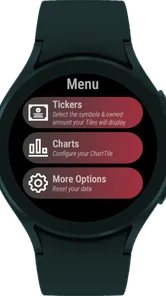
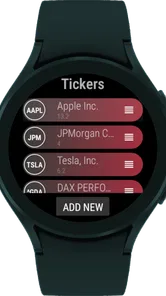
On first opening it, I would start small: choose only the assets I genuinely follow, then arrange the screen so the most important ones are easy to spot. A short watchlist is easier to scan and less likely to become another wall of market noise. Before relying on any quote for a decision, check that you have selected the intended asset; similar company names or symbols can make a watchlist misleading if you add the wrong entry.
That small-list approach is more than a tidy-screen preference. It gives each tile a clear purpose: a holding I already own, an asset I am researching, or a benchmark I use for comparison. I would avoid mixing those roles without a reason, because seeing them together can make a speculative idea look like part of a settled portfolio. A quick mental label for each item keeps the screen useful even when I revisit it after a busy week.
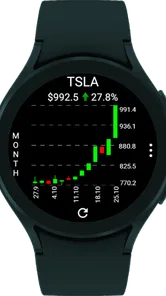
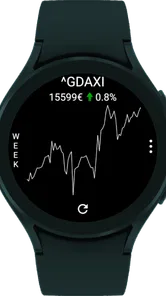
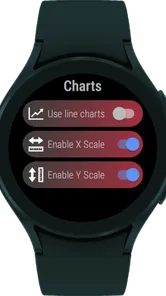
After that, pick one asset and use its chart to answer a simple question, such as whether its recent direction is worth a closer look. Comparing the same asset across chart styles can also help you avoid treating one visual presentation as the whole story. A line view is quick to read, while a candlestick view can make price swings more apparent; neither tells you why a move happened, so I would pair that glance with independent research before acting.
More From Our News Desk

 Gmail
Gmail in a Busy Inbox: Who Benefits Most?
From first account to crowded workday, Gmail earns its place through dependable search and flexible sorting—but its best fit depends on how much inbox maintenance you can tolerate.

 Prime Video
Switching to Prime Video: What Changes in Your Viewing Routine
Prime Video can make a compelling second home for streaming, but switching means learning a different catalog, rental layer, and route from browsing to playback.

 Universal TV Remote Control
 Works Best as a Reliable Backup
A phone remote earns its place through quick setup and reliable habits. Here is how to get more from Universal TV Remote Control—and where its limits show.

 Weather - By Xiaomi
Weather by Xiaomi Review: Clear at a Glance, Less Clear Up Close
Xiaomi’s weather app makes everyday forecasts quick to scan, but its calm surface can leave useful details and recovery paths harder to find than they should be.

 X
X Under Pressure: Can It Recover When Posting Goes Wrong?
A resilience-focused review of X, examining setup, mistaken posts, interruptions, weak connections, and the gaps that matter when recovery needs to be dependable.

 Clash of Clans
 Is Won Between the Battles
Its raids are quick; its community is a long-term project of coordination, teaching, rivalry, and shared responsibility—with all the friction that entails.
Latest News



For a first meaningful success, I would not aim to predict a price or find a trading opportunity. I would add one familiar asset, make sure I have the right one, and use its chart to get a quick visual sense of its movement. If that saves me from searching through a broker just to answer a simple question, the app has already done its limited job. That is a more reassuring test than trying to explore every control at once.
Making the glance useful rather than distracting
A small watchlist works best when it reflects a real routine. For example, someone saving for a long-term goal might check a handful of investments once in the morning and leave the rest of the day alone. Someone comparing companies before doing deeper research could keep only the names currently under consideration, then remove them when that comparison is finished. In both cases, the value is less about watching every tick and more about making a deliberate check easy to repeat.
I would also decide in advance what deserves a follow-up. A price moving is not automatically a reason to act; the useful next step might be to read company news, revisit a personal investing plan, or simply close the app. This habit matters especially with charts, which make movement visually compelling even when a short-term change has little relevance to a long-term decision. A tile should prompt a question, not silently supply the answer.
There is a practical compromise between a compact display and a complete overview. Keeping only a few assets makes scanning quicker, but it may leave out the wider market context or the balance of a portfolio. If I need to understand whether one holding is unusually volatile compared with the rest of my investments, I would switch to a portfolio or analysis tool rather than trying to make a short list serve that purpose. StockTiles is most persuasive when I let it remain a small part of a broader routine.
Where it fits, and where it does not
Compared with a general financial news app, a focused tile layout is better suited to checking selected prices without being pulled into headlines. Compared with a broker, it is a narrower tool: a broker is the more practical choice when you need account balances, order entry, or a consolidated portfolio. If you mainly want a broad market overview, a finance service built around indexes and news may be a better match than a personal list of assets.
The comparison also helps set expectations about what a first-time user should do next. If a chart catches my attention, I would verify the symbol and look for context in a source designed for research; if I am ready to trade, I would use the broker where my account is held. If I want to compare overall exposure, I would turn to a portfolio tracker. That division can feel less convenient than an all-in-one service, but it avoids asking a simple price display to do several different jobs.
StockTiles costs $0.99 and has an Everyone age rating. Its average rating is 2.3 from around 22 ratings, with 8 written reviews, so I would weigh the modest reception before paying rather than assuming it will suit me. It has passed 500 installs, which makes it a small, specialized option rather than a widely established platform. The clearest fit is someone who values a dedicated price-and-chart view and is comfortable keeping other investing tasks in separate apps.
The app is at version 1.5.3 and supports operating systems from version 9 onward. Those details make it easier to decide whether it is even a practical candidate for your device, but they do not change the central question: do you want a focused place to view selected assets, or do you need an account-based service? I would skip it if paying for a narrowly scoped companion feels unnecessary, if you want one app to handle research and transactions, or if the low user rating makes you prefer a more established alternative.
First Impressions
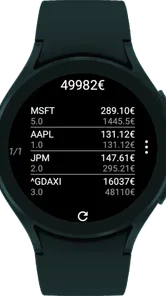
From the moment you open StockTiles - Prices & Charts, you’re greeted with a sleek, intuitive interface. It’s like the app is saying, "Hey, I know stocks can be complicated, but I’m here to make it simple for you." The layout is clean, with tiles representing each stock you’re following, and it’s all customizable to your liking. Whether you’re a newbie or a seasoned trader, the ease of navigation is a breath of fresh air.
Features That Stand Out
One of the standout features is the real-time price updates. You know that anxiety-inducing moment when you’re waiting for a stock price to update? Yeah, me too. But with this app, those updates happen faster than you can say "bull market." The charts are detailed yet easy to read, providing everything from simple line graphs to more complex candlestick charts. This versatility is perfect for both quick glances and in-depth analysis.
Another cool aspect is the alert system. You can set it up to notify you when a stock hits a certain price. No more constantly checking your phone; just set your parameters and let the app do the work. It’s like having a little stock-watching assistant in your pocket.
Alerts can help when I have a specific level in mind, but I would treat them as prompts to check in, not as instructions to buy or sell. A notification can arrive at an inconvenient moment, and reaching a chosen price does not explain why the market moved or whether the move changes my view. I would set a threshold only when I know what I plan to do with the information; otherwise, the alert may simply recreate the habit of checking constantly in a different form.
For someone new to charts, I would start with the simplest view and keep the question narrow: what has the price been doing over the period shown? Candlesticks can reveal more detail about movement, but added visual information is not the same as added understanding. If a chart feels confusing, switching back to a line view is a sensible way to regain the broad picture before researching further. Neither chart style is a recommendation, and neither replaces careful consideration of risk.
User Experience
Let’s talk about the user experience a bit more. The app runs smoothly, with quick loading times and no annoying glitches. You know how some apps crash at the worst times? Thankfully, that’s not an issue here. Plus, it’s available on both Android and iOS, so no one’s left out of the loop.
What I really appreciate is how user-friendly the app is. Even if you’re not a tech whiz, you can navigate through the features without a hitch. The developers clearly kept the user in mind, making it accessible to all levels of investors.
For a first-time user, I would keep the initial session short rather than trying to build a complete market dashboard immediately. Add an asset you recognize, confirm the selection, look at its chart, and decide whether the layout gives you the quick answer you wanted. Then add another only if it has a distinct place in your routine. This sequence makes it easier to notice whether the app is genuinely saving time, instead of confusing a fuller screen with a better one.
One useful way to test the fit is to compare the same task across your usual tools. If checking a familiar symbol in a broker takes several taps, a tile-based view may be a more convenient stop for a quick look. If the next question requires account holdings, transaction history, or research, the broker or a dedicated research service is likely to be more useful. I would keep that handoff in mind so I do not expect a lightweight viewing tool to replace the parts of investing that require context.
Final Thoughts
Overall, StockTiles - Prices & Charts is a fantastic tool for anyone interested in the stock market. It combines functionality with simplicity, making it a great choice whether you’re casually checking prices or deep-diving into stock analysis. It’s not just an app; it’s your personal guide through the ups and downs of the market. So, if you’re looking to up your stock game, give it a whirl. You might just find it’s exactly what you need to stay ahead in the financial game.
My recommendation is more measured: I would consider it if the specific appeal is a compact, customizable view of assets I already follow, and if I am happy to pay for that focused convenience. I would not choose it as my only finance app, or rely on its charts and alerts to make investment decisions without outside context. The best first test is simple: build a short, correctly identified watchlist and see whether one quick glance genuinely makes your routine calmer. If it does, the narrow role may be worth the cost; if you need trading, portfolio analysis, or broader market coverage, another kind of service is the better fit.
StockTiles - Prices & Charts Frequently Asked Questions
What is StockTiles - Prices & Charts?
StockTiles - Prices & Charts is a comprehensive mobile application designed to provide users with real-time stock market data. The app offers an intuitive interface where users can monitor stock prices, analyze market trends, and visualize data through interactive charts. It's an essential tool for investors and traders looking to stay informed about market movements.
How do I customize the stock tiles in StockTiles?
Customizing stock tiles in StockTiles is straightforward. Users can select which stocks they want to monitor by searching for the stock symbol and adding it to their personalized dashboard. The app allows for easy rearrangement of tiles, enabling users to prioritize stocks of interest and quickly access vital information at a glance.
Is the data provided by StockTiles real-time and accurate?
Yes, StockTiles provides real-time data sourced from reliable financial markets. The app constantly updates stock prices and charts, ensuring users have access to the most current information. This accuracy and timeliness are crucial for making informed decisions in the fast-paced world of stock trading.
Can I track global stock markets using StockTiles?
Absolutely, StockTiles supports monitoring of global stock markets. Users can access a wide range of stock exchanges from different countries, allowing them to track international stocks. This feature is particularly beneficial for users interested in diversifying their investment portfolio across various global markets.
Does StockTiles offer any educational resources for new users?
Yes, StockTiles provides educational resources to help new users understand stock market basics. The app includes tutorials and guides on how to interpret stock charts and data. These resources are invaluable for beginners looking to enhance their financial literacy and confidently engage with the stock market.
Pros
- User-friendly interface for quick navigation.
- Real-time updates on stock prices.
- Customizable watchlists for tracking favorites.
- Detailed charts with analytical tools.
- Supports multiple stock exchanges.
Cons
- Limited features in the free version.
- Ads can be intrusive at times.
- Occasional lag in data refresh.
- Requires internet connection for updates.
- No cryptocurrency tracking available.