

Stingray Music - 100s of DJs
- 2.42K
- 4.6
- Installs
- 1.00M
- Price
- Free

Screenshots
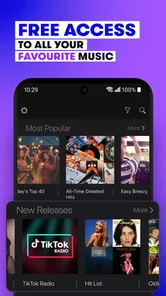


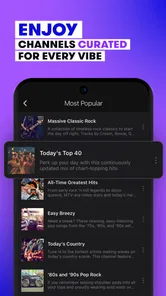
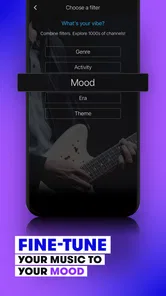
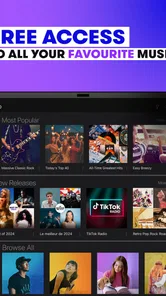


Analysis by Reviewed
I approached Stingray Music as a simple way to put curated audio on in the background rather than as a replacement for a full music library. That distinction matters. This is a free Music & Audio app from Stingray Group, built around channels selected for different moods and moments. Instead of beginning with a blank search box and asking me to choose every artist, it gives me a guided listening starting point.
My first impression was that the app makes the most sense for people who want music ready quickly: during a commute, while cooking, at a small gathering, or when I need something on without interrupting whatever else I am doing. The store page presents Stingray Music as a service with many expertly curated channels, and in everyday use that editorial approach is its main identity. I am not managing a personal collection every minute; I am choosing a direction and letting the channel do more of the work.
It is available at no upfront cost and carries a Teen content rating. The app has been around since August 12, 2011, which gives it a more established feel than a brand-new streaming experiment. Its current Android version is 9.7.4, and it requires Android 5.0 or later. Stingray Group is the developer, and the app has passed the one-million-install mark with an average rating of 4.6 from roughly fifty-four thousand ratings. Those figures do not replace personal testing, but they do suggest that the service has found a substantial audience.
What listening feels like after installation
The central experience is channel-based listening. I choose a channel that fits the moment, start playback, and let the programming carry on. That is a noticeably different rhythm from opening a conventional on-demand service, typing a song title, building a queue, and adjusting the order myself. Stingray Music is more useful when I know the atmosphere I want but do not have a precise track in mind.
That makes it especially comfortable for background listening. I can select a broad musical direction and return to what I was doing instead of treating the app like a second task. A channel can provide continuity while I work, clean, drive, or host friends. The benefit is not simply having audio available; it is reducing the number of small decisions between opening the app and hearing something suitable.
I would not describe it as the best place for someone who wants exact control over every song. If I have a very specific album in mind, want to replay one track immediately, or need to arrange a carefully ordered playlist, a traditional on-demand music service is likely a better fit. Stingray Music is strongest when discovery and convenience matter more than ownership of the listening sequence.
The “100s of DJs” idea is important to understanding the character of the app. The programming feels shaped by human curation rather than being presented as an entirely automated stream. That can be refreshing when algorithmic recommendations keep circling the same familiar choices. It also means that I should approach a channel as a guided broadcast, not as a promise that every selection will match my taste.
More From Our News Desk

 Gmail
GmailGmail in a Busy Inbox: Who Benefits Most?
From first account to crowded workday, Gmail earns its place through dependable search and flexible sorting—but its best fit depends on how much inbox maintenance you can tolerate.

 Prime Video
Switching to Prime Video: What Changes in Your Viewing Routine
Prime Video can make a compelling second home for streaming, but switching means learning a different catalog, rental layer, and route from browsing to playback.

 Universal TV Remote Control
Universal TV Remote Control Works Best as a Reliable Backup
A phone remote earns its place through quick setup and reliable habits. Here is how to get more from Universal TV Remote Control—and where its limits show.

 Weather - By Xiaomi
Weather by Xiaomi Review: Clear at a Glance, Less Clear Up Close
Xiaomi’s weather app makes everyday forecasts quick to scan, but its calm surface can leave useful details and recovery paths harder to find than they should be.

 X
XX Under Pressure: Can It Recover When Posting Goes Wrong?
A resilience-focused review of X, examining setup, mistaken posts, interruptions, weak connections, and the gaps that matter when recovery needs to be dependable.

 Clash of Clans
Clash of Clans Is Won Between the Battles
Its raids are quick; its community is a long-term project of coordination, teaching, rivalry, and shared responsibility—with all the friction that entails.
Latest News



Who will get the most from it
I think the best audience is someone who regularly says, “I want music, but I do not know what to play.” It also suits listeners who enjoy moving between moods without spending time maintaining playlists. If I am preparing dinner and want a relaxed soundtrack, I can start with a fitting channel instead of stopping to curate a sequence while handling ingredients. If I am driving, the reduced interaction is another practical advantage: I can make a broad choice before setting off and leave the stream to do its job.
It can also work well in shared spaces. A personal playlist may reflect one person’s narrow preferences, while a curated channel can feel more neutral when several people are in the room. I would still preview the sound before leaving it on for guests, because a channel’s tone may shift in ways I would not choose for every setting. The useful habit is to treat channel selection as the main control, not to expect the app to remove every need for judgment.
Listeners who should probably skip it are those who need a permanent offline collection, highly detailed library management, or guaranteed access to a particular recording. I would also look elsewhere if my main goal were discovering obscure releases through deep artist research. Stingray Music is about the flow of listening; it is less compelling when the research, cataloging, or exact playback order is the reason I opened a music app.
The first setup: keep it simple
After installing, I recommend resisting the urge to browse aimlessly. Give yourself a clear first goal: find one channel that matches what you want to hear right now. The app is easier to judge when I evaluate it in a real situation rather than scrolling through every available option. I would start with the mood or style closest to the moment, begin playback, and listen long enough to decide whether the channel has the right energy.
Because the app is free to install, the initial commitment is low. There are in-app purchases ranging from $2.99 to $69.99 per item, so I would pay attention to any purchase screen and avoid assuming that every possible part of the experience is covered by the free download. The practical rule is straightforward: start with the no-cost listening path, understand what is available to me, and only consider an optional purchase if I have a specific reason.
On an older Android phone, the minimum requirement of Android 5.0 or later is reassuring, although compatibility alone does not guarantee that every device will feel equally quick. I would close unnecessary apps if playback or navigation feels sluggish, and I would test the app before relying on it for a long drive or a gathering. That is not a criticism unique to Stingray Music; it is simply good preparation for any streaming audio app.
For a first-time user, the most useful setup is not a complicated configuration. It is choosing a listening context. Decide whether you want something energetic for movement, calmer audio for concentration, or an easy background option for a shared room. That small decision makes the channel list more meaningful and prevents the common mistake of judging the whole service after selecting a style that does not fit the moment.
Reaching the first meaningful success
My definition of success with this app is hearing a suitable run of music without having to intervene repeatedly. To get there, I would use this short routine:
Open the app when I already know the situation I am trying to soundtrack.
Choose the channel whose overall character seems closest to that situation.
Start playback and give the selection a fair listen instead of changing channels after the first song.
If the mood is wrong, move one step in another direction rather than browsing without a purpose.
Once a channel works, keep it in mind as a dependable starting point for the next similar occasion.
The third step is more important than it looks. A curated channel is a sequence, not a single recommendation. One track can be an unusual fit while the following choices may suit the atmosphere much better. I found that the app becomes more useful when I judge the overall flow rather than demanding an instant perfect match.
A realistic example is a weekday evening when I am making food and cleaning the kitchen at the same time. I do not want to hold my phone with wet hands, search for separate artists, or keep rebuilding a queue. I can select a channel with the right general mood, start it, and let the music fill the room while I focus on the meal. If the tone becomes too intense, I can switch to a calmer option; the important part is that the next choice is based on the room and activity, not on endless catalog browsing.
Another useful workflow is to choose before a transition. If I am about to start a workout, commute, or study session, I can make the channel decision first and then put the phone away. This turns the app into a small piece of preparation instead of a distraction during the activity. It is a modest habit, but it highlights the service’s real strength: getting from indecision to continuous listening quickly.
Where new users may get confused
The biggest possible misunderstanding is expecting a channel service to behave exactly like a personal playlist. A channel may be well curated and still include songs I would not have selected. That is part of the trade-off. I receive a more effortless stream, but I give up some precision. If I keep trying to force the app into an on-demand model, I may conclude that it is limited when the real issue is that I chose the wrong type of listening tool.
Another point of confusion is the difference between finding a mood and finding a song. I would browse with broad intent first. Searching mentally for one exact track is likely to make the experience feel indirect, while choosing a channel for “quiet background audio” or “something lively for a drive” matches the design better. Once I accept that the channel is the product, the interface becomes easier to understand.
I would also avoid treating the high average rating as a guarantee that every listener will love every selection. The app’s roughly 4.6 average across about fifty-four thousand ratings is encouraging, but music taste is personal. A listener who wants full control may reasonably prefer another service even if many people enjoy Stingray Music. Ratings tell me that the overall idea works for a large audience; they do not remove the need to match the app to my habits.
The presence of in-app purchases deserves a calm, practical approach. Since the download is free but individual purchases can range from $2.99 to $69.99, I would read each purchase prompt carefully and decide whether it improves the way I actually listen. I would not buy anything simply because I reached a limit or saw an upgrade message. First I would establish whether the free experience already solves my background-listening problem.
There is also a difference between a service that helps me discover a comfortable stream and one that helps me build a personal archive. Stingray Music is not the app I would choose to organize years of albums, compare editions, or create a precise sequence for repeated listening. For those jobs, a library-focused or on-demand alternative has the advantage. Here, the value comes from letting the channel shape the session.
Small habits that improve the experience
My first tip is to make channel choices according to activity, not only genre. A style I enjoy while driving may be distracting while reading, and a channel that works during housework may overpower a conversation. Thinking in terms of energy, concentration, and social setting produces better results than choosing the most familiar label.
My second tip is to give a channel a proper trial before abandoning it. Curated programming has a broader arc than a single recommendation. I would listen through a meaningful stretch of the session, note whether the transitions and energy suit me, and then decide. This avoids constantly restarting and gives the app a fair chance to show why its DJ-led approach is useful.
My third tip is to use the app as a decision-saving tool. I would identify two or three dependable starting points for recurring situations: one for focused work, one for movement, and one for relaxed social time. I would not need a complicated personal system; simply remembering which channel fits each activity can make future sessions nearly automatic.
A fourth trade-off is worth keeping in mind: curation can create pleasant surprises, but it can also reduce predictability. If I am playing music in a setting where every song needs to be appropriate, I would listen first rather than starting a channel blindly. For a private commute, that uncertainty may be part of the fun. For a public or professional environment, previewing is the more responsible choice.
How it compares with familiar music alternatives
Compared with an on-demand streaming service, Stingray Music asks less of me at the beginning but gives me less control afterward. I do not need to assemble a playlist before hearing something suitable, which is excellent for spontaneous background listening. On the other hand, an on-demand service wins when I want a specific artist, album, song order, or repeatable personal mix.
Compared with ordinary radio, the appeal is the emphasis on curated channels and the ability to select a listening direction rather than simply accepting whatever station happens to be available. Traditional radio can still be better when I want local programming, live information, or a familiar broadcast routine. Stingray Music is more attractive when I want music-first listening with a choice of mood or style.
Compared with algorithmic playlists, the app’s DJ-centered identity may feel more intentional and less dependent on my previous listening history. That can be a strength when I want to step outside my usual habits. The trade-off is that a human-curated channel may not adapt to me with the same precision as a personalized recommendation system. I would choose Stingray Music for guided variety and another service for highly individualized discovery.
Who should install it, and what to do next
I would recommend Stingray Music to a first-time user who wants to start listening quickly, enjoys curated variety, and often needs music for an activity rather than a carefully planned listening session. It is particularly convincing when the question is “What fits this moment?” rather than “Which exact song do I want?” The free entry point makes it easy to test that distinction without making a large commitment.
I would skip it if my essential requirement is offline listening, exact playback control, deep library organization, or guaranteed access to a particular recording. In those cases, a conventional on-demand catalog or a locally managed music collection would better match the job. I would also avoid paying for extras until I had used the basic experience in several real situations and knew precisely what problem an in-app purchase would solve.
My suggested next step is concrete: install it, choose one channel for the next activity already on your schedule, and judge whether it can carry that session with minimal attention. Try it while cooking, commuting, working, or relaxing rather than testing it only through random browsing. If it gives you a comfortable stream and saves you from repeatedly choosing songs, it has earned a place on your phone.
After that first successful session, keep your expectations aligned with the app’s design. Let the curated channels handle the flow, accept that not every selection will be personal perfection, and switch to another type of music service when control matters more than convenience. For effortless, mood-led listening, this is a genuinely useful free option, and my overall impression is that Stingray Music works best when I treat it as a smart musical companion for everyday moments—not as a complete substitute for every other way I listen.
Stingray Music - 100s of DJs Frequently Asked Questions
Does Stingray Music let me choose individual songs, or does it work more like radio?
Stingray Music is designed around curated channels rather than a conventional song-by-song player. You browse stations organized around genres, moods, eras, or other themes, then let the channel provide continuous listening. That approach can be convenient when you want music without building a playlist, though it may suit you less if choosing each track yourself is essential.
Can I browse the channels before deciding whether to download Stingray Music?
The app is centered on browsing curated music channels, with selections arranged to help you find a station for a particular genre, mood, or moment. You can explore what is available after opening the app, and the catalog may vary by location or account access. If a specific style matters to you, check the available stations in your region before relying on it.
Is Stingray Music available for both Android and iOS?
Stingray Music is a mobile music app, and its availability depends on the app store and device you use. Before downloading, check the store page for your phone or tablet and make sure your operating system meets the app’s requirements. The Android version requires Android 5.0 or later. Availability and compatible features can vary by device and region.
Who develops Stingray Music, and what kind of app is it?
Stingray Music is developed by Stingray Group and belongs to the Music & Audio category. Its focus is curated listening: you choose a channel suited to a genre, mood, or moment, then let it play rather than selecting every track yourself. The app is free to download, though access and optional paid features may depend on your location or account.
What is Stingray Music – 100s of DJs?
Stingray Music – 100s of DJs is a streaming radio app that gives you access to a broad selection of curated music channels hosted and programmed by professional DJs. Instead of choosing individual songs, you can browse genre-, mood-, and era-based stations and start listening immediately. The app is designed for users who enjoy continuous radio-style playback, discovery, and expert-selected playlists.
Pros
- Large selection of genre-based stations for different moods and tastes.
- Curated programming feels more personal than a typical algorithmic playlist.
- Easy access to live radio without creating a complicated music library.
- Useful for discovering artists and songs outside your usual listening habits.
- Clean interface makes switching between stations quick and straightforward.
Cons
- Some stations or features may depend on your location and availability.
- Music playback can consume considerable mobile data over extended listening sessions.
- Limited control over individual songs compared with on-demand streaming services.
- Commercial breaks and station announcements may interrupt the listening experience.
- Background listening may drain battery during long sessions on mobile devices.











