Splitwise
- 7.47K
- 4.2
- Installs
- 10.00M
- Price
- Free

Screenshots
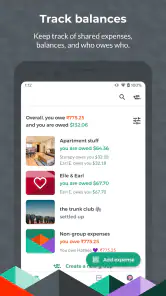
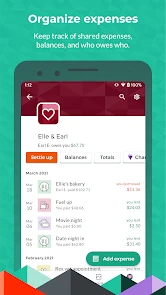
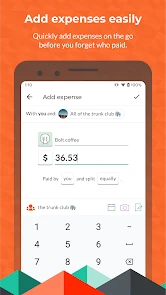
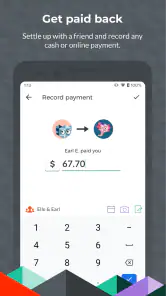
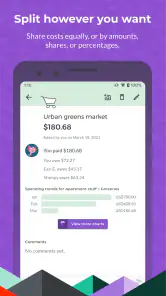
Analysis by Reviewed
Have you ever found yourself in a tangled web of shared expenses with friends or roommates? Trust me, I’ve been there. Enter Splitwise, the app that promises to make splitting bills a breeze. I decided to give it a whirl to see if it really lives up to the hype.
Where shared-expense tracking can get stuck
The trouble with splitting costs is often not the arithmetic; it is remembering who paid, which purchases belong to the group, and whether everyone has seen the latest total. I find a shared ledger most useful when people agree to record costs as they happen. If you wait until the end of a trip or month, missing details can turn a simple entry into a group debate.
A practical habit is to add a short, recognizable description to each expense, then check the participants and amounts before saving it. For a grocery run, for example, note whether it was for the whole household or only a couple of roommates. That small distinction can prevent a balance from looking wrong later.
There is also a social snag that no expense tracker can resolve: people may remember the same purchase differently. I find it helps to decide in advance what counts as shared, such as household basics but not personal snacks, or common transport but not an optional side trip. Agreeing on those boundaries before the first bill arrives is less awkward than debating them when someone sees an unexpected balance.
For a group that has already fallen behind, resist the urge to enter a single vague total called “weekend costs.” Separate the purchases when you can, and identify who paid and who participated. That takes a little longer at the start, but it gives everyone a useful trail to check if the final amount looks surprising.
Getting Started with Splitwise
First things first, downloading and setting up Splitwise is painless. The app is available on both Android and iOS, so no worries about compatibility here. Once installed, you can easily sign up using your email or link your Facebook account. Within minutes, you're ready to start splitting!
Setup checks that save confusion
Before entering a run of shared purchases, I would make sure the group contains the right people and that each expense is assigned to the people who actually shared it. This matters more than it might seem: an even split is convenient, but it is not fair when one person was absent or a purchase was personal. Review the amount and currency as you enter each item, especially when traveling or sharing costs across different countries.
More From Our News Desk

Clash of Clans Is Won Between the Battles

Android Auto Makes the Case for Quieter Car Software

MobiOffice: Transforming Mobile Productivity with Seamless Integration

EA SPORTS FC™ Mobile Soccer: Redefining Mobile Sports Gaming

How Microsoft OneDrive Became a Mobile Productivity Giant

How Google Translate Breaks Language Barriers Effortlessly
Splitwise is a free finance app from Splitwise, with optional in-app purchases. It is rated for Everyone, and the current version is 25.11.1, with Android support listed from OS 9. Its 4.2 average comes from around 185,000 ratings, and it has over 10 million installs. Those figures suggest a well-established tool, but the more important question is whether your group will keep its entries current.
When inviting people, I would explain the group’s purpose in a sentence before adding a pile of costs. “Shared apartment groceries” is a clearer expectation than simply “expenses,” and it gives new members a chance to say whether they belong in that particular pool. For a trip, the same check can prevent someone who joined only for one leg from being treated as part of every shared purchase.
Another useful setup choice is deciding who will enter costs when one person pays on behalf of the group. Letting everyone add their own purchases can distribute the work, while assigning one organizer may help a small group that prefers a single point of contact. The trade-off is that a single organizer becomes a bottleneck if they are busy, so I prefer shared responsibility when the group is comfortable with it.
Ease of Use
The interface is refreshingly straightforward. I mean, who has time to decipher complicated menus when all you want to do is split a pizza bill, right? The home screen gives you a clear view of your balances and lets you add expenses with just a few taps. You can even categorize expenses, which is super handy for keeping track of who owes what.
For a recurring household routine, I would treat the app as a running record rather than a monthly calculator. If one roommate pays for cleaning supplies and another covers a shared meal, enter both promptly and use the descriptions to make them easy to recognize. At month-end, the group can review the ledger instead of reconstructing weeks of purchases from bank statements and chat messages.
A small workflow improvement is to add the expense while the receipt or purchase is still in front of you. That is when the payer, amount, and participants are easiest to verify. If adding it immediately is inconvenient, a quick note in a group chat can preserve the details temporarily, but I would still move it into the shared record soon so the chat does not become the unofficial ledger.
Features That Stand Out
One of the standout features for me is the ability to create groups. Whether you’re sharing a house with roommates or planning a vacation with friends, this feature makes managing shared expenses incredibly simple. You can add expenses, track payments, and even settle up directly through the app.
Groups are especially useful for keeping separate circles from bleeding into each other. I would use one for a shared home and another for a weekend away, rather than putting every friend and purchase into one long list. On a trip, adding costs as they happen also gives the group a chance to catch mistakes while the details are still fresh.
Imagine a group of friends sharing a rented place for a few days. One person pays for groceries, another covers a taxi, and a third pays for a meal that not everyone attends. The important step is not just recording the totals: the meal should include only the people who joined, while the groceries may belong to everyone. Entering each purchase with that distinction keeps the group’s running balance far more meaningful than splitting the whole weekend bill evenly.
That is where this app can be more helpful than a quick calculator. A calculator can show each person’s share for one purchase, but it does not maintain the evolving picture when different people pay several times. A payment request in a wallet app can move money, but it is not necessarily a convenient history of all the group’s costs. Splitwise is strongest in the middle ground: the group needs an ongoing record, but does not want to build and maintain its own spreadsheet.
Oh, and did I mention the currency support? If you’re traveling abroad or dealing with international friends, Splitwise has your back with its multi-currency feature. It automatically converts currencies based on real-time exchange rates, saving you the headache of manual calculations.
For international trips, I would still enter the original currency carefully and look over the converted totals with the group before settling. Conversion makes mixed-currency costs easier to track, but it does not decide which exchange assumptions your friends consider fair, nor does it correct a wrong amount or participant list. Taking a moment to check the entry is a better safeguard than trying to untangle several purchases after everyone has returned home.
When the numbers look wrong
If a balance seems unexpected, I would first inspect the individual entries rather than assume the app has miscalculated. Check who was included, whether an expense was split evenly or assigned differently, and whether a payment was recorded. A quick review with the group can often identify a forgotten purchase or a mistaken participant without deleting the whole history.
For recovery, make corrections close to the original expense and leave a clear description so other members can follow the change. If someone has not been entering costs, agree on a simple catch-up process: gather receipts or notes, add the missing items, and verify the result together. The app can organize shared information, but it cannot supply details nobody recorded.
If an entry is missing, I would check the simplest causes first: was it added to a different group, was the right person selected as the payer, and were the intended participants included? These checks are more useful than starting over, especially after a trip with many small purchases. If the group is unsure about one item, keep the discussion focused on that entry instead of treating every balance as unreliable.
When someone has paid outside the app, keep the record and the transfer distinct. Update the shared history only when the group agrees that a balance has been settled, and make sure the payment went to the intended person. This avoids a common confusion: a transfer can happen in a separate service while the shared ledger still shows the old amount until the group records the settlement.
Integrations and Notifications
Another cool aspect is its integration with PayPal and Venmo. Once you’re ready to settle up, you can do so smoothly without leaving the app. Plus, the notifications ensure you’re always in the loop about who owes what. No more awkward reminders or forgetting to pay back your friends!
Still, a notification is not proof that a payment has reached the right person. I would treat the balance and the actual transfer as separate steps, then confirm with the other person if anything is unclear. If a reminder creates tension, a quick, neutral message about checking the shared record usually works better than assuming someone has ignored it.
People also have different preferences around reminders. Some appreciate a prompt because it keeps a small balance from lingering; others would rather settle in person or handle payments on their own schedule. I would agree on a group norm early, particularly with roommates or close friends, so a notification is treated as a practical nudge rather than a judgment about anyone’s reliability.
When another approach is better
For a few occasional shared meals, a calculator and a single payment request may be quicker than asking everyone to join a group and keep a ledger. For a household, a trip with many purchases, or friends who repeatedly take turns paying, a shared record is more useful than a string of chat messages. A spreadsheet may suit people who want custom columns and complete control, while Splitwise is more convenient when the group values quick entries and visible balances.
I would also skip it if the group is unwilling to agree on what gets shared or if nobody wants to maintain entries. In those cases, a one-time calculation after each outing can be less work than creating a record that quickly becomes incomplete. Likewise, people who need formal bookkeeping, detailed budgeting, or a carefully controlled personal ledger may be better served by a dedicated finance tool or their own spreadsheet rather than a friend-to-friend expense tracker.
The main trade-off is cooperation: everyone needs to enter expenses consistently and agree on how to split them. People who prefer not to use a shared app, or who rarely share costs, may find the setup and notifications unnecessary. Splitwise is free to start, with in-app purchases ranging from $0.99 to $59.99 per item, so I would check what is included before paying for anything; occasional users may not need an upgrade.
There is a difference between the app being difficult and the group’s process being unclear. If totals keep surprising people, first check whether the group has a shared rule for personal purchases, uneven participation, and settling balances. If those rules are settled but entries still seem confusing, simplify the descriptions and ask everyone to review their own costs. That practical reset often helps more than switching tools immediately.
Who will get the most from it
I see the best fit as people with recurring shared costs and a group willing to maintain a common record: roommates, travel companions, or friends who regularly take turns paying. It is particularly useful when one person often pays upfront but the final shares vary from purchase to purchase. Keeping the expenses together gives the group something concrete to review, instead of relying on memory or scrolling through old messages.
It is less compelling for a couple of casual purchases or a group that already settles everything instantly and has no need to revisit the totals. It may also be a poor match when privacy preferences make members uncomfortable sharing expenses in an app. In that situation, a simple verbal agreement or a one-off payment request can be more comfortable, even if it offers less history.
Final Thoughts
So, is Splitwise worth it? Absolutely. It’s a lifesaver for anyone who regularly shares expenses. Whether you're a student, a frequent traveler, or just someone who loves dining out with friends, this app is a must-have. With its user-friendly interface and robust feature set, Splitwise truly simplifies the hassle of splitting bills. Give it a try, and you might just find yourself wondering how you ever managed without it.
My recommendation comes with one condition: use it as a shared record, not as a substitute for clear agreements or timely communication. It is best for groups that will enter costs and check their balances together. If that sounds like your roommates or travel companions, it can remove a lot of end-of-trip guesswork; if not, a simpler one-off split may be the easier choice.
Splitwise Frequently Asked Questions
Can I create separate groups for different expenses in Splitwise?
Yes. Separate groups are a practical way to keep unrelated shared costs from getting mixed together, such as household expenses and a trip with friends. Within a group, members can add expenses and review how costs are divided. This makes the record easier to follow, especially when people contribute at different times or take part in different plans.
Is Splitwise suitable for tracking recurring household bills?
Splitwise can help roommates keep shared household costs in one place. Group members can add bills and other expenses as they arise, then use the app’s expense record to see how the amounts are divided and who owes whom. It is useful for organizing contributions, although the group still needs to enter expenses and keep its record up to date.
Can I use Splitwise without linking a bank account or making payments in the app?
Splitwise focuses on recording shared expenses and calculating who owes whom, which can help a group keep its accounts clear. You can use that record to organize costs without treating the app as a shared bank account. If you are downloading it mainly to track balances, consider whether that expense-tracking approach suits the way your group prefers to settle up.
Is Splitwise available for Android and iOS?
Splitwise is available on Android and iOS, so it can suit groups whose members use different kinds of phones. Each person can use the app to participate in shared expense tracking, add costs, and review the group’s record. Before installing, check that your phone meets the supported operating-system requirement, particularly if you are using an older device.
Can I use Splitwise for both small groups and larger shared plans?
Yes. Splitwise is designed for shared expenses with friends, roommates, group trips, and other groups, so it can help organize costs across different kinds of plans. Members can add expenses to a group and see how the amounts are divided, which is useful when several people contribute at different times. The app is free to download and is rated for Everyone.
Pros
- Easy expense tracking between friends.
- Syncs across multiple devices seamlessly.
- Supports various currencies for travel.
- Intuitive and user-friendly interface.
- Detailed expense reports and summaries.
Cons
- Limited features in free version.
- Ads can be intrusive at times.
- Occasional syncing issues reported.
- No offline mode available.
- Customer support response can be slow.
- Category
- Finance
- Version
- 25.11.1