

Splitfun
- 6.00
- 3.8
- Installs
- 50.00K
- Price
- Free

Screenshots


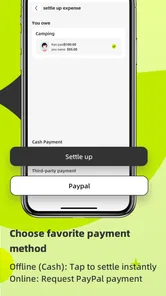
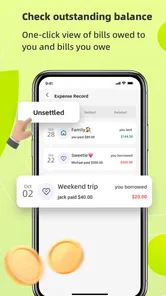
Analysis by Reviewed
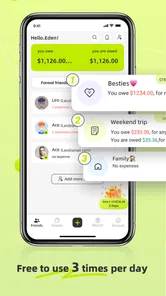
Managing shared spending sounds simple until several people pay at different times, someone joins late, and a small purchase gets forgotten. Splitfun is a free finance app from Forward Silver Limited built around that everyday problem. I see it as a focused tool for organizing group costs rather than a complete personal banking or budgeting system.
After using it, my main impression is that its value depends less on complicated financial features and more on whether it makes a shared expense easier to remember, divide, and settle. That makes it interesting for trips, shared homes, dinners, clubs, and informal projects. It also means the app is not automatically the best choice for someone who wants investment tracking, detailed household budgeting, or a full account-management service.
How Splitfun feels during normal use
I find the most useful test for Splitfun is whether it fits into the moment a shared cost happens, rather than asking everyone to reconstruct it later. I’d pay attention to how your group agrees on who benefited from each purchase and who will keep the record tidy. Those small habits shape the experience as much as the app itself, and they lead naturally to the question of what information people are comfortable entering.
A focused approach to shared expenses
The app’s purpose is easy to understand: keep group bills in one place and reduce the mental arithmetic involved in deciding who owes what. That narrow focus is a strength. I would rather use a tool that stays centered on shared spending than one that buries a simple group calculation under unrelated financial dashboards.
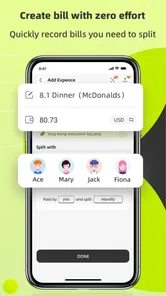
The most useful way to approach it is to create a shared expense as soon as it happens, not at the end of a trip when memories have already become uncertain. If one person pays for transport, another covers groceries, and a third handles tickets, recording each item while the details are fresh should make the eventual balance more trustworthy.
That workflow also exposes an important trade-off. A shared-expense app is only as accurate as the information people enter. Splitfun can organize the record, but it cannot know whether a purchase was personal, shared equally, or meant for only two members of a larger group. I found that agreeing on the rule before adding an expense prevents more arguments than correcting the total later.
Speed expectations on a modest phone
Splitfun is a relatively small, specialized finance app, and its job does not appear to require the kind of heavy processing associated with video editing, gaming, or large offline databases. In practical terms, I expect the important actions—opening a group record, entering an amount, and checking the running balance—to feel more immediate than resource-intensive apps.
More From Our News Desk

 Gmail
GmailGmail in a Busy Inbox: Who Benefits Most?
From first account to crowded workday, Gmail earns its place through dependable search and flexible sorting—but its best fit depends on how much inbox maintenance you can tolerate.

 Prime Video
Switching to Prime Video: What Changes in Your Viewing Routine
Prime Video can make a compelling second home for streaming, but switching means learning a different catalog, rental layer, and route from browsing to playback.

 Universal TV Remote Control
Universal TV Remote Control Works Best as a Reliable Backup
A phone remote earns its place through quick setup and reliable habits. Here is how to get more from Universal TV Remote Control—and where its limits show.

 Weather - By Xiaomi
Weather by Xiaomi Review: Clear at a Glance, Less Clear Up Close
Xiaomi’s weather app makes everyday forecasts quick to scan, but its calm surface can leave useful details and recovery paths harder to find than they should be.

 X
XX Under Pressure: Can It Recover When Posting Goes Wrong?
A resilience-focused review of X, examining setup, mistaken posts, interruptions, weak connections, and the gaps that matter when recovery needs to be dependable.

 Clash of Clans
Clash of Clans Is Won Between the Battles
Its raids are quick; its community is a long-term project of coordination, teaching, rivalry, and shared responsibility—with all the friction that entails.
Latest News



That does not mean every experience will be identical. A phone with little free storage, many background processes, or an older operating system can make any app feel slower. Splitfun supports Android from version 7.0 onward, which gives it a broad device range, but older compatible phones may still respond less briskly than recent models.
My advice is to judge speed by the moments that matter. If the app opens promptly when you are standing at a restaurant table, lets you capture the payment without a long detour, and keeps the balance understandable afterward, it is doing its job well. A finance tool does not need flashy transitions; it needs to get out of the way while people are trying to settle a real expense.
What happens during heavier group activity
The demanding situation is not necessarily one large purchase. It is a busy weekend in which several people add expenses, change participation, check the balance repeatedly, and try to settle up while moving between places. That is where clarity and consistency matter more than visual polish.
I would use a simple routine for this kind of event. One person can take responsibility for entering shared purchases, while everyone else sends the details immediately. Each entry should include a plain note that distinguishes a meal, a taxi, a household item, or a personal purchase accidentally paid with the group’s money. This reduces duplicate entries and makes later review much easier.
A less obvious benefit of that approach is that it creates an audit trail for memory, not just mathematics. When a group disagrees about a balance, the question is often “what was this payment for?” rather than “can the app divide it?” Descriptive entries make the record useful days later, especially after a trip where receipts and conversations are scattered across several phones.
There is also a practical limit. If your group has complicated rules—different currencies, taxes split in unusual ways, reimbursements outside the group, or business expenses requiring formal documentation—you should test the workflow carefully before relying on it. A straightforward shared-bill tool is most comfortable when the group’s rules are straightforward too.
Reliability is partly a human process
For this kind of app, reliability has two layers. The first is whether the application remains usable when you need it. The second is whether the group keeps the record complete and agrees on what each entry means. The second layer is easy to underestimate.
I would not wait until the final evening of a holiday to reconstruct every payment. That creates a single point of failure: one person may forget a coffee, misremember who attended dinner, or enter a rounded amount. Adding information close to the purchase gives the group a better chance of producing a fair result.
Recovery also matters. If you close the app before finishing an entry, lose track of a receipt, or discover that a payment was assigned incorrectly, the sensible response is to review the affected expense rather than blindly adding a replacement. Duplicate entries are a common source of confusion in any shared ledger. A short note beside each item can help distinguish a correction from a new charge.
I also recommend agreeing on a closing point. For a weekend away, that might be after the final shared meal. For housemates, it might be a regular day each month. Without a clear finish, a group can keep changing the balance indefinitely, which makes even a well-organized record feel unreliable.
Device limits and everyday practicality
The broad Android compatibility is useful for groups because not everyone owns a new phone. The minimum requirement of Android 7.0 means the app can fit into mixed-device situations where one participant has an older handset. That is particularly relevant for shared homes, student groups, and families who do not upgrade at the same time.
At the same time, older devices can have practical constraints unrelated to the app’s core purpose. Limited storage, aggressive battery management, or a crowded notification area can interrupt any short task. I would keep the app available and avoid relying on a last-minute installation at the checkout counter. A few minutes spent setting up the group before the event is more comfortable than trying to solve access problems while everyone is waiting.
Resource demands should also be considered in context. This is not the sort of finance app I would choose for complex analysis or a large personal archive. Its appeal is the lightweight nature of the job: capture a shared cost, keep the group’s position visible, and make settlement less awkward. If your needs grow into long-term financial reporting, you may eventually want a spreadsheet or a dedicated budgeting service beside it.
A realistic dinner scenario
Imagine four friends having dinner. One person pays the restaurant bill, another has already paid for a taxi, and one friend did not join the taxi ride. If everyone simply divides the final total equally, the result is quick but unfair. A better process is to record the meal as a group expense, record the taxi separately, and identify who participated in each cost.
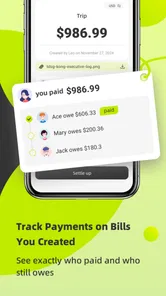
This is where I find the app’s concept most useful. The group can discuss the rule while the event is still happening instead of relying on one person’s memory the next morning. The person who paid does not need to chase three separate calculations in a messaging thread, and the others can see why the suggested balance looks the way it does.
The non-obvious lesson is that the app works best as a shared conversation starter, not as an invisible accountant. Before entering an expense, say who benefited from it. That small habit handles exceptions—such as a guest, a child, or someone who skipped a meal—more effectively than trying to repair an apparently equal split afterward.
Who will appreciate the workflow
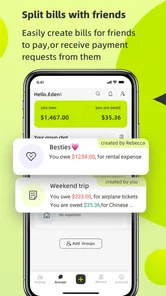
I think Splitfun is a good fit for people who regularly share ordinary costs and want something more structured than a chat thread. Travelers can use it to keep a trip’s payments together. Housemates can use it to avoid repeatedly asking who bought cleaning supplies. Friends planning an event can use it to track contributions without maintaining a separate document.
It may also suit people who dislike spreadsheets. Spreadsheets are flexible, but that flexibility can become a burden when several people need to understand the record quickly on a phone. A dedicated expense app offers a more direct path for the specific question, “Who paid, who participated, and what remains to be settled?”
On the other hand, I would skip it if your priority is complete personal finance management. Someone looking for bank synchronization, investment performance, recurring-budget analysis, tax preparation, or formal company expense reporting should compare it with a broader financial product. Splitfun’s focused purpose is helpful only if that is the problem you actually want to solve.
Compared with the usual alternatives
The most common alternative is still a group chat. Messages are convenient because everyone already has one, but payment details quickly become buried among photos, plans, and unrelated replies. A chat can record that someone paid, yet it is not naturally designed to maintain a clean running balance.
A spreadsheet offers the opposite experience. It can handle custom formulas, categories, and unusual arrangements, but it asks users to understand the structure and maintain it carefully. For a technically confident organizer, that control may be worth it. For a group that wants to record a few shared purchases without teaching everyone a system, Splitfun is likely more approachable.
Another alternative is simply doing the arithmetic manually. That works for a single dinner with equal participation, but it becomes fragile when several people pay at different times. The app earns its place when the number of transactions or exceptions makes mental calculation uncomfortable, while the situation remains too informal to justify a full accounting workflow.
There is a trade-off in choosing a specialized app over a familiar tool. The dedicated experience can be clearer, but every participant must be willing to use it. If one person refuses to enter payments or does not check the shared record, the group may still end up reconciling everything manually. Adoption is therefore part of the decision, not an afterthought.
Cost, maturity, and expectations
Splitfun is free to install, although optional in-app purchases range from $3.99 to $34.99 per item. That makes it easy to try before committing money, but I would still look at the purchase screen carefully and decide whether the free experience covers your normal group routine. A tool for occasional dinners should not become an unnecessary expense simply because a premium option is available.
The app was released on January 15, 2025, and its current version is 0.1.10. I read that version information as a sign to keep expectations practical: the product is still relatively early in its life, so I would pay attention to how comfortably it handles your particular habits rather than assuming it already covers every unusual expense arrangement.
Its store presence shows an average rating of 3.8 from around fifty-five ratings, with six written reviews, and more than fifty thousand installs. Those figures suggest that people are trying it, while the rating also indicates that it will not be a perfect match for everyone. I would treat that as a reason to test it with a small group first, not as a reason to dismiss it.
Privacy-minded habits and group etiquette
Shared expense records can contain sensitive details even when the amounts are ordinary. I would avoid placing unnecessary personal information in notes, especially when a simple description such as “shared groceries” is enough. The goal is to identify the purchase, not create a detailed diary of everyone’s private life.
It is also worth deciding who should be allowed to make changes. If several people edit the same record without communicating, a corrected amount can look like a new charge. A group message saying “I changed the taxi entry because one person did not ride” prevents confusion and keeps the financial discussion separate from personal disagreement.
For recurring household use, I would keep categories consistent. Calling one purchase “cleaning,” another “supplies,” and a third “house items” may seem harmless, but inconsistent wording makes later review harder. A small shared vocabulary gives the record more value without turning it into formal bookkeeping.
My performance verdict
My overall view is positive but specific: Splitfun makes the most sense as a focused shared-expense companion. It should appeal to someone who wants to replace scattered messages and rough calculations with a clearer record, especially when several people contribute at different moments.
I would not describe it as a replacement for a full finance suite. Its strength is the short path from a real-world payment to a group balance. Its limitations appear when the group’s rules become complex, when participants do not cooperate, or when the user expects advanced personal money management.
The best way to judge it is to start with a small, low-risk example: a dinner, a short outing, or one week of shared household purchases. Enter each expense promptly, identify who benefited, and agree on when the record is final. If that process feels natural to your group, the app can remove a surprising amount of friction. If your group prefers spreadsheets, avoids shared apps, or needs formal financial records, a different option will probably serve you better.
For my own recommendation, I would suggest trying Splitfun to friends who repeatedly say, “I’ll calculate it later.” That sentence is usually where shared expenses become confusing. A simple, dedicated record can make the final conversation shorter, fairer, and less uncomfortable. Just remember that the app works best when paired with clear group rules and timely entries, not treated as a substitute for them.
Splitfun Frequently Asked Questions
Who develops Splitfun, and is it available for my phone?
Splitfun is a finance app from Forward Silver Limited, designed around the idea of splitting bills and managing shared expenses. It is available for Android devices running version 7.0 or later. Before downloading, check that your phone meets the operating-system requirement and that Splitfun is available in your region’s app store.
What is Splitfun and how does it work?
Splitfun is a finance app designed around sharing bills and managing expenses with other people. After installing it, users can explore the available sections, choose a feature, and follow the on-screen instructions to participate. The exact experience may depend on the current version, supported region, and whether other users are available, so checking the app description and permissions before starting is recommended.
Is Splitfun free to download and use?
Splitfun is free to download, but some features may require optional in-app purchases. Prices can range from $3.99 to $34.99 per item, so review the purchase details shown in the app before confirming a payment. The free download does not necessarily mean every feature is free to use, and users should check the options available on their platform.
Does Splitfun require an account or an internet connection?
The requirements can vary according to the feature you want to use. Basic areas may open without registration, while social, synchronized, or personalized functions may require an account. An internet connection is generally recommended for downloading content, connecting with other users, updating information, or accessing online services. If you plan to use Splitfun while traveling, verify which functions remain available offline.
Is Splitfun safe for children and what permissions does it request?
Splitfun has an Everyone content rating, but parents should still review its privacy information and permissions before allowing a child to use it. Apps with social, communication, camera, microphone, storage, or location features may request sensitive permissions, although not every permission is required for every function. Only grant access that is necessary, use parental controls when appropriate, and supervise interactions involving unknown users.
Pros
- Simple interface makes splitting photos quick and easy.
- Useful layouts help create collages for social media posts.
- Works well for casual edits without advanced design skills.
- Fast sharing options make it easy to publish finished images.
- Suitable for creating side-by-side comparisons and photo grids.
Cons
- Some layouts or tools may be limited without an upgrade.
- Export quality can vary depending on the selected format.
- Advertisements may interrupt editing in the free version.
- Limited customization compared with professional photo editors.
- Results may require cropping
- which can remove parts of the original photo.











