

Speak Spanish: Palteca
- 58.00
- 4.7
- Installs
- 50.00K
- Price
- Free

Screenshots
Analysis by Reviewed
Learning Spanish can look simple from the outside: open an app, study a few words, and start speaking. In practice, the difficult part is usually staying with a method long enough for it to become useful. I spent time with Speak Spanish: Palteca as an education app for beginners, paying particular attention to where a new learner may hesitate, what makes a session easy to resume, and which expectations the app can realistically meet. My overall impression is that it is a friendly starting point for practical vocabulary and early speaking practice, but it works best when I treat it as a guided habit rather than a complete Spanish course.
Speak Spanish: Palteca is made by Palteca Languages and is available free of charge, with optional in-app purchases ranging from $4.99 to $94.99 per item. The app is suitable for Everyone, and its store summary focuses on useful vocabulary, speaking practice, and methods intended for beginners. That positioning matters: I would recommend it first to someone who wants to build confidence with everyday Spanish, not to a learner searching for an advanced grammar reference or a replacement for conversation with a real person.
Getting past the first points of friction
I find the first few sessions go more smoothly when I treat small uncertainties as things to check, not reasons to quit. This section looks at practical ways to settle into the speaking activities and distinguish ordinary beginner hesitation from a genuine audio or response problem. Once that groundwork feels manageable, the next question is how to keep practice useful when daily plans get interrupted.
Why a beginner may feel stuck early
The first challenge with any language app is not always the lesson itself. It is deciding what to do when I do not understand a word, cannot remember a phrase, or feel unsure about my pronunciation. A beginner can easily mistake that normal discomfort for a problem with the app. With this kind of speaking-focused tool, progress depends on accepting that the first attempts will sound incomplete. I found it more useful to answer aloud, even imperfectly, than to wait until I felt ready.
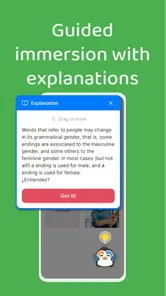
The app’s beginner orientation makes it approachable, but that also means experienced Spanish learners may find the early material too gentle. If I already understand common greetings, basic introductions, and familiar everyday vocabulary, I would probably move through the opening material quickly and use it mainly to identify gaps. Someone expecting long explanations of verb forms, regional differences, or formal grammar may need a separate resource alongside it.
A second source of friction is the difference between recognizing a phrase and producing it. I can often understand a word when I see it but fail to recall it during a conversation. Speak Spanish: Palteca is more useful when I deliberately pause before revealing or checking an answer. That small delay turns passive recognition into retrieval practice. Tapping through material quickly feels efficient, but it gives me a weaker memory of the language afterward.
A setup routine that prevents avoidable confusion
Before beginning a serious study session, I recommend checking the basics that affect any speaking app. I make sure the phone is not muted, the volume is comfortable, and the microphone is not covered by a case or blocked by anything on the desk. I also choose a quiet place where I can speak without feeling rushed. These checks sound obvious, yet they make a noticeable difference when the activity depends on listening and saying words aloud.
More From Our News Desk

 Gmail
GmailGmail in a Busy Inbox: Who Benefits Most?
From first account to crowded workday, Gmail earns its place through dependable search and flexible sorting—but its best fit depends on how much inbox maintenance you can tolerate.

 Prime Video
Switching to Prime Video: What Changes in Your Viewing Routine
Prime Video can make a compelling second home for streaming, but switching means learning a different catalog, rental layer, and route from browsing to playback.

 Universal TV Remote Control
Universal TV Remote Control Works Best as a Reliable Backup
A phone remote earns its place through quick setup and reliable habits. Here is how to get more from Universal TV Remote Control—and where its limits show.

 Weather - By Xiaomi
Weather by Xiaomi Review: Clear at a Glance, Less Clear Up Close
Xiaomi’s weather app makes everyday forecasts quick to scan, but its calm surface can leave useful details and recovery paths harder to find than they should be.

 X
XX Under Pressure: Can It Recover When Posting Goes Wrong?
A resilience-focused review of X, examining setup, mistaken posts, interruptions, weak connections, and the gaps that matter when recovery needs to be dependable.

 Clash of Clans
Clash of Clans Is Won Between the Battles
Its raids are quick; its community is a long-term project of coordination, teaching, rivalry, and shared responsibility—with all the friction that entails.
Latest News



I also prefer to start with a short session rather than trying to complete a large amount of material immediately. A short first run lets me learn how the lessons present vocabulary, how I move between activities, and how the app expects me to respond. If something feels unclear, I can identify the exact step instead of assuming the entire course is difficult. This is particularly helpful for a new user who has never used a speaking-oriented language app before.
The current Android version is 2.10.2 and requires Android 7.0 or later. That makes the app accessible on many older Android devices, although the experience can still vary depending on the phone, its audio settings, and the condition of its microphone. The app has passed the early adoption stage with over 50 thousand installs, while its average rating is 4.7 from around 2.6 thousand ratings. Those figures suggest a positive reception, but they should not replace a personal test on the device I plan to use.
What to do when audio or responses seem wrong
When I cannot hear something, I first separate an app issue from a phone issue. I test another sound on the device, raise the media volume rather than the ringtone volume, and disconnect headphones or Bluetooth audio if the sound appears to be going somewhere else. If the problem affects only one lesson, I leave and reopen that activity. If it affects everything, restarting the app and then the phone is a sensible next step before assuming the lesson is broken.
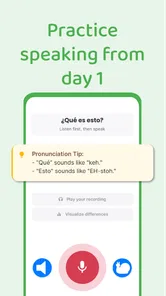
Speaking practice creates a different kind of uncertainty. A learner may say a phrase correctly but still feel that the result is inconsistent. Pronunciation is influenced by background noise, microphone position, speaking speed, and the learner’s accent. I get better results by speaking at a natural but measured pace, keeping the phone in the same position, and repeating the phrase once rather than rushing through several attempts. The goal is not to perform a perfect accent in the first session; it is to make the sound clearer and more familiar over time.
Building a workflow that survives interruptions
A routine only helps if it is easy to return to, so I focus here on making each session self-contained and choosing a clear next step after a break. I’ll look at how to keep review targeted without turning it into busywork, and how to fit practice around real plans rather than waiting for a perfect study window.
My practical way to use each lesson
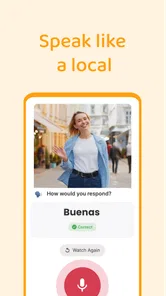
I use a three-pass routine with beginner vocabulary. First, I listen and focus only on the sound. Second, I try to recall the meaning before looking for help. Third, I say the phrase aloud and connect it to a situation I might actually encounter. For example, if the lesson introduces a phrase useful in a café, I imagine ordering, asking for something, or responding to a simple question. This makes the vocabulary easier to retrieve than studying isolated translations.
One of the most useful trade-offs is resisting the temptation to chase quantity. Learning many new words in one sitting can create the feeling of progress, but it also gives me more items to forget. I would rather leave a session able to produce a small group of phrases without looking than finish a much longer session with only vague recognition. The app supplies the structure; I still have to control the pace.
I also keep a separate note with phrases that I repeatedly miss. I do not copy everything. I record only the words or expressions that cause trouble, along with a short personal example. This creates a small review list that reflects my weaknesses instead of a generic vocabulary collection. It is an especially useful workaround when I notice that I can recognize a phrase in the app but cannot use it spontaneously.
Recovering after a missed day
Missing a day does not require starting over. When I return after an interruption, I spend the first few minutes revisiting material I already encountered rather than immediately pushing into new content. This quickly shows whether the earlier lesson stayed in memory. If I remember most of it, I continue. If not, I repeat the difficult section and shorten the next new session.
The important point is to avoid turning a missed day into a missed week. I find that a small restart is psychologically easier than trying to compensate with an unusually long study block. Speak Spanish: Palteca fits this approach because its beginner-focused material can be used in brief, repeatable sessions. It is less suitable for someone who wants one intensive course session to solve a large learning goal all at once.
For travel preparation, I would use the app as part of a focused routine several weeks before leaving. I would select vocabulary connected to transport, food, greetings, directions, and polite requests, then practice saying those phrases aloud while imagining the situation. I would not rely on memorized phrases alone, because real conversations move unpredictably. Still, this workflow can reduce the anxiety of producing the first sentence in Spanish.
How it compares with common alternatives
Compared with a traditional phrasebook, the app is more useful for active recall and speaking repetition. A phrasebook is excellent when I need to look up a specific expression quickly, but it does not naturally push me to retrieve and say the language. Compared with classroom study, Speak Spanish: Palteca is more flexible and less demanding to schedule, although it cannot provide the immediate correction, interaction, and accountability of a teacher or conversation partner.
Compared with a broad language-learning platform, its beginner emphasis can be an advantage for someone who feels overwhelmed by too many paths and exercises. The trade-off is depth. A larger course may offer more extensive grammar, writing, listening variety, or progression beyond the basics. I would choose this app when my priority is getting started with useful Spanish and building a speaking habit. I would choose a more comprehensive course when I need a structured route toward intermediate or advanced ability.
When the app is not the real cause of a problem
Sometimes the difficulty is not technical at all. A learner may be tired, distracted, or studying vocabulary that has no connection to current needs. In that situation, switching apps may not solve much. I get more from Speak Spanish: Palteca when I study at a consistent time and connect each session to a clear purpose, such as introducing myself, ordering a drink, or understanding a basic question.
Another common mistake is expecting pronunciation practice to work without speaking. Listening silently can feel productive, but it does not train the muscles and timing needed for conversation. I make a point of saying the material aloud, even when I am studying alone. If that is uncomfortable, I begin quietly and gradually use a normal voice. The app can guide practice, but it cannot create speaking confidence without actual spoken attempts.
There is also a limit to what any beginner app can do with regional variation. Spanish differs across countries in accent, word choice, and everyday usage. A learner who is moving to a specific country, preparing for professional communication, or studying for a formal examination should supplement this experience with region-specific listening and expert instruction. The app remains useful for foundations, but I would not treat a beginner vocabulary path as a complete cultural or linguistic map.
Who should pay attention to the purchase model
The free entry point makes it easy to decide whether the teaching style suits me before spending money. I would begin with the available free experience, check whether the pace and speaking activities match my preferences, and only then consider an optional purchase. The listed purchase range is wide, so I would read each offer carefully and think about whether I will use the material consistently rather than buying from enthusiasm on the first day.
This is also where expectations matter. Free access is attractive for casual learners, but someone who wants a complete, uninterrupted pathway should examine which parts of the experience require payment before making a long-term plan. I would not purchase simply because I like the idea of learning Spanish; I would purchase only after establishing that I can maintain a regular routine with the app.
My practical verdict for different learners
For a complete beginner, I think Speak Spanish: Palteca is a sensible and approachable place to begin. It gives vocabulary and speaking practice a clearer purpose than simply collecting word lists, and its free availability lowers the risk of trying it. The strongest results come from slowing down, answering from memory, and saying phrases aloud in realistic situations.
For an intermediate learner, the decision is more conditional. I would use it for revision, pronunciation confidence, or filling everyday vocabulary gaps, but I would not expect it to replace richer listening, grammar study, reading, or real conversation. For a learner who dislikes speaking aloud, wants advanced explanations, or needs a formal curriculum, another option may be a better main tool.
My final recommendation is to treat it as a practical first step rather than a promise of fluency. Palteca Languages has created an education app with a clear beginner focus, a strong average rating, and a low-risk way to start because the app itself is free. Its real value appears when I use it consistently and actively. If I use each session to retrieve, speak, and connect phrases to everyday situations, it becomes much more useful than a simple vocabulary browser.
Speak Spanish: Palteca Frequently Asked Questions
What devices and operating systems can run Speak Spanish: Palteca?
Speak Spanish: Palteca is an education app for mobile devices, with support starting from Android 7.0. Before installing, check that your device meets this requirement and has enough available storage for the app and its learning materials. If you use an iPhone or iPad, check the relevant app store for compatibility with your particular device and operating system.
Who develops Speak Spanish: Palteca, and what do users think of it?
Speak Spanish: Palteca is developed by Palteca Languages. It has an average rating of 4.7 from around 2,600 ratings, giving prospective learners a useful indication of how other users have responded to the app. Ratings reflect individual experiences, so it is still worth considering whether its beginner-focused approach and lesson style match the way you prefer to study.
What is Speak Spanish: Palteca, and who is it designed for?
Speak Spanish: Palteca is a language-learning app focused on helping users practice Spanish through guided lessons, useful vocabulary, pronunciation activities, and everyday expressions. It can be helpful for beginners, travelers, students, or anyone who wants a more convenient way to study Spanish on a mobile device. The learning experience is best suited to users who prefer short, interactive practice sessions rather than traditional textbook-based study.
Can Speak Spanish: Palteca help me learn Spanish from the beginning?
The app is suitable for beginners because it introduces common words, phrases, and basic communication patterns in a gradual way. New learners can use it to become familiar with greetings, introductions, numbers, travel vocabulary, and other practical topics. However, users should not expect the app alone to provide complete fluency. Regular practice, listening to native speakers, and real conversations are still important for developing stronger comprehension and speaking skills.
Does Speak Spanish: Palteca include pronunciation or speaking practice?
Speak Spanish: Palteca is intended to support practical language use, so pronunciation and speaking-focused activities may be an important part of the learning experience, depending on the lesson or device features available. These exercises can help users become more comfortable repeating Spanish words and phrases. Nevertheless, automated feedback should be treated as guidance rather than a perfect evaluation, since regional accents, microphone quality, and pronunciation differences can affect results.
Pros
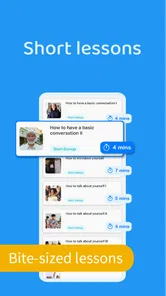
- Short
- practical lessons are easy to fit into a busy routine.
- Useful everyday phrases help beginners start speaking quickly.
- Audio practice supports pronunciation and listening development.
- Simple navigation makes the app approachable for first-time learners.
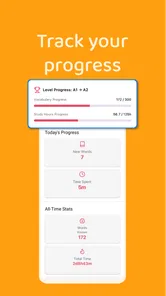
- Progress tracking can encourage consistent daily study.
Cons
- Some content may feel too basic for intermediate Spanish learners.
- Explanations may not cover Spanish grammar in much depth.
- A stable internet connection may be needed for some features.
- Speech and audio quality can vary between lessons.
- Limited practice variety may reduce long-term engagement.











