SpanishDictionary.com Learning
- 11.53K
- 4.8
- Installs
- 1.00M
- Price
- Free

Screenshots

Analysis by Reviewed
I tried this as the kind of Spanish reference I could leave within reach at home, where a learner might study alone one day and ask someone else a quick question the next. That shared-device setting changes how I judge a language app: it should be useful for brief lookups as well as planned practice, and it should be easy to tell when a session is a personal lesson rather than a family activity. SpanishDictionary.com Learning works best when each person brings a clear question or goal, rather than expecting the app to coordinate everyone’s progress.
One app, several learning habits
For a household, I’d treat it as a reference and practice resource that people can take turns using, not as a shared classroom. One person might check a verb before doing homework while another reviews vocabulary; those are useful moments, but they do not automatically create a common study plan. If people share a device, it is sensible to make a habit of checking whose lesson or lookup is on screen before continuing, especially when learners have different levels.
This setup suits a parent helping a school-age learner, a couple planning a trip, or roommates who want to settle a quick language question. It is less suitable when everyone needs separate, coordinated progress tracking or a formal teacher-led curriculum. I would choose a dedicated class or course for that kind of structure, and keep this app nearby for explanations and reference between lessons.
Making shared use practical
A useful routine is to turn a real question into a short solo session: look up the word or grammar point, listen to the pronunciation when relevant, then ask the learner to use it in a sentence without staring at the screen. That small step helps keep a lookup from becoming passive scrolling. For a household with mixed confidence levels, the more experienced learner can explain the example, but should still let the beginner try first; otherwise the app becomes a source of answers rather than practice.
I would also keep expectations modest around coordination. Sharing an app does not mean sharing one learner’s needs, and a child’s school vocabulary may have little overlap with an adult’s travel phrases. Agreeing on a simple turn-taking routine and keeping study goals separate avoids confusion without assuming the app provides family controls or household profiles.
Features That Make You Go "¡Increíble!"
First off, let’s talk about the incredible features packed into SpanishDictionary.com Learning. This app is not just a dictionary; it’s a comprehensive learning tool. It covers everything from basic vocabulary to advanced grammar topics. Whether you’re a beginner or brushing up on your skills, there’s something here for everyone.
One of the standout features is the interactive flashcards. These aren’t your average flashcards! They are designed to help reinforce your vocabulary through repetition and contextual usage. Plus, the app quizzes you regularly, ensuring that those words are locked in your memory.
More From Our News Desk

Weather by Xiaomi Review: Clear at a Glance, Less Clear Up Close

X Under Pressure: Can It Recover When Posting Goes Wrong?

Clash of Clans Is Won Between the Battles

Android Auto Makes the Case for Quieter Car Software

MobiOffice: Transforming Mobile Productivity with Seamless Integration

EA SPORTS FC™ Mobile Soccer: Redefining Mobile Sports Gaming
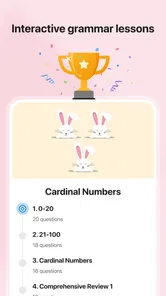
Grammar That Doesn't Make You Groan
Grammar can be a tough nut to crack, but this app makes it a whole lot easier. The grammar guide is thorough yet accessible, breaking down complex concepts into bite-sized pieces. Each topic is accompanied by examples that make it easier to understand and remember. No more groaning when you hit the subjunctive mood!
Another great feature is the verb conjugation tool. Spanish verbs can be tricky with all their tenses and moods, but this tool breaks it down in a way that’s easy to digest. You can search for any verb and get a complete breakdown of its conjugations in every tense. It’s like having a personal Spanish tutor in your pocket!
Immersive Learning Experience
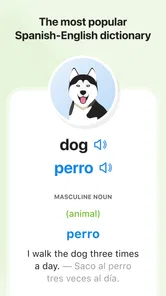
What sets this app apart is its ability to immerse you in the language. The audio pronunciations are a fantastic touch, helping you to perfect your accent. You can listen to native speakers and practice along, which is crucial for sounding more natural when speaking Spanish.
Besides, there are cultural notes and idiomatic expressions sprinkled throughout the app. These little nuggets of wisdom not only enhance your language skills but also give you a deeper understanding of Spanish-speaking cultures. It’s not just about speaking the language; it’s about feeling it too.
Choosing it for everyday study
In practice, I find the strongest workflow is to keep the app open while reading a Spanish passage or doing classwork. When a sentence stalls on one verb, check its conjugation, return to the sentence, and notice how the tense changes the meaning. For vocabulary, a flashcard review is more useful when I say the answer aloud before revealing it. That combines recall with the pronunciation support instead of treating the cards as a recognition game.
Compared with a conventional dictionary, this app gives more help with learning: grammar explanations, conjugation guidance, and review tools can keep a small question from turning into a chain of unrelated searches. A course app may be better if you want a prescribed sequence of lessons, while a dictionary-only tool can be quicker for a single translation. I see this one as a practical middle ground, especially for someone who already has a class, book, or real-world reason to study.
Building a useful study loop
One small habit makes the reference tools more valuable: write down the question that brought you to the app, then close the lookup by answering that question in your own words. If I check a conjugation, I try to explain why that tense fits the sentence; if I review a word, I make a new phrase with it. This takes only a moment, but it helps distinguish understanding from simply recognizing a correct answer on screen.
For a realistic weekday routine, imagine pausing while preparing dinner because a Spanish recipe uses an unfamiliar verb. I would look it up, listen to its pronunciation, and return to the recipe rather than opening a long lesson at the counter. Later, I could revisit the word through flashcards when I have more attention. That division—quick reference in the moment, deliberate review later—fits the app better than expecting every small lookup to become a full study session.
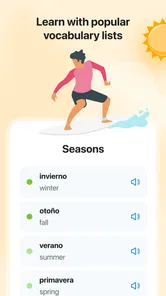
It is also worth being selective about what goes into review. A beginner may be tempted to save every unfamiliar word, but a smaller set tied to current homework, travel plans, or daily conversation is easier to revisit meaningfully. I would prioritize words that recur or that I need to say aloud. The app can support repetition, but choosing what matters remains the learner’s job.
Where it fits among language tools
Compared with a full course, the main trade-off is freedom versus sequence. I like being able to jump from a grammar doubt to a verb form or a vocabulary review, but that flexibility means I must decide what to study next. Someone who learns best by following a fixed path, with lessons that build in a planned order, may get more value from a structured course. Someone who already has a textbook, class, or conversation group can use this as a handy companion rather than replacing those foundations.
A translation-only tool can be faster when the sole task is understanding one short phrase. But speed can come at the cost of knowing how a word behaves in a sentence or how a verb changes with tense and subject. I reach for this app when I want an explanation or a way to practice, not just a quick equivalent. For longer reading, I also try not to interrupt every sentence: I mark the confusing point, finish the passage, and then look up only the items that still matter.
That distinction helps set expectations. This is a useful fit for curious beginners, returning learners who need a refresher, and students who want a reference beside their coursework. It is less compelling for someone who expects an app to plan a complete curriculum, provide personal teacher feedback, or manage several family members’ progress in one coordinated space. In those situations, a course, tutor, or class platform is the better primary choice.
Age, cost, and expectations
Curiosity Media makes this free Books & Reference app, which is rated for Everyone and has an average rating of 4.8 from around 81,000 ratings. It has been installed over a million times, and its current version is 4.2.3. Those figures suggest it has found a broad audience, but they do not replace trying its teaching style yourself. The app includes in-app purchases, with items ranging from $2.99 to $59.99, so I would check the purchase details before treating every part of the experience as free.
The age rating makes it reasonable to consider for younger learners, but I would still sit with a child at first and help turn explanations into practice. A reference can show an answer without ensuring the learner understands why it is right. For adults, the same principle applies: use the conjugation and grammar sections to resolve a doubt, then make your own example. I would skip it if you need a fully structured, teacher-guided program or if you only want a quick translation and will not use the learning tools.
Keeping expectations clear at home
For a shared device, I would make the boundary simple: take turns, say whose question is being answered, and avoid treating another person’s study session as a continuation of your own. That is especially useful when a child and adult are working at different levels. A parent can help interpret an example without turning every session into a test, while the learner still gets the chance to try the answer independently.
Before relying on any paid feature, I would check what the purchase screen says and decide whether it suits the person who will use it. The app is free to start, but its in-app purchases mean a household should not assume every tool or learning experience has no cost. That is a practical point rather than a reason to avoid it: the best approach is to explore the available reference and practice resources first, then make a deliberate choice instead of buying on impulse.
For younger users, the Everyone rating is a useful starting point, not a substitute for an adult’s judgement about study habits. I would focus on whether the learner can use the explanations constructively and whether the app is helping with a real goal. If a child mainly taps through answers, I’d sit together and turn one lookup into a spoken example. If they are already studying independently, it can serve as a convenient reference alongside schoolwork.
Final Thoughts
So, would I recommend SpanishDictionary.com Learning? Absolutely! Whether you’re preparing for a trip to Spain, trying to ace your Spanish class, or just want to expand your linguistic horizons, this app has got you covered. It’s user-friendly, comprehensive, and downright fun to use.
In a world where language is the key to so many opportunities, this app is a valuable tool that fits right into your daily routine. So why wait? Download it, give it a whirl, and watch as your Spanish skills take off!
My household verdict is positive, with one condition: treat it as a flexible learning companion, not a family-management system. It can support a child’s homework, an adult’s refresher, and a shared travel-planning conversation, but each learner should still have a distinct purpose for opening it. If I wanted a single app for grammar help, verb reference, pronunciation practice, and vocabulary review, I’d keep it close. If I needed a fixed course path or coordinated family study, I’d pair it with a more structured option instead.
SpanishDictionary.com Learning Frequently Asked Questions
Can I use SpanishDictionary.com Learning to look up Spanish words while studying?
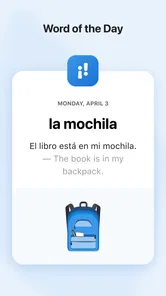
SpanishDictionary.com Learning is presented as a Spanish-learning app, and its learning resources include a library of words and phrases. The published feature set also mentions vocabulary exercises and audio pronunciations, which can make word study more useful than memorizing translations alone. If you want an app to support regular Spanish practice, those tools may be helpful alongside its lessons and quizzes.
Is SpanishDictionary.com Learning appropriate for children and families?
The app has an Everyone age rating, so it is broadly suitable for users of different ages. That can make it an option for families looking for a Spanish-learning resource, as well as for adults studying independently. Its lessons, vocabulary practice, and interactive activities offer several ways to approach learning, though the best fit depends on the learner’s age, goals, and preferred study style.
Can I use SpanishDictionary.com Learning without paying for a subscription?
SpanishDictionary.com Learning is free to download and provides a variety of free resources, so you can begin exploring it without committing to a subscription. The app also offers optional in-app purchases and subscriptions for additional content and features. Review the choices shown in the app before purchasing, and consider whether the free resources already meet your learning needs.
Is SpanishDictionary.com Learning free to download, and are there optional purchases?
SpanishDictionary.com Learning is free to download, so you can explore its learning resources without paying upfront. It also offers in-app purchases, with prices ranging from $2.99 to $59.99 per item. Those options may suit users who want more than the free experience, so check the available choices in the app before deciding whether a purchase fits your needs.
What is SpanishDictionary.com Learning and what does it offer?
SpanishDictionary.com Learning is a comprehensive app designed to help users learn Spanish effectively. It offers a wide range of features including vocabulary building exercises, grammar lessons, personalized quizzes, and an extensive library of phrases and words. Additionally, it provides audio pronunciations and interactive games to enhance learning, making it suitable for beginners and advanced learners alike.
Pros
- Comprehensive Spanish-English dictionary.
- Easy-to-use interface for beginners.
- Includes audio pronunciation.
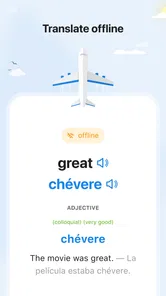
- Supports offline access.
- Regular updates with new words.
Cons
- Contains ads in free version.
- Some advanced features require payment.
- Occasional app crashes reported.
- Limited regional dialects covered.
- Requires internet for full access.











