Spanish English Translator
- 5.00K
- 4.4
- Installs
- 1.00M
- Price
- Free

Screenshots
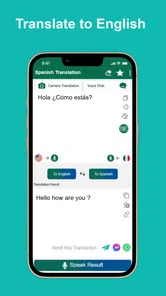
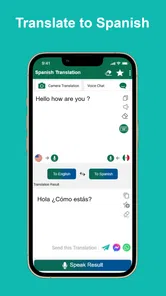
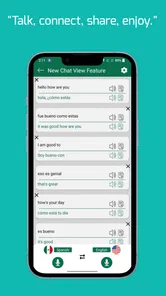
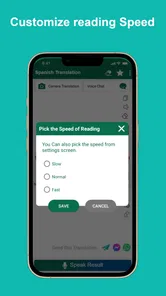
Analysis by Reviewed
I find a two-way English–Spanish translator most useful when I know what I want to communicate but need help getting the wording across. That makes Spanish English Translator a handy pocket reference for quick, everyday exchanges: I can check a phrase, consider how it sounds, and use the result to keep a conversation moving. Its offline focus is particularly appealing when I’m preparing for travel or expect an unreliable connection, though I still treat any machine translation as a starting point rather than a promise of perfect nuance.
Choose the right task before you translate
Before opening a translator, I decide whether I need to understand a short message, prepare something to say, or check a single word. That quick distinction helps me avoid asking one translation to do three jobs at once. For a basic question, I enter the central idea in plain language. If I’m trying to understand someone else, I keep the original wording available so I can compare it with the translated result instead of relying on a vague recollection.
This approach is especially useful when a phrase has more than one possible meaning. Rather than submitting a long paragraph and trusting the first output, I break the thought into small pieces and check whether each result still expresses what I intended. I also avoid translating idioms literally unless I know the recipient will understand them. A direct, simple sentence is often more useful in a real exchange than a clever expression that may not carry over cleanly.
A practical routine for quick translations
I get the most value from a translator when I treat it as a check, not as a substitute for understanding. For a short question, I enter the thought in plain English, read the Spanish result, and then use the pronunciation guide before speaking. If the first wording seems too formal or misses the point, I try a shorter version rather than feeding it a long, tangled sentence. That small habit makes the result easier to judge and easier to say.
Offline access is especially useful when I prepare before a trip. I can look up likely phrases while connected, then rely on the app when a weak signal or roaming concerns make an online tool inconvenient. I would still prepare essential details, such as an address, in a form I can show someone; a translation app is a useful aid, not a guarantee that every exchange will go smoothly.
Small checks that improve the result
With English and Spanish, I pay attention to the purpose of a sentence, not just its dictionary meaning. A request, an apology, and a question can need different wording even when they share several of the same words. If a result feels strangely stiff, I make the original sentence more direct and try again. This is a practical way to reduce ambiguity without pretending that a translator can explain every grammatical choice.
I also consider who will read or hear the translation. A short phrase for a shop interaction can be brief; a message explaining a personal situation may need more care and a second check. When I’m uncertain, I avoid adding extra details just to sound fluent. The simpler the input, the easier it is for me to notice whether the translated sentence still matches my intent.
More From Our News Desk

Weather by Xiaomi Review: Clear at a Glance, Less Clear Up Close

X Under Pressure: Can It Recover When Posting Goes Wrong?

Clash of Clans Is Won Between the Battles

Android Auto Makes the Case for Quieter Car Software

MobiOffice: Transforming Mobile Productivity with Seamless Integration

EA SPORTS FC™ Mobile Soccer: Redefining Mobile Sports Gaming
Using Spanish English Translator with good judgment
The Spanish English Translator is not just any translation app. It’s like having a personal language assistant right in your pocket. What I love about this app is how incredibly intuitive it is. You don’t have to be a tech wizard to navigate through it. The interface is clean, straightforward, and super user-friendly.
Features That Stand Out
One of the coolest features of this app is its voice translation capability. Just speak into your phone, and voilà, it translates your words instantly! This feature is perfect for those quick exchanges where typing just isn’t practical. Plus, the pronunciation guide is a lifesaver for getting that Spanish accent just right. No more awkward moments trying to roll your R’s in public!
Another standout feature is the offline mode. Whether you’re in the middle of nowhere or trying to save on data, you can still access translations without an internet connection. This is a huge plus for travelers like me who often find themselves off the beaten path.
Settings and faster habits
Before relying on voice input, I check that the selected language direction matches what I’m trying to say. It is an easy detail to overlook when switching between English-to-Spanish and Spanish-to-English, especially in a hurry. I also keep spoken requests short and clear: one question at a time is easier to review than a whole conversation captured in one go. In a noisy place, typing may be less frustrating than repeating a phrase into the phone.
For repeat situations, I build a simple routine instead of assuming the app has shortcuts or saved phrase tools: translate the key sentence, listen to or practise its pronunciation, then keep the screen ready to show the other person if speaking is awkward. This is handy at a café when I need to explain an ingredient concern or ask whether a dish contains something. I can use the translation to start the exchange, then let the person answer in their own words and translate that response separately.
Make a repeatable travel routine
For a day out, I prepare a few likely questions while I have a connection, but I don’t try to script every possible conversation. I focus on practical building blocks: asking where something is, clarifying a basic need, and checking a detail I expect to come up. Keeping these as separate, short translations makes it easier to find and adapt the right idea in the moment, even if I have to enter it again rather than depend on a saved shortcut.
One useful habit is to keep names, addresses, and other exact details in their original form alongside a translated sentence. Names can be misheard or altered when spoken, while a visible written address gives someone a clearer reference. In a taxi or at a reception desk, I can show the essential detail and use the app for the surrounding question. That division of labour is more dependable than expecting a translated sentence to carry every important piece of information.
Real-Life Applications
Let me tell you, this app is not just for tourists or language students. It’s for anyone who wants to bridge the communication gap. I’ve used it to help my non-Spanish-speaking friends at restaurants, guide tourists around my city, and even during my Spanish learning sessions. It’s like having a bilingual buddy who never gets tired of helping out.
Also, for those of you who love learning languages, this app offers a great way to improve your vocabulary. It provides synonyms and different usage examples which can be super helpful for understanding context and nuances in language.
Everyday situations where it earns its place
Picture arriving at a small guesthouse after a long trip, with a weak connection and a question about check-in. I can type a short English question, review the Spanish version, and show the screen if saying it aloud feels uncertain. If the staff member replies in Spanish, I can use the reverse direction to get the gist, then ask a simpler follow-up if anything remains unclear. That back-and-forth is more realistic than expecting one spoken translation to cover an entire conversation.
At a restaurant, I would use it to ask a straightforward question about a dish, then wait for the answer and translate that separately. I would not treat a machine-generated response as a guarantee about an allergy or other serious dietary risk; for that, I’d want clear confirmation from the staff and, where possible, a trusted human translation. The app can help open the conversation, but the stakes should decide how much I rely on it.
For a learner, a useful exercise is to translate one short sentence and then try to reconstruct its meaning without looking. The pronunciation guide can help with speaking practice, while the synonyms and examples can prompt a follow-up check on how a word is used. I wouldn’t count a translated output as a complete lesson in grammar, though. It works best as a companion to deliberate study, not as a replacement for learning why a sentence takes a particular form.
Who it suits, and who may need another tool
As a free Books & Reference app from HeapSol Technologies, Inc, it suits travellers, casual learners, and anyone who needs a quick English-Spanish lookup without depending on a connection. Its 4.5 average from around 15,000 ratings and more than a million installs suggest it has found a broad audience, while the Everyone age rating makes it suitable for general use. The current version is 4.10007, and it runs on Android 5.0 or later.
I’d recommend it to someone who mainly switches between English and Spanish, wants a straightforward reference, and values offline access for ordinary travel needs. It is also a reasonable choice for a person who is beginning to practise phrases and wants to hear how a translation may sound. Someone who needs many languages in one place, extensive document handling, or carefully polished translations for professional publication will probably be better served by a broader or more specialised alternative.
Compared with a general online translator, its clearest practical advantage is being able to work offline; an online alternative may be a better choice when I need broader language coverage or want to cross-check a complicated passage. For formal writing, legal or medical wording, or a conversation where a mistake could matter, I would not rely on a quick translation alone. Short, everyday phrases are its natural territory. If I were studying seriously, I would pair it with structured lessons and use translations as examples, rather than treating a translated sentence as a full grammar explanation.
What to check before depending on it
The offline strength is most valuable when I plan around it rather than assume it solves every travel problem. I test the sort of phrases I expect to need before leaving a reliable connection, and I keep critical information somewhere readable outside the translation itself. That way, if a result is unclear or the app is not the right tool for a particular exchange, I still have the details I need to communicate.
Voice input is convenient, but it is not always the fastest option. A noisy street, a quiet waiting room, or a phrase with an unfamiliar name can make speaking into a phone awkward. I switch to typing when I want to control the wording or check a result carefully. Conversely, when my hands are occupied and the setting is calm, voice can make a short lookup feel more natural. Choosing the input method for the situation is a small adjustment that avoids unnecessary retries.
Another trade-off is that speed can make people overconfident. A fluent-sounding sentence may still miss tone, regional usage, or a detail that matters to the listener. I use pronunciation support to practise, but I don’t mistake sounding confident for being correct. If the other person looks confused, I rephrase the idea with fewer words rather than repeating the same translated sentence louder.
When accuracy matters more than convenience
There are clear cases where I would not make this app my only resource. A contract, a medical instruction, an official form, or a sensitive personal message deserves careful review by someone qualified to understand both languages and the context. A general-purpose translator can help me identify the rough meaning or prepare a first draft, but it cannot take responsibility for consequences if a subtle distinction is lost.
For ordinary navigation and casual exchanges, the balance is different: a quick, imperfectly nuanced translation may still be useful, especially when the alternative is no communication at all. I keep the stakes in view. If a misunderstanding would merely require asking again, I’m comfortable using the app to get started. If it could affect health, money, legal rights, or safety, I slow down and seek a more reliable check.
Wrapping Up
All in all, the Spanish English Translator app is a must-have tool for anyone looking to break down language barriers. Whether you’re traveling, learning, or just want to make sure you order the right dish at a Spanish restaurant, this app has got your back. It’s reliable, easy to use, and packed with features that make communication a breeze. So, why not give it a try and see how it transforms your interactions?
My strongest recommendation is to use it as a pocket helper for modest, practical tasks: checking a phrase, hearing how it sounds, or making a basic exchange when internet access is unreliable. The free price lowers the barrier to trying it, but its usefulness still depends on keeping expectations sensible. If your needs centre on polished long-form translation, nuanced regional language, or dependable high-stakes interpretation, choose a more specialised resource and verify important wording with a fluent speaker. For everyday travel and casual practice, this is a straightforward tool I would be happy to keep within reach.
A measured verdict for regular use
What makes this translator worth keeping close is not that it removes every language barrier, but that it can make a small next step easier: checking a phrase, practising its sound, or getting the basic sense of a reply. I would build a habit around short inputs, confirming the language direction, and switching between voice and typing according to the setting. Those choices make its strengths more useful without pretending that any translation is automatically exact.
If you are deciding whether to try it, ask yourself what you actually need most often. For quick English–Spanish exchanges and offline reference, it is a sensible free option with a low learning curve. If you need polished writing, broad language coverage, or dependable interpretation for consequential conversations, choose a more suitable service and bring a fluent speaker into the process. Used with that distinction in mind, it is a practical companion rather than a substitute for language knowledge.
Spanish English Translator Frequently Asked Questions
Can I use Spanish English Translator without an internet connection?
Yes. Spanish English Translator is described as an offline translator for both English-to-Spanish and Spanish-to-English use, so it can help when you need a translation in a place with limited connectivity. That can be especially useful while traveling or when you want to look up a word or phrase without relying on a connection.
Is Spanish English Translator suitable for learning or studying Spanish?
It can be useful as a reference while studying, since the app translates in both directions between English and Spanish. You can use it to check words or phrases and support everyday language practice. It is best treated as a translation aid rather than a complete language course, so learners may still want other resources for grammar, structured lessons, and broader study.
Can I use Spanish English Translator as a quick reference while traveling?
Yes. Spanish English Translator is a Books & Reference app intended for translating between English and Spanish, so it can be handy when you need to check a word or phrase while traveling. Its offline translation capability is especially useful when connectivity is limited. The app is free and rated for Everyone, making it an accessible option for a broad range of users.
What should I know about the app before downloading it?
Spanish English Translator is a free app from HeapSol Technologies, Inc. It is described as an offline translator from English to Spanish and from Spanish to English, and its short description is Spanish Translator. It has a 4.5 average rating from around 15 thousand ratings, with about 4.9 thousand reviews and over one million installs. Its content rating is Everyone.
What features does the Spanish English Translator app offer?
The Spanish English Translator app provides a comprehensive suite of features designed to assist users in translating between Spanish and English seamlessly. Key features include real-time text translation, voice-to-text capabilities, and offline mode for translations without an internet connection. Additionally, it offers pronunciation guides and a phrasebook to help users with common expressions.
Pros
- Supports voice input for quick translations.
- Fast and accurate text translation.
- User-friendly interface with intuitive design.
- Supports offline translation for selected languages.
- Frequent updates with new language additions.
Cons
- Ads can be intrusive at times.
- Limited offline language support.
- Pronunciation feature needs improvement.
- Occasional inaccuracies in slang translation.
- Requires internet for most features.











