Space Cleaner
- 12.00
- 4.0
- Installs
- 100.00K
- Price
- Free

Screenshots



Analysis by Reviewed
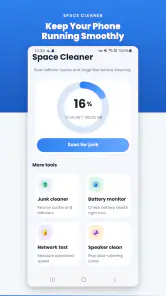
I tested Space Cleaner as the kind of utility you open when a phone feels crowded, the battery seems less dependable, or a speaker sounds muffled after being used outdoors. Developed by KAJO TECH, this free Android app brings several maintenance tasks into one place: removing unwanted files, checking battery condition, and using a speaker-clearing tool. That combination makes it more interesting than a simple storage cleaner, especially in a household where one phone may pass between several people.
My first impression was that Space Cleaner is aimed at convenience rather than deep technical control. You do not need to assemble separate tools for storage, battery information, and speaker maintenance. The trade-off is that an all-in-one utility deserves a little caution: cleaning a phone is not automatically the same as improving it, and the safest results depend on reviewing what the app wants to remove before confirming anything.
How Space Cleaner fits into a shared household phone
A realistic use case is a family tablet or spare phone used by different people during the week. One person downloads videos, another takes photos, and someone else installs games or saves documents. After a while, the device becomes difficult to manage because no single user remembers where everything came from. Space Cleaner can be useful as a shared maintenance stop, giving the household one place to inspect clutter instead of relying on whoever happens to notice the storage warning first.
I would use it before a long trip, for example, when a shared phone needs room for maps, photos, or offline entertainment. I would also run a storage check after a weekend event when several people have captured large media files. The important habit is to treat the scan as an inventory, not as permission to erase everything immediately. Photos, school files, downloaded tickets, and recordings can look like disposable clutter to one person while being important to another.
This is where the app’s simple idea becomes more useful than its short store label suggests. The value is not only in freeing space; it is in creating a repeatable household routine. One person can review the results, ask who owns the files, and then clean only what everyone agrees is unnecessary. That approach reduces the common shared-device problem of one user “fixing” the phone and accidentally removing another person’s material.
Space Cleaner is also suitable for someone who does not want to learn several specialized utilities. Its tools are grouped around everyday phone upkeep, so a less technical family member can understand the purpose of opening it. Still, I would not hand the cleaning decision to a child without supervision. An Everyone content rating describes the broad suitability of the app, not the importance of the files stored on a particular device.
What to decide before the first cleanup
Before using the junk-cleaning function, I recommend agreeing on three simple boundaries. First, decide which folders or file types belong to the household rather than to one person. Second, choose a place for important photos and documents before deleting anything. Third, make the person who created a file part of the decision. These steps are more valuable than pressing a cleaning button quickly, because storage tools cannot understand family ownership or sentimental value.
I would be especially careful with a phone used by teenagers. A large group of images may look repetitive, but some may be needed for school, clubs, or personal memories. A shared device also creates an account-boundary issue: Space Cleaner can help organize the phone itself, but it should not be treated as a way to manage separate user identities, private accounts, or family permissions. Those responsibilities still belong to the operating system and the people using the device.
The same caution applies to downloaded files. A household member may have saved a document for offline access, while another person sees it as temporary clutter. My preferred workflow is to review large or unfamiliar items manually, remove obvious leftovers first, and leave anything with an unclear owner alone. This makes the app a safer assistant rather than an automatic decision-maker.
Because the app is free, it is easy to try without adding a purchase decision to the household conversation. That is convenient for a spare phone or an older family device. It also means I would pay attention to the screens shown during cleaning and avoid rushing through prompts. Free utilities can still involve choices that affect files, battery information, or sound-related functions, so convenience should not replace reading.
Storage cleaning: where the practical benefit is strongest
The junk-file feature is the part I would expect to use most often. Storage pressure is usually caused by accumulation rather than one dramatic problem: temporary files, repeated downloads, old installation leftovers, and media that no longer has a purpose. A cleaner can make that buildup easier to confront, but the real improvement comes from selecting carefully.
My most useful tip is to clean in two passes. On the first pass, I would remove items that are clearly disposable and leave personal media untouched. On the second, I would inspect the remaining large files with the other household users. This is slower than accepting a single recommendation, but it is much better for a shared phone. It also reveals which person or activity is filling the device, making future coordination easier.
Another practical workflow is to use the cleaner after transferring photos rather than before. If a family member has copied pictures to a computer or another safe location, the phone’s local duplicates become easier to identify. Space Cleaner cannot replace a backup strategy, and I would never consider a scan a backup. Its role is to help locate cleanup candidates after the household has decided what is safely stored elsewhere.
The limitation is that freeing space does not solve every performance complaint. If the phone is old, has a weak battery, or is overloaded by demanding apps, deleting a modest amount of clutter may not transform the experience. I would choose this app for routine housekeeping, not as a promise of a complete speed repair. If the device remains unstable after sensible cleaning, the cause probably needs a different solution.
Battery information without unrealistic expectations
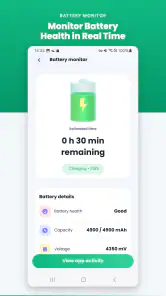
The battery-health monitor adds a useful diagnostic angle. In a shared household, people often disagree about whether a phone is “broken” because battery life depends heavily on who used it, how bright the screen was, and which apps were active. A battery-focused view can give the conversation a more consistent starting point than impressions alone.
I would use this tool when deciding whether a phone is still suitable for a child’s commute, a guest device, or emergency contact use. If the battery seems to drop quickly, checking its condition can help separate normal heavy use from a broader battery concern. It is also useful before handing an older phone to another family member, because expectations should be realistic from the beginning.
However, a health reading should not be treated as a guarantee of exact daily endurance. Battery behavior changes with signal strength, temperature, screen time, charging habits, and the apps running in the background. I would compare the app’s information with actual use over several days rather than making a replacement decision after one glance. That is a key distinction between monitoring and diagnosis.
The app is therefore a good fit for people who want a convenient overview, but less suitable for users seeking detailed engineering data or repair-level analysis. Someone troubleshooting a serious battery fault may prefer the phone maker’s own diagnostics or professional service. Space Cleaner’s advantage is accessibility: it places battery awareness beside the other maintenance tools instead of making the user search through technical menus.
Clearing a speaker after everyday mess
The speaker-clearing function is the most situational feature. I see its value after a phone has been exposed to light moisture, dust, or debris, or when audio seems less clear than usual. It can be a handy first step before assuming the speaker is permanently damaged. I would use it carefully and follow the app’s on-screen guidance rather than treating the feature as a repair tool.
This matters in a household because phones are often used in kitchens, bathrooms, gardens, and near children’s activities. A device may pick up residue simply through normal use. If the speaker sounds dull after that kind of situation, a dedicated clearing routine is more convenient than searching for a separate sound utility. It also gives the family a shared procedure: stop using the phone carelessly, try the clearing function, and reassess the sound afterward.
There is an important boundary here. A speaker-clearing feature cannot correct every audio problem. Physical damage, a faulty component, severe liquid exposure, or a blocked grille may require inspection. I would not keep repeating a sound routine when the phone has obvious damage or behaves strangely. In that situation, protecting the device and seeking proper help is wiser than experimenting.
I also would not use the speaker tool as entertainment around sleeping children or pets. The purpose is maintenance, not repeated sound playback. On a shared device, explaining that distinction helps prevent someone from activating it without understanding why the phone is producing unusual audio.
Coordination, privacy, and account boundaries
Space Cleaner works best when one person coordinates the maintenance session while everyone else retains ownership of personal content. I would nominate a household member to review storage, but I would not assume that person should inspect private photos, messages, or account material. The app can help with device-level housekeeping; it should not become an excuse to cross personal boundaries.
A useful routine is to announce the cleanup in advance, ask each user to mark important files, and set a short review window. Afterward, record what was removed in ordinary language, such as old downloads or duplicated media. This is not about bureaucracy. It simply prevents confusion when someone later asks why a file is gone or why the phone suddenly has more room.
For a family with separate accounts, I would keep the app’s role narrow. Use it for shared storage decisions and general maintenance, while leaving account passwords, private conversations, and personal cloud libraries to their respective owners. Space Cleaner should not be presented as parental control software, a family dashboard, or a substitute for the phone’s own user-management features. Keeping that boundary clear is one of the most important ways to use it responsibly.
The same principle applies to an older relative who shares a device with others. A helper can open the app and explain each step, but should ask before removing anything. The straightforward design may make the utility approachable, yet approachability is not the same as understanding every file category. A calm, guided review is safer than assuming a scan’s suggestions fit everyone.
Compatibility, trust, and everyday expectations
Space Cleaner is listed as a free Tools app for Android, with a minimum operating-system requirement of Android nine. That makes checking the phone’s software version an important first step, particularly with older household devices. If the phone is below that requirement, I would not plan a family cleanup around this app; I would use the system’s own storage and battery settings instead.
The current version is 9.0.3, and the app has reached over one hundred thousand installs. Its average rating is 4.0 from just over one hundred ratings, with a smaller set of written reviews. I read those figures as a sign of genuine interest but not as a reason to assume that every phone will respond identically. Utility apps can behave differently depending on storage layout, Android version, speaker hardware, and how the device is used.
Trust is especially important because a cleaner handles information about the contents of a phone. I would review the app’s own permission prompts and privacy explanations during installation, and I would avoid granting anything that does not make sense for the task. I would also keep the app updated through the normal app store process and remove it if it no longer feels useful. These are sensible habits for any maintenance utility, particularly on a shared phone.
The Everyone age rating makes it broadly suitable for general audiences, but household suitability still depends on supervision and file ownership. A young user can understand that the app frees space or checks the battery without being ready to judge which personal files are safe to delete. In my view, the best family use is guided maintenance, not unsupervised cleanup.
Where it beats usual alternatives—and where it does not
The usual alternative is to open Android’s built-in storage settings, inspect apps individually, check battery information through system menus, and handle speaker problems separately. That approach can offer more direct system context and may be preferable to someone who wants maximum control. It also avoids installing another utility for tasks the phone may already support.
Space Cleaner’s advantage is the single-purpose workflow. Storage cleanup, battery awareness, and speaker maintenance sit under one recognizable tool, which is helpful for a family member who does not want to remember several menu paths. The app is also easier to recommend when the household needs a repeatable routine rather than a technical investigation.
On the other hand, I would choose the built-in settings first when I need to manage a specific application, inspect detailed battery usage, or understand a system-level problem. I would choose a backup service when the real need is protecting photos and documents. I would choose repair support when the speaker or battery appears physically damaged. Space Cleaner complements those options; it does not replace them.
That distinction prevents the most common disappointment. A cleaner may make a crowded phone easier to manage, but it cannot turn limited hardware into a new device. A battery monitor can improve awareness, but it cannot restore worn cells. A speaker routine can be useful after minor everyday exposure, but it cannot guarantee recovery from serious damage. I appreciate the app most when I judge it by those realistic boundaries.
My household verdict
After using Space Cleaner as a household-oriented utility, I see it as a convenient maintenance companion for people who want storage cleanup, battery checking, and speaker care in one Android app. Its strongest use is not dramatic rescue; it is establishing a simple, repeatable moment to review a shared phone before clutter becomes a crisis.
I would recommend it to families sharing a spare device, to users who find Android’s maintenance menus scattered, and to anyone who wants an approachable first check when storage or sound becomes troublesome. The free price lowers the barrier to trying it, and the broad age rating makes it easy to discuss with different members of a household.
I would skip it if I wanted advanced battery diagnostics, automated family permissions, guaranteed performance gains, or a replacement for backups and repair service. I would also avoid careless one-tap cleaning, especially on a phone containing several people’s files. The app is most valuable when a person stays involved in the decisions.
My final recommendation is to make it part of a controlled routine: review storage together, protect important files first, use battery information as a guide rather than a verdict, and treat the speaker tool as a limited maintenance step. Used that way, Space Cleaner earns its place as a practical Android tool. It is not a magic fix, but for shared-device housekeeping, careful review before cleanup is the feature that matters most.
Pros
- Quickly identifies large
- duplicate
- and unnecessary files.
- Simple interface makes storage cleanup easy for beginners.
- Helps free space without requiring advanced technical knowledge.
- Useful file categories make unwanted content easier to review.
- Can improve device organization by grouping cluttered files.
Cons
- Scanning may take time on devices with extensive storage.
- Some recommendations may require manual review before deletion.
- Cleaning results can vary depending on Android or iOS restrictions.
- Ads or premium prompts may interrupt the cleanup experience.
- Deleting files accidentally can be difficult to undo.

- Category
- Tools
- Version
- 9.0.3











