

Soundmap - Find Your Songs
- 4.14K
- 4.5
- Installs
- 500.00K
- Price
- Free

Screenshots
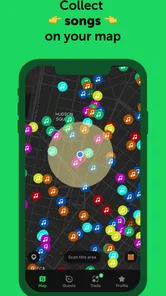
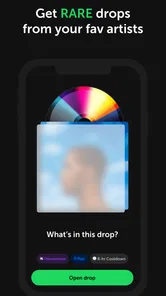
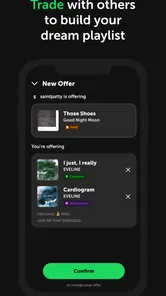
Analysis by Reviewed
I approached Soundmap as a music discovery app with a social collecting layer rather than as another streaming service. Its central idea is simple: music becomes something I can find, collect, and trade with other fans. That changes the way I use my phone. Instead of opening an app only when I already know what I want to hear, I have a reason to check in, browse, make choices, and think about which artists or songs are worth keeping.
That distinction matters. This is not the right pick if your main goal is uninterrupted listening, detailed audio controls, or a replacement for a conventional music library. It belongs more naturally in the Music & Audio category as a playful companion for people who enjoy music culture, discovery, and interaction with a community. The developer is SuperStar Labs, and the app is free to start, with optional purchases that range from $0.99 to $499.99 per item. I would treat those purchases carefully, because the collecting format can make optional spending feel more tempting than it first appears.
How Soundmap feels when a connection is part of the experience
The most important thing to understand is that the experience depends heavily on communication between the app, its current content, and its user community. Finding songs and interacting with the collecting side feels most natural when I have a stable connection. Content can load, choices can be made, and the social element feels alive instead of like a collection of empty screens waiting for a response.
That network dependence is not automatically a flaw. In fact, it is part of what gives the app its purpose. A collection that can be traded or compared with other fans needs current information and active interaction. The drawback is that the app is less satisfying in places where reception is weak, such as an underground station, a crowded venue, or a long journey through areas with inconsistent coverage.
I would not plan to use it as my only music app during a flight, a commute with unreliable reception, or any situation where I need guaranteed access. The safer approach is to think of it as an online collecting activity that fits around listening services, downloaded albums, and playlists. When the connection is good, it gives me something to do with my music interests; when the connection disappears, it should not be the tool I rely on for entertainment.
Why the online element improves discovery
Traditional streaming apps are excellent when I know the artist, album, or mood I want. They are built around playback, recommendations, and personal libraries. Soundmap approaches music from a different angle. The act of collecting encourages curiosity because a song is not only something to play; it can also become part of a personal set and a possible item for exchange.
That creates a useful change in behavior. I may notice an artist I would normally skip because the collecting context gives me a reason to investigate. A track can become the starting point for listening rather than the final result of a search. For someone who enjoys finding overlooked artists, comparing tastes, or building a collection around personal themes, this is more engaging than endlessly scrolling through generic recommendations.
More From Our News Desk

 Gmail
GmailGmail in a Busy Inbox: Who Benefits Most?
From first account to crowded workday, Gmail earns its place through dependable search and flexible sorting—but its best fit depends on how much inbox maintenance you can tolerate.

 Prime Video
Switching to Prime Video: What Changes in Your Viewing Routine
Prime Video can make a compelling second home for streaming, but switching means learning a different catalog, rental layer, and route from browsing to playback.

 Universal TV Remote Control
Universal TV Remote Control Works Best as a Reliable Backup
A phone remote earns its place through quick setup and reliable habits. Here is how to get more from Universal TV Remote Control—and where its limits show.

 Weather - By Xiaomi
Weather by Xiaomi Review: Clear at a Glance, Less Clear Up Close
Xiaomi’s weather app makes everyday forecasts quick to scan, but its calm surface can leave useful details and recovery paths harder to find than they should be.

 X
XX Under Pressure: Can It Recover When Posting Goes Wrong?
A resilience-focused review of X, examining setup, mistaken posts, interruptions, weak connections, and the gaps that matter when recovery needs to be dependable.

 Clash of Clans
Clash of Clans Is Won Between the Battles
Its raids are quick; its community is a long-term project of coordination, teaching, rivalry, and shared responsibility—with all the friction that entails.
Latest News



The trade-off is that the collecting layer can distract from the music itself. I sometimes find myself thinking about what is rare, desirable, or tradable instead of asking whether I actually enjoy the song. My advice is to use the collection as a prompt for listening, not as a substitute for taste. If an item catches your attention, play the artist elsewhere or spend time with the music before deciding whether it deserves a place in your collection.
Using it during ordinary mobile moments
The app makes the most sense in short, repeatable moments: while waiting for a friend, taking a break, riding public transport, or browsing music after discovering a new artist. These are situations where I have a few minutes to explore but do not necessarily want to commit to a full album or a long game session.
A realistic routine would be checking it after arriving at a café, looking through available discoveries, and saving the most interesting results for later listening. On the way home, I could review what I collected and decide which pieces are worth trading. That two-step habit is more useful than opening the app randomly and expecting instant value. The first visit is for discovery; the second is for sorting and making decisions.
Short sessions also reduce the frustration caused by a poor connection. If loading slows down, I can leave rather than repeatedly refreshing. I would avoid opening it when I am already rushing, because a network-dependent app can turn a quick check into a sequence of waiting screens. It rewards relaxed attention more than hurried use.
Battery and mobile data are also practical considerations, even without treating the app as a heavy streaming tool. I prefer using it on a reliable Wi-Fi connection when I am exploring for a longer period, especially if I am browsing repeatedly or moving through several sections. On cellular data, I keep sessions focused: check what is available, make a decision, and close the app instead of leaving it open in the background without a clear reason.
What happens when the connection fails
Connectivity problems are most noticeable when an action depends on a current response. A page may take longer to appear, a discovery may need to be checked again, or a trade-related decision may not feel complete until the app confirms it. The safest habit is to avoid tapping repeatedly when the interface seems stuck. Repeated attempts can make it harder to tell which action succeeded and which one did not.
When something does not load, I first check whether other apps are also struggling. If the problem is local to the connection, moving to a stronger signal or switching between Wi-Fi and mobile data is more sensible than immediately assuming the collection has been lost. I then reopen the relevant screen and verify the result before trying again. This small pause is especially important when an action affects something I want to keep.
I also recommend making important decisions while the app is responding normally. If I am comparing items for a trade, I do it before entering a poor-signal area rather than starting the process underground or inside a crowded building. The app is more enjoyable when I treat a stable connection as part of the right setup, not as an afterthought.
There is a psychological side to this. Collecting apps encourage quick reactions, and network delays can make me feel that I need to act immediately before an opportunity disappears. I try not to let that pressure control spending or trading choices. If the screen is slow, that is a good reason to wait, not a reason to make a rushed purchase or accept an unclear exchange.
Keeping mobile data use under control
My practical workflow is simple. I explore on Wi-Fi when possible, keep mobile sessions short, and avoid repeatedly refreshing a screen that has not loaded. I also separate discovery from listening: I use Soundmap to find and organize music interests, then use the listening tools I already trust for longer playback. That division keeps the app focused and avoids treating it like a full streaming replacement.
It is worth checking your device’s normal data-usage settings if you plan to use it frequently away from Wi-Fi. I would also avoid combining a long browsing session with other data-heavy activities, such as video playback or large downloads, on the same mobile connection. The point is not to make the app feel restrictive; it is to prevent small, repeated sessions from becoming an unexpected part of your monthly usage.
Notifications deserve the same measured approach. A collecting community can be more engaging when I know something needs attention, but too many interruptions can turn a pleasant hobby into a constant obligation. I prefer allowing only the alerts that help me return intentionally, rather than letting every possible update pull me back to the screen. That makes the app feel like a music pastime instead of a task list.
Collecting, trading, and the question of value
The trade system is the feature that gives the app its strongest identity. Collecting alone can become repetitive, but trading adds judgment. I have to decide whether an item is personally meaningful, useful for completing a theme, or better exchanged for something that fits my taste more closely.
My best advice is to define your own collecting rules before the catalog becomes large. You might focus on favorite artists, songs connected to particular memories, or discoveries from genres you want to explore. Without a rule, it is easy to keep everything that looks interesting and then struggle to understand what your collection is actually for.
Trading also works better when I separate emotional value from exchange value. A song I love may not be the most attractive item to another person, and an item that seems desirable in the community may mean little to me. That is not a problem; it is the reason personal priorities matter. I would rather keep a modest collection that reflects my listening habits than chase every popular item and lose the connection that made collecting enjoyable.
The optional purchase range makes restraint important. The app is free, which makes it easy to try without committing money at the beginning, but the presence of high-priced individual purchases means I would not recommend treating it like a harmless impulse-buy environment. Set a personal limit before spending, and never use a trade or purchase to compensate for frustration caused by a slow connection or an unlucky discovery.
Who will enjoy it, and who should choose something else?
I think Soundmap is a strong fit for music fans who enjoy discovery with a game-like sense of progress. It is especially appealing if you like comparing tastes, organizing collections, and having a reason to revisit artists you might otherwise overlook. People who already use a streaming service but want a more interactive way to explore music may find it adds a fresh layer without replacing their existing listening habits.
It is less suitable for someone who wants a straightforward player with a large library, dependable playback, equalizer controls, or a carefully managed offline listening routine. A conventional streaming service is better for building playlists and listening continuously. A local music player is better when network access is unavailable. A social platform focused on artist discussion may also be a better choice if conversation matters more to you than collecting and trading.
I would also be cautious if you dislike systems that encourage completion, comparison, or repeated check-ins. The collecting loop can be motivating, but it can also make music feel like a checklist. If you prefer discovering songs at your own pace without thinking about ownership or exchange, the app may add pressure rather than enjoyment.
Device fit and everyday expectations
The app supports devices running Android 8.0 or later, so compatibility is broad enough for many users with older phones. It is still sensible to keep expectations realistic on an aging device, particularly when the connection is unstable and several screens need to load. A newer phone will not fix a weak signal, but it can make navigation feel less tiring during longer sessions.
The current version is 2.18.1, and the app carries a Teen content rating. That makes it more appropriate for older children and adults than for unsupervised young users, especially because the experience includes interaction with a wider fan community and optional purchases. Families should still discuss spending boundaries and online behavior rather than relying on the age label alone.
The public response is encouraging, with an average rating of 4.5 from around 102 thousand ratings and roughly 4.1 thousand written reviews. It has passed 500 thousand installs, which suggests that the concept has found a real audience without making it feel like an anonymous experiment. I do not read those figures as proof that everyone will enjoy it; they mainly support the impression that the collecting format has enough interest to sustain regular use.
My verdict on staying connected
After using it as a companion to normal listening, I see Soundmap as a distinctive way to turn music discovery into an active hobby. Its best moments come when I have a reliable connection, a few unhurried minutes, and a clear idea of what I want to explore or trade. The network is not merely a technical requirement around the edges; it shapes the pace, the social energy, and the usefulness of the experience.
The limitations are equally clear. It is not the app I would choose for guaranteed access during travel, long listening sessions, or careful offline organization. Connection problems require patience, and the purchase structure calls for firm personal boundaries. Those issues do not erase its appeal, but they do define the right way to use it.
My recommendation is to try it as an online music collecting companion, not as your main music player. Start free, explore on a dependable connection, keep mobile sessions deliberate, and build a collection around your own taste instead of chasing every tempting item. If that combination of discovery, trading, and community sounds more interesting than simply pressing play, this app offers a genuinely different relationship with music.
Soundmap - Find Your Songs Frequently Asked Questions
What kind of app is Soundmap - Find Your Songs?
Soundmap is a music-collecting app built around exploring and connecting with other music fans. Its central appeal is finding virtual song drops, building a collection, and trading with other players. If you enjoy discovering tracks and completing collections, its format may be engaging; it is less like a conventional music player and more like a location-based collecting game.
Who develops Soundmap, and how popular is it?
Soundmap is developed by SuperStar Labs. It has a 4.5 average rating from around 102,000 ratings, with roughly 4,100 reviews and over 500,000 installs. Those figures suggest a sizable community for an app focused on collecting and trading music, which matters because the social side of the experience depends on having other players to interact with.
Is Soundmap suitable for teenagers?
Soundmap is rated Teen, and its social trading features are worth considering before a younger user starts playing. Players can interact while arranging trades, so families may want to talk about safe online behavior and avoiding the sharing of personal information. The app’s core idea is music collecting, but its community features make privacy awareness relevant too.
Which devices can run Soundmap?
Soundmap is available for Android and iOS, with the Android version requiring Android 8.0 or later. Before downloading, check that your device meets the operating system requirement and has enough space for an app that uses maps and an internet connection. Keeping the operating system updated can also help with compatibility and a smoother experience.
What is Soundmap - Find Your Songs, and how does it work?
Soundmap is a location-based music collecting game that turns walking around your neighborhood into a search for virtual song drops. After creating an account, you explore the map and collect songs that appear near you. You can organize your collection, trade duplicates with other players, complete artist sets, and discover music while moving through real-world locations.
Pros
- Turns music discovery into an engaging location-based collecting game.
- Supports trading songs with other players to complete your collection.
- Frequent drops and challenges give regular players reasons to return.
- Simple interface makes browsing
- collecting
- and trading easy to understand.
- Can introduce you to artists and tracks outside your usual listening habits.
Cons
- Some valuable drops may depend heavily on your location and travel.
- Progress can feel slow without frequent walking or visiting new areas.
- Trading and collecting may become repetitive after the initial excitement.
- Battery and location usage can increase during longer playing sessions.
- Some features and rewards may encourage optional in-app purchases.











