

SoundCloud: The Music You Love
- 385.97K
- 4.7
- Installs
- 100.00M
- Price
- Free

Screenshots


Analysis by Reviewed
My first impression of SoundCloud is that it works best as a place to follow musical curiosity rather than simply press play on a familiar collection. I can browse across independent releases, mixes and DJ sets, then follow a trail from one interesting track to another. If you usually reach for the same few playlists, this gives you a more open-ended way to find sounds outside your routine.
What to expect from the listening experience
SoundCloud is a free music and audio app from SoundCloud, with a 4.7 average from around 7.4 million ratings and over 100 million installs. It is rated Teen, and in-app purchases range from $5.99 to $114 per item. Those purchases matter if you are considering paid options, so check what is offered in the app before deciding whether you need anything beyond the free experience.
The main difference I notice compared with more tightly curated streaming services is the mix of material: alongside familiar tracks, there is a strong focus on uploads, remixes and DJ mixes. That variety is useful when I want to explore a scene or hear a longer set, but it can make discovery feel less predictable than choosing a polished editorial playlist. SoundCloud’s roots go back to 2010, and the app’s appeal still comes from that sense of browsing music made and shared by a wide range of creators.
Getting started without overthinking it
When you first open the app, I’d keep setup simple: look for music you already enjoy, then follow a few artists or creators whose uploads you want to keep up with. From there, use listening as a way to refine what you search for. A useful first session is to play one track you know, check the related suggestions, and save or follow only the discoveries you genuinely want to revisit. That small routine gives the app clearer signals than tapping through dozens of unrelated tracks.
If you are wondering whether you need to be deeply involved in music culture to enjoy it, I don’t think so. Casual listeners can browse and play, while dedicated fans can spend more time exploring creators and following releases. The best first success is finding one unexpected track that earns a place in your regular rotation; you do not have to build a huge library on day one.
Finding music that fits your day
For a realistic everyday example, I might open SoundCloud during a walk, search for a mood or style I’m curious about, and let a promising mix carry the session while I’m away from a screen. Before a commute with unreliable reception, I’d prepare anything I expect to need offline while connected. Treat offline listening as something to plan, rather than assuming every track will be ready automatically.
Discovering New Tunes
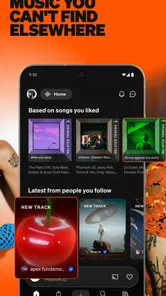
One of the standout features of SoundCloud: Play Music & Songs is its ability to introduce users to a world of new music. The app isn’t limited to just the mainstream hits; it’s a treasure trove of undiscovered gems. You’ll find everything from indie artists who upload their latest tracks to DJs spinning fresh remixes. It’s like having a backstage pass to the music industry, where you can uncover potential chart-toppers before anyone else.
More From Our News Desk

 Gmail
GmailGmail in a Busy Inbox: Who Benefits Most?
From first account to crowded workday, Gmail earns its place through dependable search and flexible sorting—but its best fit depends on how much inbox maintenance you can tolerate.

 Prime Video
Switching to Prime Video: What Changes in Your Viewing Routine
Prime Video can make a compelling second home for streaming, but switching means learning a different catalog, rental layer, and route from browsing to playback.

 Universal TV Remote Control
Universal TV Remote Control Works Best as a Reliable Backup
A phone remote earns its place through quick setup and reliable habits. Here is how to get more from Universal TV Remote Control—and where its limits show.

 Weather - By Xiaomi
Weather by Xiaomi Review: Clear at a Glance, Less Clear Up Close
Xiaomi’s weather app makes everyday forecasts quick to scan, but its calm surface can leave useful details and recovery paths harder to find than they should be.

 X
XX Under Pressure: Can It Recover When Posting Goes Wrong?
A resilience-focused review of X, examining setup, mistaken posts, interruptions, weak connections, and the gaps that matter when recovery needs to be dependable.

 Clash of Clans
Clash of Clans Is Won Between the Battles
Its raids are quick; its community is a long-term project of coordination, teaching, rivalry, and shared responsibility—with all the friction that entails.
Latest News



User-Friendly Interface
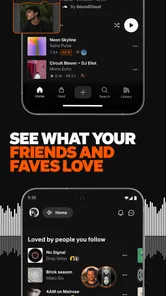
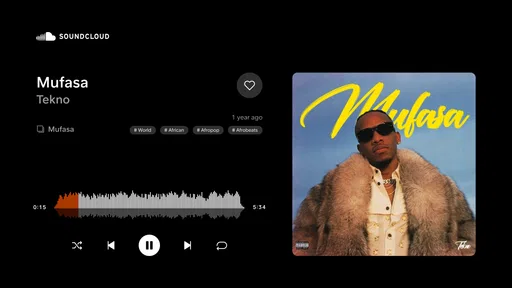
Now, let’s talk about navigating this musical playground. The app’s interface is slick and intuitive. Even if you’re not the most tech-savvy person, you’ll find it easy to dive into playlists, explore trending tracks, and follow your favorite artists. It’s all about making the music discovery process as seamless as possible. I found myself spending hours just browsing through different genres, and the app’s recommendations kept getting better with each session.
One tip that makes browsing more purposeful is to use a search phrase that narrows the sound you want, rather than a broad genre alone. A tag or a particular mood can lead me toward smaller creators, while a wider search is better when I simply want to see what is popular. I also avoid treating every recommendation as a verdict on my taste: if a result misses, I move on and follow the artists that do connect. That keeps my feed from becoming a record of one passing curiosity.
Engaging Community
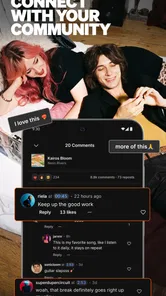
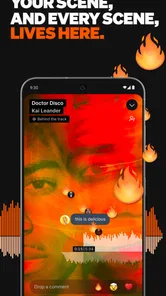
What sets SoundCloud apart is its vibrant community. The comment sections are bustling with activity, where fans and artists engage in lively discussions. It’s not just about listening to music; it’s about connecting over shared interests and discovering what’s resonating with others. Whether you’re leaving feedback on a track or just lurking to see what others are saying, it feels like being part of a global music conversation.
That social layer is most useful when I treat comments as context, not as a substitute for listening. A conversation can point me toward a creator’s other work or help me see how listeners respond to a release, but popular discussion does not guarantee that a track will suit my taste. If I want music purely as background, I can ignore the community side and keep browsing; if I’m curious about how a scene is developing, it adds something a conventional playlist often lacks.
Offline Listening
For those moments when you’re off the grid but still crave your favorite tunes, SoundCloud has you covered. With its offline listening feature, you can download tracks and playlists to enjoy anytime, anywhere. This is a game-changer for those long commutes or when you find yourself in a Wi-Fi dead zone. Trust me, having access to your favorite beats without worrying about data is a blessing.
I would choose SoundCloud over a conventional on-demand service when the goal is to discover uploads, remixes or DJ-led listening. If I mainly wanted a predictable collection of mainstream albums and familiar playlists, another service built around that experience could be a better fit. The trade-off is clear: exploration is a strength here, but it can take more active searching to land on exactly the right thing.
Who will get the most from it
I’d recommend trying it if you enjoy following artists beyond their best-known releases, exploring niche sounds, or listening to mixes that take you beyond single-track playback. It can also suit creators and fans who like seeing music circulate through a community. On the other hand, listeners who want a hands-off soundtrack with minimal browsing may prefer a service that centres its experience on ready-made playlists.
One common point of confusion is expecting every search to feel like a neatly organized catalogue. SoundCloud’s discovery can be uneven: a broad query may surface a jumble of styles or versions, so adding a creator name, mood or more specific phrase can save time. I also recommend checking the track and creator details before saving something, especially when several results have similar titles. That little pause helps me avoid losing a good find among near-matches.
In conclusion, if you’re someone who loves music and is always on the hunt for something new, SoundCloud: Play Music & Songs is a must-have app. It’s not just about listening; it’s about exploring, engaging, and immersing yourself in a vibrant musical universe. So, grab your headphones, dive in, and let the rhythm take over. You won’t be disappointed!
A sensible next step
My practical advice is to start with one sound you already like, follow a small handful of creators, and give the recommendations time to become useful rather than judging the app after a quick scroll. Keep offline listening in mind when planning a trip, and explore comments only when the community adds value to your session. That makes the first visit approachable while leaving room to discover what sets SoundCloud apart.
Making your first session count
If I were helping a friend try it for the first time, I’d suggest choosing a track they already know as an anchor, then branching out in just one direction. That might mean following a remix, checking another upload from its creator, or searching for a mix with a similar mood. Keeping the first session focused makes it easier to tell whether the app’s open-ended style suits you, instead of mistaking a random run of search results for the whole experience.
A useful habit is to separate “play now” finds from “follow for later” finds. I may enjoy a track once without wanting its creator in my ongoing feed, while another artist’s work may be worth keeping up with even if the first upload is not an instant favorite. This distinction helps keep discovery personal rather than turning every passing listen into a commitment.
Search with a listening goal
SoundCloud is at its best when I know what kind of exploration I want, even if I don’t know the exact track. Searching for a specific atmosphere, scene, or type of set gives me a clearer route than typing a broad word like “music.” If I’m after background listening, I look for a longer mix; if I’m trying to find a new artist, I use a style or sound as a starting point and pay attention to the creator behind a track.
This approach also makes it easier to judge search results. Similar titles can refer to different versions or uploads, so checking who posted a track and what kind of recording it is can prevent an avoidable mismatch. I wouldn’t assume that every result is an official or polished release; the range of material is precisely what makes the service interesting, but it also asks me to make a little more effort than a tightly managed catalogue would.
How it fits into a music routine
I see it as a useful second listening destination rather than a replacement everyone needs to make. A person can keep a familiar streaming service for albums and everyday playlists, then open SoundCloud when they want to follow a DJ, explore a niche style, or hear material that travels through creator communities. That split works especially well for someone who likes dependable background music but doesn’t want their discovery habits limited to familiar hits.
For a shared-house evening, for example, I might use a longer DJ set as a continuous soundtrack while friends talk, then save a few standout tracks to revisit later. That is different from choosing a sequence of individual songs for focused listening: the mix can carry the room, while the saved discoveries give me a route back to the artists afterward. It’s a practical way to turn casual listening into a more intentional exploration without stopping the conversation every few minutes.
Trade-offs to keep in mind
The open upload culture is both the point and the compromise. It can expose me to fresh versions and creators I would not encounter in a more standardized service, but not every search feels neatly organized, and the quality or completeness of what I find can vary. When I need a specific familiar recording quickly, a service with a more consistent album-first catalogue may save me time. When I want to wander, that same looseness becomes an advantage.
Offline listening is another area where a small amount of planning pays off. I would not wait until I’m already in a tunnel or away from a connection to decide what I want available. I pick likely listening ahead of time while online, and I avoid assuming that every item I can stream will be available offline in the same way. That simple check is especially useful before travel, when a long session depends on having the right material ready.
Choosing whether to continue
After a few visits, I’d judge the app by whether it is giving me worthwhile paths to follow, not by how quickly it reproduces the feel of another streaming service. If I have found creators I want to check again, or mixes that fit moments when a standard playlist feels stale, it is earning its place. If I repeatedly search for familiar albums and spend more time sorting through versions than listening, I’d use a more conventional service for that job instead.
The free starting point makes it easy to explore before deciding whether any paid option is relevant to your routine. I would first work out what I actually use: casual browsing, creator discovery, or planned offline sessions. Then I’d review the available in-app purchase choices directly and decide based on that need, rather than paying simply because the app offers extra options. For many first-time listeners, learning how discovery feels is the more important first step.
My final recommendation
SoundCloud is a strong choice when the pleasure is not only hearing a song but finding the next one through creators, remixes, mixes, and listener conversation. Its Teen rating is worth keeping in mind for younger users and families choosing what belongs on a device. I’d recommend it to curious listeners who enjoy taking a few turns away from the obvious path, while advising anyone who wants a perfectly predictable, low-effort catalogue to keep their usual alternative close.
Start small: search for one sound you already enjoy, follow only creators you genuinely want to hear from, and give yourself time to explore without expecting every result to be a keeper. That first meaningful discovery is a better measure of fit than a rushed tour through every corner of the app. If that kind of musical detour feels rewarding, SoundCloud can become a useful part of your listening routine; if it feels like work, a more curated service may suit you better.
SoundCloud: The Music You Love Frequently Asked Questions
What kind of content can I explore before deciding whether SoundCloud is for me?
SoundCloud is a music and audio app built around discovering songs, tracks, mixtapes, DJ sets, and fresh sounds. Its focus on creator uploads and a varied audio community can make browsing feel different from using a catalog centered mainly on familiar releases. If you enjoy exploring rather than searching only for specific popular songs, its approach may suit you.
Is SoundCloud a free app to download?
SoundCloud is free to install, so you can try its music and audio discovery experience without an upfront app price. The app also includes optional in-app purchases for listeners considering paid options. Before confirming a purchase, review the details displayed in your app store and decide whether the features offered make sense for how you plan to listen.
Does SoundCloud offer paid options as well as free access?
Yes. SoundCloud is free to install and also offers in-app purchases, with listed prices ranging from $5.99 to $114.00 per item. The free option can be a starting point for exploring music and audio, while paid choices may appeal to listeners looking for additional features. Check the purchase description in the app store before choosing an option.
What is SoundCloud’s age rating, and should families review it?
SoundCloud has a Teen content rating. That can help families decide whether the app is suitable, but it is still sensible to consider the kind of music and audio each teenager enjoys. SoundCloud brings together a broad creator community, and its social features allow interaction around content, so families may also want to discuss how young listeners use those features.
What should I check before installing SoundCloud on my phone?
SoundCloud is a music and audio app for exploring songs, mixtapes, DJ sets, and fresh sounds. Before installing, check that your phone has enough available space and that its operating system meets the requirements shown in your app store. It is free to install, so you can try its discovery-focused experience before deciding whether any paid options suit the way you listen.
Pros
- Large music library with diverse genres
- User-friendly interface and easy navigation
- Offline listening available for premium users
- Supports independent artists and creators
- Offers personalized playlists and recommendations
Cons
- Ads in the free version can be intrusive
- Offline features limited to premium users
- Some songs may not be available in all regions
- Audio quality varies across tracks
- Free version lacks advanced features











