

Sonivo:Music Player
- 36.00
- 4.6
- Installs
- 10.00K
- Price
- Free

Screenshots
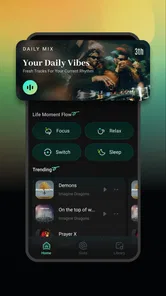
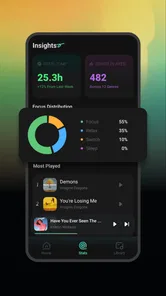

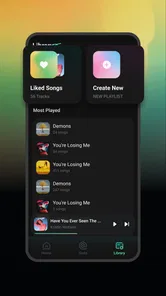
Analysis by Reviewed
Music apps often reveal their real value when a connection becomes unreliable. Sonivo: Music Player, from I Care, caught my attention because it is positioned as a free music and audio app with an emphasis on simple listening. Its store summary presents it as completely free and easy to use, while also mentioning offline music, so the central question for me was not whether it looks impressive on paper, but how useful that promise feels during ordinary mobile listening.
After spending time with it, I see Sonivo as a straightforward option for people who want less friction than they usually get from larger music platforms. It is not trying to be a complicated social network or an all-purpose entertainment hub. The appeal is narrower: open a player, find something to listen to, and avoid turning a short listening session into a hunt through menus. That simplicity can be welcome, although it also means the experience may feel limited to listeners who expect a large ecosystem around their music.
How Sonivo handles listening when connectivity changes
I find that the most useful way to judge Sonivo is to separate the moment I prepare music from the moment I need to hear it. That distinction shapes how I think about changing networks: a commute or a trip is easier when I have already checked what I can play, rather than trying to solve a connection problem on the move. It also leads to the practical question of which listening habits suit a focused player best.
The first impression: a small, focused music app
Sonivo’s short store description is simply “Sonivo,” which tells a reader almost nothing. The more useful clue is its placement in Music & Audio and its promise of free, easy listening. I approached it as a player rather than as a replacement for every music service on a phone. That distinction matters because a focused player should be judged by how quickly it gets me to audio, how understandable its controls are, and how gracefully it behaves when the network is not ideal.
The interface feels best suited to someone who does not want to learn a new music system. Instead of making discovery the entire point, the app’s practical value is in reducing the distance between opening the app and starting playback. For a casual listener, that can be more important than elaborate recommendations. I can imagine using it while getting ready in the morning, during a short walk, or when I want background audio without committing to a long browsing session.
That simplicity is also the first trade-off. People who choose a major streaming service for curated playlists, synchronized libraries, podcasts, artist pages, or broad discovery may find Sonivo too modest. I would not install it expecting the same depth as a mature subscription platform. I would install it when the priority is uncomplicated music access and a lighter overall experience.
What happens before the connection becomes a problem
Connectivity still matters even when an app is intended for offline listening. Any content that must be found, prepared, or made available before leaving a reliable network needs a sensible workflow. My advice is to treat Sonivo as something to prepare in advance rather than something to test for the first time on a train, in a basement, or halfway through a trip.
More From Our News Desk

 Gmail
GmailGmail in a Busy Inbox: Who Benefits Most?
From first account to crowded workday, Gmail earns its place through dependable search and flexible sorting—but its best fit depends on how much inbox maintenance you can tolerate.

 Prime Video
Switching to Prime Video: What Changes in Your Viewing Routine
Prime Video can make a compelling second home for streaming, but switching means learning a different catalog, rental layer, and route from browsing to playback.

 Universal TV Remote Control
Universal TV Remote Control Works Best as a Reliable Backup
A phone remote earns its place through quick setup and reliable habits. Here is how to get more from Universal TV Remote Control—and where its limits show.

 Weather - By Xiaomi
Weather by Xiaomi Review: Clear at a Glance, Less Clear Up Close
Xiaomi’s weather app makes everyday forecasts quick to scan, but its calm surface can leave useful details and recovery paths harder to find than they should be.

 X
XX Under Pressure: Can It Recover When Posting Goes Wrong?
A resilience-focused review of X, examining setup, mistaken posts, interruptions, weak connections, and the gaps that matter when recovery needs to be dependable.

 Clash of Clans
Clash of Clans Is Won Between the Battles
Its raids are quick; its community is a long-term project of coordination, teaching, rivalry, and shared responsibility—with all the friction that entails.
Latest News



A useful habit is to open the app while connected, identify what you expect to listen to, and make sure it is ready before closing the network connection. This is a small step, but it avoids the most common mistake with offline-oriented listening: assuming that the word “offline” means every part of the experience will work without preparation. In practice, browsing, discovering, and playing are separate moments, and the first two may depend more heavily on connectivity than the final listening session.
This is where Sonivo’s easy-to-use positioning helps. A complicated preparation process would undermine the whole idea. I would still recommend checking the player before going out, especially if the music is important for a commute or exercise session. A quick test with connectivity disabled can reveal whether the material you intended to use is actually available in the state you expect.
Everyday mobile situations where it makes sense
Sonivo is particularly appealing in places where network quality changes from minute to minute. Picture a morning commute with a patchy signal: music starts at home, continues through a poor-coverage section, and remains useful without requiring constant interaction. In that situation, a simple player can feel more dependable than an app that repeatedly tries to refresh recommendations, artwork, or a remote catalog.
It also fits short listening sessions. If I have ten minutes before an appointment, I do not want to spend half that time comparing playlists or waiting for a service to decide what to show me. A focused app gives me a better chance of pressing play quickly. The same is true for background listening while cooking or tidying, when I want controls that are easy to understand at a glance.
Travel is another practical case, but preparation is essential. On a flight, in a rural area, or in a hotel with unstable internet, the benefit comes from having listening material ready before departure. Sonivo can be a sensible companion for those moments because its identity is tied to free and offline-oriented music use, but I would not rely on any app blindly for a long journey. I would test the exact listening routine beforehand rather than discovering a limitation after takeoff.
For families, the Everyone content rating makes the app broadly approachable from an age-classification perspective. That does not automatically make every piece of audio suitable for every household, since the rating describes the app rather than personal listening preferences. Still, the uncomplicated presentation may be less intimidating for someone who wants a basic player instead of a feature-heavy service.
Recovering from interruptions and weak signals
The real test of a music app is not a perfect Wi-Fi connection; it is what happens after that connection disappears. A good offline routine should let me continue listening without repeatedly confronting connection warnings or an empty discovery screen. Sonivo’s appeal is strongest when it behaves like a player first and a network-aware app second.
When a connection drops, I would avoid repeatedly restarting the app or tapping refresh. That can turn a temporary network issue into unnecessary confusion. The more reliable approach is to return to the music already prepared for listening and use the basic playback controls. If the app opens to a screen that expects connectivity, waiting for the signal to return may be more productive than treating the failure as a missing song.
This is also why I prefer a short pre-trip test. Put the phone into a no-connection situation, open Sonivo, and try the intended playback path. If it works, I know the routine is dependable for that device and setup. If it does not, I have time to adjust rather than discovering the problem when the phone is already offline. That is not a glamorous feature, but it is the kind of practical check that makes the difference between a useful travel player and a frustrating one.
Users should also remember that interruptions can come from the phone itself, not just the network. Battery-saving behavior, accidental taps, headphones disconnecting, and another app taking audio focus can all affect playback. Sonivo’s simple approach makes it easier to inspect the obvious controls, but it cannot remove the general complications of mobile audio. I would keep the player updated and confirm that the current version, 1.0.8, is installed before depending on it for an important listening session.
Using less data without making listening inconvenient
For anyone watching mobile data, Sonivo’s offline focus is potentially its most useful quality. The sensible workflow is to do preparation on a trusted connection, then reserve mobile data for the moments when it is genuinely needed. This is especially helpful for listeners with limited plans or for people who spend much of the day moving between networks.
I would make this part of a weekly routine: prepare the music I expect to use, test one item away from Wi-Fi, and then avoid unnecessary browsing while mobile. The goal is not to micromanage every tap. It is to separate the data-heavy or connection-dependent part of the experience from the actual listening. That separation makes the app feel more predictable.
There is a subtle trade-off here. A data-conscious player may be less convenient for spontaneous discovery. If I suddenly want something completely new while away from a reliable connection, a large streaming service may be better equipped to search, recommend, and deliver it immediately. Sonivo makes more sense when I value control and preparation over endless choice.
I also like the possibility of using it as a secondary music tool rather than replacing every other audio app. A streaming service can remain my discovery source, while Sonivo handles the listening material I have already selected for commutes, travel, or low-connectivity places. That division of labor is more realistic than expecting one small app to cover every music habit.
Who will appreciate it, and who should look elsewhere
I would recommend Sonivo to someone who wants a free music app with a clear, uncomplicated purpose. It is a good match for listeners who dislike subscription pressure, need a practical option for offline situations, or simply prefer not to navigate a crowded entertainment platform. Its Everyone rating also makes it an approachable choice for a broad audience, provided each household makes its own decisions about the audio being played.
It is less suitable for someone who wants a deep catalog with constant new releases, sophisticated recommendations, collaborative playlists, or a strong social layer. Those users are likely to feel more comfortable with an established streaming service. Likewise, anyone who expects every listening action to work without preparation should slow down and test the offline workflow first. The app’s promise is useful, but it should not be interpreted as a guarantee that discovery and setup never need connectivity.
Compared with a standard phone music player, Sonivo’s advantage is its clearer identity around accessible, free listening. Compared with a major streaming platform, its advantage is simplicity and a potentially more data-conscious routine. The cost of that simplicity is breadth: fewer surrounding services and less reason to open the app when I am in the mood to explore rather than listen.
What the current app details suggest
Sonivo is free, developed by I Care, and has reached over ten thousand installs. Its average rating is 4.7 from around 119 ratings, with roughly 33 written reviews, which suggests that early users have generally responded positively. I treat those figures as encouraging rather than conclusive: a small, focused app can satisfy its audience without having the scale or polish of a long-established platform.
The app was released on April 8, 2026, and requires Android 8.0 or later. That minimum version keeps it relevant to many older Android phones, which is important for a lightweight music tool. If someone is using an older device, checking the operating system before planning a trip is still worthwhile. Compatibility is not just a technical detail when the whole point is dependable listening away from a strong connection.
The current release being 1.0.8 also gives me a realistic expectation: this is a young product, not a finished ecosystem with years of accumulated features. That can be positive because the app may remain uncluttered, but it also means I would judge it by its core listening workflow rather than expecting every advanced convenience found in larger alternatives.
My practical setup for a smoother experience
If I were helping a friend start with Sonivo, I would suggest a simple sequence. First, install it on a compatible Android phone and open it while connected. Next, prepare a small selection for the next day instead of trying to organize an entire library immediately. Then, disable connectivity briefly and confirm that the intended playback path works. Finally, leave the app in a familiar state so it is easy to resume later.
This approach has three advantages. It exposes connection requirements before they become urgent, keeps mobile data use under control, and prevents a long list of untested content from becoming a source of confusion. It also makes it easier to decide whether Sonivo really fits your habits. If you mainly want spontaneous search, you may quickly discover that a different service is more appropriate. If you mainly want prepared music that is easy to reach, the app has a much stronger case.
I would also keep expectations realistic about the word “free.” The app itself is free to use, which is a meaningful benefit, but free does not automatically mean unlimited catalog access, perfect availability, or the same discovery tools as a paid platform. The best way to appreciate Sonivo is to judge it as a practical music player with an offline-minded workflow, not as a direct clone of a premium streaming subscription.
My connectivity verdict
Sonivo: Music Player is most convincing when the listener plans ahead. Its strengths are its approachable purpose, free access, compatibility with older Android versions, and focus on listening that does not have to depend on a perfect live connection. I appreciate that it can serve a quiet, practical role: prepare music, leave the network behind, and avoid wasting mobile data on a simple listening session.
My reservation is equally clear. People who want constant discovery, broad platform features, or a richly connected music ecosystem will probably outgrow it quickly. The app is better for deliberate listening than for browsing without limits. Its offline-oriented identity is valuable, but users should verify their own preparation routine instead of assuming that every screen behaves identically without a network.
Overall, I would recommend Sonivo to a friend who wants a straightforward, free option for mobile music and is comfortable preparing content before going offline. I would not recommend it as the only music app for someone whose enjoyment comes from live search and endless recommendations. Its best feature is the sense of control it can bring to unreliable connectivity, provided the listener does the small amount of preparation that makes that control possible.
Sonivo:Music Player Frequently Asked Questions
Can I use Sonivo: Music Player to listen to songs from streaming services?
Sonivo is presented as a music player for listening to music saved on your device, rather than as a streaming service. If you want to play tracks from a streaming account, those songs may not be available through Sonivo. It is a better fit for people who already keep audio files on their phone and want a dedicated way to play them.
What Android version do I need to install Sonivo: Music Player?
Sonivo: Music Player requires Android 8.0 or later. Before downloading, check the Android version in your device settings, particularly if you use an older phone or tablet. The app is listed as free and has an Everyone content rating, so the main compatibility point to consider is whether your device meets the minimum operating-system requirement.
What is Sonivo: Music Player and what can I use it for?
Sonivo: Music Player is designed for listening to music stored on your device through a clean, dedicated audio player. It can be useful if you prefer managing local tracks instead of relying entirely on streaming services. Before downloading, remember that the available features may depend on your device, operating system, supported audio formats, and whether your music files are already saved locally.
Does Sonivo: Music Player work without an internet connection?
A local music player generally allows you to listen to downloaded or transferred songs without a constant internet connection, which is convenient for travel, limited data plans, or areas with poor reception. Sonivo is described as an offline music app, making local listening its central appeal. Any online functions, such as updates or external artwork retrieval, may still require connectivity. Test your library offline after installation to see how it works on your device.
Which audio files and devices are supported by Sonivo: Music Player?
Compatibility can vary between Android versions and individual devices. Sonivo may support common formats such as MP3, AAC, WAV, or similar files, but unusual codecs, protected music, cloud-only tracks, and files stored inside restricted folders may not appear. Check the app’s current store listing and permissions before downloading, especially if you use a large or specialized music collection.
Pros
- Clean
- intuitive interface makes browsing your music quick and easy.
- Supports offline playback
- so you can listen without using mobile data.
- Useful playlist tools help organize songs for different moods and activities.
- Lightweight design runs smoothly on many older Android devices.
- Custom playback controls offer a more personal listening experience.
Cons
- Some advanced features may require a premium upgrade or in-app purchase.
- Audio quality can depend heavily on the source files and device hardware.
- Limited streaming integration may disappoint users of major music services.
- Album art and song details may be missing for poorly tagged local files.
- Background playback can be affected by aggressive battery-saving settings.











