

SongTrail: Offline Music
- 2.00
- 4.5
- Installs
- 10.00K
- Price
- Free

Screenshots
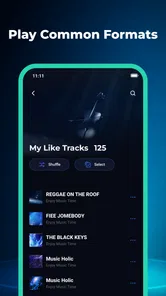
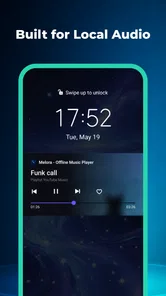
Analysis by Reviewed
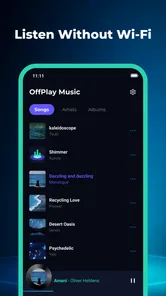
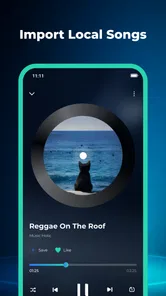
I like the idea behind SongTrail: Offline Music: a music player built around songs already saved on your device, rather than a service that expects you to stream. That makes it a natural fit for commutes, travel, or moments when you want to listen without depending on a connection. Its appeal is focused, not flashy: local playback, playlist organization, and controls available from the lock screen.
That focus is also the main question to consider before installing it. SongTrail can make a personal music library easier to use, but it is not a replacement for a streaming catalog or a tool for discovering new artists. I’d look at it as a practical companion for music you already have, especially if you want a simple way to group tracks and control playback while your phone stays in your pocket.
Before you rely on it away from home
The first question I would ask is whether the music I want to hear is actually on the phone. SongTrail is useful when the answer is yes; it does not turn an online playlist into a local collection by itself. Before a trip, I would check my intended selection while connected and confirm that the tracks I expect to play are available on the device. That small habit prevents the frustrating mismatch between “I have this in my music account” and “I have this file ready offline.”
It is also worth deciding how much preparation fits your routine. If you like selecting albums or making a short queue before heading out, the app’s local focus can feel pleasantly direct. If you want to start listening with no planning and let an online service choose what comes next, the extra step of preparing a local selection may feel like a chore. The choice depends less on technical skill than on whether you enjoy having a deliberate collection ready.
For a practical test, I would start with a small selection rather than reorganizing an entire library at once. Make one playlist for a familiar situation, use it for a few ordinary outings, and see whether the way you choose tracks feels quicker. This gives you a useful sense of fit without turning setup into a project.
Where a local music player earns its place
I find that a local music player earns its place when it makes a familiar listening habit easier to repeat, not when it tries to replace every music service on your phone. The useful test is whether having your own tracks arranged and ready saves you a decision at the moment you want to listen. From there, the key question is how to prepare a collection that stays convenient rather than becoming another chore.
A useful routine for music already on your phone
The most convincing use for SongTrail is a listening routine that should keep working when mobile data is inconvenient. Think of a train ride through patchy coverage, a flight, or a walk where you would rather not rely on streaming. If your songs are stored locally, the app’s offline-first purpose suits that situation. The key distinction is that the app plays local music; it does not, by that fact alone, supply a library of tracks.
More From Our News Desk

 Gmail
GmailGmail in a Busy Inbox: Who Benefits Most?
From first account to crowded workday, Gmail earns its place through dependable search and flexible sorting—but its best fit depends on how much inbox maintenance you can tolerate.

 Prime Video
Switching to Prime Video: What Changes in Your Viewing Routine
Prime Video can make a compelling second home for streaming, but switching means learning a different catalog, rental layer, and route from browsing to playback.

 Universal TV Remote Control
Universal TV Remote Control Works Best as a Reliable Backup
A phone remote earns its place through quick setup and reliable habits. Here is how to get more from Universal TV Remote Control—and where its limits show.

 Weather - By Xiaomi
Weather by Xiaomi Review: Clear at a Glance, Less Clear Up Close
Xiaomi’s weather app makes everyday forecasts quick to scan, but its calm surface can leave useful details and recovery paths harder to find than they should be.

 X
XX Under Pressure: Can It Recover When Posting Goes Wrong?
A resilience-focused review of X, examining setup, mistaken posts, interruptions, weak connections, and the gaps that matter when recovery needs to be dependable.

 Clash of Clans
Clash of Clans Is Won Between the Battles
Its raids are quick; its community is a long-term project of coordination, teaching, rivalry, and shared responsibility—with all the friction that entails.
Latest News



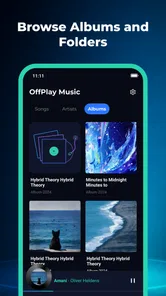
That can be a real advantage for anyone who has collected albums, purchased downloads, or moved music onto a phone over time. Instead of opening a streaming app and searching through a service’s catalog, you can work with the files you already keep. The trade-off is equally clear: your listening choices depend on what is present on the device. If a track is not in your local collection, SongTrail cannot make it appear.
In a day-to-day setting, I can see using it before leaving home: choose a set of familiar tracks, arrange them for the trip, and then use the lock screen to pause or move through playback without unlocking the phone. That is a modest workflow, but it addresses a real annoyance. Reaching for a screen while carrying a bag or walking is often more disruptive than the music itself.
Playlists are more than a convenience
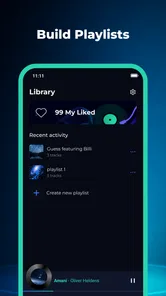
Playlist organization matters most when a library contains music for different parts of the day. A single general collection can become awkward when you want quieter songs for reading, upbeat tracks for a run, or a short selection for a commute. SongTrail’s playlist focus gives local files a more deliberate shape, rather than leaving you to browse the same broad collection every time.
One practical tip is to create playlists around situations, not just genres. A “short trip” list, for example, is easier to choose when you are heading out than a collection with a broad label such as “favorites.” This is not a special feature claim; it is a way to get more value from the organization the app is designed to support. A playlist is only helpful if its name and contents make the next listening choice quicker.
There is a trade-off here for people who enjoy constantly changing mixes. A manually organized local library asks you to decide what belongs in each playlist. That can feel satisfying if you like control, but it is less hands-off than streaming services that assemble recommendations or keep a rotating queue for you. SongTrail’s strength is giving your own collection a usable structure, not removing the work of curating it.
Another useful way to keep playlists manageable is to give each one a clear job and a realistic size. A short commute list should be quick to scan; a travel selection can be broader if it is meant to cover a longer stretch. Keeping those purposes separate makes it easier to choose without scrolling through one catch-all list, and it avoids the common trap of creating playlists that are so large they stop helping you decide.
Lock-screen control keeps listening low-friction
Lock-screen controls are a small detail with an outsized effect on everyday use. If you are cooking, walking, or commuting, being able to manage playback without opening the full app helps the phone stay out of the way. For this kind of player, that matters more than an elaborate interface: once a playlist is underway, the best interaction may be the one that lets you get back to what you were doing.
A helpful workflow is to settle the playlist before starting an activity, then rely on the lock-screen controls for basic listening adjustments. That reduces the temptation to repeatedly unlock the phone and browse. It also makes SongTrail a more plausible choice for background listening than a player that requires frequent trips back into its main screen.
Still, lock-screen controls should not be mistaken for a full music-management system. They make playback easier to handle, but they do not solve the separate question of how you acquire, transfer, or maintain your music collection. If your main frustration is getting tracks onto a device or keeping a large library meticulously tagged, that is a different problem from controlling what is already playing.
In a real morning routine, I would choose the playlist while getting ready, start playback before putting the phone away, and use the lock screen only when I need to pause or skip. That division of tasks is the point: playlist choice happens when I can focus, while the controls handle simple adjustments later. If you find yourself constantly reopening the app to rethink what to play, the convenience is less valuable and a recommendation-driven service may suit you better.
What the app is—and what it is not
SongTrail is a Music & Audio app from APPINNOVA TECHNOLOGY PTE. LTD. Its current version is 1.0.0, and its listed minimum operating-system requirement is 8.0. It is free, carries an Everyone age rating, and has a 4.5 average from 11 ratings, with 10K+ installs. Those figures offer a little context, but the small number of ratings means I would treat the average as an early signal rather than strong proof of long-term reliability.
The app’s straightforward scope is important when comparing it with familiar alternatives. A streaming service is usually the better choice if you want a broad catalog, new releases, recommendations, or easy listening across devices. A local player such as SongTrail makes more sense if you already have the music and want offline playback with playlists and convenient controls. These are different jobs, so the better option depends less on which app has more features and more on whether you want access to a service’s catalog or control over a collection you own or have saved.
It is also not the obvious pick for someone who expects music to follow them automatically between phones, computers, and speakers. A local-file approach puts the device and its stored tracks at the center of the experience. If your library lives primarily in a streaming account, or you switch devices often and do not want to manage local files, the usual streaming alternative will likely feel more natural.
Compared with a general-purpose audio player, SongTrail’s appeal is more specific: it puts the everyday listening routine—local tracks, playlists, and playback from the lock screen—at the center. That can be enough for someone who wants a straightforward companion rather than a tool to fine-tune every part of a music library. If you rely on detailed sorting or extensive collection maintenance, however, a player built around deeper library management may be a better match. I would choose based on the task I repeat most, not on the assumption that one player must replace every other music app.
Where the simple approach can feel limiting
The same narrow focus that makes SongTrail easy to understand can leave some listeners wanting more. Local playback depends on having music available on the device, and playlist organization depends on how much effort you are willing to put into arranging it. Anyone looking for an all-in-one music destination—with a large online catalog and built-in discovery—should not expect this app to fill that role.
There is also a practical distinction between “offline playback” and “no preparation required.” Listening away from a connection is useful only when the relevant tracks are already stored locally. I would make a habit of checking that the music I plan to hear is on the phone before leaving, rather than assuming an offline player will fetch anything later. That simple check matters most before a long journey or a day with limited connectivity.
For listeners with a very large or carefully maintained library, the decision may come down to how much organization they need. SongTrail’s stated strengths cover playlists and playback controls, but a person who depends on extensive library-management tools should compare it with a player specifically chosen for that kind of collection. The right test is not whether a simpler app can be made to work, but whether it saves time in the way you actually listen.
One further trade-off is that an offline collection is tied to the practical work of keeping the right tracks available on the device you carry. If you change phones or regularly listen from different devices, you may prefer a service that handles access through an account rather than relying on a collection stored locally. SongTrail makes most sense when that device-centered approach feels manageable, not when it creates another library to maintain.
Who I would recommend it to
I would recommend SongTrail to someone who keeps music on their phone, listens in places where a connection is unreliable, and wants a cleaner way to group tracks for different situations. It is especially appealing if you value quick playback control more than discovery features. For that listener, the app’s limited ambition is a benefit: it stays centered on the music already at hand.
I would be more cautious if you mainly stream, rarely keep audio files locally, or expect an app to recommend what to hear next. The same goes for people who want a single service to handle discovery, library access, and listening across multiple devices. SongTrail’s local emphasis may introduce extra preparation instead of reducing it for those users.
It may also suit someone who is gradually moving away from streaming for particular activities without abandoning it entirely. You could keep a small offline collection for commuting or travel while continuing to use another service for exploration. That split approach is often more realistic than expecting one app to be ideal for every listening situation.
For instance, someone who takes the same commute each week could keep a focused set of familiar tracks ready for that journey, then use a streaming app at home when they want to browse unfamiliar music. A traveler with albums already stored locally may value having those choices close at hand, while a listener who depends on newly released tracks will probably prefer streaming for the main library. The useful question is whether you can name a recurring situation where your own saved music is exactly what you want.
I would also skip it if the main goal is hands-free discovery: choosing a mood and expecting an app to continually suggest suitable new music. SongTrail’s described purpose is more grounded in playback and organization than in finding the next artist. That distinction is easy to overlook when comparing music apps, but it is the difference between managing a collection and asking a service to build one around you.
A focused choice for a prepared library
My verdict is that SongTrail: Offline Music is worth considering when your music is already on your device and your priorities are straightforward: offline listening, playlists, and lock-screen control. It offers a clear use case without pretending to be a streaming catalog. I find that honesty of purpose more useful than a long feature list aimed at a different kind of listener.
The main reservation is not that the idea is flawed, but that it asks users to bring their own organized collection. If you are happy to do that, SongTrail could make everyday listening feel more direct and dependable. If you want instant access to a vast catalog or automated discovery, choose a streaming app instead. For the right listener, the best reason to try it is simple: your music is already yours, and this app is designed to help you play it with less fuss.
SongTrail: Offline Music Frequently Asked Questions
What is SongTrail: Offline Music?
SongTrail: Offline Music is a music-listening app focused on playing audio stored on your device without needing an internet connection. It can be useful for enjoying music during travel, in areas with limited coverage, or when you want to avoid streaming data. The exact features, supported file types, and library tools can vary by app version and device, so check the store listing before downloading.
Can I listen to music offline with SongTrail?
The app’s offline focus means you can listen without a live internet connection once compatible music files are available on your device. It should not be assumed to download songs from streaming services or provide a built-in catalog unless the current app listing explicitly says so. Make sure your tracks are stored locally and that SongTrail has the media or file access permissions needed to find and play them.
Does SongTrail: Offline Music include free music or require a subscription?
Whether SongTrail is free, ad-supported, or offers paid upgrades depends on the version and the platform’s current listing. An offline player generally plays music you already have rather than supplying a licensed music library, so don’t expect every song to be available automatically. Review the app’s pricing, in-app purchases, and subscription details in Google Play or the App Store before installing.
What music file formats does SongTrail support?
Supported formats can differ between app releases and between Android and iOS, so confirm compatibility with the store description or the app’s help information. If a track does not appear or will not play, check its file type, location, and whether it is protected by digital rights management. Some services’ downloaded tracks are restricted to their own apps and cannot be opened in a separate player.
What permissions or internet access does SongTrail need?
To play music saved on your phone, SongTrail may need permission to access audio files or media storage. You can review and change those permissions in your device settings, although restricting access may prevent the app from building or updating its music library. Offline playback can work without a connection, but internet access may still be used for optional features, updates, advertising, or other services.
Pros
- Plays music without an internet connection once tracks are available offline.
- Useful for listening during travel or in areas with poor reception.
- Keeps music playback separate from streaming and social features.
- Can help reduce mobile data use while listening away from Wi-Fi.
- A straightforward option for listeners who want offline playback.
Cons
- Offline access may depend on how music is added or downloaded.
- Available tracks and formats may be limited by the app’s catalog.
- Downloaded music can take up substantial storage space.
- Some features may vary between Android and iOS versions.
- Offline playback does not guarantee access to every song you want.











