

SongAI - AI Music Generator
- 268.00
- 4.6
- Installs
- 50.00K
- Price
- Free

Screenshots

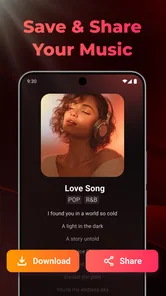
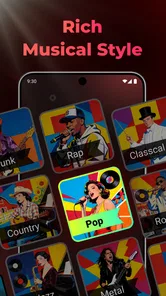
Analysis by Reviewed
I approached SongAI as a practical music-making tool rather than a replacement for a full recording studio. Its appeal is immediate: I can start with an idea, guide it toward a song, and explore a combination of voice, beats, and lyrics without first learning a complicated digital audio workstation. That makes it especially interesting for people who hear melodies in their head but do not play instruments, or for anyone who wants a quick creative sketch on a phone.
SongAI is a free Music & Audio app from StudioLLC, rated 4.6 from around 900 ratings and used by more than 50 thousand people. Those figures suggest a healthy level of interest, but they do not tell me whether every generated result will fit my taste. After using it, my view is more specific: it is best treated as an idea generator and a fast drafting companion. It can help me move from a vague concept to something audible, while the quality of the final result depends heavily on how clearly I describe what I want and how willing I am to refine the request.
How I build a song from a rough idea
My most reliable starting point is not a long paragraph. I begin with the emotional purpose of the track: a late-night song about missing someone, an upbeat chorus for a short video, or a calm instrumental background for reading. Then I add the musical direction in plain language. I might mention the mood, broad genre, vocal character, energy level, and the role I want the lyrics to play. This gives the generator a useful frame without burying the central idea.
The first attempt is rarely the version I would keep. I listen for three separate things: whether the arrangement matches the mood, whether the vocal delivery feels believable, and whether the lyrics actually support the subject. Separating those judgments matters. A result can have a catchy beat but weak words, or a promising lyric idea but a vocal style that does not suit it. I find SongAI more useful when I treat each generation as a draft to evaluate rather than as a finished song.
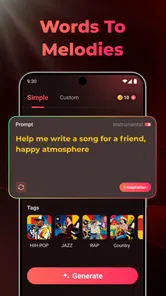
A realistic everyday use case is writing a small birthday song for a friend. I can describe the person, choose a warm tone, and ask for something simple instead of trying to compose a complete arrangement from scratch. The result may need editing or several attempts, but it gives me a musical starting point that is much more personal than a generic background track. The same workflow works for a short intro, a mood board for a larger project, or a playful demo to share privately.
For lyrics, I get better results when I provide a clear central image instead of a list of unrelated topics. “A quiet train ride after an argument” gives the song a scene to return to. I then look for repetition, awkward wording, and lines that sound written rather than sung. AI-generated lyrics often benefit from a human pass, especially if the song is meant to represent a real experience. I would not publish personal or professional work without checking every line myself.
The app is also useful when I am stuck before the recording stage. I can use it to test whether a concept feels more natural as a slow song, an energetic track, or something more restrained. That kind of comparison is one of its strongest creative uses. Instead of debating an idea in the abstract, I can hear a rough interpretation and decide what direction deserves more work.
More From Our News Desk

 Gmail
GmailGmail in a Busy Inbox: Who Benefits Most?
From first account to crowded workday, Gmail earns its place through dependable search and flexible sorting—but its best fit depends on how much inbox maintenance you can tolerate.

 Prime Video
Switching to Prime Video: What Changes in Your Viewing Routine
Prime Video can make a compelling second home for streaming, but switching means learning a different catalog, rental layer, and route from browsing to playback.

 Universal TV Remote Control
Universal TV Remote Control Works Best as a Reliable Backup
A phone remote earns its place through quick setup and reliable habits. Here is how to get more from Universal TV Remote Control—and where its limits show.

 Weather - By Xiaomi
Weather by Xiaomi Review: Clear at a Glance, Less Clear Up Close
Xiaomi’s weather app makes everyday forecasts quick to scan, but its calm surface can leave useful details and recovery paths harder to find than they should be.

 X
XX Under Pressure: Can It Recover When Posting Goes Wrong?
A resilience-focused review of X, examining setup, mistaken posts, interruptions, weak connections, and the gaps that matter when recovery needs to be dependable.

 Clash of Clans
Clash of Clans Is Won Between the Battles
Its raids are quick; its community is a long-term project of coordination, teaching, rivalry, and shared responsibility—with all the friction that entails.
Latest News



The right mindset for the first generation
I recommend keeping the first request focused. If I ask for too many changes at once, it becomes difficult to understand why the result missed the target. A better habit is to establish the main mood first, then adjust the vocal or lyrical direction on a later attempt. This creates a simple comparison process: I know which change produced the improvement.
Another useful habit is saving the wording that produced a promising result. Even when the app does not give me exactly what I want, the request can reveal which descriptions it handles well. I can reuse the successful structure for another idea while changing the subject. This is more efficient than starting from a completely blank prompt every time.
Settings and choices I check before judging a result
Because SongAI is designed for quick creation, I do not approach it with the same expectations as a desktop production suite. I first inspect the available creative choices and make sure I understand what I am asking the app to control. The important question is not simply “does this sound good?” but “which part of the result is responsible for the problem?” If the beat is right but the voice is wrong, I adjust the vocal direction rather than rewriting the entire concept.
I also pay attention to the balance between specificity and flexibility. A highly detailed request can produce a song that follows instructions but feels stiff. A very vague request may sound pleasant while losing the identity of the idea. My preferred middle ground is a clear mood, a recognizable subject, and a small number of musical cues. I leave room for the generator to interpret the arrangement instead of trying to dictate every second.
Lyrics deserve their own check. I read them as text before deciding whether the song works. This catches repeated phrases that feel accidental, lines that do not fit the intended point of view, and wording that may sound unnatural when sung. If the app lets me guide the lyrical direction, I use short, concrete concepts and avoid stuffing the request with abstract adjectives. “A bright morning after a difficult week” is more useful to me than a string of words such as “beautiful, emotional, cinematic, powerful.”
Voice choice is another area where expectations need to stay realistic. A generated vocal can communicate a mood quickly, but it may not have the personal character of a singer I know or the precise pronunciation I would want in a commercial recording. For demos, social experiments, and private sketches, that trade-off is acceptable. For a track where identity, diction, or emotional nuance is the main attraction, I would move the idea into a conventional recording workflow.
The app is free to install and use, which makes experimentation approachable. It also includes in-app purchases ranging from $4.99 to $129.99 per item. I would therefore decide how seriously I plan to use it before spending money. Casual users can begin with the free experience and learn whether the workflow suits them. Someone producing many drafts should examine what each purchase provides and whether it improves the part of the process that actually matters to them. I would not pay simply because a first generation is imperfect; iteration is part of working with this kind of tool.
SongAI is marked for Everyone, which fits its accessible presentation. Even so, I would still supervise younger users when the app is being used to create or share personal material. The age label makes the app approachable, but it does not replace sensible judgment about what lyrics to enter, what private details to include, or where a generated song is shared.
Repeatable habits that make creation faster
Experienced use is less about finding one magical prompt and more about building a repeatable routine. I keep a small set of starting templates: one for a reflective song, one for an energetic track, and one for a simple background piece. Each template contains only the elements I usually need, such as subject, mood, pace, vocal direction, and lyrical focus. I then replace the specific details instead of rebuilding the request from nothing.
I also separate exploration from selection. During exploration, I accept that some results will be odd and focus on discovering a direction. During selection, I compare only the strongest candidates and ask which one has the clearest hook or most usable atmosphere. Mixing those stages makes the process frustrating because I judge unfinished experiments as if they were final productions.
A particularly effective pattern is to change one variable at a time. If the first result has the right lyrics but feels too slow, I request a more energetic interpretation while preserving the topic. If the next version loses the emotional quality, I know the energy change caused the problem. This approach takes patience, but it gives me more control than repeatedly making broad, contradictory requests.
For short-form content, I think in terms of the moment where the music will be heard. A song intended for a short clip needs an immediately recognizable mood, while a track for private listening can take longer to develop. I describe that purpose when forming the idea, then judge the result by whether it supports the intended use. A technically attractive song may still be the wrong choice if it takes too long to establish its atmosphere.
I would also keep a written note of the concepts that worked. This is not a glamorous technique, but it prevents useful discoveries from disappearing in a stream of experiments. I record the subject, the general musical direction, and what I liked about the result. Over time, that becomes a personal reference library for SongAI rather than a collection of random attempts.
Where the app stops being a full production solution
The biggest limitation is control. SongAI can help me generate a musical interpretation, but it is not the same as manually arranging every instrument, editing every vocal phrase, and mixing each track with precision. If I need exact timing, detailed automation, multitrack editing, or a carefully engineered final master, a traditional digital audio workstation is the better choice.
There is also a creative trade-off in relying on generated material. The app can produce a useful starting point quickly, but the result may feel less distinctive than something built from a personal performance or a carefully selected sample palette. That does not make it worthless. It means I need to decide whether speed or authorship is the priority for a particular project.
Pronunciation and lyrical nuance are areas where I would listen closely. A phrase that looks fine on screen may sound awkward once performed. Names, unusual words, regional expressions, and deliberately conversational lines deserve extra attention. If the song depends on a very specific story, I would expect to rewrite parts of it rather than assume the first generated version understands the intended meaning.
Another trade-off concerns consistency. A successful idea may not be easy to reproduce exactly in a later attempt. That matters if I am trying to create several connected pieces with the same musical identity. For a single sketch, variation can be enjoyable. For a series, I would keep expectations modest and use the app mainly to explore directions before moving to a more controlled tool.
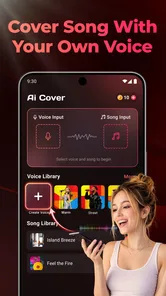
People who want to record their own voice, edit a detailed arrangement, or collaborate through a conventional studio workflow may find the app too limited. Likewise, anyone looking only for a large library of ready-made songs is looking for a different type of product. SongAI makes more sense when the attraction is generating and shaping an original idea, not merely pressing play.
Who will get the most from SongAI
I see three especially good audiences. Beginners can use it to understand how a lyrical idea changes when the mood or vocal direction changes. Content creators can use it for quick musical concepts when they need something tailored to a particular scene. More experienced musicians can use it as a sketchpad when they want to test an unusual direction before investing time in a full arrangement.
It is also a good fit for people who enjoy playful experimentation. The low barrier makes it easy to turn a joke, memory, travel scene, or fictional character into a song-shaped idea. That experience is valuable even when the result is not polished. It encourages creative decisions that might feel intimidating in a conventional studio program.
I would skip it if my main requirement is precise production control or a guaranteed professional vocal performance. I would also choose a conventional music editor if I already have recorded stems and want to mix them carefully. In those situations, the app may add an interesting experiment, but it will not replace the tools built for detailed editing.
My verdict after using the complete workflow
SongAI works best when I use it as a fast partner for musical exploration. Its combination of generated voice, beats, and lyrics can turn a loose idea into something I can hear and evaluate, which is often the hardest step for a beginner. The strongest results come from focused requests, one-variable revisions, and a willingness to edit the output rather than accept it unchanged.
Its free entry point makes it easy to try, while the optional purchases mean heavier users should think carefully about their workflow before committing to additional spending. The current version is 1.1.9, and it runs on operating systems from version 10 onward, so compatibility is worth checking before installation.
My final recommendation is straightforward: try it if you want to create song drafts quickly, discover new directions, or make a personal musical idea without setting up a full studio. Keep a traditional editor in your plans if you need detailed control, consistent repeatability, or a release-ready production. The key is to judge SongAI as an idea-to-draft tool, not as an automatic substitute for musical decisions. Used that way, it is approachable, enjoyable, and genuinely useful when inspiration arrives before technical skill.
SongAI - AI Music Generator Frequently Asked Questions
Is SongAI - AI Music Generator free to download, and are there in-app purchases?
SongAI is free to download, so you can try the app without paying an upfront price. It also offers in-app purchases, with options ranging from $4.99 to $129.99 per item. Check the purchase screen carefully before confirming anything, since access to certain creation features or usage limits may depend on the option you choose.
Is SongAI suitable for beginners, and what kind of ideas can I enter?
SongAI is intended to help turn ideas into music, making it approachable even if you do not have formal music-production experience. You can start with a description of a concept, mood, or preferred genre, then refine the prompt to guide the result. Clear, specific instructions can make it easier to get a draft that matches what you have in mind.
What is SongAI - AI Music Generator, and how does it work?
SongAI - AI Music Generator is designed to create original music from user-provided ideas, prompts, moods, or genre preferences. After entering a description, you can typically choose details such as musical style, atmosphere, tempo, or vocals, and the app generates a song based on those instructions. Results may vary, so more specific prompts generally produce more suitable compositions.
Can SongAI create complete songs with vocals and lyrics?
SongAI may support more than instrumental generation, including lyrics, vocal arrangements, or complete song concepts, depending on the version and features available on your device. Users should check the creation settings before starting a project, because vocal quality, language support, song length, and available styles can differ. AI-generated vocals may also sound less natural in complex passages.
Can I use music created with SongAI commercially?
Commercial usage depends on SongAI’s current licensing terms and the subscription or plan used to generate each track. Before publishing music on streaming platforms, videos, advertisements, or social media, review the app’s terms regarding ownership, attribution, copyright, and monetization. AI-generated content can also raise legal questions, particularly when prompts imitate identifiable artists or copyrighted songs.
Pros
- Creates original songs from simple text prompts
- Offers quick idea generation for lyrics and melodies
- Useful for experimenting with different musical styles
- Can help overcome writer’s block during composition
- Suitable for beginners without music production experience
Cons
- Generated vocals and lyrics may sound artificial or repetitive
- Results can vary significantly between similar prompts
- Advanced editing and arrangement controls may be limited
- Some features or exports may require a paid subscription
- Commercial usage rights should be checked before publishing tracks











