

SnapTok - TT Video Downloader
- 828.00
- 4.5
- Installs
- 10.00M
- Price
- Free

Screenshots
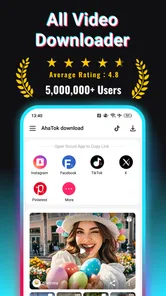



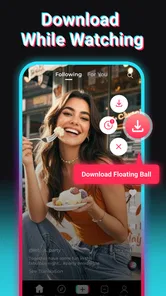

Analysis by Reviewed
When I save a short video for later, I want the process to be simple, but I also want to think about where the clip comes from and how I plan to use it. SnapTik - TT Video Downloader is aimed at people who want to keep TikTok videos on their device, and its appeal is easy to understand: copy a video link, paste it into the app, and save a local copy. I’d treat that convenience as a practical tool, not as a reason to download every clip I see. Saving someone else’s work also calls for care: keeping a video for personal viewing is different from reposting it or presenting it as your own.
What I consider before saving a clip
A downloader sits between a social post and a file on my phone, so I think about trust in practical terms. I pay attention to the choices the app actually presents, rather than assuming that a simple interface tells me everything about its data practices. If an Android or iOS permission prompt appears, I read it before deciding; I do not grant access automatically just because I want to save one video. That habit is useful with any app that handles media, and it keeps the decision in my hands.
I also separate convenience from authorization. A clean local copy can be useful for personal reference, but it does not make a creator’s work mine to publish elsewhere. If I want to share a clip, I would rather send the original post or ask the creator than circulate a downloaded file without context. This matters particularly for short videos, where a caption, sound, or surrounding discussion can change what the clip means.
Why SnapTik Stands Out
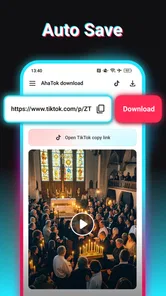
First off, SnapTik - TT Video Downloader is a breeze to use. You don't need to be a tech whiz to get the hang of it. Just copy the link of the TikTok video you want, paste it into the app, and voilà, the video is yours to keep. The app's interface is super user-friendly, making the whole process straightforward and quick. No need for complicated steps or a degree in computer science here!
That link-based workflow is useful when I want to save a recipe demonstration before shopping, or keep a tutorial handy for a moment when I might not have a reliable connection. It also gives me a simple check before I save: I can confirm I copied the intended video link rather than downloading something by accident. I would still review the result in my phone’s gallery before relying on it, especially if I need a particular clip for a class, trip, or personal reference.
A World of Features
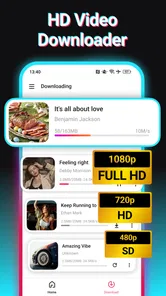
One of the standout features of this app is that it allows you to download videos in high quality. Whether you're looking to save a hilarious skit or a dance tutorial, the resolution won't disappoint. Additionally, SnapTik doesn't leave a watermark on the downloaded videos, which is a huge plus. You get clean, crisp videos ready to be shared or watched offline.
That clean presentation is handy for personal viewing, but it is not permission to remove a creator’s credit or repost their work without consent. I’d use a saved clip as a reference or for offline watching, and check the creator’s terms before sharing it elsewhere. A downloaded video can also be less useful than it first appears if its meaning depends on a caption, comments, or context from the original post; when that matters, I keep the source in mind rather than treating the file as a complete substitute.
More From Our News Desk

 Gmail
GmailGmail in a Busy Inbox: Who Benefits Most?
From first account to crowded workday, Gmail earns its place through dependable search and flexible sorting—but its best fit depends on how much inbox maintenance you can tolerate.

 Prime Video
Switching to Prime Video: What Changes in Your Viewing Routine
Prime Video can make a compelling second home for streaming, but switching means learning a different catalog, rental layer, and route from browsing to playback.

 Universal TV Remote Control
Universal TV Remote Control Works Best as a Reliable Backup
A phone remote earns its place through quick setup and reliable habits. Here is how to get more from Universal TV Remote Control—and where its limits show.

 Weather - By Xiaomi
Weather by Xiaomi Review: Clear at a Glance, Less Clear Up Close
Xiaomi’s weather app makes everyday forecasts quick to scan, but its calm surface can leave useful details and recovery paths harder to find than they should be.

 X
XX Under Pressure: Can It Recover When Posting Goes Wrong?
A resilience-focused review of X, examining setup, mistaken posts, interruptions, weak connections, and the gaps that matter when recovery needs to be dependable.

 Clash of Clans
Clash of Clans Is Won Between the Battles
Its raids are quick; its community is a long-term project of coordination, teaching, rivalry, and shared responsibility—with all the friction that entails.
Latest News



Another cool aspect is its speed. Some apps take ages to download a single video, but with SnapTik, the download is quick, letting you build your video library in no time. Plus, the app supports multiple downloads simultaneously, so you can save more and wait less.
For a sensible workflow, I’d queue only the clips I truly want and check available phone storage before starting a large batch. Short-form videos add up, and a crowded camera roll can make later searches frustrating. I find it more useful to save a few specific clips for a purpose than to collect dozens and forget why I wanted them. If a download does not work, checking that the copied link points to the video itself is a reasonable first step; I would avoid repeatedly retrying a link I cannot verify.
Getting more from a small download routine
One useful habit is to treat each saved clip as a temporary reference, not an archive by default. After watching it, I can decide whether it still has a reason to stay on the phone. For cooking or repair instructions, I might keep the file until I have completed the task, then remove it if I no longer need it. That simple review prevents a downloader from quietly turning into a second, poorly organized video library.
For multiple downloads, I would also avoid starting a batch while I am about to leave a stable connection or need the phone for something else. The app’s simultaneous-download option can save waiting time, but it does not remove the need to check that each result is the right clip and plays as expected. A quick check immediately after saving is more useful than discovering later, when offline, that I kept the wrong post or that the video does not serve the purpose I had in mind.
Ease of Access and Use
The app is available for both Android and iOS users, which means no one gets left out. It’s also free, which is music to anyone's ears. Who doesn't love a freebie, especially when it’s packed with so many useful features?
It is a video-saving utility rather than a full video editor, so I would not choose it when I need to trim clips, add subtitles, or organize a polished project. The usual alternative is to save videos within TikTok for convenient in-app viewing, where available; that is better if I want to stay close to the original post, while a downloader is more useful when I specifically need a file on my device. For editing or dependable project organization, a dedicated editor and a deliberate file-management routine are better fits.
One thing I particularly love about SnapTik is its no-login policy. That's right, no need to create yet another account or remember another password. Just download the app and start saving those videos. It's as simple as it sounds.
Not needing an account is a welcome reduction in friction, but I would not take it as proof that an app collects no information or needs no permissions. I make the same careful choice I would with any downloader: read the permission prompts when they appear, allow only what seems necessary for the task, and reconsider if a request does not make sense. The app is free, with optional in-app purchases listed from $0.99 to $19.99 per item, so I would check any purchase screen before confirming rather than assume every option is included at no cost.
Practical fit and everyday trade-offs
I see the strongest fit for someone who already knows why they need a local video file: a student keeping a brief reference for personal study, a home cook consulting a technique in a kitchen with unreliable reception, or a traveler saving a few useful demonstrations before going offline. In each case, the value is not collecting content for its own sake. It is having a particular clip available at the moment it is useful.
There are also clear reasons to skip this kind of tool. If I only want to revisit posts while browsing TikTok, an in-app save is usually less work and preserves the connection to the original creator and discussion. If I need to edit, add narration, or build a sequence from several clips, SnapTik is not a substitute for an editor. And if I do not want to manage files or think about storage, a local downloader may create more housekeeping than convenience.
Compared with the usual alternatives, the key distinction is where the video lives and what I can do with it. A platform bookmark keeps viewing tied to the social app, while a downloaded file is easier to find outside that feed and can be watched offline. The latter also asks me to take more responsibility: I should check what I saved, keep the original source in mind, and avoid treating a watermark-free result as permission to redistribute. That trade-off is more important than download speed for anyone saving another person’s work.
One question I would ask before relying on any downloader is what happens when a link does not produce the expected result. My first move would be to return to the post, copy its video link again, and test one clip rather than launching a large batch. If it still fails, I would use the platform’s own viewing or saving option instead of repeatedly trying variations. This is a cautious, low-effort way to avoid wasting time and to keep the app’s role limited to the cases where it works for me.
Trust, choices, and fit
SnapTik is developed by Video Downloader & Video Saver. It is a video player and editing-category app with a 4.4 average from around 51,000 ratings, and it has been installed over 10 million times. Those figures suggest that many people have tried it, but popularity alone does not settle whether its approach suits me. It is free to download, rated for Everyone, and its current version is 3.4.2; it requires Android 8.0 or later. I’d check that my device meets the requirement and review the app’s current prompts and choices before using it.
The practical question is less whether a downloader is popular and more whether its trade-offs match my habits. I like that this routine does not require an account, and I would still make decisions based on the prompts I see on my own device. I would not infer privacy guarantees from the absence of a sign-in step. For a data-sensitive moment, such as saving a clip that I do not want to keep permanently, I would download only what I need, check the file, and remove it when the purpose has passed.
For an everyday example, imagine I’m planning a weekend meal and find a quick cooking clip while scrolling. I can copy its link, save the video, then check that the file plays and keep it for reference in the kitchen. That is a focused use case: one clip, a clear reason, and no need to rely on a saved file as a replacement for the creator’s page. Someone who mainly wants to watch videos inside TikTok, avoid managing files, or edit footage should probably stick with the platform’s built-in options or choose a tool designed for those jobs.
Final Thoughts
In a nutshell, if you're someone who loves TikTok and wants to keep a collection of your favorite videos without the hassle, SnapTik - TT Video Downloader is the app for you. It's fast, efficient, and incredibly easy to use. While it might seem like just another video downloader, its small perks like no watermarks and high-speed downloads make it stand out from the rest.
For me, the strongest reason to try it is the direct link-to-file routine, especially when I have a specific clip I want to revisit offline. The trade-off is that a saved video needs a little more personal organization and care than simply bookmarking a post. Keep your downloads selective, respect the people who made the videos, and pay attention to permission and purchase prompts. With those habits, SnapTik can be a convenient companion; without a real need for local copies, the in-app viewing option may be the simpler choice.
So, go ahead, give SnapTik a try, and never miss out on saving those viral TikTok moments ever again. Happy downloading!
SnapTok - TT Video Downloader Frequently Asked Questions
Does SnapTik work on iPhones and Android phones?
SnapTik is listed as an Android app, and it requires Android 8.0 or later. If you use an iPhone, check the relevant app store for availability before trying to download it; an Android installation file is not suitable for iOS. On a compatible Android device, review the app’s requested permissions during setup and make sure you are comfortable granting them.
Will SnapTik preserve the video’s quality when saving it?
SnapTik’s store summary describes it as a fast, HD social media video saver, suggesting that high-definition video saving is part of its intended use. The final quality may still depend on the source video and the available version of that content. After saving a clip, play it on your device to check that it meets your needs before sharing or keeping it.
Where do downloaded videos appear on my device?
SnapTik saves downloaded videos to your device, so you can watch them offline rather than returning to the original post each time. The precise folder or gallery behavior can depend on your device and its settings. After your first download, check your gallery or the device’s file manager; this also helps you confirm that the video finished saving successfully.
What should I check before installing SnapTik?
SnapTik is a free video player and editor app from Video Downloader & Video Saver. It is rated for Everyone and requires Android 8.0 or later. The app has a 4.4 average from around 51,000 ratings, and it offers in-app purchases ranging from $0.99 to $19.99 per item. Check that your device meets the system requirement before downloading.
What is SnapTik and how does it work?
SnapTik is an application designed to download TikTok videos without a watermark. Users simply need to copy the TikTok video link and paste it into SnapTik. The app then processes the video and saves it to your device, allowing offline viewing or sharing without the TikTok branding.
Pros
- Fast video downloads
- No watermark on videos
- Easy to use interface
- Supports multiple formats
- Free to use
Cons
- Contains ads
- Limited features without premium
- May need occasional updates
- In-app purchases required for some features
- Requires internet for downloading











