

Smart AudioBook Player
- 11.14K
- 4.9
- Installs
- 5.00M
- Price
- Free

Screenshots


Analysis by Reviewed
I approached Smart AudioBook Player as the kind of app that should make long-form listening feel calm rather than complicated. After using it for audiobooks, I found that its real value is not a flashy design or a large social ecosystem. It is the way it turns an audiobook into an organized listening routine, with controls that make sense when your hands are busy and your attention is somewhere else. For anyone who listens while commuting, walking, cooking, or settling down at night, that focus matters.
Smart AudioBook Player is a free music and audio app from Books Software, available for Everyone. It has been around since October 2, 2011, and its current audience is substantial: more than five million installs, with an average rating of 4.9 from roughly 199 thousand ratings. Those figures do not replace personal testing, but they do match my impression that this is a mature audiobook tool rather than a newly released experiment.
The short description calls it Smart AudioBook Player, but that label is more useful than it first appears. This is not trying to be a general streaming service, a podcast network, or a music discovery app. Its strongest role is helping you play and manage audiobook files you already have. That distinction shapes almost every recommendation I would make.
Building a dependable audiobook routine
I build a dependable audiobook routine by deciding in advance what I want each session to do: relax, make a commute feel shorter, or revisit an idea worth remembering. That small intention helps me choose the right book and playback pace instead of fiddling with controls once I have started. Next, I look at how a few simple setup checks can prevent avoidable interruptions.
Start with the library, not the player
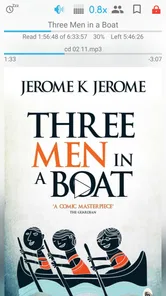
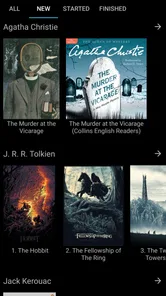
The best way to use this app is to treat it as a personal audiobook shelf. Instead of opening it only when you want to press play, I would first organize the books you plan to hear. A clean folder structure and sensible book grouping make the later controls much more useful, especially if you keep several unfinished titles at once.
That workflow is particularly helpful for books divided into many files. A badly arranged collection can make even a capable player feel awkward, while a tidy one lets you resume quickly and understand where you are in the story. I found that the app rewards a little preparation: once the audiobook is recognized as a coherent listening project, returning to it becomes almost automatic.
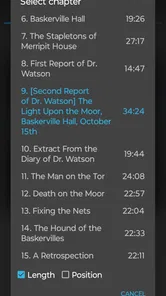
This is also where Smart AudioBook Player differs from the usual music player. Music apps are built around tracks, albums, artists, and playlists. Audiobooks need a different mental model. You care about chapters, progress through a long narrative, and remembering the exact place where you stopped. A normal audio player may technically play the same files, but it usually makes you reconstruct that structure yourself.
More From Our News Desk

 Gmail
GmailGmail in a Busy Inbox: Who Benefits Most?
From first account to crowded workday, Gmail earns its place through dependable search and flexible sorting—but its best fit depends on how much inbox maintenance you can tolerate.

 Prime Video
Switching to Prime Video: What Changes in Your Viewing Routine
Prime Video can make a compelling second home for streaming, but switching means learning a different catalog, rental layer, and route from browsing to playback.

 Universal TV Remote Control
Universal TV Remote Control Works Best as a Reliable Backup
A phone remote earns its place through quick setup and reliable habits. Here is how to get more from Universal TV Remote Control—and where its limits show.

 Weather - By Xiaomi
Weather by Xiaomi Review: Clear at a Glance, Less Clear Up Close
Xiaomi’s weather app makes everyday forecasts quick to scan, but its calm surface can leave useful details and recovery paths harder to find than they should be.

 X
XX Under Pressure: Can It Recover When Posting Goes Wrong?
A resilience-focused review of X, examining setup, mistaken posts, interruptions, weak connections, and the gaps that matter when recovery needs to be dependable.

 Clash of Clans
Clash of Clans Is Won Between the Battles
Its raids are quick; its community is a long-term project of coordination, teaching, rivalry, and shared responsibility—with all the friction that entails.
Latest News



Why progress handling matters more than visual polish
With an audiobook, losing your place is more frustrating than missing a decorative feature. I paid attention to how easily I could pause, leave the app, and return later without turning the next session into a search exercise. The player is designed around continuing a book, which makes it better suited to interrupted listening than a basic file player.
A realistic example is a weekday commute. I might listen for twenty minutes on the way to work, stop before entering the building, and continue later while walking home. The useful habit is to pause deliberately rather than close the app in a hurry. I also recommend making a quick mental note when you stop at a confusing scene or a chapter transition. The app handles playback, but your own stopping routine still determines how quickly you reconnect with the story.
For study material, biographies, and nonfiction, I would take a slightly different approach. I stop at the end of a useful idea, add a bookmark when the app provides that option for the listening workflow, and avoid assuming that continuous playback will be enough. Fiction often benefits from uninterrupted momentum; educational listening benefits from deliberate pauses and occasional review.
Where it fits beside streaming services
Smart AudioBook Player is not the obvious choice for someone who wants to browse a catalog, buy a title inside the same service, or switch between audiobook recommendations and music. A streaming platform is more convenient when discovery, cloud synchronization, and a ready-made library are your priorities.
This app makes more sense when you already have audiobook files and want control over playback. It can be a better companion for a personal collection because it is centered on listening rather than selling or recommending content. The trade-off is clear: you take more responsibility for obtaining, naming, and organizing your books.
I would also choose a dedicated audiobook player over a podcast app for long novels. Podcast apps are excellent at subscriptions and episodes, but an audiobook is not really a feed. It is one sustained work, often split into chapters, and the player needs to respect that continuity.
Settings worth checking before a long book
I would not begin a thirty-hour audiobook by pressing play and leaving every option untouched. The first useful checks are playback speed, sleep behavior, rewind and forward intervals, and any organization choices that affect how chapters appear. You do not need to change everything. The goal is to remove small annoyances before they become repeated interruptions.
Playback speed deserves a careful approach. Increasing it can make familiar nonfiction more efficient, but a fast setting may flatten character voices or make a complex argument harder to absorb. I prefer testing a modest change for several minutes, then returning to normal speed if dialogue starts to feel rushed. The right setting can vary between books, and sometimes between a narrator’s dialogue and explanatory passages.
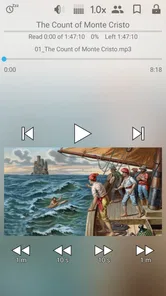
Short skip controls are especially valuable when attention drifts. A small rewind is usually better than dragging a progress bar through a long chapter. Larger jumps are useful when you are certain that you missed a whole exchange or want to move past an interruption. I recommend learning both actions instead of relying on one oversized jump for every situation.
Sleep settings are another practical detail. If you listen in bed, use a timer rather than trusting yourself to stop at the right moment. The best habit is to choose a conservative duration and accept that you may need to rewind a little the next evening. That is far less irritating than waking up to discover that the story continued for hours.
Make controls work for your surroundings
The app becomes more useful when the controls match the way you listen. At home, the screen is available, so browsing chapters and adjusting options is easy. Outdoors, your attention is divided, and the ideal action is usually pause, resume, or a quick rewind. In those moments, simple repeatable controls matter more than exploring the interface.
I suggest setting up your preferred behavior before leaving the house. Check the volume, confirm the selected book, and start from a clear chapter position. This sounds basic, but it prevents the common mistake of trying to navigate a long audiobook while walking or carrying bags.
If you listen through headphones or another playback device, keep the phone accessible enough to pause safely. I would not treat any player as a substitute for situational awareness. The app can make listening convenient, but it cannot decide when you should stop listening because traffic, conversation, or a work task needs your full attention.
Faster patterns for everyday listening
Experienced use is less about constantly changing settings and more about repeating a reliable sequence. My preferred pattern is simple: open the current book, confirm the saved position, listen at a speed suited to the material, and use a short rewind whenever concentration breaks. That sequence avoids unnecessary browsing and keeps the app in the background of the experience.
For a busy morning, I would prepare the book the night before. Leave it selected, choose a comfortable position, and decide whether a sleep timer or standard playback is appropriate. In the morning, the app becomes a one-action tool instead of another decision competing for attention.
For household chores, I use a different rhythm. I expect interruptions, so I favor easy pausing and brief rewinds over aggressive speed. If someone speaks to me, I stop immediately and rewind after the conversation rather than trying to remember the last sentence. This habit is more reliable than hoping the brain will reconstruct a missed paragraph.
For repeated listening, such as language practice or a favorite chapter, I would use the available repeat-oriented controls carefully. Repetition can be useful for pronunciation, dense explanations, or a passage that deserves closer attention. It is less helpful when enabled accidentally across an entire book, so I check the current playback behavior before leaving the phone unattended.
Bookmarks and memory aids
Audiobooks often contain moments you want to revisit, but remembering a timestamp is not a good long-term system. When I reach a useful quotation, an important argument, or a confusing plot detail, I prefer creating a bookmark if the current setup supports it. I give it a meaningful label rather than relying on a vague position alone.
This is one of the less obvious ways to get more from the app. A bookmark can turn passive listening into a lightweight reference system. For a novel, it might mark a character introduction. For nonfiction, it might identify a chapter worth replaying. The value appears later, when you want to return without scanning through the book from memory.
There is a trade-off: too many bookmarks become another form of clutter. I would keep only places that have a clear purpose. If every minute receives a marker, none of them helps you find the important passage.
Managing multiple books without losing focus
Some listeners keep one audiobook active until the end. Others move between fiction, professional reading, and shorter titles. Smart AudioBook Player can support either style, but switching frequently increases the need for organization. I recommend limiting the number of active books and giving each one a clear reason for being in rotation.
For example, I might keep one story for evening listening and one nonfiction title for daytime walks. That separation reduces the chance of choosing a demanding book when I only have enough attention for something lighter. It also makes progress feel more meaningful because each listening session has a defined purpose.
If your collection contains many unfinished books, spend time cleaning up the library view. Remove duplicates, use consistent names, and avoid treating every downloaded file as a separate book. The player can help you listen, but it cannot compensate for a collection that is confusing before playback begins.
Advanced limits you should understand
The app’s focused design is also its main limitation. It is excellent when your audiobook files are ready to play, but it is not a complete content ecosystem. If you want automatic discovery, a built-in store, or a single account that follows you across several services, another option may suit you better.
I would also be cautious about expecting every audiobook file to behave perfectly. File naming, chapter structure, and the way an audiobook was assembled can affect how comfortably it fits into a player. When something looks disorganized, the problem may be the source files rather than the playback controls. A little file cleanup can be necessary before the app feels polished.
Another limitation is that a dedicated player asks you to learn its habits. Streaming apps often hide complexity behind a large catalog and familiar media controls. Here, the reward comes after you understand how your library, bookmarks, speed, timers, and skip actions work together. Someone who wants instant simplicity may find that setup more effort than expected.
In-app purchases range from $0.99 to $4.99 per item, so the free starting point is accessible, while optional paid elements may matter depending on the features you choose. I would make that decision after using the basic workflow rather than paying immediately. The important question is whether the app has become part of your regular listening routine.
Who should use it, and who should skip it
I would recommend Smart AudioBook Player to people with a personal audiobook collection, listeners who regularly pause and resume across the day, and anyone frustrated by music players that treat chapters like ordinary tracks. It is particularly appealing if you care about sleep listening, controlled rewinding, bookmarks, and a library built around books rather than songs.
I would skip it if your main goal is finding new audiobooks inside the app, streaming from a subscription catalog, or keeping all media in one cloud-based service. It is also not the best match for someone who rarely listens to audiobooks and does not want to organize files or learn dedicated controls.
For families, the Everyone age rating makes the app broadly approachable, but the suitability of the listening material still depends on the audiobook itself. The player does not change the content of the books you choose. That distinction is worth remembering when sharing a device or preparing a library for younger listeners.
My mastery verdict after using the full workflow
My final opinion is that Smart AudioBook Player succeeds by taking audiobook listening seriously. It does not need to imitate a music service because its best features are built around continuity: returning to the right place, handling interruptions, adjusting the pace, and making long books manageable in small sessions.
The strongest results come from combining settings with habits. I would prepare the library, test speed before committing to it, learn the rewind and forward actions, use a timer at night, and keep bookmarks purposeful. None of those steps is difficult, but together they make the difference between a player you tolerate and one you trust.
The key strength is control over a personal audiobook routine, not access to a content catalog. If that is what you need, the app is easy to recommend, and its long presence since 2011 helps explain why it feels established. If you want discovery, cloud convenience, or a service that supplies the books as well as plays them, look elsewhere.
For me, the free entry point, mature audiobook focus, and high user reception make it a strong choice in the Music & Audio category. I would start with one book, organize it carefully, and use the first few listening sessions to tune the controls. Once that routine feels natural, the app largely disappears—which is exactly what I want from a tool designed to keep the story in the foreground.
Smart AudioBook Player is therefore best understood as a practical specialist from Books Software. It is not trying to be everything on your phone, and that narrow purpose is why it works. For listeners who already have audiobooks and want a dependable way to live with them, Smart AudioBook Player is one of the more convincing choices I have used.
Smart AudioBook Player Frequently Asked Questions
Can I move my audiobooks from another device to Smart AudioBook Player?
Smart AudioBook Player is intended for audio files stored on your device, so you can listen to audiobooks you have transferred there, provided they are in a supported format and are not restricted by DRM. The app works with your local collection rather than acting as a cloud library. Make sure the files are accessible on the device where you install the app.
Who develops Smart AudioBook Player, and what kind of app is it?
Smart AudioBook Player is an audiobook listening app from Books Software, in the Music & Audio category. Its purpose is to make local audiobook files easier to play and manage than they might be in a general-purpose music player. It is built around spoken content and features such as book organization, chapter navigation, and saved listening progress.
Can I use Smart AudioBook Player with audiobooks from a streaming service?
Smart AudioBook Player is designed for audiobook files stored on your device, rather than as a built-in streaming service. If you have an audio file that you can access locally, you can try adding it to your library. Files protected by digital rights management may not play, so check that you can use the audiobook as a regular file before relying on the app.
What playback controls make Smart AudioBook Player useful for long audiobooks?
The app is made for listening to spoken content over extended sessions, with features such as chapter support and the ability to return to your place in a book. Its audiobook-focused approach can be more convenient than using a general music player, particularly when you move between several titles. The exact controls available may depend on the version you install.
What is Smart AudioBook Player, and who is it designed for?
Smart AudioBook Player is an Android app created for listening to audiobooks stored on your device. It is especially useful for people who download DRM-free audiobook files and want more control than a basic music player provides. The app organizes books, remembers your position, supports chapters, and offers playback tools designed specifically for long-form spoken content.
Pros
- Playback speed controls help match different listening preferences.
- Supports bookmarks for saving important moments in long audiobooks.
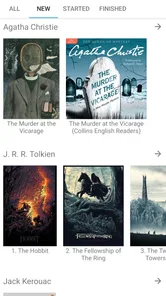
- Separate categories make it easier to organize a growing library.
- Sleep timer can stop playback automatically after a chosen period.
- Customizable widgets provide quick access to playback controls.]
Cons
- The free version has a limited trial period before requiring payment.
- Some advanced features may take time for new users to discover.
- It does not provide a built-in catalog for purchasing audiobooks.
- Large audiobook collections can require manual cover and metadata cleanup.
- Certain features may vary or be unavailable on iOS compared with Android.











