SiriusXM: Music, Sports & News
- 177.71K
- 4.5
- Installs
- 10.00M
- Price
- Free

Screenshots





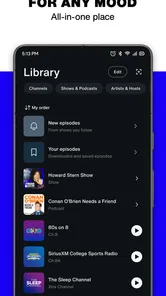

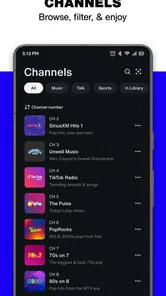
Analysis by Reviewed
I notice the difference between a music app and a radio-style listening service most when my day is already in motion. I don’t always want to choose an album, build a queue, or keep skipping until an algorithm gets the mood right. Sometimes I want a familiar voice, a sports discussion, or a station that gives me a place to start. SiriusXM: Music, Sports & News is built around that kind of listening, bringing music, sports radio, podcasts, and news into one app from SiriusXM.
Listening works best when the connection cooperates
The app’s broad mix is appealing, but the way I would use it depends on having a dependable internet connection. Streaming is convenient at home, in the car, or on a walk with a solid signal; it becomes less predictable when coverage drops. That matters more here than it does with a music library you have already stored on a device. I treat a stable connection as part of the listening setup, not a minor detail.
Network-dependent moments
Live radio and sports coverage make connectivity especially noticeable. If I tune in while a game or discussion is underway, a weak signal can interrupt the moment rather than simply delay a song I can restart. Before relying on a stream for a commute or an important stretch of a game, I’d check that my route usually has reception and start listening before I leave a strong Wi-Fi connection. That small habit gives me a chance to notice problems early instead of troubleshooting while moving.
On a home network, the app is an easy way to move between music and spoken programming without changing services. On mobile data, the same convenience comes with a practical trade-off: continuous listening uses a connection for as long as I keep a stream going. If I’m planning a long session away from Wi-Fi, I’d consider my data allowance and avoid assuming that a radio stream is as light as checking a few headlines.
Where it fits into a mobile day
I can see this being useful during a drive, a walk, or a stretch of routine work when looking at a screen is inconvenient. Spoken sports coverage and talk programming suit those moments particularly well because I can follow along without needing to watch. Music can fill the quieter parts of a day, while news and podcasts give me another option when I want something more focused than a playlist. The strongest use case is not constant browsing; it is having different kinds of audio ready for different activities.
For a realistic example, I might put on music while getting ready, switch to a sports discussion during a drive, then choose a podcast later when I have time to listen closely. That variety is a genuine advantage over opening a separate app for each format. At the same time, anyone who likes to carefully curate every track may prefer a conventional music service with a stronger emphasis on albums, personal libraries, and queue control. SiriusXM feels more like choosing a channel or program than assembling a perfect sequence song by song.
When the stream falters
If audio cuts out, I would first check whether the connection itself is the issue: move to a stronger signal, switch between Wi-Fi and mobile data if practical, or pause and try the stream again. Those are ordinary recovery steps rather than a guarantee that every interruption will disappear. For live listening, a brief connection problem can mean missing part of a conversation or play-by-play, so I would not depend on it as my only source for time-critical information.
More From Our News Desk

 Gmail
Gmail in a Busy Inbox: Who Benefits Most?
From first account to crowded workday, Gmail earns its place through dependable search and flexible sorting—but its best fit depends on how much inbox maintenance you can tolerate.

 Prime Video
Switching to Prime Video: What Changes in Your Viewing Routine
Prime Video can make a compelling second home for streaming, but switching means learning a different catalog, rental layer, and route from browsing to playback.

 Universal TV Remote Control
 Works Best as a Reliable Backup
A phone remote earns its place through quick setup and reliable habits. Here is how to get more from Universal TV Remote Control—and where its limits show.

 Weather - By Xiaomi
Weather by Xiaomi Review: Clear at a Glance, Less Clear Up Close
Xiaomi’s weather app makes everyday forecasts quick to scan, but its calm surface can leave useful details and recovery paths harder to find than they should be.

 X
X Under Pressure: Can It Recover When Posting Goes Wrong?
A resilience-focused review of X, examining setup, mistaken posts, interruptions, weak connections, and the gaps that matter when recovery needs to be dependable.

 Clash of Clans
 Is Won Between the Battles
Its raids are quick; its community is a long-term project of coordination, teaching, rivalry, and shared responsibility—with all the friction that entails.
Latest News



It also helps to choose what to listen to before starting an activity where phone handling is awkward. Browsing while driving or crossing a busy street is a poor fit for any audio app, and a weak signal is a frustrating moment to be searching through sections at the same time. I’d make the selection while stationary, then leave the phone alone as much as possible. This is a simple workflow, but it makes the service feel more reliable in the situations where hands-free listening matters.
Keeping mobile data in mind
The app is free to install, but access to its broader listening experience involves a subscription, and in-app purchase options are listed across a range of prices. I would check the plan and purchase details shown in the app before committing, because the right choice depends on how often I would use its channels and programs. Occasional listeners may find it hard to justify a recurring expense if they only want a few songs now and then; someone who regularly listens to sports, music, and talk may get more value from having those formats together.
For data-conscious use, my practical approach would be to reserve longer listening sessions for Wi-Fi when possible and be selective about streaming on the go. If I’m unsure how much mobile data a session will use, I would check my device’s data-use settings after listening rather than guess. I would also avoid leaving audio running after I’m finished, especially when away from Wi-Fi. These habits won’t change the service itself, but they make the connection cost easier to manage.
Who will get the most from it
I’d recommend trying it if you enjoy radio-style discovery, want sports talk alongside music, or regularly listen to podcasts and news during tasks that keep your eyes busy. It is particularly handy for people who like switching between formats without opening several apps. SiriusXM is less compelling if your main priority is owning a carefully organized offline music collection, building detailed playlists, or listening in places where internet access is unreliable. In those cases, a service centered on downloaded albums or locally stored audio is likely a better match.
The app is in the music and audio category, is rated Teen, and is free to download. Its average rating is 4.5 from around 1.1 million ratings, with over 10 million installs. Those figures suggest a well-established audience, but they don’t tell me whether its programming fits my tastes; that still comes down to sampling the kinds of shows and music I actually enjoy. The current version is 7.22.0, and the app supports Android 7.0 or later.
How it compares with familiar alternatives
Compared with a standard music-streaming app, SiriusXM puts more emphasis on hosted radio and spoken programming than on building a personal music collection. That can be a welcome change when I’m tired of deciding what to play, but it is not automatically better for everyone. A playlist-focused service usually makes more sense when I want a particular artist, album, or carefully ordered set of tracks. A podcast app may be simpler if spoken shows are all I need. SiriusXM’s appeal is the combination: it gives me a reason to open one place for several kinds of listening.
That combination also means I’d judge it by more than whether I like its music selection. The value is in finding something suitable for different parts of the day and returning to programs or channels I already enjoy. I would give it a fair trial by using it across a few real situations—at home on Wi-Fi, during a connected commute, and for a spoken show—rather than deciding after a quick browse. If the programming feels natural in those routines, the all-in-one approach earns its place; if I keep reaching for another service to control my music or avoid streaming, it may not.
What I would check before settling in
A common question is whether the app makes sense without paying. It costs nothing to install, but the listening options and in-app purchases mean I would review the current subscription choices before expecting full access. Another practical question is whether it suits travel. It can work well when a reliable connection is available, but I would plan around coverage and data use rather than assume uninterrupted listening everywhere. If a particular program matters, I’d start it before entering a low-signal area and keep a backup source in mind for essential updates.
I’d also think about how I prefer to discover audio. If I like being guided by hosts, channel formats, and curated selections, this approach can reduce the effort of choosing. If I prefer total control over every track and want my listening to continue without a network, another kind of music app will probably feel more comfortable. That distinction is more useful than treating one service as universally better: the right choice depends on whether I want a radio-like experience or a self-managed library.
Music, sports, and news in one place
Picture this: a single app that brings together your favorite music, sports updates, and the latest news all in one place. That’s exactly what SiriusXM: Music, Sports & News does. It’s like carrying a pocket-sized entertainment hub wherever you go. Whether you’re a music aficionado, a sports fanatic, or a news junkie, this app has something for everyone.
Music that moves you
Let’s dive into the music scene. With an extensive library covering virtually every genre, you’ll find yourself lost in a sea of tunes. From classic rock to the latest pop hits, and even those hidden indie gems, it's got it all. The app’s curated playlists are a blessing when you’re not quite sure what to listen to. And trust me, the sound quality is top-notch. It feels like the artists are performing right there in your room!
Sports on the go
Are you someone who lives for the adrenaline rush of live sports? Then you’ll love the sports coverage on SiriusXM. It offers live play-by-play broadcasts from major leagues, insightful commentary, and even exclusive interviews with athletes. Whether you’re stuck in traffic or out for a jog, you won’t miss a single moment of the action.
Stay informed
In today’s fast-paced world, staying updated with the latest news is crucial. SiriusXM ensures you’re always in the loop with real-time news coverage from trusted sources. From breaking news to in-depth analyses, the app covers it all. Plus, the variety of talk shows and podcasts available will keep your intellectual curiosity piqued.
But wait, there’s more! The app’s user interface is incredibly intuitive. Navigating through the app feels like a breeze, even if you’re not tech-savvy. And for all the night owls out there, the dark mode is a blessing for late-night listening sessions.
Now, I’m not going to sugarcoat it; there is a subscription fee involved. But considering the wealth of content and the premium experience it offers, it’s a small price to pay. Plus, they often have promotional offers that are worth keeping an eye out for.
My connectivity verdict
For me, the best reason to choose this service is the mix of music, sports radio, podcasts, and news, especially when I want something to listen to without building a playlist from scratch. The main caveat is equally clear: streaming depends on a usable connection, and mobile listening deserves a little planning around coverage and data. If that trade-off suits your routine, it is an easy app to explore. If uninterrupted offline listening or precise track-by-track control matters most, I’d choose a different audio option.
In a nutshell, SiriusXM: Music, Sports & News is a game-changer for anyone who craves quality entertainment on the go. It’s like having a personalized radio station that knows exactly what you want. So, if you’re tired of the same old radio routine and want to elevate your listening experience, give this app a whirl. You won’t be disappointed!
SiriusXM: Music, Sports & News Frequently Asked Questions
What kind of content can I listen to with SiriusXM?
SiriusXM brings together music, sports radio, news, podcasts, and talk programming in one listening app. Its store description highlights sports radio, podcasts, and music curated by favorite stars, so it may appeal if you like switching between different kinds of audio. The available experience can vary by channel and program, making it useful to explore the options that match your interests.
Can I listen to SiriusXM while traveling or away from home?
You can use SiriusXM wherever you have a suitable internet connection, which can make it convenient for listening on the move. The app also allows users to download select content for offline listening. Choose what you want to download while connected, then use that saved content when an internet connection is unavailable; offline access applies to select content rather than everything in the app.
Is SiriusXM free to download, and what might I need to pay for?
SiriusXM is free to download, so you can install the app before deciding whether its listening options suit you. Access to channels and other content requires a subscription, and in-app purchases are available. The app’s purchase options range from $1.00 to $99.99 per item, so check the offer shown in the app before confirming a purchase.
What is SiriusXM and what does it offer?
SiriusXM is a popular app offering a wide range of entertainment options, including music, sports, news, and talk radio. Users can access over 300 channels that feature commercial-free music, live sports coverage, expert sports commentary, exclusive talk shows, and news from renowned global networks. It's designed to provide a comprehensive listening experience for various interests.
Is SiriusXM available on both Android and iOS platforms?
Yes, SiriusXM is available for both Android and iOS devices. Users can download the app from Google Play Store for Android devices and the App Store for iOS devices. It offers a seamless experience across platforms, ensuring that you can enjoy your favorite content on any device, whether it's a smartphone or a tablet.
Pros
- Extensive music library across genres.
- Live sports coverage and events.
- Up-to-date news from various channels.
- Customizable playlists and stations.
- Available on multiple devices.
Cons
- Requires subscription for full access.
- Limited offline listening options.
- Occasional app crashes reported.
- High data usage for streaming.
- Geographical restrictions apply.