Shukhee
- 13.00
- 4.4
- Installs
- 1.00M
- Price
- Free

Screenshots
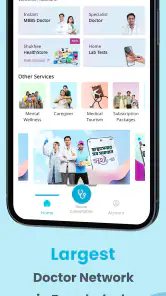
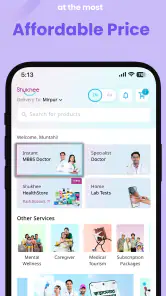
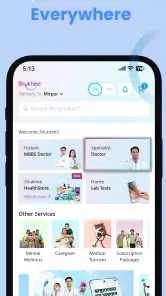
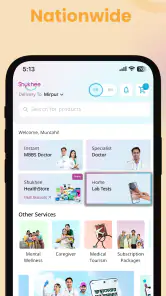
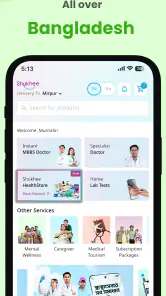
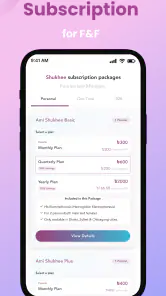
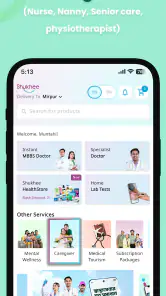
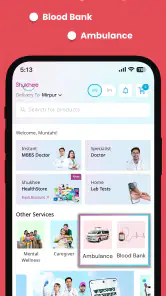
Analysis by Reviewed
When I look for a medical app, I want something that helps me take the next sensible step without making a simple health question feel overwhelming. Shukhee takes that broad approach by presenting itself as an on-demand digital healthcare service rather than a single-purpose symptom checker, fitness tracker, or appointment tool. I found that positioning useful because everyday health needs rarely arrive in neat categories: one day I may need guidance, another day I may want to arrange care, and sometimes I simply need a clearer route to professional help.
Developed by GRAMEEN HEALTHTECH LIMITED, Shukhee is a free app for Everyone and belongs to the medical category. It has reached over a million installs and holds a 4.4 average from around 1.2 thousand ratings, which suggests that it has attracted a meaningful audience while still leaving room for different user experiences. The app was released on June 10, 2024, and the current version is 2.2.4. It runs on Android 7.0 or later, so people using older but still serviceable Android phones may be able to install it without upgrading their device.
How Shukhee feels as a digital healthcare starting point
My main impression is that Shukhee is most valuable as a front door to healthcare. It is not trying to replace a hospital, emergency department, or in-person clinician. Instead, its appeal comes from reducing the uncertainty that often appears before those options. If I am unsure whether a concern needs immediate attention, routine advice, or a planned consultation, having a single digital place to begin can be more practical than searching across several unrelated services.
That distinction matters. Many health apps focus on one narrow task, such as recording symptoms, counting medication doses, or displaying educational articles. A broader platform can be more convenient, but it also asks the user to spend a little time understanding how the service is organized. I would not install Shukhee expecting a magical answer to every medical question. I would install it because I want a more connected way to approach common healthcare decisions.
The app’s store summary describes it as an on-demand 360-degree digital health care platform. In everyday terms, I read that as an attempt to bring several parts of a healthcare journey closer together. The benefit is less app switching. The trade-off is that the experience may feel less focused than a specialist app built around one very specific problem.
A realistic everyday use case
Imagine noticing a persistent but non-emergency health concern after work. The usual alternatives might involve searching the web, calling a clinic, asking a friend, or waiting until the next available appointment. Each route has a weakness: search results can be alarming, friends may not know enough, and calling can be inconvenient when the issue does not feel urgent. In that situation, I would use Shukhee first to organize my next step, gather the details I need, and decide whether digital support is appropriate or whether I should seek direct care.
The important habit is to prepare before opening the app. I would note when the concern began, whether it is getting worse, what I have already tried, and any relevant medical information. This makes a digital consultation or care request more useful than entering a vague sentence and hoping the service reconstructs the whole situation. It is a small workflow improvement, but it can save time and reduce repeated explanations.
More From Our News Desk

Weather by Xiaomi Review: Clear at a Glance, Less Clear Up Close

X Under Pressure: Can It Recover When Posting Goes Wrong?

Clash of Clans Is Won Between the Battles

Android Auto Makes the Case for Quieter Car Software

MobiOffice: Transforming Mobile Productivity with Seamless Integration

EA SPORTS FC™ Mobile Soccer: Redefining Mobile Sports Gaming
I would also use the app for a family member who is comfortable with a phone but less comfortable navigating several healthcare websites. A single recognizable service can make the first step feel less intimidating. However, I would still keep the family member involved in every decision rather than treating the app as a substitute for their understanding or consent.
Who is likely to benefit most
Shukhee makes the most sense for people who want a convenient digital starting point for ordinary healthcare needs. It may suit users who prefer handling initial questions from a phone, people who find traditional healthcare navigation confusing, and households that want one medical app rather than a collection of disconnected tools.
It can also be useful for someone who values continuity in their own health routine. Even when an app does not solve a problem instantly, having a familiar place to begin can encourage better preparation and more consistent follow-up. I especially appreciate that the free price removes an obvious barrier to trying it. That does not guarantee that every service connected to a healthcare platform will be free, so I would always check any cost shown before confirming a paid action, but the app itself is accessible to start with.
On the other hand, I would not make Shukhee my first choice for emergency symptoms, severe breathing difficulty, chest pain, major injury, sudden confusion, or any situation where waiting for an app could be dangerous. In those cases, direct emergency services and immediate professional care are more appropriate. I would also skip it if my only goal were detailed calorie tracking, exercise analytics, or a highly specialized condition-management dashboard. A focused app may offer a deeper toolset for those purposes.
What the current version tells me about the product
The current version, 2.2.4, shows that the product has already moved beyond its initial release rather than remaining a first draft. That is a useful sign for existing users because healthcare apps depend heavily on refinement: clearer navigation, fewer interruptions, and more dependable handling of routine tasks can matter as much as adding a headline feature.
I see the version number as evidence of ongoing product development, not proof that every part of the experience is perfect. A later version can improve stability or polish while still leaving important questions about coverage, response times, service availability, and the depth of clinical support. I would judge Shukhee by whether updates make the core healthcare journey easier, not simply by whether the version number increases.
For someone who installed an earlier release, the practical approach is to update before making an important request. That gives the app the best chance of presenting the current workflow and reduces the risk of following outdated instructions from memory. I would also review the screen carefully each time rather than assuming that a familiar button still leads to the same place.
How it compares with the usual alternatives
Compared with a general web search, Shukhee offers a more structured starting point. Search engines are excellent for finding broad information, but they can mix reliable medical guidance with outdated, sensational, or irrelevant pages. An app designed around healthcare can feel less chaotic, especially when I already know that I want to move from information toward an actual care decision.
Compared with calling a clinic directly, the app may be more comfortable for people who prefer written communication or who are trying to begin outside normal phone habits. A phone call can still be better when the issue is complicated, urgent, or likely to require back-and-forth explanation. Voice communication also helps some users describe symptoms more naturally than typing.
Compared with a single-purpose telemedicine app, Shukhee’s broader identity is its main differentiator. A specialist service may be faster for one defined task because every screen is built around that task. Shukhee’s wider healthcare approach may be more useful when I am not yet sure which service I need. The trade-off is that I may have to navigate more choices before reaching the right one.
Compared with visiting a physical clinic, Shukhee is more convenient for the first step but cannot provide every form of examination, testing, or hands-on treatment. I would use it to reduce unnecessary friction, not to avoid in-person care when a clinician needs to see, examine, or test me directly.
Small habits that make the experience more useful
The first practical tip is to treat the app as a preparation tool, not just a question box. Before starting, I would write down the exact concern, its timeline, relevant medicines, allergies if they matter, and what outcome I want. For example, “I need help deciding whether to arrange a consultation” is more useful than simply typing “I feel unwell.” Clear input makes digital healthcare more efficient and helps prevent an important detail from being forgotten.
The second tip is to separate routine questions from urgent changes. A symptom that was mild yesterday but suddenly becomes severe today should not automatically follow the same in-app route. I would reassess the situation each time I open Shukhee instead of assuming that because a concern began as routine, it remains routine.
The third tip is to use the app deliberately when helping another person. I would keep their information distinct from mine, read every confirmation aloud if needed, and let them verify important details before anything is submitted. This is especially valuable in a household where several people share one phone or where a family member has limited confidence with digital services.
A fourth useful habit is to save enough time for the complete interaction. Digital healthcare is convenient, but convenience does not mean instant resolution. I would avoid beginning a consultation or care request while rushing into a meeting, traveling, or dealing with a worsening symptom. The app works best when I can read instructions carefully and respond accurately.
Where the experience may still feel limited
The broad platform concept creates an unavoidable tension between range and simplicity. A user who already knows exactly which specialist or service is needed may prefer a direct route. If Shukhee presents several healthcare paths before reaching the relevant one, that extra choice could feel like friction rather than help. My advice is to give the app a fair trial for a common, non-urgent need and then decide whether its navigation matches the way you think about healthcare.
Another limitation is that digital access cannot remove every real-world constraint. A phone-based service still depends on the user being able to read, type, understand the instructions, and follow through with the recommended next step. Someone with limited digital confidence may need a trusted person nearby. Someone with a complex medical history may need a longer conversation with a clinician than an app-based interaction can comfortably provide.
I would also keep expectations realistic around the phrase “360-degree.” It communicates breadth, but breadth is not the same as complete coverage for every condition or location. The quality of the experience depends on whether the particular help I need is available through the service at that moment. This is why I see Shukhee as a practical access point rather than a universal replacement for the healthcare system.
Privacy and personal responsibility deserve attention too. Medical information is sensitive, so I would read the app’s current notices and permissions before entering details, use a secure device lock, and avoid sharing account access casually. Those are sensible precautions for any medical app, but they matter even more when one platform becomes a regular place for health-related activity.
What existing users should watch as Shukhee evolves
For current users, I would watch whether future releases make the main journey clearer rather than simply adding more sections. The most meaningful improvements would be easy-to-understand service labels, transparent next steps, dependable follow-up, and a simple way to know what requires immediate outside care. Those changes would strengthen the app’s role as a healthcare starting point.
I would also pay attention to how well the app serves both confident smartphone users and people who need more guidance. A platform that feels fast for experienced users but remains readable for older relatives would have a stronger everyday value than one that only rewards exploration. Clear language and predictable navigation are especially important in medical contexts, where confusion can lead to delay.
Another area worth watching is the balance between convenience and clinical depth. If the app becomes easier to access but does not help users understand when digital support is insufficient, the experience remains incomplete. I would like to see the product continue making that boundary clear: what can be handled digitally, what needs a scheduled consultation, and what should go straight to urgent care.
My recommendation after using it
I recommend Shukhee to Android users who want a free, broad medical app for beginning everyday healthcare tasks from a phone. Its strongest quality is not one isolated trick; it is the attempt to make healthcare navigation feel more connected. The combination of a million-plus install base, a 4.4 average, and continued development through version 2.2.4 makes it a credible option to try, while the Everyone age rating keeps its intended audience wide.
I would recommend it with sensible boundaries. Use it for organization, guidance, and appropriate digital care pathways, but do not rely on it when symptoms are severe or time-critical. Do not expect it to replace a physical examination, a specialist relationship, or a focused health tracker. If you want one accessible place to start rather than another narrow tool, Shukhee is worth exploring.
My final view is that the app’s value depends less on treating it as a complete medical answer and more on using it intelligently. Prepare your questions, choose the right urgency level, protect your health information, and be ready to move to in-person care when necessary. Used that way, Shukhee feels like a useful bridge between uncertainty and the next appropriate healthcare step, even though its broad design may not be the fastest option for every specialized need.
Shukhee Frequently Asked Questions
Who developed Shukhee, and what kind of app is it?
Shukhee is a medical app developed by GRAMEEN HEALTHTECH LIMITED. It is described as an on-demand, 360-degree digital health care platform, so it is intended to bring health-related services together in a mobile experience. The app is free to download and is rated for Everyone, making it suitable for a broad audience, though individual services may have their own requirements.
What is Shukhee, and what can I use it for?
Shukhee is a digital health and wellness application designed to help users access health-related information and services from a mobile device. Depending on the features available in your region, it may support consultations, appointment management, health guidance, reminders, or communication with healthcare professionals. Before downloading, check the current app description and supported services, since availability can vary by country and account type.
Is Shukhee available for both Android and iPhone?
Shukhee may be available for Android and iOS, but compatibility can depend on your device model, operating system version, and location. Before installing, visit the official Google Play Store or Apple App Store listing and review the technical requirements. Downloading from official stores is recommended because it helps ensure that you receive the legitimate application and future security updates. Android users should also check that their device runs version 7.0 or later.
Do I need to create an account to use Shukhee?
Most of Shukhee’s personalized services are likely to require registration, especially if the application stores health information, manages appointments, or connects you with a provider. During sign-up, you may need to submit contact details or other identifying information. Review the registration screens and privacy policy carefully, and use accurate information so that notifications, bookings, and account recovery work correctly.
Is Shukhee safe to use for personal or health information?
Because Shukhee may handle sensitive personal or health-related information, users should review its privacy policy, permissions, and security practices before creating an account. Install the app only from an official store, keep your device and application updated, and use a strong, unique password. Avoid sharing login details, and remember that the app should not replace emergency medical assistance or professional diagnosis.
Pros
- Simple interface makes browsing products quick and easy.
- Useful categories help users find relevant items faster.
- Product details are presented in a clear
- readable format.
- Convenient access to offers can help users compare shopping options.
- Lightweight design should work well on many Android devices.
Cons
- Product availability may vary depending on location.
- Some listings may lack detailed descriptions or specifications.
- Performance can depend on internet connection quality.
- Notifications may become distracting if promotional alerts are frequent.
- Customer support options may be limited for certain issues.
- Category
- Medical
- Version
- 2.2.4











