Shokz
- 1.53K
- 3.9
- Installs
- 1.00M
- Price
- Free

Screenshots


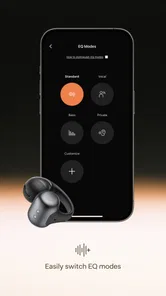
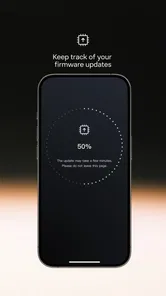
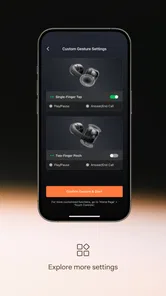
Analysis by Reviewed
When a headphone companion app does not seem to recognize a device, it is easy to assume the headset is broken or the app is failing. I would start with a simpler question: is the phone connected to the headphones in the way the app expects? Shokz is a Music & Audio app from Shokz, intended to help owners get started with the company’s headphones, so its value is closely tied to that setup moment rather than to managing every part of a phone’s sound.
Where setup can feel unclear
The first hurdle is knowing what role the app plays. It is not a general music player, and it is not a replacement for the phone’s Bluetooth controls. I see it as a companion for people who already have Shokz headphones and want help getting oriented. If you install it expecting playlists, equalizer tools, or a universal headset dashboard, that mismatch can make the experience seem thinner than it is.
A useful first check is whether the headphones are powered on and nearby before you begin pairing or opening the app. If the phone has previously connected to another audio device, confirm that you are working with the intended headset rather than assuming the app will sort out every connection automatically. These are ordinary Bluetooth checks, but doing them deliberately can save time and prevent repeated attempts that do not address the real snag.
Make the first attempt easier
I would keep the initial setup simple: turn on the headphones, keep them close to the phone, and follow the prompts shown on the device rather than switching between several settings screens at once. If the headset does not appear, check the phone’s Bluetooth settings and make sure it is not already connected to a different device. Then return to the app and try again. This sequence is less frustrating than tapping repeatedly without knowing whether the phone or the companion app is handling the connection.
Shokz is free, rated for Everyone, and has reached over a million installs, with an average rating of 4.4 from around 11,000 ratings. Those figures suggest that plenty of owners find it useful, but they do not guarantee that every setup will be effortless on every phone. The app was released on December 2, 2021, and version 5.6.4 supports Android 8.0 and later. I would check compatibility before installing it on an older Android device.
Using the companion app in everyday listening
Once the headphones are connected, I would treat the app as a starting point and keep the phone’s own audio controls in the workflow. For a commute, for example, I would connect the headset before leaving home, confirm audio is routed to it, and then use the usual music or podcast app. That small order of operations helps separate a pairing problem from an issue with playback in another app.
Recovering from a connection hiccup
If the app seems stuck, avoid changing several things at once. First check whether audio works through the headphones at all. If it does, the headset-to-phone connection may be fine and the issue may be limited to the companion app’s setup flow. If there is no audio, check the phone’s Bluetooth connection, move the devices closer, and reconnect using the phone’s normal controls before reopening the app. A restart can also be a reasonable basic step when an app or phone has stopped responding, though it is not a guarantee.
More From Our News Desk

 Gmail
Gmail in a Busy Inbox: Who Benefits Most?
From first account to crowded workday, Gmail earns its place through dependable search and flexible sorting—but its best fit depends on how much inbox maintenance you can tolerate.

 Prime Video
Switching to Prime Video: What Changes in Your Viewing Routine
Prime Video can make a compelling second home for streaming, but switching means learning a different catalog, rental layer, and route from browsing to playback.

 Universal TV Remote Control
 Works Best as a Reliable Backup
A phone remote earns its place through quick setup and reliable habits. Here is how to get more from Universal TV Remote Control—and where its limits show.

 Weather - By Xiaomi
Weather by Xiaomi Review: Clear at a Glance, Less Clear Up Close
Xiaomi’s weather app makes everyday forecasts quick to scan, but its calm surface can leave useful details and recovery paths harder to find than they should be.

 X
X Under Pressure: Can It Recover When Posting Goes Wrong?
A resilience-focused review of X, examining setup, mistaken posts, interruptions, weak connections, and the gaps that matter when recovery needs to be dependable.

 Clash of Clans
 Is Won Between the Battles
Its raids are quick; its community is a long-term project of coordination, teaching, rivalry, and shared responsibility—with all the friction that entails.
Latest News



This is where a companion app differs from a broad audio utility. A general Bluetooth manager or the phone’s settings can handle basic connection tasks across many devices, while Shokz is relevant specifically to Shokz headphone owners. I would not install it just to fix audio from an unrelated headset; the phone’s built-in settings are the more sensible place to start in that case.
When the problem is not the app
Not every listening issue begins in the companion app. A headset that is out of battery, a phone connected to another speaker, or playback paused inside a music service can all look like a failed setup at first. Check the simple causes one by one: confirm the headphones are on, verify the phone’s selected audio output, and test sound in another familiar app. This gives you a clearer picture before you uninstall anything or repeat the same pairing steps.
For someone choosing between this and a generic headphone-control app, the deciding factor is ownership. Shokz is the more relevant choice if you use Shokz headphones and want a brand-specific starting point. If you use several brands or mainly need to manage Bluetooth connections, your phone’s built-in controls are less specialized but may be enough. I would also skip this app if you do not own compatible Shokz headphones, since its purpose is tied to getting started with them.
Are you in search of a game that combines strategic planning with real-time action? Well, let me introduce you to the enchanting world of Shokz! This game has been capturing the attention of gamers worldwide, and I decided to dive in to see what all the fuss is about. Spoiler alert: I wasn’t disappointed.
Immersive Gameplay
The first thing that struck me about Shokz is its immersive gameplay. Right from the get-go, you're thrown into a vibrant universe teeming with challenges and opportunities. The game brilliantly blends strategy with action, requiring players to not only think on their feet but also plan several moves ahead. It’s like playing chess, but with explosions and power-ups!
Intuitive Controls
Let’s talk about the controls. Often, mobile games can be cumbersome when it comes to maneuvering through complex environments. However, Shokz does a stellar job at keeping things intuitive. Within minutes, I was navigating through levels with ease, thanks to the responsive touch controls and well-designed interface. It’s as if the game was reading my mind, anticipating my next move!
Stunning Graphics
If you’re a sucker for eye candy, then you’re in for a treat. The graphics in Shokz are nothing short of breathtaking. Each level is a visual masterpiece, with intricate details and vibrant colors that make the game world come alive. It’s one of those games where you might find yourself pausing just to admire the scenery.
Engaging Storyline
Another aspect that sets Shokz apart is its engaging storyline. As you progress through the game, you're not just completing levels; you're unraveling a narrative that keeps you hooked. The characters are well-developed, and the plot twists are enough to keep even the most seasoned gamers on their toes.
Soundtrack and Sound Effects
No game review would be complete without mentioning the audio experience. The soundtrack of Shokz perfectly complements the gameplay, enhancing the overall experience. The sound effects are crisp and add to the immersion, making you feel every blast and crash as if you were in the game yourself.
In conclusion, Shokz offers a balanced mix of strategy, action, and narrative, wrapped up in a visually stunning package. Whether you’re a casual gamer or someone who likes a bit of a challenge, this game has something for everyone. So, if you’re looking for your next gaming obsession, give Shokz a try. Trust me; you won’t regret it!
A practical routine for busy days
The app makes the most sense when setup is occasional rather than something you need to revisit before every listening session. I would use it when first getting the headphones ready, then rely on the phone’s ordinary audio interface for day-to-day playback. For instance, before a morning walk, connect the headset while still at home and play a short clip. If it works there, you can head out without spending the first few minutes of the walk troubleshooting.
That quick test is useful because it checks the full path: the headphones are awake, the phone has selected them for audio, and the playback app is producing sound. It is also a better diagnostic than opening multiple apps and changing settings at once. If music works but a call does not, that points toward a different issue than a total Bluetooth failure; checking the phone’s selected audio device during the call is a sensible next step.
Shokz Frequently Asked Questions
What should I know about the Shokz app before downloading it?
Shokz is a free Music & Audio app from Shokz, designed to help you quickly get started with Shokz headphones. It is intended to complement the headphones rather than serve as a general music-streaming service. The app is rated for Everyone, and its current version is 5.6.4. Make sure your device runs Android 8.0 or later before installing.
Is the Shokz app free, and how popular is it?
The app is free to download and has a 4.4 average from around 11,000 ratings, with about 1,200 written reviews. It has been installed over 1 million times. These figures offer a quick sense of its reach, but your experience will depend on whether you use Shokz headphones and how well the app suits your needs.
What is Shokz and what does it offer?
Shokz is an innovative app designed to enhance your audio experience by offering bone conduction technology. This allows you to listen to music, podcasts, or take phone calls while staying aware of your surroundings. It's particularly useful for outdoor activities like running or cycling, where situational awareness is crucial for safety.
How does Shokz's bone conduction technology work?
Shokz utilizes bone conduction technology, which transmits sound vibrations directly to the inner ear through the bones of your skull, bypassing the eardrum. This method allows users to hear audio content clearly while keeping the ears open to ambient sound, making it an ideal choice for those who need to stay alert in their environment.
Is Shokz compatible with all devices?
Shokz is compatible with a wide range of devices, including both Android and iOS. It connects via Bluetooth, ensuring a seamless and wireless experience. Before downloading, check if your device supports Bluetooth connectivity to ensure optimal performance and compatibility with Shokz's features.
Pros
- Excellent sound quality
- Comfortable fit for all-day use
- Long-lasting battery life
- Water-resistant for outdoor use
- Easy to use touch controls
Cons
- Limited bass response
- Pricey compared to competitors
- Occasional Bluetooth dropouts
- Limited color options
- No active noise cancellation