

Sheet Music Scanner & Reader
- 203.00
- 3.9
- Installs
- 50.00K
- Price
- $19.99

Screenshots
Analysis by Reviewed
I’d treat Sheet Music Scanner & Reader less like a replacement for a musician and more like a practical bridge between a printed score and hearing what is on the page. Its appeal is immediate: I can start with music I already have, scan or open it, and use playback to check how the notes fit together. For someone learning a piece, that can make an unfamiliar page feel less abstract before practice even begins.
A useful first step with a new score
The app is made by David Zemsky and sits in the music and audio category. I can see it helping a student who has brought home a new piece, a hobby pianist checking a melody, or a player who wants to hear a part before rehearsing with other people. It is for reading and listening to notation, not for composing a full arrangement from scratch, so I would not choose it as my main creative workspace if editing or publishing original music is the goal.
A realistic use is to scan a page before an evening practice session, listen through once, then revisit a tricky passage at a slower tempo. That first listen gives me a sense of the tune and rhythm; it does not replace counting carefully or learning the fingering. I’d keep the printed score or a reliable digital copy nearby, especially if a scan has dense notation or unusual markings that need a musician’s judgement.
Where it fits in a day of practice
I’d reach for the app when I have a concrete question about music already on the page, rather than when I’m looking for a general practice companion. For example, if I’m asked to prepare a new piano part after work, I can use the scan and playback to get oriented before sitting down at the instrument. I can listen for the shape of the melody, notice where the accompaniment changes, and mark the bars that deserve more attention during practice.
That workflow is particularly helpful for someone who can read some notation but still needs an audible reference. A beginner can compare what they see with what they hear; a more experienced player can check an unfamiliar line before a rehearsal. I wouldn’t treat playback as a substitute for a teacher’s explanation or a musician’s interpretation, but it can make the first encounter with a score less dependent on guesswork.
The Magic of Instant Music Reading
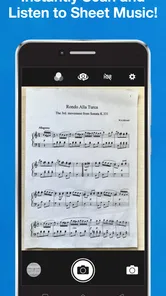
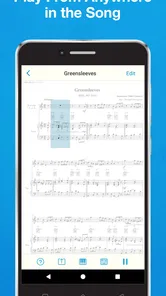
So, I started my journey by simply pointing my phone camera at a sheet music page. Can you believe it? The app scanned it in seconds, and voila, it started playing the music! It was like having my personal pianist in my pocket. This feature is especially handy when you’re trying to learn a new piece and want to hear how it’s supposed to sound. The Sheet Music Scanner & Reader doesn’t just read music, it feels like it understands it.
Features That Stand Out
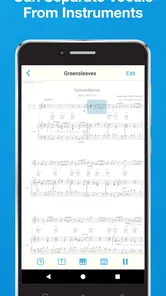
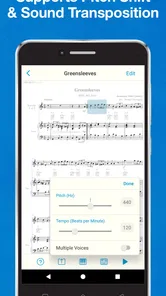
One of the coolest features I found is the ability to adjust the tempo. Say goodbye to struggling at full speed; now you can slow down that complicated part and really get it under your fingers before ramping up the speed. It’s perfect for practice sessions. Another gem is the ability to isolate tracks. If you’re practicing a duet or ensemble piece, you can mute the part you’re playing and focus on the others. It’s like having a conductor on standby just for you.
More From Our News Desk

 Gmail
GmailGmail in a Busy Inbox: Who Benefits Most?
From first account to crowded workday, Gmail earns its place through dependable search and flexible sorting—but its best fit depends on how much inbox maintenance you can tolerate.

 Prime Video
Switching to Prime Video: What Changes in Your Viewing Routine
Prime Video can make a compelling second home for streaming, but switching means learning a different catalog, rental layer, and route from browsing to playback.

 Universal TV Remote Control
Universal TV Remote Control Works Best as a Reliable Backup
A phone remote earns its place through quick setup and reliable habits. Here is how to get more from Universal TV Remote Control—and where its limits show.

 Weather - By Xiaomi
Weather by Xiaomi Review: Clear at a Glance, Less Clear Up Close
Xiaomi’s weather app makes everyday forecasts quick to scan, but its calm surface can leave useful details and recovery paths harder to find than they should be.

 X
XX Under Pressure: Can It Recover When Posting Goes Wrong?
A resilience-focused review of X, examining setup, mistaken posts, interruptions, weak connections, and the gaps that matter when recovery needs to be dependable.

 Clash of Clans
Clash of Clans Is Won Between the Battles
Its raids are quick; its community is a long-term project of coordination, teaching, rivalry, and shared responsibility—with all the friction that entails.
Latest News



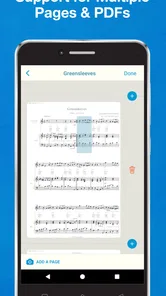
Not to forget, the app supports a variety of music formats. So, whether you have a PDF, an image, or even a JPEG, the app can handle it. No fuss, no muss. I was particularly impressed when I tried it with some handwritten scores. While it wasn’t perfect, it did a decent job of deciphering my chicken scratch notes.
Making the scan work for practice
For better results, I’d use a flat, evenly lit page and keep the phone directly above it rather than shooting from the side. That simple habit makes the notation easier to capture and gives me a cleaner starting point for playback. Handwriting is a different story: the experience can be useful for a quick check, but I would not rely on it as the only record of a carefully prepared manuscript. If a passage sounds wrong, I’d compare the recognized notes with the page before changing my practice based on the playback.
There is also a practical trade-off in using playback as a learning aid. Hearing a part can clarify pitch and phrasing, while a slowed tempo can help me isolate a difficult run; neither automatically teaches good tone, articulation, or musical expression. I’d use the scanner to answer specific questions—does this interval go up or down, or how does my line sit against the accompaniment?—then put the phone aside and play the passage myself.
Handling uncertainty in a scan
A useful habit is to check a short, familiar passage before trusting a longer scan. I’d compare a few notes and rhythms against the printed page, especially near crowded chords, rests, or markings that could be mistaken for notation. If the opening looks right but a later section sounds oddly different, I’d inspect that part directly rather than assuming the whole score was read consistently. This small check can save time: the app is most valuable when its playback helps me learn, not when I’m practicing an error it introduced.
I’d also avoid treating the tempo control as a promise that every passage becomes easy. Slowing a phrase is useful for hearing note order and locating a difficult transition, but an extremely slow playback may make the musical line harder to follow. I’d use it briefly to identify the problem, then return to a more natural pace and work on the passage at the instrument. The aim is to make practice more informed, not to let playback become the practice itself.
How it fits into a musician’s toolkit
Compared with a conventional sheet-music viewer, this app’s distinctive draw is that it can turn notation into audible playback rather than simply displaying a page. Compared with a metronome or a dedicated instrument-learning tool, it starts from the score itself, which is handy when the piece is already in front of you. The trade-off is that a specialized notation editor is a better choice for composing, revising, or preparing polished parts, while a metronome is simpler if all you need is a steady beat.
For a small ensemble rehearsal, I’d use it beforehand to hear the other lines while focusing on my own part. At home, a parent or teacher could also use playback to help a beginner connect written notes with sound, then check the printed page together when something seems off. It is most useful when the goal is understanding or practicing existing notation, not when the task is to produce a finished score for other musicians.
Choosing between this and other tools
The choice depends on what I already have and what I’m trying to do. If I only need to read a digital score, a standard viewer may be enough and may keep the workflow simpler. If I need a steady pulse while playing, a metronome is the more direct tool. If I’m changing notes, arranging parts, or preparing a score for other people, a notation editor is the better fit. This app earns its place when the missing step is hearing the notation, especially when I want to focus on one part or check a passage before practice.
That distinction also helps set expectations about the result. Playback can give me a useful reference for pitch and rhythm, but it isn’t the same as hearing a human performance with expressive phrasing and instrument-specific tone. I’d use it as a study aid, then listen to a recording or ask a teacher when interpretation is the real question. For an ensemble player, isolating the other lines can be more useful than simply replaying the full score, because it lets me listen for how my part fits into the texture.
User-Friendly Interface
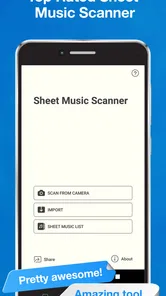
Now, I’m not a tech wizard, so I really appreciate an app that’s easy to navigate. The interface is clean and intuitive, making it simple to jump right in and start using without a steep learning curve. It’s thoughtfully designed to ensure that all the powerful features are just a tap away. Within minutes, I was scanning, playing, and adjusting music like a pro.
One thing I noticed is how light the app is on my phone’s resources. It runs smoothly without any annoying lags or crashes. I could have it running in the background while using other apps, and it didn’t slow down my device at all.
Who is likely to get the most from it?
I think it makes the most sense for a musician who encounters printed or image-based scores often enough to value quick playback. Piano learners, singers working through a written line, and instrumentalists preparing for a group rehearsal can all benefit from hearing how notes relate before they try a passage. It can also be useful for a parent helping a child connect notation to sound, provided they are willing to check the scan together instead of treating it as infallible.
I’d be less enthusiastic about recommending it to someone who rarely reads sheet music, wants an app to teach an instrument from the ground up, or mainly creates and edits arrangements. In those cases, the central scan-and-listen workflow may not solve the user’s main problem. A dedicated lesson tool, a plain score reader, or notation-editing software would be a more sensible choice depending on the task.
Cost and compatibility in context
The app has a 3.9 average from around 2.7 thousand ratings, and it has been installed over 50 thousand times. It costs $19.99, so I’d think about how often I work with printed or image-based scores before buying. Someone who scans music every week and benefits from playback may get more out of it than a player who only needs to open a score occasionally. Its Everyone age rating makes it suitable for a broad audience, though younger learners will still benefit from an adult helping check whether a scan has read the notes correctly.
Version 2.200 requires Android 6.0 or later. That makes checking the device’s Android version a sensible first step before installing. I would also decide in advance what success means for my use: quick playback and practice support are realistic goals, while expecting perfect recognition of every handwritten mark would set the wrong expectation. For a clean printed page, the workflow is more straightforward; for untidy or unusual notation, careful checking remains part of the job.
A practical handoff, not a publishing desk
When I’m preparing for a lesson or rehearsal, the useful handoff is the sound and understanding I take away from the score, not a polished new edition. I can use the app to investigate a passage, then return to the original page with a clearer idea of what I need to practice. If I need to correct notes, lay out parts, or deliver publication-ready sheet music, I’d move to software built for notation editing instead of treating a scanner and player as an editing suite.
Making the handoff useful
For a practical lesson or rehearsal handoff, I’d note the bars that need attention on the original score rather than assuming the app has created a finished working document. I can arrive with clearer questions—where the rhythm changes, which line I want to hear, or which measure still feels uncertain—and use rehearsal time to solve those musical problems. That is a modest form of preparation, but it’s a real advantage when I’m short on time and need to get from a page to a focused practice plan.
The same boundary matters if I’m working on original music. Playback may help me inspect existing notation, but the app is not the place I’d rely on to revise a composition or prepare a clean part for a performer. I would keep the original file or paper score as the source of truth, and move to a notation program for edits and delivery. Thinking of the app as a listening and checking step, rather than the final production tool, makes its role much clearer.
Final Thoughts
If you’re passionate about music, the Sheet Music Scanner & Reader is definitely worth a try. It’s a handy tool that bridges the gap between traditional sheet music and the digital world. From its instant scanning ability to the user-friendly interface, it’s designed to cater to musicians at all levels. Whether you’re practicing at home or on-the-go, this app is like having a music teacher in your pocket. Give it a whirl, and you might just find it becomes an indispensable part of your musical journey.
My recommendation is strongest for musicians who regularly need to hear written material, slow a passage down, or study the relationship between parts. I’d skip it if my main need were composing, editing, or sharing a finished score, or if I rarely use notation and already have another easy way to hear a piece. For the right kind of practice, though, it can make the move from page to sound feel much less intimidating.
Sheet Music Scanner & Reader Frequently Asked Questions
What devices and operating systems can run Sheet Music Scanner & Reader?
Sheet Music Scanner & Reader is an app for scanning and playing sheet music, and it runs on devices using Android 6.0 or later. Before downloading, check that your device meets this requirement so you can install and use the app smoothly. The app is listed in the Music & Audio category and is intended for musicians who want to work with printed scores on a mobile device.
Is Sheet Music Scanner & Reader suitable for beginners learning to read music?
The app can be useful for beginners because it turns scanned sheet music into playback, letting you listen while following the notes on the page. This can help connect written notation with how it sounds, especially during practice. It is not a replacement for learning note-reading fundamentals, but its playback can give learners another way to study a score at their own pace.
What is Sheet Music Scanner & Reader and how does it work?
Sheet Music Scanner & Reader is an innovative app designed to help musicians of all levels easily scan and play sheet music. By using your device's camera, the app captures the sheet music and converts it into audible playback. This feature allows users to listen to the music as they follow along with the notes, providing an invaluable tool for learning and practicing.
Is Sheet Music Scanner & Reader compatible with all types of sheet music?
The app is designed to be compatible with most standard sheet music, recognizing a wide range of musical symbols and notations. However, it may struggle with non-standard or highly complex scores, such as those with unconventional markings or highly intricate arrangements. It's always a good idea to test the app with your specific sheet music to ensure compatibility.
What features does Sheet Music Scanner & Reader offer for enhancing musical practice?
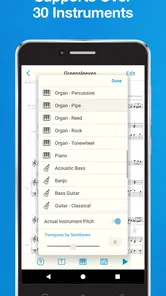
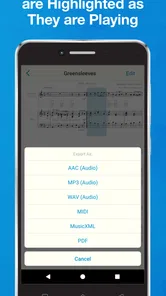
Sheet Music Scanner & Reader offers several features to enhance musical practice, including the ability to adjust playback speed, transpose the music, and even isolate specific parts for practice. These features make it an excellent tool for learners who want to focus on difficult passages or practice at their own pace. The app also supports MIDI output, allowing for further integration with digital instruments.
Pros
- Easy to scan sheet music
- Supports multiple music notations
- User-friendly interface
- Quick music playback
- Compatible with various devices
Cons
- Limited free features
- Occasional scanning errors
- Needs active internet for some features
- May struggle with complex scores
- In-app purchases can be pricey











