Security Camera Mod Minecraft
- 106.00
- 4.3
- Installs
- 1.00M
- Price
- Free

Screenshots
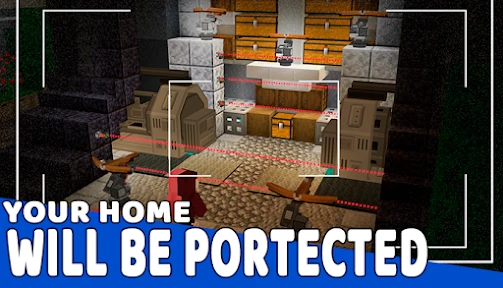
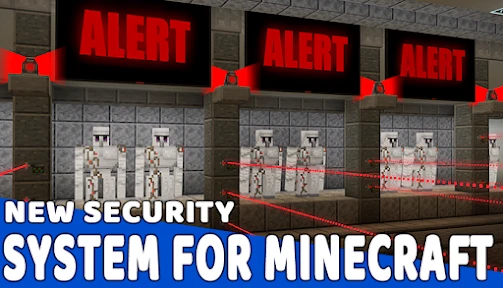
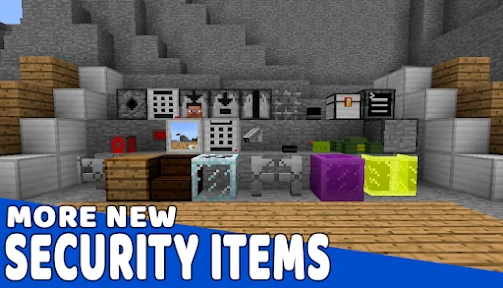
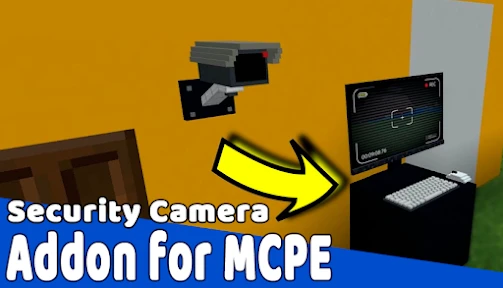

Analysis by Reviewed
I’d judge Security Camera Mod Minecraft by a practical question: do you want a focused camera-and-security theme for a Minecraft Pocket Edition project, or are you looking for general help with the game? It is a free Books & Reference app from Ireptio Craftia Corporation, and that narrow subject is central to its appeal. I would consider it for a build with a specific surveillance idea in mind, not as a replacement for a broad Minecraft guide.
What free access means for its value
There is no purchase price to weigh against its usefulness: the app is free. That makes it easy to consider if you are curious about security-camera ideas for a Minecraft PE world, though free access alone does not guarantee a perfect fit. I would judge its value by whether its camera-focused material helps with a project you actually want to make, rather than assuming it replaces a full guide or every other way of customizing Minecraft.
The app has an average rating of 4.3 from around 7,200 ratings, with more than a million installs. Those figures suggest that many users have tried it, but they cannot tell me whether it suits a specific Minecraft version, device, or play style. It is rated for Everyone, and its current version is 3361. The app was released on July 17, 2020, and requires Android 6.0 or later, details worth checking against your device before you decide to install it.
What the camera theme can add to a build
For me, the idea is most useful when a build has a purpose beyond looking good. A camera-themed setup can give a base a control-room feel, create a role-play setting, or help a group invent a security challenge for friends. It offers a focused concept rather than the broad mix of crafting recipes, building inspiration, and survival advice you might expect from a general Minecraft reference app.
One practical way to get more from that focus is to plan the layout before placing anything in your world. Think about which entrances, corridors, or resource rooms are important to your build, then decide where a camera viewpoint would make the scene feel convincing. That small bit of planning can turn a handful of decorative ideas into a coherent base concept instead of scattered tech-themed blocks.
Trade-offs to consider before installing
The main limitation is scope. If you want an all-purpose encyclopedia, a detailed survival walkthrough, or help with unrelated Minecraft topics, a broader reference app will probably serve you better. Likewise, players who prefer vanilla building and do not enjoy security or role-play themes may have little reason to keep a camera-focused app around.
I would also separate the app itself from the Minecraft content it points toward: installing an app does not automatically mean that a mod is installed in your game or works with every setup. If your goal is to use a modification, check that the instructions match your edition and device before changing a world you care about. Trying new content in a separate test world is a sensible precaution, especially if you play with friends and want to avoid disrupting a shared build.
More From Our News Desk

Clash of Clans Is Won Between the Battles

Android Auto Makes the Case for Quieter Car Software

MobiOffice: Transforming Mobile Productivity with Seamless Integration

EA SPORTS FC™ Mobile Soccer: Redefining Mobile Sports Gaming

How Microsoft OneDrive Became a Mobile Productivity Giant

How Google Translate Breaks Language Barriers Effortlessly
How I would test the idea before committing to a big build
I would begin by treating this as a planning aid, then verify the practical details in Minecraft before making permanent changes. The first question is whether the material describes the same Minecraft edition and device setup I use; the app focuses on Pocket Edition, so a player using a different edition should not assume the steps transfer unchanged. The second is whether the instructions are clear enough to follow without guessing. If I hit a mismatch, I would pause rather than keep changing a world that matters to me.
A small test world is useful for more than avoiding damage. It lets me find out whether a camera concept actually suits my play style: maybe I enjoy designing a control room, but do not care about checking views during ordinary survival. I would try one modest build, see how it feels in play, and only then decide whether to expand it. That approach keeps the project fun and prevents a decorative idea from turning into a long setup chore.
A realistic use case for a shared world
Imagine that a few friends have built a base together and keep returning to a central storage room. I would use the camera theme as a group activity: agree on a small area to monitor, design a compact control corner, and let each player contribute a detail to the build. The point is not to make the entire world feel watched; it is to give the shared base a playful purpose and create a new reason to collaborate.
That scenario also makes the limits easier to notice. If the group wants a reliable way to protect valuable items or prevent every surprise, a themed build should not be mistaken for a guarantee of security. I would frame it as role-play and atmosphere unless I had checked that the relevant Minecraft setup truly behaves as expected. This distinction matters most in a shared world, where friends may rely on an idea differently from the person who built it.
What to check when the instructions meet your setup
Before following any guide, I would check the edition named in the instructions, the version of Minecraft I have, and whether the steps describe an add-on or another kind of modification. Those terms are easy to blur together, but they can mean different installation paths. If the directions do not clearly match what is on my device, I would not improvise with a valuable save; I would look for guidance that explicitly fits my setup.
I would also keep the project reversible. Make changes in a fresh test world, take note of what you altered, and avoid mixing several modifications at once while you are still learning the process. That way, if the camera idea does not work as expected, it is easier to identify the problem and return to normal play. For younger players, I would have an adult help assess installation steps rather than treating a simple app install as proof that every linked game change is equally straightforward.
How it compares with other Minecraft references
Compared with a general Minecraft reference app, this one has a much tighter brief: it is about a camera-themed modification rather than recipes, crafting, mobs, and broad building advice. That focus can be an advantage when I already know the sort of base I want to create, because I do not have to sift through unrelated topics. It is less useful when I am still learning the basics or need answers across several parts of the game.
It also serves a different purpose from searching for a single tutorial or choosing a purely decorative build idea. A focused reference app can give a project a more coherent starting point, while a one-off tutorial may be quicker for a specific question and a visual build guide may be better for appearance. I would choose according to the job: use this app when the surveillance concept itself is the project, and use a broader resource when the question is about Minecraft overall.
What the app is—and what the mod is
It is worth keeping the app and the modification concept separate. The app is a Books & Reference product; the camera setup belongs to the Minecraft experience and depends on the instructions and compatibility of the game environment. In other words, installing the reference app is not the same thing as adding a working camera system to a world. I would treat it as a source for a particular idea, then check each step before expecting an in-game result.
That distinction also answers a common practical concern: whether a player can rely on it without already knowing how to install Minecraft content. Someone comfortable checking edition-specific instructions will find it easier to evaluate. A newcomer may still use the app for inspiration, but should take time to understand the installation steps and avoid assuming that every listed item will appear automatically in the game.
Have you ever fancied turning your Minecraft world into a high-tech surveillance network? Well, brace yourself, because the Security Camera Mod for Minecraft is here to fulfill that tech-savvy dream. As someone who spends a fair amount of time in the blocky universe of Minecraft, I couldn't resist the temptation to give this mod a whirl. And let me tell you, it’s like stepping into a whole new dimension of gameplay.
Getting Started with Surveillance
First things first, the Security Camera Mod is incredibly easy to install. If you’re familiar with adding mods to Minecraft, this will be a walk in the park. Once you’ve got it up and running, you’ll find a new set of items in your inventory. These are your security cameras and monitors, your very own tools for espionage. I felt like a spy setting up my own CCTV network! The mod allows you to place cameras anywhere and view the feed from a computer screen block, which is a new item introduced by the mod.
Functionality at its Best
The cameras can rotate 360 degrees, letting you keep an eye on every nook and cranny of your build. I was particularly impressed with how smoothly the cameras operated. You can zoom in and out, switch between cameras, and even configure them to follow entities. Imagine catching a creeper sneaking up on your precious house – no more surprises! This feature is a game-changer for those who enjoy role-playing or simply want to add a layer of complexity to their base security.
Moreover, the mod doesn’t just stop at cameras. It also includes security systems like retinal scanners and keycard readers. I spent hours setting up a secret base that only I could enter. These features are not only functional but also add a fun, immersive element to the game.
Aesthetic and Immersion
Visually, the mod is a perfect fit for Minecraft’s aesthetic. The textures are clean and blend seamlessly with the vanilla blocks. It doesn't feel out of place or overly modern. I appreciated how the mod developers maintained the balance between functionality and the game's original style. Plus, the immersion factor is off the charts. Playing with this mod felt like living in a futuristic world while still being in the familiar Minecraft environment.
Setting up a network of cameras and security systems added a new strategic layer to my gameplay. It wasn't just about building anymore; it was about protecting what I built. This added depth has kept me hooked for hours on end, strategizing and planning my next move.
Making the most of a camera network
A useful workflow is to start with one clear goal instead of trying to cover an entire base. For example, in a shared survival world, I would focus first on the entrance and the storage area, then see whether monitoring those spots makes the build more enjoyable. A compact setup is easier to understand and gives friends a natural role-play hook; a sprawling network can become decoration that nobody remembers to use.
Camera placement is also a design choice, not just a security choice. A view down a long corridor creates a different mood from a view into a busy workshop, and a monitor placed where players gather can become part of the scene. I would sketch the room and sightlines before committing blocks, especially in a cramped base where a screen or camera could interrupt the look of the build.
Who is likely to get the most from it
I can see this appealing most to Minecraft PE players who enjoy secret bases, themed builds, and role-play with friends. It also suits builders who like turning practical details into part of a story: a guarded research room, a hidden entrance, or a control booth overlooking a village. If you usually build for appearance alone, the camera concept may still provide a useful theme, but its appeal depends on whether you want that extra layer of play.
For a casual evening, I might use the idea to give a friend’s base a playful security makeover, then let the group decide which rooms deserve monitoring. That is a low-pressure way to test whether surveillance mechanics make the world more fun before investing time in a larger installation. If you mainly want recipe help or survival answers, though, I would choose a general reference resource instead; this app’s narrower subject is its strength and its limit.
Final Thoughts
In conclusion, the Security Camera Mod for Minecraft is a must-try for any player looking to enhance their gameplay. It’s not just about security; it’s about adding an element of strategy and immersion that keeps the game fresh and exciting. Whether you’re a seasoned builder or a Minecraft newbie, this mod is sure to provide hours of entertainment. So, if you're in the mood to play detective or just want to keep those pesky creepers at bay, give this mod a shot. Trust me, you won’t regret it!
Security Camera Mod Minecraft Frequently Asked Questions
What kind of app is Security Camera Mod Minecraft?
Security Camera Mod Minecraft is a free Books & Reference app from Ireptio Craftia Corporation, with a short description of “Security Camera Mod.” It is intended for Minecraft PE players interested in adding a security-camera theme to their game. The app is rated for Everyone and is compatible with Android 6.0 and later, so check your device’s operating-system version before downloading.
Is Security Camera Mod Minecraft an official Minecraft app?
No. Security Camera Mod Minecraft is a separate app developed by Ireptio Craftia Corporation, rather than an official Minecraft product. Its store summary describes a security-camera mod for Minecraft PE, so it is aimed at players looking for related content. If you use Minecraft on a particular platform or edition, make sure the app’s content suits that setup before expecting it to work with your game.
What is the Security Camera Mod for Minecraft?
The Security Camera Mod for Minecraft introduces advanced surveillance capabilities into the game, allowing players to monitor various areas of their gaming environment. This mod is perfect for players who wish to keep an eye on their creations and ensure the safety of their in-game assets. By installing this mod, users can strategically place cameras and have a real-time view of different locations, enhancing both security and gameplay experience.
How do I install the Security Camera Mod in Minecraft?
To install the Security Camera Mod, you must first ensure you have Minecraft Forge installed, as it is a prerequisite for most mods. Once Forge is installed, download the Security Camera Mod file and move it to the 'mods' folder within your Minecraft directory. Launch Minecraft with the Forge profile, and the mod should be activated, ready to enhance your security measures within the game. Because this app is described as being for Minecraft PE, check that these installation steps match the edition you play before following them.
What features does the Security Camera Mod offer?
The Security Camera Mod offers a variety of features designed to enhance your Minecraft gameplay. Key features include the ability to place multiple cameras, switch between camera views in real-time, and utilize a control panel to manage your surveillance system. This mod adds a layer of strategy, as players can monitor areas for hostile mobs or other players, ensuring their creations remain protected.
Pros
- Easy to install and configure mod.
- Enhances security in Minecraft.
- Compatible with most Minecraft versions.
- Customizable settings for cameras.
- Doesn't significantly impact game performance.
Cons
- Requires additional mods to function.
- May not work on all servers.
- Some features are limited in free version.
- Setup might be complex for beginners.
- Occasional bugs with camera angles.

- Category
- Books & Reference
- Version
- 3361