

Sea Trials - USCG License Exam
- 172.00
- 4.5
- Installs
- 10.00K
- Price
- Free

Screenshots
Analysis by Reviewed
Preparing for a United States Coast Guard license exam is a very different task from casually reading about boating. The questions demand recall, careful interpretation, and enough repetition to make technical material feel familiar under pressure. I found Sea Trials - USCG License Exam most useful in that narrow space: it is an education app from Lokey Labs, LLC built around exam preparation rather than general seamanship entertainment. Its store summary, “Upgrade USCG License,” describes the purpose plainly, while “Sea Trials” gives the app a more memorable identity.
My first impression was that this is best treated as a focused study companion, not as a complete replacement for official references, classroom instruction, or practical experience on the water. That distinction matters. An app can help me recognize question patterns and identify weak areas, but it cannot demonstrate navigation skills, replace a qualified instructor, or make regulatory material automatically current in my mind. Used with that expectation, it has a sensible place in a mariner’s study routine.
What Sea Trials is really useful for
The app belongs in the education category, and its central value is repetition. Instead of opening a large manual every time I have a spare moment, I can use a short study session to test what I remember. That makes it particularly suitable for people who are already working toward a USCG credential and need a convenient way to keep exam topics active between longer study periods.
I would not approach it as a broad boating course. Someone who has never encountered chart work, rules of the road, safety procedures, or vessel operations may need structured teaching before question practice becomes productive. Sea Trials is more convincing as a review layer: first learn the subject from dependable material, then use practice questions to expose uncertainty and decide what deserves another reading.
The app is free to install, which lowers the barrier to trying it. It also carries an Everyone age rating, so the presentation is not positioned as mature entertainment. Optional purchases are listed from around thirty dollars to three hundred dollars per item, however, so I would examine the purchase flow carefully before committing to anything. The free entry point is helpful, but “free” should not be confused with every preparation path being cost-free.
Its average rating is 4.5 from over three hundred ratings, with more than one hundred written reviews. That gives me some confidence that it has been useful to a meaningful group of learners, although ratings cannot tell me whether the question coverage matches my exact license goal. The app has passed ten thousand installs, which suggests a real audience without making it a substitute for checking the content myself.
How I would fit it into a study plan
I would begin by identifying the credential and exam subjects I actually need, then keep a separate note of topics that cause mistakes. During the first few sessions, I would resist the temptation to chase a high score. The more valuable result is a map of weaknesses: perhaps I am confusing similar navigation rules, overlooking wording in safety questions, or relying on a half-remembered definition.
More From Our News Desk

 Gmail
GmailGmail in a Busy Inbox: Who Benefits Most?
From first account to crowded workday, Gmail earns its place through dependable search and flexible sorting—but its best fit depends on how much inbox maintenance you can tolerate.

 Prime Video
Switching to Prime Video: What Changes in Your Viewing Routine
Prime Video can make a compelling second home for streaming, but switching means learning a different catalog, rental layer, and route from browsing to playback.

 Universal TV Remote Control
Universal TV Remote Control Works Best as a Reliable Backup
A phone remote earns its place through quick setup and reliable habits. Here is how to get more from Universal TV Remote Control—and where its limits show.

 Weather - By Xiaomi
Weather by Xiaomi Review: Clear at a Glance, Less Clear Up Close
Xiaomi’s weather app makes everyday forecasts quick to scan, but its calm surface can leave useful details and recovery paths harder to find than they should be.

 X
XX Under Pressure: Can It Recover When Posting Goes Wrong?
A resilience-focused review of X, examining setup, mistaken posts, interruptions, weak connections, and the gaps that matter when recovery needs to be dependable.

 Clash of Clans
Clash of Clans Is Won Between the Battles
Its raids are quick; its community is a long-term project of coordination, teaching, rivalry, and shared responsibility—with all the friction that entails.
Latest News



After that initial pass, I would use Sea Trials in short blocks rather than one exhausting sitting. A practical routine might be a quick session before work, a second review after reading the relevant official material, and a final check later in the week. The important step is closing the loop. When I miss a question, I would not simply tap through until the correct answer feels familiar; I would look up the underlying rule and write down why the wrong choice seemed appealing.
That workflow turns a quiz app into a diagnostic tool. It also protects against one of the biggest risks of exam practice: memorizing answer positions or recognizable wording without understanding the rule. If the question is phrased differently on the real exam, shallow memorization can disappear quickly.
Small-screen study has a real advantage
The strongest everyday use case is the gap between larger study sessions. Imagine a deckhand commuting, waiting for an appointment, or taking a quiet break before a shift. Carrying a reference manual may be impractical, while a phone is already available. A few focused questions can keep preparation moving and reveal one subject to revisit that evening.
I also like the possibility of using the app immediately after studying a single topic. Rather than mixing every subject together, I would read about one area, practice it, and then return to it a day later. That spacing helps reveal whether I truly learned the material or only recognized it while the page was still fresh.
There is a trade-off, though. A phone encourages distracted studying. Notifications, small text, and hurried tapping can make a session feel productive when it was not. I would use a quiet setting, read each question twice when wording matters, and stop when concentration drops. More questions are not automatically better questions.
Trust starts with what the app lets me control
Because this is a study tool rather than a social platform, I would pay attention to the moments when it asks for account information, presents a purchase, or stores progress. The useful trust question is not whether an app makes broad promises; it is whether the screen gives me understandable choices before I continue. I would look for clear labels around sign-in, purchases, restoration, and deletion, and I would avoid entering information that is not needed for exam practice.
I would also review the permissions shown by my device before settling into regular use. Permissions are not automatically suspicious, but each one should make sense for the task. An exam-preparation app should earn confidence through visible, limited choices rather than through assumptions that users will accept every prompt. If a permission or account request feels unrelated to studying, I would pause and investigate it instead of granting access reflexively.
The same caution applies to in-app purchases. The listed range, from $29.99 to $299.99 per item, is substantial enough that I would treat the purchase screen as a decision point, not a casual tap. I would confirm exactly what an item unlocks, whether it is intended for my license path, and whether the device’s purchase confirmation is active. A free download is convenient, but the financial commitment can become much larger once optional material enters the picture.
Where personal data can matter during study
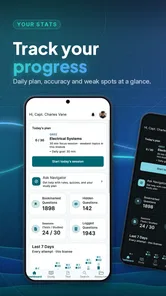
Study progress can feel harmless, yet it may still reveal useful information about a person’s preparation: which subjects they struggle with, how often they study, or whether they are approaching an exam. I would therefore avoid treating progress tracking as invisible background activity. Before creating an account or synchronizing anything, I would check what choices are presented and whether I can use the core study experience without sharing more than necessary.
I would be especially careful on a shared phone or a device used by several crew members. Saved accounts, purchase access, and visible progress can create practical problems even when nobody has bad intentions. Signing out when appropriate, using the device’s purchase authentication, and checking which profile is active are simple habits that prevent an accidental purchase or a confusing study record.
Another sensitive moment is changing devices. If progress is tied to an account, I would want to understand how sign-in and restoration work before deleting the old installation. If it is stored only on the device, I would avoid assuming that a reinstall will preserve everything. The safe approach is to inspect the app’s account and settings screens first, record important study notes separately, and make changes deliberately.
I would also keep official documents outside the app’s study record. Personal identification, license paperwork, employer information, and vessel details are not needed for ordinary question practice. Keeping those materials separate reduces the consequences if a phone is lost or someone else briefly uses it.
What the current version means for a serious candidate
The current version is 8.9.2, and the app supports devices running Android 7.0 or later. That makes compatibility worth checking before a long preparation plan, especially if I am using an older phone or a managed work device. A successful installation is not the same as a comfortable study experience, so I would test readability, navigation, and purchase controls during the first session.
For a serious candidate, version information also creates a useful habit: review the app after updates rather than assuming familiar screens still behave exactly the same way. I would check whether account controls, content organization, or purchase prompts have changed. This is not about distrusting every update; it is about keeping control of the tools that support an important exam.
I would still compare practice content with current official requirements and authoritative references. License preparation is sensitive to wording and scope. Even a well-rated app should be one part of the process, because the final responsibility for knowing the applicable material cannot be outsourced to a quiz interface.
Where it beats ordinary alternatives
Compared with studying only from printed manuals or long PDF files, Sea Trials offers a faster way to discover what I cannot recall. A manual is better for full explanations, diagrams, context, and careful reference. The app is better when I need active recall and immediate feedback. I would use the manual to learn and the app to test.
Compared with watching general boating videos, it is likely to keep my attention closer to exam preparation. Videos can explain concepts clearly, but they are passive unless I stop and test myself. Sea Trials encourages a decision on each question, which makes gaps harder to ignore. On the other hand, video instruction can be superior when I need to see a procedure or hear an instructor explain why two similar answers differ.
Compared with a classroom course, the app is more flexible and private. I can study at my own pace and revisit a troublesome area without feeling behind other students. A classroom remains better for asking follow-up questions, learning from an instructor’s practical examples, and building confidence around material that feels confusing. I would choose the app as a supplement rather than as a complete replacement when the license path is new to me.
Who should use it, and who should skip it
I think Sea Trials is a good fit for a mariner who already knows the basics, has a defined USCG exam target, and wants portable practice. It is also useful for someone who studies in irregular bursts and needs a low-friction way to keep reviewing. The free installation makes an initial trial reasonable, provided the optional purchase screens are read carefully.
I would be more cautious recommending it to a complete beginner who expects lessons from the ground up. I would also skip relying on it alone if I needed deep explanations, instructor feedback, hands-on training, or a carefully documented study curriculum. In those situations, official references, a qualified course, or a specialist tutor would be the better primary choice.
People who dislike studying on a phone may also get more from printed material or a larger-screen resource. The app’s convenience only helps if I can read comfortably and stay focused. Likewise, anyone who is uncomfortable with account prompts or optional purchases should inspect those controls before investing time in a long-term workflow.
My cautious verdict
After looking at its role, pricing structure, device requirements, and practical study value, I see Sea Trials - USCG License Exam as a focused revision companion rather than a one-stop license solution. Its best contribution is simple but useful: it makes active recall available when a full study session is not. That can turn scattered spare minutes into meaningful preparation, especially when I record mistakes and verify the underlying rules elsewhere.
I would recommend trying it to a prepared candidate who wants question practice, while keeping expectations realistic about what an app can teach. I would also make trust part of the setup: review permissions on the device, read account and purchase choices, protect purchase confirmation, and avoid storing unnecessary personal information. Those steps do not make studying harder; they preserve control while the app does its job.
For me, the deciding question is not whether it can replace every other resource. It cannot. The better question is whether it helps me identify weak areas and return to them consistently without creating avoidable confusion around access or purchases. If the answer is yes for my exam path, this education app earns a place beside official study material. If I need comprehensive instruction or practical coaching, I would put that money and time into a course first, then use Sea Trials - USCG License Exam for targeted review.
Sea Trials - USCG License Exam Frequently Asked Questions
Is Sea Trials - USCG License Exam free to download, and are there paid features?
Sea Trials is free to download, so you can try the app before deciding whether it fits your study routine. It also offers in-app purchases, which means some content or features may require an additional payment. Consider what you need for your exam preparation and review the purchase options in the app before buying anything. The app is rated for Everyone.
What devices can run Sea Trials - USCG License Exam?
Sea Trials is available for mobile devices running Android or iOS, with a minimum operating-system requirement of version 7.0. Before installing, check that your device meets that requirement and has enough space for the app. Keeping your operating system and the app current can also help provide a smoother experience and access to the latest available version.
Who develops Sea Trials - USCG License Exam, and how popular is it?
Sea Trials - USCG License Exam is developed by Lokey Labs, LLC. It has an average rating of 4.5 from 328 ratings, with 172 written reviews and more than 10,000 installs. Those figures offer a broad sense of how other users have responded, though individual experiences can differ depending on their license goals, study habits, and expectations.
What is Sea Trials - USCG License Exam?
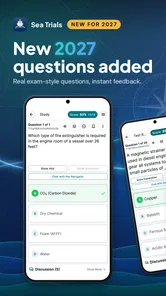
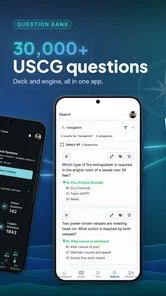
Sea Trials - USCG License Exam is a study and practice app designed for people preparing for United States Coast Guard merchant mariner license examinations. It provides exam-style questions covering important subjects such as navigation, deck safety, rules of the road, seamanship, and maritime regulations. The app is intended to support independent study and help users become familiar with the format and difficulty of licensing questions.
Which USCG license subjects does the app cover?
The available subjects can vary depending on the license level and app version, but Sea Trials generally focuses on the knowledge areas tested in USCG examinations, including navigation, deck general, deck safety, chart work, rules of the road, and related seamanship topics. Before downloading, users should review the current subject list and confirm that it matches their intended credential, route, tonnage, and endorsement requirements.
Pros
- Covers key USCG exam subjects in a focused
- study-friendly format.
- Practice questions help identify weak areas before taking the real exam.
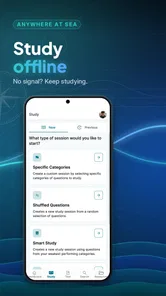
- Useful for reviewing on the go without needing an internet connection.
- Simple interface makes it easy to start a quiz or resume studying quickly.
- Suitable for both first-time applicants and experienced mariners refreshing skills.
Cons
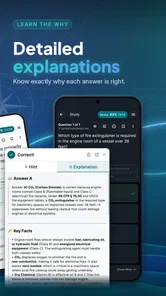
- Question explanations may not be detailed enough for difficult navigation topics.
- It cannot replace official Coast Guard materials or hands-on maritime training.
- Some users may find repeated practice questions less engaging over time.
- Exam content may require updates when USCG rules or requirements change.
- A small screen can make charts
- diagrams
- and navigation details harder to read.











