

ScanSolve - AI Homework Helper
- 240.00
- 4.5
- Installs
- 1.00M
- Price
- Free

Screenshots


Analysis by Reviewed
I find the best way to use ScanSolve - AI Homework Helper is to treat it as a study aid, not an answer button. When a question is confusing, scanning it can give me a starting point; the useful part is then checking each step and asking myself why it follows. That small habit makes the result more valuable than simply copying a solution, especially when I need to solve a similar problem on my own later.
A repeatable homework routine
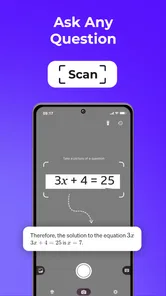
For a practical routine, I first make sure the whole question is visible and the page is well lit, then scan just the problem I want help with. If a worksheet has several questions close together, framing one at a time helps me keep the explanation tied to the right task. After reading the answer, I cover it and try the next step myself. This is a simple way to use an instant solution without letting it do all the thinking.
A realistic example: I’m working through algebra after school and get stuck rearranging an equation. Rather than scan the entire page, I focus on that equation, compare the explanation with the method from class, and note the step that caused the confusion. If the answer looks surprising, I check the original symbols and numbers before trusting it; a blurry minus sign or exponent can change the question completely.
Make the result work for you
Experienced use is less about secret shortcuts and more about consistent habits. I keep the phone steady, avoid shadows over the text, and review the scan before relying on the explanation. With a longer question, I separate the prompt from nearby notes so the app has a clearer target. These small choices can prevent a misread from turning into a convincing but irrelevant answer.
I also use the explanation as a prompt for follow-up study: write down the rule I missed, then attempt a fresh example without looking at the screen. That is especially helpful in subjects where knowing the final number is not enough. If the scan gives me an answer but I still cannot explain the reasoning in my own words, I treat that as a sign to revisit the lesson or ask a teacher.
Build a study habit around the scan
One useful way to keep the app from becoming a reflex is to decide what kind of help I want before opening it. If I only need to check whether I copied a question correctly, I inspect the image first. If I am stuck on a particular step, I try to name that step in my notes before looking at a solution. That gives me a clear question to compare against the explanation, instead of passively reading whatever appears.
For a longer homework session, I would use it selectively rather than scan every exercise. I might work through a few problems unaided, use a scan when I hit a genuine roadblock, then return to the remaining questions and see whether I can apply the same idea. This pattern makes the app most useful as a checkpoint. It also helps reveal whether I misunderstood one rule or need to review the whole topic.
More From Our News Desk

 Gmail
GmailGmail in a Busy Inbox: Who Benefits Most?
From first account to crowded workday, Gmail earns its place through dependable search and flexible sorting—but its best fit depends on how much inbox maintenance you can tolerate.

 Prime Video
Switching to Prime Video: What Changes in Your Viewing Routine
Prime Video can make a compelling second home for streaming, but switching means learning a different catalog, rental layer, and route from browsing to playback.

 Universal TV Remote Control
Universal TV Remote Control Works Best as a Reliable Backup
A phone remote earns its place through quick setup and reliable habits. Here is how to get more from Universal TV Remote Control—and where its limits show.

 Weather - By Xiaomi
Weather by Xiaomi Review: Clear at a Glance, Less Clear Up Close
Xiaomi’s weather app makes everyday forecasts quick to scan, but its calm surface can leave useful details and recovery paths harder to find than they should be.

 X
XX Under Pressure: Can It Recover When Posting Goes Wrong?
A resilience-focused review of X, examining setup, mistaken posts, interruptions, weak connections, and the gaps that matter when recovery needs to be dependable.

 Clash of Clans
Clash of Clans Is Won Between the Battles
Its raids are quick; its community is a long-term project of coordination, teaching, rivalry, and shared responsibility—with all the friction that entails.
Latest News



Students who are learning independently may appreciate that quick path from a printed problem to a possible worked explanation. Those who need a full lesson, a carefully paced course, or regular feedback from a person should not expect a scan to provide the same kind of support. I would pair it with class notes or a textbook when I need the broader context, and use a teacher or tutor when the difficulty is understanding why a method is appropriate.
The Magic of Scanning
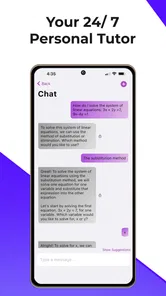
Imagine this: you’re stuck on a math problem that looks like it’s written in hieroglyphics. All you have to do is snap a picture of it with your phone, and ScanSolve does the rest. It’s like having a personal tutor available 24/7. The app’s AI technology is impressive, breaking down complex problems into understandable solutions. I’ve tried it with some algebra and even a bit of calculus, and it hasn’t disappointed yet.
Easy to Use Interface
One of the standout features for me is how user-friendly this app is. I’m not the most tech-savvy person, but navigating through ScanSolve - AI Homework Helper was a breeze. Everything is laid out clearly, and the app guides you through the process step by step. Plus, there’s something incredibly satisfying about seeing a problem that had you stumped laid out in simple steps.
ScanSolve is an education app from developer Collins Chukwuma. It is free to install, rated for Everyone, and has a 4.5 average from around 26 thousand ratings, alongside over one million installs. Version 1.5.0 is the current release, and the app is listed for Android 7.0 and later. Optional in-app purchases range from $7.99 to $94.99 per item, so I’d check the purchase details before committing to anything beyond basic use.
Settings and choices worth checking
Before making this part of a regular routine, I would spend a moment reviewing the options available in the app and the purchase screen. I would not assume a paid item is needed just because it is offered; first, I’d see whether the free use is enough for the kinds of questions I actually bring to it. If I were helping a younger student, I would also make sure the way they use any homework helper fits the expectations set by their family and school.
It is worth thinking about the device and the page together, too. A camera scan is most convenient when the question is printed clearly and the phone can be held steady. If I am working from a book with a curved spine, I would flatten the page as much as possible and avoid capturing the gutter, where symbols can bend or disappear. When the source is a screen or a photocopy, I would check for glare and low contrast before blaming the explanation for a result that may have started with a poor image.
Beyond Math
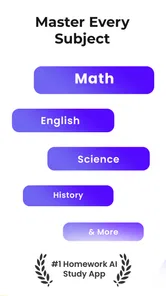
While math is where I’ve found the app most useful, it doesn’t stop there. ScanSolve also helps with other subjects like physics and chemistry. You’d think an app would struggle with the nuances of different subjects, but it handles them like a pro. It’s like having a Swiss army knife for homework!
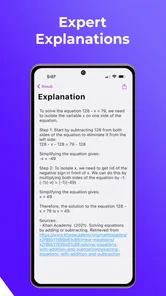
And let’s not forget the app’s ability to explain concepts in a way that actually makes sense. I’ve had a few "aha!" moments thanks to the app’s explanations, which is something I haven’t experienced with other homework helpers.
Faster patterns without rushing
The fastest reliable routine is not necessarily taking the picture as quickly as possible. I get more value by preparing the page first: isolate one question, make its full wording visible, and check that a diagram or label has not been cut off. Then I read the explanation once for the overall approach and again to compare the specific steps. This is a small investment of attention that can save time otherwise spent following an answer to the wrong version of a problem.
For science questions, I would make a habit of checking units and notation before using a result. A number without its unit can be misleading, and a tiny subscript or exponent can change what a symbol means. I also keep the original prompt nearby while reviewing the solution rather than relying on memory. That comparison is especially useful when a question includes several quantities or a diagram that is easy to crop accidentally.
Where it fits among study tools
Compared with searching the web for a worked example, scanning is more direct when I already have a specific question on paper. It saves me from guessing which search terms will lead to the right method. A textbook or class notes are still better when I need a full topic explained in order, while asking a teacher is the stronger choice for feedback on my own reasoning. I see this app as a quick bridge between being stuck and knowing what to review, not a replacement for those resources.
It suits students who want help interpreting a printed exercise and are willing to work through the reasoning afterward. It is less suitable when a task requires a personal argument, an original essay, or a teacher’s assessment of how you reached an answer. I’d also choose another approach if a diagram is crowded, handwriting is hard to read, or the exact wording matters more than a likely solution: typing the question into a trusted reference or asking someone to check it may be safer.
There is a practical difference between this scan-first approach and typing a question into a search engine. Search can be better when I want several explanations, a video lesson, or a source I can compare with my course material. Scanning is more convenient when the wording is already in front of me and I need a quick place to begin. Neither removes the need to judge whether the result fits the question; I would switch methods whenever the scan seems uncertain or the topic calls for a broader explanation.
What to check before relying on it
A scan-based helper depends on the image capturing the question accurately, so I treat the wording as part of the answer, not just the camera step. In physics and chemistry, units, subscripts, and diagram labels can carry as much meaning as the numbers. I compare those details with the original page before using a result. If the explanation skips a step I need for class, I don’t assume the shortcut is the method my teacher expects; I use it to identify what to ask about.
The app was released on February 28, 2023, and its current version is 1.5.0. I would check the app’s settings and purchase screen myself before settling into a routine, particularly if I’m considering paid options. I wouldn’t assume a paid item is necessary for every student: start with the free use that fits your needs, then decide based on the actual value you get. The best setting is the one that makes the scan and explanation easy to review, rather than one that encourages me to rush through the work.
When a scan is not the right tool
Some schoolwork is difficult for a different reason than not knowing how to solve a printed exercise. If I am asked to develop an argument, explain a personal interpretation, or write an original response, a scanned answer is not a substitute for doing the thinking and drafting myself. Likewise, if I cannot tell whether the question was captured correctly, I would rather reframe it or use my notes than accept a plausible-looking response. The app is most helpful when there is a concrete problem to inspect, not when the assignment depends on my own voice or judgment.
I would also avoid treating a short explanation as proof that I have mastered a subject. A worked answer can make sense while I am looking at it and still be hard to reproduce later. After using it, I try one similar question without assistance, or explain the method aloud in ordinary words. If that fails, the next step is more practice or a clearer lesson, not another scan of the same prompt. That distinction keeps a convenient helper from creating false confidence.
Why It’s Worth Trying
So, why should you give ScanSolve a whirl? Well, aside from the obvious convenience, it’s a fantastic way to learn. Instead of just giving you the answers, it breaks down problems so you can understand them better. This means you’re not just completing your homework, you’re actually learning something new each time.
In conclusion, if you’re looking for a homework helper that’s both smart and easy to use, ScanSolve - AI Homework Helper is definitely worth checking out. It’s turned my homework headaches into manageable tasks, and I’m sure it can do the same for you. So go ahead, give it a try, and watch as your homework woes become a thing of the past!
My settled view
My recommendation comes with one condition: use the scan to uncover the next step, then do enough work yourself to remember it. That approach makes the app more useful for quick practice than for outsourcing an assignment. With 240 reviews and a 4.5 average, it has attracted substantial user interest, but I’d still judge it by whether its explanations fit the subject and level I’m studying.
For students who often meet a specific problem on paper and want a fast explanation, ScanSolve is worth trying. If you need a complete course, dependable feedback on original writing, or a guaranteed match to your teacher’s preferred method, I’d rely on class resources first. Used selectively, it can turn a frustrating pause into a focused study session; used as a substitute for practice, it is much less likely to help.
ScanSolve - AI Homework Helper Frequently Asked Questions
Is ScanSolve free to download, and what might cost extra?
ScanSolve is free to download, so you can try the app without an upfront purchase. It also offers in-app purchases priced from $7.99 to $94.99 per item, so check the available options and their terms before buying. Consider whether the free experience meets your study needs before deciding to spend money.
What should I consider before using an AI homework helper for schoolwork?
ScanSolve is designed to give students help with academic tasks, but it is best treated as a study aid rather than a substitute for learning or checking your work. Read the solutions carefully and make sure you understand the reasoning before relying on an answer. This approach can help you use the app to support your studies instead of simply copying results.
Who develops ScanSolve, and what kind of app is it?
ScanSolve is an education app developed by Collins Chukwuma. Its focus is homework help: the store summary describes its approach as “Snap, Solve, Succeed,” with instant answers. If you are choosing an app for schoolwork, that gives you a quick sense of its purpose before you decide whether its scan-and-solve style suits the way you study.
What is ScanSolve and how does it work?
ScanSolve is an AI-powered homework helper app designed to assist students with their academic tasks. Users simply take a photo of their homework or type in their query, and the app uses advanced algorithms to provide detailed solutions and explanations. It's a convenient tool for understanding complex subjects and improving study efficiency.
Is ScanSolve suitable for all subjects and grade levels?
ScanSolve is versatile and supports a wide range of subjects including mathematics, science, and language arts. It's suitable for students from elementary to high school levels. However, its efficacy might vary depending on the complexity of the subject matter and the specific curriculum followed by the user.
Pros
- Quick homework solutions
- Accurate problem-solving
- User-friendly interface
- Supports multiple subjects
- Improves learning efficiency
Cons
- Requires internet access
- Limited free features
- Occasional errors in solutions
- Ad-supported version
- Subscription can be pricey











