SafeBrowser - Secure & Private
- 116.00
- 4.5
- Installs
- 100.00K
- Price
- Free

Screenshots
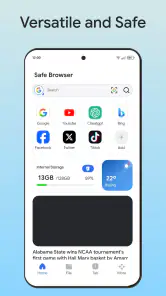

Analysis by Reviewed
SafeBrowser - Secure & Private is the kind of Android tools app I would try when ordinary browsing feels too exposed or cluttered. Its central promise is straightforward: it brings private, safer browsing into one focused application instead of asking me to assemble several separate tools. After spending time with it, I see the appeal most clearly in everyday situations where I want to open a page, search for something sensitive, or browse on a shared network without making that activity feel unnecessarily public.
What makes this app worth discussing is not a long list of flashy extras, but the way its privacy-first purpose changes how I use a browser. I am less likely to open a regular browser, leave a trail among unrelated tabs, and then remember later that I should have cleaned everything up. SafeBrowser gives that private session its own place. The real benefit is reducing casual exposure during routine browsing, not turning a phone into an invisible device.
It is a free app from Smart Utils Dev Team, listed for Everyone and available on Android devices running version eight or later. The current release is 1.0.5. The app has reached over one hundred thousand installs, with an average rating of 4.5 from more than six hundred ratings. Those figures suggest that its simple approach is connecting with a useful group of people, although I would still judge it by the way it fits my own browsing habits rather than by popularity alone.
Private browsing as the main reason to install it
What the privacy focus changes
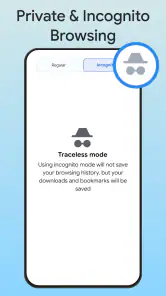
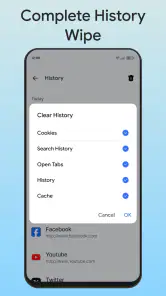
Most people understand private browsing as a switch they turn on only when they have something unusual to search for. In practice, I find it more useful as a separate routine. When I open SafeBrowser, I already know that the session is meant for browsing that I do not want mixed with my normal activity. That mental separation matters because it removes one small but common mistake: using a familiar browser for a private task and forgetting what remains in its history, tabs, or suggestions.
This does not mean I would treat the app as a complete anonymity solution. A private browser can help limit local traces and make browsing feel more contained, but it cannot automatically make every website trustworthy or erase what a site, network operator, or online account may already know. I consider that distinction essential. SafeBrowser is most useful as a practical privacy layer for personal browsing, not as a guarantee that every part of an online connection is hidden.
The store summary calls it an all-inclusive private and smart browser, while its short description presents it as SafeBrowser. I read those phrases as a description of the app’s direction rather than a reason to expect every advanced browser feature. Its strongest identity is the private browsing workflow. If that is the capability I need, the focused design makes sense. If I am looking for a full replacement for a feature-heavy browser, I would compare it carefully before moving all my daily browsing into it.
Why a separate browser can be more useful than a private tab
A private tab inside a standard browser is convenient, but convenience can also work against good habits. I might open a normal tab by accident, switch between work and personal browsing, or leave the private tab open for someone else to see later. A dedicated app creates a stronger boundary. I can use my regular browser for accounts, saved pages, and ordinary searches, then use SafeBrowser when I want a cleaner, more deliberate session.
That separation is especially helpful on a family tablet, a borrowed phone, or a device that I occasionally hand to another person. It does not replace a device lock, and it does not protect an already signed-in account from its own activity. Still, it reduces the chance that a later user will casually find a page through the browser’s history or open tabs. This is a modest advantage, but it is the kind of advantage that matters because it fits into normal behavior without requiring technical knowledge.
The effect on search and browsing habits
Using a privacy-focused browser also changes what I pay attention to. I become more careful about whether I need to sign in, whether a page is asking for unnecessary information, and whether I should open a link at all. That is a positive side effect, but it also means the app is not a substitute for judgment. SafeBrowser can provide a more appropriate place for a sensitive search; it cannot decide whether the result is legitimate or whether I should submit personal details.
I would also avoid assuming that private browsing means downloaded files, screenshots, or copied text are automatically private. Once content leaves the browsing session and enters another part of the phone, it may be handled by the operating system or another app. My practical rule is simple: use SafeBrowser to control the browsing session, then treat anything I save, share, or open elsewhere as a separate privacy decision.
How I would use it in practice
A simple workflow for a sensitive search
My preferred workflow starts before I open the first page. I decide whether the task really needs a private session, launch SafeBrowser, and keep that session limited to the purpose at hand. For example, if I am researching a health question, checking a gift idea, or looking up travel information that I do not want appearing among my everyday suggestions, I stay in this browser rather than jumping between it and my usual one.
That sounds obvious, but it prevents a surprisingly common problem: beginning privately and then opening the same search in a normal browser because a link is easier to find there. Keeping the entire task in one place gives me a clearer end point. When I am finished, I close the session and return to my regular browser for ordinary work. I find that this deliberate start-and-stop routine is more valuable than simply having another browser installed.
Using it on shared networks and shared devices
SafeBrowser makes the most sense to me when the device or browsing environment is not entirely private. On a shared home tablet, I would use it for searches that I do not want appearing in the next person’s browsing suggestions. On a public or guest network, I would use it to reduce local browser traces, while remembering that the network itself is a separate matter. The app can improve privacy at the browser level, but it should not make me careless about public Wi-Fi, suspicious pages, or account security.
There is also a useful distinction between privacy from other people using the phone and privacy from online services. A separate browser app helps more with the first situation. For the second, I still need to think about logins, forms, cookies, permissions, and the behavior of each website. That is why I see SafeBrowser as one part of a sensible privacy routine rather than a single button that solves everything.
A realistic everyday example
Imagine I am planning a surprise birthday purchase on a phone that my partner sometimes uses. In a normal browser, the search could remain visible through history, open tabs, or suggestions. I would open SafeBrowser for the research, compare the relevant pages there, and finish the task without mixing it with my usual browsing. I would still be careful about email receipts, shopping accounts, notifications, and saved files, because those can reveal the purchase outside the browser. The app helps with the browsing portion of the surprise, not every digital trace connected to it.
That limitation actually makes the app easier to use responsibly. I know what problem it is addressing: keeping a browsing session more separate and private. I do not have to pretend that it protects every related activity. For ordinary users, that clear boundary is healthier than vague confidence.
What I would check before making it my main browser
Before replacing my everyday browser, I would test the pages I use most. I would check whether sign-in flows behave as expected, whether pages load comfortably, whether forms are convenient, and whether the lack of familiar browser habits slows me down. A privacy-focused browser can be excellent for specific sessions while still being less comfortable for long workdays, research projects, or heavy tab management.
I would also keep my expectations realistic about saved information. If my usual workflow depends on synchronized bookmarks, shared tabs, password tools, or a carefully organized browser profile, I would not abandon that setup without testing SafeBrowser alongside it. The app’s value comes from its private focus; it does not automatically replace every convenience I may have built elsewhere.
Where the focused approach works best
People who want privacy without technical setup
The strongest audience is someone who wants a more private browsing habit but does not want to configure a complicated system. SafeBrowser is approachable because the purpose is easy to understand: open it when the browsing task should stay separate. That makes it suitable for people who are not interested in browser settings, extensions, or privacy terminology but still want more control over casual local exposure.
I also think it suits users who regularly share devices. Parents, couples, students using communal equipment, and people who use a work phone for personal searches can all benefit from having a clearly separate browsing space. The advantage is not dramatic protection; it is fewer accidental leftovers in the place where another person is most likely to look.
Situations where it saves more effort than it adds
The app earns its place when I use it for repeatable categories of browsing: personal research, surprise shopping, sensitive questions, temporary searches, or browsing on a device that is not exclusively mine. In those cases, launching a dedicated browser is quicker than remembering to switch modes in a general browser and then checking whether I left anything behind.
A less obvious use is separating short-lived research from my long-term browser profile. Search suggestions and open tabs can become noisy over time, especially when I look up one-off topics. Keeping those tasks in a private browser helps preserve the organization of my main browser. That is not only about secrecy; it also reduces clutter and makes my normal browsing easier to navigate.
When another option may be better
I would skip SafeBrowser as my only browser if I depend heavily on advanced synchronization, extensive tab organization, enterprise controls, or a mature password-management workflow. In that situation, my established browser may be more efficient for daily use, while SafeBrowser remains a companion for private sessions. I would also choose a different solution if my main concern were protection from sophisticated network surveillance, because a private browser by itself does not address every layer of online privacy.
People who want the broadest possible compatibility should test it with the websites and services they use every day. A focused privacy tool can be the right answer for a narrow job and still feel restrictive as a universal replacement. I prefer that honest trade-off to forcing one app into a role it was not designed to fill.
Trade-offs I noticed while judging the app
Privacy is useful only when the habit is consistent
The biggest trade-off is behavioral. SafeBrowser can make a private session easier to start, but I still have to use it consistently. If I search in the app and then continue the same activity in my usual browser, the benefit becomes fragmented. The app rewards a clear workflow, so users who want a completely automatic privacy experience may find that discipline frustrating.
There is also a small convenience cost in maintaining two browsing spaces. I need to remember which browser contains a page, where I started a search, and whether a task belongs in my regular or private workflow. For me, that cost is reasonable when privacy matters, but it would be unnecessary for casual browsing that I do not mind keeping in my normal history.
Private does not mean risk-free
I would not use the app as permission to open unknown links, ignore warning signs, or enter sensitive information on any page that looks suspicious. The private label describes the browsing approach, not the trustworthiness of every website. I still check the address, avoid unnecessary forms, and think twice before downloading anything. That advice is particularly important for users who may interpret “secure” as a promise that harmful content cannot reach them.
Another practical trade-off is that privacy can reduce convenience. If I avoid signing in, some sites may offer a less personalized experience. If I keep a session temporary, I may need to repeat a search later. Those are not failures of the app; they are the normal cost of keeping browsing separate. The right question is whether the task benefits enough from privacy to justify that extra step.
What the version and rating tell me as a buyer
SafeBrowser is currently on version 1.0.5, so I approach it as a relatively young tool rather than a browser with years of accumulated refinement. Its 4.5 average rating and more than one hundred reviews indicate encouraging user response, but ratings cannot tell me whether every specialized website will work perfectly for my needs. I would install it because the privacy workflow matches my situation, not simply because the number looks reassuring.
The app is free, which makes trying it alongside an existing browser easy. I can evaluate it without immediately reorganizing my entire setup. That is important here because the best role for SafeBrowser may be as a dedicated companion rather than a complete replacement. A no-cost trial in real situations will reveal more than a quick look at the app’s description.
My recommendation after using it
I recommend SafeBrowser - Secure & Private to anyone who wants a simple, separate place for browsing that should not be mixed with everyday activity. Its most convincing capability is not an extravagant collection of tools; it is the way a dedicated private browser encourages a cleaner beginning and ending for sensitive sessions. That can make a genuine difference on shared devices, during personal research, and whenever I want to avoid adding one-off searches to my normal browser profile.
I would recommend using it with a clear plan: keep the task inside the app, avoid unnecessary logins, treat saved files and screenshots separately, and remember that website and network privacy are broader issues. Those habits turn the app from a vague promise into a practical part of a privacy routine.
I would not recommend replacing a feature-rich main browser without testing the workflows I rely on most. Users who need deep synchronization or advanced organization may be happier keeping their current browser and adding this one for selected tasks. That is not a weakness in the app’s concept; it is the sensible way to use a focused tool.
Overall, SafeBrowser - Secure & Private is a worthwhile free Android utility for people who value separation more than maximum browser convenience. Smart Utils Dev Team has aimed it at an everyday privacy problem, and in my experience that narrow purpose is exactly where it feels most useful. If I wanted one browser for everything, I would compare alternatives first. If I wanted a dedicated space for private, temporary browsing, I would gladly keep this app available.
Pros
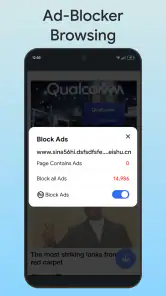
- Blocks many ads and trackers for a cleaner
- faster browsing experience.
- Private browsing tools help reduce exposure of your search and visit history.
- Simple interface makes secure browsing accessible to less technical users.
- Useful protection on public Wi-Fi networks and unfamiliar websites.
- Can reduce distracting pop-ups and improve readability on mobile pages.
Cons
- Some websites may not work correctly when privacy protections are enabled.
- Advanced security features may require a paid plan or additional setup.
- Blocking scripts can occasionally affect logins
- videos
- or online forms.
- Browser performance may vary depending on device and protection settings.
- It may offer fewer extensions and customization options than major browsers.

- Category
- Tools
- Version
- 1.0.5











