

Runout Poker Trainer GTO Coach
- 106.00
- 4.6
- Installs
- 50.00K
- Price
- Free

Screenshots
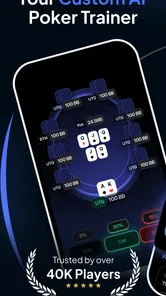
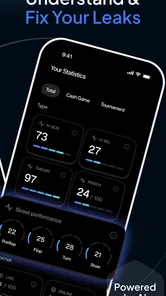
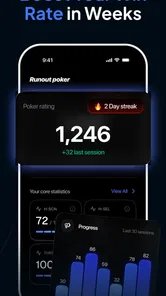
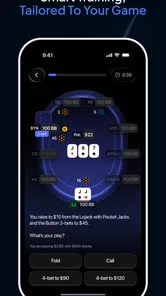
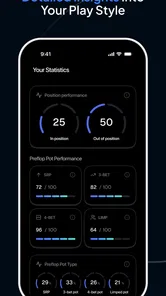
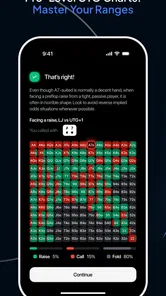
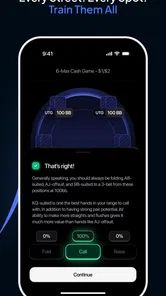
Analysis by Reviewed
I approached Runout Poker Trainer GTO Coach as a study tool rather than a poker game, and that distinction matters from the first session. It is an education app from Learn Poker Offline Labs built around poker ranges, GTO strategy, odds, and AI-based training. I would recommend it to a player who wants a focused way to review decisions away from a table, especially when the goal is to improve thinking rather than simply play more hands.
The app is free to install, although optional in-app purchases range from around eighteen dollars to around ninety dollars per item. That makes the first stage easy to try, but it also means I would spend time testing the free experience before paying for anything. Its Teen content rating is understandable for a poker-learning product, and the app has reached over fifty thousand installs with a 4.6 average from around four thousand ratings. Those figures suggest a useful level of interest, but they do not replace checking whether its training style suits the way you personally learn.
Getting past the first points of friction
The most likely place a new user gets stuck is not the poker theory itself. It is understanding what the app expects from a study session. A range trainer can feel less immediately rewarding than a normal poker app because there is no need to chase chips, opponents, or a long match. The value is in making a decision, examining the reasoning, and noticing where your instinct differs from a theoretically sound line.
I found it helpful to begin with a narrow purpose instead of trying to absorb every part of the training at once. For example, I might use one session to think about pre-flop ranges and another to concentrate on odds. Mixing every topic immediately makes mistakes harder to interpret. If I miss a decision, I want to know whether the problem came from hand selection, board understanding, or calculating the situation. A smaller target turns an incorrect answer into useful feedback.
The AI training angle can also create the wrong expectation. I would not treat it as a replacement for a coach who knows my complete playing history. Its practical role is closer to a patient practice partner: it gives me repeated opportunities to make choices and compare them with a GTO-oriented approach. That is valuable, but only if I pause after an error instead of tapping through the next prompt automatically.
One useful habit is to say my decision aloud before checking the result. I name the action I would take, the reason, and the information I am using. This exposes shallow guesses. If I choose a move because a hand “looks strong,” the app becomes a mirror for that weakness. If I can explain the choice in terms of position, range interaction, and odds, the exercise becomes much closer to real study.
What to check before blaming the training session
When a lesson seems confusing, I first check whether I have actually understood the situation presented. Poker decisions depend heavily on context, and a familiar-looking hand can still require a different response because of the range or runout. I reread the prompt, identify the street, and separate the cards I know from the assumptions I am making. That simple pause prevents me from calling a clear training result “wrong” when I have skipped a detail.
More From Our News Desk

 Gmail
GmailGmail in a Busy Inbox: Who Benefits Most?
From first account to crowded workday, Gmail earns its place through dependable search and flexible sorting—but its best fit depends on how much inbox maintenance you can tolerate.

 Prime Video
Switching to Prime Video: What Changes in Your Viewing Routine
Prime Video can make a compelling second home for streaming, but switching means learning a different catalog, rental layer, and route from browsing to playback.

 Universal TV Remote Control
Universal TV Remote Control Works Best as a Reliable Backup
A phone remote earns its place through quick setup and reliable habits. Here is how to get more from Universal TV Remote Control—and where its limits show.

 Weather - By Xiaomi
Weather by Xiaomi Review: Clear at a Glance, Less Clear Up Close
Xiaomi’s weather app makes everyday forecasts quick to scan, but its calm surface can leave useful details and recovery paths harder to find than they should be.

 X
XX Under Pressure: Can It Recover When Posting Goes Wrong?
A resilience-focused review of X, examining setup, mistaken posts, interruptions, weak connections, and the gaps that matter when recovery needs to be dependable.

 Clash of Clans
Clash of Clans Is Won Between the Battles
Its raids are quick; its community is a long-term project of coordination, teaching, rivalry, and shared responsibility—with all the friction that entails.
Latest News



I also keep my first sessions short. A tired player often interprets repeated mistakes as an app problem, when the real issue is attention. Range work is mentally demanding because it asks for consistency rather than dramatic wins. A compact practice block gives me cleaner information about whether the explanations and exercises are helping.
Device preparation is equally ordinary but worthwhile. I make sure the phone is running a compatible Android release, since the minimum requirement is Android 7.0, and I keep the app updated to version 1.1.17 when an update is available. I also check that the installation completed properly before starting a serious study session. These are basic steps, yet they matter when a screen behaves unexpectedly or a lesson does not open as expected.
If I am using the app while travelling or between other tasks, I avoid assuming that every part of the experience will behave exactly like a fully offline notebook. The product is presented as a trainer for poker study, but I would still test the particular lessons I plan to use before relying on them during a commute or in a place with an unreliable connection. That is a sensible setup check, not a criticism of the teaching model.
Another practical check is financial. Because the app is free to start but includes optional purchases, I review the purchase prompt carefully before confirming anything. I would not buy an advanced item simply because I am frustrated with an early mistake. First I want to establish that I understand the lesson format, that the app fits my study routine, and that additional material addresses a real gap in my game.
A recovery routine when progress feels messy
When a session goes badly, my preferred recovery workflow is to reset the task rather than keep guessing. I return to one familiar concept, work through a small set of decisions, and write down the pattern behind my errors. For instance, if I repeatedly overvalue a hand on a particular board texture, I record that as a decision-making habit. The next session then has a clear purpose instead of becoming another general attempt to “get better at GTO.”
This is where the app can be more useful than a passive article. Reading about ranges may make sense while I am looking at the page, but choosing an action forces me to reveal what I would actually do. I use the result as a diagnostic tool. A wrong answer is not automatically a failure; it tells me which assumption deserves review.
I would also avoid changing several study variables at once. If I switch topics, increase the difficulty, and start buying extra material after one poor session, I lose track of what helped. A better sequence is to repeat the same type of exercise, compare my reasoning across attempts, and only then move to a different subject. This makes the app feel less like a collection of isolated quizzes and more like a personal practice log, even if I keep the log separately.
There is a subtle trade-off in GTO training that new players often miss. A theoretically balanced answer is not always the same as the easiest live-game decision to execute under pressure. I use the app to learn the underlying structure, then translate that knowledge into a simpler rule I can remember. The trainer is strongest when it improves my understanding; it is less useful if I blindly memorize actions without knowing what changes when the situation changes.
For an everyday example, imagine having ten minutes before leaving for work. I would not attempt a broad review of every poker concept. I would choose one short practice goal, answer deliberately, and note one recurring error. Later, perhaps during a longer quiet period, I could revisit the error and connect it to odds or range construction. That two-stage workflow is more realistic than expecting a single session to transform my game.
When the app is not the real problem
Some apparent failures come from expectations rather than software. If someone wants a fast poker game with colourful action, this education app may feel slow or overly analytical. Its purpose is practice, so the reward is improved decision quality, not entertainment from a live table. I would steer a casual player toward a conventional poker game instead, while recommending this trainer to someone willing to study uncomfortable mistakes.
It is also not the ideal first resource for a complete beginner who does not yet understand basic poker terms. The app can help organize strategic thinking, but a learner may need a simple rules guide before range and GTO exercises become comfortable. Starting with unfamiliar theory can create confusion that no amount of repeated tapping will fix. I would learn the hand rankings, betting structure, and basic odds first, then use the trainer to sharpen decisions.
On the other hand, an experienced player should not assume that a training result automatically matches every real table. Real opponents do not always follow balanced strategies, and the best exploit against a particular person may differ from a theoretical baseline. I use the app as a foundation, then adjust according to player tendencies, position, stack conditions, and the information available in the actual game. That is not a weakness unique to this app; it is an important limit of applying GTO study anywhere.
Confusion can also come from rushing. If I tap an answer before forming a plan, the feedback tells me very little. The app cannot correct a reasoning process I never articulate. I get more from it when I treat each exercise as a small experiment: make a prediction, inspect the result, identify the assumption, and try again later. This is one of the most concrete ways to turn an AI practice feature into genuine learning.
Another consideration is cost. Free access lowers the barrier to testing the app, but the purchase range is wide enough that I would compare the paid material with my actual needs. A player who only wants occasional odds practice may not need an expensive item. Someone following a structured, long-term study plan might find a deeper purchase easier to justify. Either way, I would decide based on repeated use, not on the promise of instant improvement.
How it compares with familiar poker study options
The usual alternatives each solve a different problem. A video course is better when I want a teacher to explain a complete concept from beginning to end. A spreadsheet or notebook is better when I want to document my own hands in detail. A solver-style study environment may be better for a highly advanced player who needs extensive control over custom scenarios. Runout Poker Trainer GTO Coach sits between these options: it gives me active decision practice without requiring me to build every exercise myself.
That middle position is its main appeal. I can use it when reading feels passive but a full technical setup feels excessive. The trade-off is depth and personal context. A guided trainer can show me patterns I repeatedly miss, but it does not replace reviewing my own hand history with all the details of a real session. I would combine it with hand notes rather than expecting it to be my entire poker education.
The app also has an advantage over casual poker play for one specific reason: losing a hand does not automatically teach me why my decision was poor. In a focused training exercise, I can examine the choice itself. That makes it a better tool for deliberate practice than simply playing more hands and trusting experience to do the teaching.
Still, I would not use it as a substitute for live-game judgment. Poker is affected by timing, table dynamics, emotional control, and opponent behaviour. A range exercise can strengthen the mathematical side, but it cannot reproduce every social and practical variable. The best workflow is to study a concept here, apply it at an appropriate table, and return with notes about what felt difficult.
My practical verdict after using its approach
Runout Poker Trainer GTO Coach is a focused education app for players who want active practice with ranges, GTO ideas, odds, and AI-guided training. I like it most as a repeatable study companion: open it with one question in mind, make decisions carefully, and use mistakes to choose the next topic. That approach offers more value than treating it as a quick-answer machine.
The developer, Learn Poker Offline Labs, has positioned the product for a specific audience rather than for general mobile entertainment. The current version is 1.1.17, and the strong average rating indicates that many users find the concept worthwhile. I would still judge it by my own routine, because a popular training format can remain a poor match for someone who prefers videos, detailed hand reviews, or live play.
My recommendation is to start free, test the training rhythm, and check whether the feedback changes how you think about decisions. Keep sessions focused, verify the situation before judging an answer, and do not confuse theoretical guidance with an automatic command for every table. The best reason to keep this app is not that it promises perfect poker; it is that it gives your mistakes somewhere useful to go.
For a learner who wants structured repetition on a phone, that is a convincing role. For someone seeking a complete poker course, a social game, or a full replacement for personal hand analysis, I would choose another tool or use this one alongside it. In my experience, its value appears when I return consistently, study one weakness at a time, and turn the app’s exercises into decisions I can explain rather than answers I merely remember.
Runout Poker Trainer GTO Coach Frequently Asked Questions
Is Runout Poker Trainer GTO Coach free to download, and what purchases does it offer?
The app is free to download, with optional in-app purchases priced from $17.99 to $89.99 per item. That means you can install it without paying upfront, but some content or features may require a purchase. Check the purchase details in your device’s app store before buying so you understand what is included and whether the cost suits your study plans.
What should I know about the app’s age rating and device compatibility?
Runout Poker Trainer GTO Coach is rated Teen, so it is intended for a teenage audience and older. It supports devices running Android 7.0 or later. Before downloading, check your device’s operating-system version and available storage, and consider your household’s age-rating preferences. The app is an educational poker trainer, so its subject matter focuses on poker concepts and strategic practice.
What is Runout Poker Trainer GTO Coach?
Runout Poker Trainer GTO Coach is a poker training app designed to help players study post-flop situations, hand ranges, and game-theory-optimal decision-making. It focuses on runouts, equity, and strategic choices rather than real-money play. The app is intended for players who want to improve their understanding of poker concepts through practice, analysis, and repeated decision-making exercises.
Is Runout Poker Trainer GTO Coach suitable for beginners?
The app can be useful for beginners, but it may feel more approachable after learning basic poker rules, hand rankings, pot odds, and position. Its GTO-oriented material often uses concepts such as ranges, equity, bet sizing, and expected value. New players can still benefit from it, although understanding the terminology first will make the training sessions easier to follow and more productive.
What poker formats and situations does the app cover?
Runout Poker Trainer GTO Coach primarily concentrates on studying post-flop decisions and how changing board runouts affect a hand. Depending on the available training modules and configuration, users may encounter different board textures, hand categories, ranges, and strategic choices. Before downloading, check the current app description to confirm whether the formats, stakes, positions, and scenarios match the type of poker you play.
Pros
- Focused GTO drills help improve decision-making in common poker spots.
- Hand quizzes provide immediate feedback and encourage active learning.
- Useful for reviewing ranges away from the poker table.
- Covers strategic concepts for players beyond the beginner level.
- Compact lessons make it convenient to practice during short sessions.
Cons
- Advanced terminology may be difficult for players new to poker strategy.
- Some training content may feel repetitive after extended use.
- GTO recommendations may not always suit highly exploitative tables.
- Requires consistent practice to turn lessons into automatic decisions.
- Certain features or content may depend on a paid subscription.











