Rumble: Stream & Watch Videos
- 55.47K
- 3.7
- Installs
- 10.00M
- Price
- Free

Screenshots


Analysis by Reviewed
I came to Rumble expecting a straightforward video app, and that is mostly what it feels like: a place to watch clips, follow live broadcasts, chat, and upload. The mix gives it a different rhythm from apps built mainly around a polished on-demand library. I find it most useful when I want to browse what people are discussing now, rather than settle in with a specific film or show. That live-first feel is appealing, though it also means the experience depends heavily on what creators are posting and streaming at the time.
A good fit for browsing in short sessions
One practical way to approach Rumble is to treat it as a place to check in, not a service that must fill every spare moment. I might open it while waiting for a meeting, scan a few clips, and leave when nothing catches my eye. That works better than expecting an endless stream of perfectly matched recommendations. When I already know the creator or subject I want, going straight to that channel is a more deliberate use of my time than repeatedly refreshing a broad feed.
For a busy day, I’d separate quick discovery from focused viewing. A short clip can help me decide whether a topic is worth more attention, while a live broadcast asks for a different level of commitment: the conversation may be unfolding in real time, and joining halfway through can mean missing context. If I have only a few minutes, I’d browse first and save a longer stream for a quieter moment rather than assume every live session can be understood at a glance.
Who benefits most, and who may prefer another app
Rumble makes the most sense for adults who like creator-led video, want to explore live conversations, or are curious about a range of viewpoints beyond a familiar subscription catalog. It can also suit a creator who wants to test another place to publish, provided they are comfortable learning the platform’s current upload and licensing choices before sharing work. The strongest reason to try it is not that it replaces every other video app; it is that its mixture of live and uploaded material may offer a different route into a topic.
I would skip it as a main choice if I want a tightly organized library of films and series, a predictable path through a particular niche, or an app selected specifically for children. The 17+ age classification matters in everyday use: I would not pass a phone to a younger family member with the assumption that a general video feed is automatically appropriate. A conventional streaming service is a better match for planned entertainment, while a more specialized learning or children’s app is a safer fit when age and subject matter need closer control.
How I would handle live viewing and discovery
A realistic routine might be checking a current-affairs stream during lunch, then opening a second source before repeating a claim to anyone else. Live chat can make it easier to notice what other viewers are asking, but comments are reactions, not verification. I’d use the discussion to find questions worth checking, then look for evidence outside the broadcast when the subject affects a decision. That small habit preserves the energy of live viewing without confusing immediacy with accuracy.
There is also a simple attention trade-off. A stream can keep moving while I am doing something else, but listening casually makes it easier to miss a qualification or change of subject. When I care about the details, I would give it my attention rather than treat it as background audio. In a shared or public setting, I’d also think about volume and the suitability of the content before starting a broadcast; a feed with varied creators is less predictable than a fixed playlist I have already screened.
More From Our News Desk

 Gmail
Gmail in a Busy Inbox: Who Benefits Most?
From first account to crowded workday, Gmail earns its place through dependable search and flexible sorting—but its best fit depends on how much inbox maintenance you can tolerate.

 Prime Video
Switching to Prime Video: What Changes in Your Viewing Routine
Prime Video can make a compelling second home for streaming, but switching means learning a different catalog, rental layer, and route from browsing to playback.

 Universal TV Remote Control
 Works Best as a Reliable Backup
A phone remote earns its place through quick setup and reliable habits. Here is how to get more from Universal TV Remote Control—and where its limits show.

 Weather - By Xiaomi
Weather by Xiaomi Review: Clear at a Glance, Less Clear Up Close
Xiaomi’s weather app makes everyday forecasts quick to scan, but its calm surface can leave useful details and recovery paths harder to find than they should be.

 X
X Under Pressure: Can It Recover When Posting Goes Wrong?
A resilience-focused review of X, examining setup, mistaken posts, interruptions, weak connections, and the gaps that matter when recovery needs to be dependable.

 Clash of Clans
 Is Won Between the Battles
Its raids are quick; its community is a long-term project of coordination, teaching, rivalry, and shared responsibility—with all the friction that entails.
Latest News



What to check before uploading
Creators should think through the destination of a video before uploading, especially when licensing choices affect where it may be used. I’d read each option presented in the upload flow rather than rely on a general impression of how the platform handles creator work. The sensible first test is a video I own outright and can keep backed up elsewhere. That lets me learn the process and see how viewers respond without putting an important project or the only copy of a file at risk.
I would also keep the expectation modest: making a video available is not the same as building an audience or earning a steady return. Before spending money on any optional item, I’d check its exact purpose and whether it is relevant to what I’m trying to do. The listed in-app purchase range is broad, so a casual viewer should not assume every purchase is necessary to watch, and a new creator should avoid treating a purchase as a shortcut to reach or income.
What using Rumble feels like
Rumble is a free video player and editor app from Rumble Inc, with a mature-audience rating of 17+. It has been available since January 13, 2020, and works on Android 5.0 and later. Its average rating is 3.8 from around 174,000 ratings, while more than 5 million installs suggest it has found a substantial audience. I would treat those figures as a snapshot of broad interest, not a guarantee that every channel or session will suit me.
Finding a reason to open it
Setting up an account on Rumble is pretty straightforward. You download the app, sign up, and voilà, you're in. The interface is clean and easy to navigate, which is a breath of fresh air if you've ever found yourself lost in a maze of settings and options on other platforms. The home screen immediately starts showing you viral videos, similar to what you might expect from other video platforms, but with a twist.
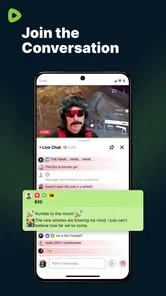
In practice, I’d use the home feed as a discovery tool, then move into a live stream when a topic or creator catches my attention. Chat makes a broadcast feel more like a shared event than a video watched alone, but it is also a reason to be selective about when and where I watch. If I’m in a quiet public place, I’d keep the sound low and rely on captions or headphones where available rather than assume every stream is suitable for casual viewing.
The Content and Community
One of the things I really appreciate about Rumble is the variety of content. Whether you're into cooking tutorials, tech reviews, or just want to watch cats being adorable, there's something for everyone. The community on Rumble is also worth mentioning. It's a mix of creators who are genuinely passionate about what they do, and viewers who are eager to discover new content.
What sets Rumble apart is its commitment to free speech. There's a strong emphasis on allowing creators to express themselves without the fear of being demonetized or censored, which is a big deal in today's digital landscape.
That open, creator-led character is a trade-off as much as a draw. I wouldn’t assume that a recommendation is a careful editorial selection; I’d check the channel and the context before treating a clip as reliable news. For a quick update, a live discussion can be engaging, but for a consequential claim I’d compare it with established reporting or primary sources. The app is better for exploring voices and conversations than for replacing my usual fact-checking habits.
Making and sharing videos
For creators, Rumble offers some pretty sweet monetization options. Unlike other platforms where it can feel like you're jumping through hoops to earn a buck, Rumble provides a more straightforward path to making money from your content. They have a unique licensing model where videos can be monetized on Rumble and even beyond, like on YouTube and other platforms.
Plus, there's the Rumble Player, which helps boost your video’s reach. If you’re a creator looking to make a living from your content, this might just be the place for you.
I’d still approach uploading as an experiment rather than a dependable income plan. The app is free to download, but it includes optional in-app purchases, with listed items ranging from $0.99 to $499.99. Those prices make it worth checking exactly what an item offers before buying, especially if you’re only testing the service. If you create videos, a practical approach is to keep an original copy outside any social platform, then upload a short sample and see whether the audience and workflow fit before committing a larger catalog.
Where it fits among video apps
Compared with a conventional subscription video service, Rumble is centered on user-uploaded material and live conversation, not a curated slate of films and series. Against large video-sharing alternatives, its appeal is the chance to encounter a different creator mix and a more visibly interactive stream; the trade-off is that familiar channels, polished recommendations, or a particular niche may be easier to find elsewhere. I’d keep it alongside another video app if I want breadth, rather than expect one service to cover every viewing mood.
A realistic use is checking a stream during a lunch break, then saving longer viewing for home. Before opening a live broadcast in public, I’d consider the setting and whether the chat or subject matter is appropriate; the mature rating is a useful reminder that this isn’t an app I’d hand to a child as a general-purpose video player. Adults who enjoy live commentary and creator uploads may get the most from it, while viewers who want tightly curated, family-friendly programming or a predictable library may be happier with a different service.
What to keep in mind as it evolves
The release date gives the app a longer history than a brand-new platform, but it doesn’t by itself show which changes have reached a particular user or how often the experience evolves. I’d judge it by what I can actually do in the current version on my device, rather than assume older descriptions of creator tools or monetization explain every present-day detail. Existing viewers can start with the channels they care about and see whether live and uploaded content work well for their routine; creators should review the terms and options shown during their own upload process before making licensing decisions.
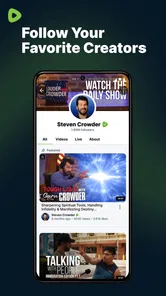
For someone who has used the app for a while, the useful question is whether its present mix still earns a place in their routine. I’d revisit followed channels occasionally and remove ones that no longer interest me, so the feed has a better chance of reflecting what I actually want to watch. A creator can take a similar measured approach by reviewing an upload’s destination and audience before posting the next one. These small checks are more dependable than assuming the product has changed in a particular direction simply because it has been around for years.
Remaining trade-offs and what I’d watch
My main remaining reservation is consistency: a broad mix can make discovery lively, but it can also mean that the next worthwhile video takes a little searching. If I’m choosing between this and a more established alternative, I’d ask a simple question: do I want an open-ended feed and live community, or do I want a familiar catalog and more predictable recommendations? That answer matters more than the app’s headline features.
Over time, I’d pay attention to whether the channels I follow remain easy to find, whether live sessions fit my viewing habits, and whether the upload choices make sense for the kind of work I create. Those are practical signs of fit, not promises about future releases. If the app continues to give me worthwhile conversations and creators I would not otherwise encounter, I can accept some uneven discovery. If I spend more time searching than watching, a more focused service is probably the better choice.
Why Rumble Might Be for You
If you're someone who values discovering new, diverse content without the clutter and chaos, Rumble is definitely worth a shot. It's user-friendly for both viewers and creators, and its focus on free speech is becoming increasingly important in today's world. Sure, it might not have the same vast library as some of the giants out there, but what it does have is quality and a refreshing level of transparency.
My practical recommendation is to try it with one clear purpose: follow a creator you already enjoy, explore a topic that interests you, or test a single upload. Then judge the experience by the quality of the videos you find and how well the app fits your habits, rather than by its broad promise or a quick first impression. If the live community and open-ended browsing are what you came for, it can be a useful addition; if you want a dependable, curated library, another video service will likely feel more comfortable.
In conclusion, Rumble is more than just a video platform; it's a community of passionate individuals who value creativity and freedom of expression. Whether you're looking to watch or create, Rumble offers a space that's both welcoming and rewarding. So, if you haven't already, give it a whirl and see why it's gaining buzz among content creators and consumers alike.
Rumble: Stream & Watch Videos Frequently Asked Questions
What is Rumble, and what can I do with it?
Rumble is a video app for watching livestreams, news, and gaming content, as well as uploading videos and chatting. Its main appeal is bringing viewing and creator activity together in one place, so you can explore videos or take part in conversations rather than using it only as a player. The range of content and experiences depends on what you choose to watch and follow.
Is Rumble free to download, and do I need to pay to watch videos?
Rumble is free to download and use, and you can watch and upload videos without a subscription fee. Optional in-app purchases are also available, so check the price and terms shown for an individual purchase before confirming it. You can begin using the app without paying, while any spending is a separate choice made within the app.
What should I know about Rumble’s age rating before downloading it?
Rumble is rated Mature 17+, so it is intended for an adult audience rather than younger children. Its mix of livestreams, news, gaming, and user-uploaded videos can include material that may not suit every viewer. If you are choosing an app for a family device, consider the age rating and whether the platform’s broad range of content is appropriate for its users.
Which devices can run the Rumble app?
Rumble is a video player and editor app for mobile devices, and its Android version requires Android 5.0 or later. Checking your device’s operating system before installing is a useful first step, especially on an older phone or tablet. The app is available for Android and iOS, so users can choose the version that matches their device.
What is Rumble and how does it work?
Rumble is a dynamic video-sharing platform that allows users to upload, share, and discover a wide range of video content. It functions similarly to other video platforms but emphasizes free speech and minimal content restrictions. Users can follow channels, like videos, and engage with creators through comments and shares, making it a community-driven experience.
Pros
- User-friendly interface enhances usability.
- Diverse range of video content available.
- Offers unique monetization options for creators.
- Strong community engagement features.
- Supports high-definition video streaming.
Cons
- Limited parental controls for younger audiences.
- Occasional bugs can disrupt user experience.
- Requires a stable internet connection.
- Ads can be intrusive at times.
- Limited customization options for profiles.