

Rockbot - Request Music
- 4.31K
- 4.2
- Installs
- 500.00K
- Price
- Free

Screenshots
Analysis by Reviewed
I first looked at Rockbot - Request Music as the sort of app that makes more sense in a shared space than in a private headphone session. Its idea is simple: let people take part in choosing what plays, rather than leaving one person in complete control of the music. That changes the experience at home, in a small gathering, or anywhere several people are listening together.
Rockbot, Inc. has built this as a free Music & Audio app for Android, and it is aimed at an Everyone audience. The app has been around since February 10, 2011, which gives it a much longer history than many casual music tools. It currently sits at version 3.10.3, supports Android 5.0 and later, and has passed 500 thousand installs. Those details matter if you are considering it for an older spare phone or a shared Android device.
My overall impression is positive, but with an important qualification: this is most interesting when music selection is a group activity. If I only want a private library, carefully organized playlists, or the broadest possible control over playback, I would usually choose a conventional streaming service instead. Rockbot is more appealing when the question is not simply “what do I want to hear?” but “what should everyone hear next?”
How Rockbot fits into a shared household
A realistic use case is a living room where one phone is connected to a speaker and several people are moving around, cooking, talking, or relaxing. Without a shared request system, the person holding the phone becomes the unofficial music manager. Everyone else has to ask that person to search, skip, or change the queue. That arrangement works until people disagree, the phone is in another room, or the person controlling it wants to enjoy the evening rather than manage it.
Rockbot - Request Music makes the social part more visible. Instead of treating playback as a private decision, it gives listeners a way to participate in requests. I like that shift because it can reduce the small arguments that happen when one person keeps choosing songs for everyone. It does not magically solve disagreements, but it gives the group a shared process instead of relying on whoever happens to own the device.
In a household, I would use it for occasional shared listening rather than making it the permanent music system for every room. A weekend breakfast, a board-game evening, or a casual visit from friends is where the concept feels natural. The app has a clear role in those moments: it helps turn music into a coordinated activity without requiring one person to stand beside the speaker.
There is also a useful distinction between a shared device and a shared account. A phone placed in a common room can become a household controller, but that does not mean every family member should treat it as a personal music profile. I would decide in advance which device is responsible for playback and keep requests tied to that listening situation. That simple boundary makes the experience easier to understand, especially when several people use the same Android phone.
More From Our News Desk

 Gmail
GmailGmail in a Busy Inbox: Who Benefits Most?
From first account to crowded workday, Gmail earns its place through dependable search and flexible sorting—but its best fit depends on how much inbox maintenance you can tolerate.

 Prime Video
Switching to Prime Video: What Changes in Your Viewing Routine
Prime Video can make a compelling second home for streaming, but switching means learning a different catalog, rental layer, and route from browsing to playback.

 Universal TV Remote Control
Universal TV Remote Control Works Best as a Reliable Backup
A phone remote earns its place through quick setup and reliable habits. Here is how to get more from Universal TV Remote Control—and where its limits show.

 Weather - By Xiaomi
Weather by Xiaomi Review: Clear at a Glance, Less Clear Up Close
Xiaomi’s weather app makes everyday forecasts quick to scan, but its calm surface can leave useful details and recovery paths harder to find than they should be.

 X
XX Under Pressure: Can It Recover When Posting Goes Wrong?
A resilience-focused review of X, examining setup, mistaken posts, interruptions, weak connections, and the gaps that matter when recovery needs to be dependable.

 Clash of Clans
Clash of Clans Is Won Between the Battles
Its raids are quick; its community is a long-term project of coordination, teaching, rivalry, and shared responsibility—with all the friction that entails.
Latest News



What the first setup should clarify
Before inviting everyone to request music, I would test the app alone. I would install it on the device intended for playback, check that the device is running Android 5.0 or newer, and make sure the speaker connection already works as expected. This avoids confusing a Rockbot issue with a Bluetooth, cable, or speaker problem. It is a small preparation step, but it saves time when a group is waiting for music.
I would also decide who is allowed to handle the playback device. If the phone stays on a shelf or near the speaker, other listeners can participate without repeatedly picking it up. If everyone passes the phone around, the app becomes less of a shared request tool and more of a traditional music controller. Neither approach is wrong, but they create different household habits.
The app is free, which lowers the barrier to trying it with a family or group. I would still treat a free download as an invitation to test the workflow, not as a promise that it will replace every other audio app. The most important question is whether the people in your home actually enjoy requesting music through a shared system. If they prefer one person to make a playlist, the central idea may feel unnecessary.
One practical tip is to establish a short listening rule before the first session. For example, each person can make a request and then wait until others have had a turn. This is not a setting I would assume the app enforces; it is a household agreement that makes the social model work better. Without some arrangement, the most persistent user can dominate the queue, no matter how convenient the request process is.
Keeping personal boundaries clear
Shared music does not have to mean shared access to everything on a phone. I would use a separate household device when possible, particularly if children, guests, or roommates will be making requests. That keeps personal notifications, private accounts, and unrelated apps away from the group activity. It also makes it easier to leave the music setup in one place without handing over a personal handset.
For parents, this distinction is especially useful. Rockbot is rated for Everyone, so the age context is broad and suitable for a general audience. Even so, an Everyone rating should not be treated as a substitute for adult judgment about what a particular child should hear or access on a shared device. I would introduce the app in a common area, explain that requests are public to the group, and keep an adult nearby when younger children are involved.
That approach also helps with account boundaries. If different people are using the same device, they should know whether they are making a request for the whole room or simply changing what one person wants to hear. A quick explanation prevents the common misunderstanding that a request is private or guaranteed to play immediately. The app works best when everyone understands that participation affects a shared listening session.
For teenagers and older children, I see value in using the app as a small lesson in group consideration. They can suggest music, hear other people’s choices, and learn that a shared queue requires compromise. I would not present it as a parental monitoring tool, because that is not the role I would assign to it. Its useful household function is coordination, not supervision.
Coordination is the real reason to try it
The strongest part of Rockbot is the social workflow around music requests. Traditional streaming apps are usually excellent at personal discovery, saved libraries, algorithmic recommendations, and direct playback control. They are designed around an individual account. Rockbot feels more appropriate when several listeners need a voice in what happens next.
That difference becomes clear in a small gathering. With a normal streaming app, guests may send song suggestions to the host, search on the host’s phone, or wait for a playlist to reach their favorite track. Each method creates friction. A request-oriented app makes the act of suggesting music part of the event itself. The host can focus less on remembering every request and more on keeping the atmosphere comfortable.
My advice is to use it with a defined purpose rather than leaving the session open-ended. A family might choose a decade, a mood, or music suitable for a particular activity. The app can then serve as the place where people contribute choices within that shared context. This is more enjoyable than allowing every request to pull the room in a completely different direction.
One non-obvious trade-off is that group choice can be more democratic but less musically consistent. A carefully made personal playlist may flow smoothly from one track to the next. A shared request stream may jump between tastes, energy levels, and styles. I would choose Rockbot when participation matters more than a polished sequence. If uninterrupted musical flow is the priority, a standard playlist remains the better tool.
Another useful habit is to nominate one person as the session coordinator, even if everyone can contribute. That person does not need to choose every song. Their role is simply to explain the rules, resolve confusion, and pause the session if the room becomes divided. In my experience, shared technology works better when responsibility is visible. The app can support coordination, but it cannot replace a little human judgment.
I would also avoid using it as a background solution for a large event unless I had already tested the exact setup. A small household can adapt when something feels awkward. A bigger group has more requests, more competing expectations, and less patience for technical interruptions. Rockbot’s basic concept is easy to understand, but the social pressure around music increases as the group grows.
Where it differs from ordinary music apps
Compared with a personal streaming service, Rockbot is less about building a private audio identity and more about giving a room a shared point of interaction. That makes it attractive for families with different tastes, roommates who share a speaker, and hosts who do not want to be the only person responsible for music.
On the other hand, I would not pick it first for solitary listening. If I am wearing headphones, commuting, studying, or organizing a long-term library, I want the mature tools associated with personal streaming: saved albums, repeatable playlists, discovery controls, and a private listening history. A request-centered experience does not offer the same reason to switch away from those familiar habits.
This is also not the app I would choose when precise control is essential. A person who wants to decide the exact order, edit every transition, or keep a carefully protected queue may find group requests inconvenient. The very feature that makes Rockbot social can make it feel less predictable. That is not a flaw in the concept, but it is a real mismatch for control-focused listeners.
There is a second comparison worth making with shared speakers and voice assistants. Voice control can be faster for one person who knows exactly what to ask for, while Rockbot gives a group a more visible way to participate. Voice commands are convenient but can become awkward when several people speak at once or when the speaker mishears a title. A request-based app is better when the group wants a deliberate turn-taking process.
For a household already using another music service, I would not necessarily replace it. Rockbot can occupy a different role: the shared-request layer for social sessions, while the usual service remains the private library. Keeping those roles separate may actually be less frustrating than forcing one app to satisfy every listening situation.
Age, trust, and everyday etiquette
The Everyone rating makes Rockbot approachable for a mixed-age home, but trust still matters. I would explain to children that a request is a suggestion for the room, not a private message. I would also establish that adults can decline a request if it does not suit the setting. That is especially important during family meals, when guests are present, or when the device is being used around younger listeners.
For roommates or older children, the main issue is respect for shared time. A person should not flood the request process simply because they have many favorites. A simple household agreement—one request at a time, no repeated submissions, and consideration for the current mood—does more for a pleasant experience than any technical option could.
I would be cautious about treating the app as a way to settle every music dispute. It can make choices more transparent, but transparency can also show just how different people’s preferences are. If one listener wants quiet background music and another wants energetic tracks, the right answer may be a compromise or a change of activity, not more requests. The app is a coordination aid, not a substitute for conversation.
There is a nice educational angle here for families. Children can practice waiting, negotiating, and noticing how a choice affects other people. Adults can model the same behavior by accepting that their favorite song may not be the next one played. I would use the app in short, relaxed sessions where that lesson feels natural, rather than turning the music queue into another household rulebook.
Performance expectations and practical friction
Rockbot’s long presence on Android and its current version suggest that the app is not a brand-new experiment. Still, I would keep expectations realistic when using it on an older device. Android 5.0 compatibility is helpful for spare hardware, but an older phone may have slower menus, reduced battery life, or connection issues unrelated to the app itself. A dedicated device should be charged and placed where the group can reach it.
The biggest potential friction is not the idea of requesting music; it is the transition from individual preference to group agreement. People may assume their request should play immediately, or they may expect the app to understand the mood of the room automatically. I would set expectations before starting: requests are contributions, and the group still decides what feels appropriate.
It is also worth remembering that a shared device can become a point of failure. If its battery dies, its connection drops, or someone moves it, the music session stops regardless of how good the request system is. I would keep a backup plan, such as a prepared playlist on the usual music app. That does not undermine Rockbot; it simply recognizes that social gatherings benefit from a fallback.
The public reception is encouraging without making the app an automatic recommendation for everyone. Rockbot holds an average rating of 4.2 from around 12 thousand ratings, with roughly 4.3 thousand written reviews. I read that level of response as evidence that many people find the concept useful, while still leaving room for individual differences in taste and setup.
Who should install it, and who should skip it
I would recommend trying Rockbot if your household regularly shares one speaker and gets tired of one person controlling the music. It is also worth considering if your gatherings involve friends with different tastes and you want requests to become part of the interaction. The free price makes a trial easy, particularly on a spare Android phone that meets the minimum system requirement.
I would be more hesitant for someone who listens alone, wants a private and highly organized collection, or dislikes interruptions to a carefully planned playlist. I would also skip it as the main solution if the group cannot agree on basic listening etiquette. No request system can prevent one person from making the experience unpleasant if everyone treats the queue as a competition.
Families should think about the device arrangement before installing it. A shared tablet or spare phone in a common room is a better fit than handing over a personal phone with private information on it. Adults should explain how requests work, set expectations about suitable music, and decide whether children can participate independently or only with supervision. Those choices are not complicated, but they determine whether the app feels welcoming or chaotic.
It is equally important to decide whether the household wants participation or convenience. If the goal is simply to press play and let a trusted playlist run, the usual music app is probably faster. If the goal is to give several people a structured voice, Rockbot earns its place. That is the central trade-off I would use when deciding.
My household verdict
After looking at Rockbot as a shared listening tool, I see it as a focused app rather than a universal replacement for music services. Its strength is the social moment: several people can take part in choosing what fills the room, while the household keeps a clearer boundary between personal listening and group playback.
I especially like the possibility of using it with a dedicated common-room device. That setup keeps personal accounts and private phones separate, gives children and guests a defined way to participate, and makes the music session feel like a group activity rather than a favor controlled by one person. The experience still depends on sensible rules, but that is true of almost every shared household technology.
The limitations are just as clear. Rockbot is not my first choice for private listening, precise playlist construction, or a perfectly smooth musical progression. Its value can decrease when the group is very large, when people disagree about the atmosphere, or when nobody wants to coordinate the session. In those situations, a normal playlist or a single designated DJ may be less stressful.
For the right home, though, the app offers something ordinary music players often overlook: a simple way to make listening collective. With a 4.2 average and more than 500 thousand installs, it has attracted a substantial audience, but my recommendation is based less on those figures than on the fit of its idea. If your household wants music to be a shared conversation rather than a private queue, Rockbot is worth trying.
My final advice is to start with one short session, one playback device, and a clear agreement about requests. Watch how your family or friends actually use it. If participation makes the room more relaxed, keep it in the household toolkit. If it creates more debate than enjoyment, return to the music app that already suits your group. Rockbot is at its best when it supports togetherness without pretending to replace personal listening habits.
Rockbot - Request Music Frequently Asked Questions
Is Rockbot - Request Music compatible with my phone?
Rockbot is available for Android and iOS, and the Android version requires Android 5.0 or later. Before downloading, check that your device meets the relevant operating-system requirements and that you can access the app in your region. The app is free to download, so you can install it and explore its features without paying for the download itself.
Who develops Rockbot, and what kind of app is it?
Rockbot is developed by Rockbot, Inc. and is a Music & Audio app focused on helping people interact with music at participating venues. Its store summary, “Play Music You Love, Anywhere,” reflects the venue-based idea: you can use the app to engage with a location’s music experience rather than simply treating it as a standalone music player. The app is rated for Everyone.
What is Rockbot – Request Music and how does it work?
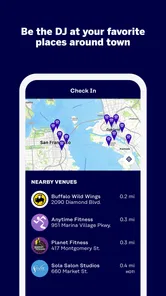
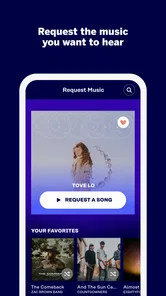
Rockbot – Request Music is an interactive music and entertainment platform used in participating bars, restaurants, gyms, bowling alleys, and other public venues. After opening the app, you select the location you are visiting, browse the available music library, and request songs for the venue’s playlist. Requests are sent to the venue’s Rockbot system, but playback depends on the location’s rules, queue, and moderation settings.
Can I choose any song I want on Rockbot?
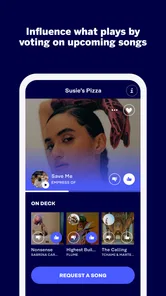
Rockbot offers a broad catalog, but the exact selection can vary by venue, subscription level, music licensing, and content restrictions. Some songs may be unavailable, blocked, or already placed in the queue. Depending on the location, you may be able to vote for songs, suggest music, or request videos and other entertainment. A request is not a guarantee that the track will play immediately or at all.
Does Rockbot cost money to use?
Downloading Rockbot is generally free, but certain features may require payment. Participating venues can decide whether guests receive free requests, need to watch an advertisement, or must purchase credits or a request pass. Prices and available options may differ from one location to another. Before confirming a paid request, review the in-app price and payment details carefully, since venue policies can affect refunds and request eligibility.
Pros
- Lets users influence the music played in participating venues.
- Requests can make nights out feel more interactive and personalized.
- Useful for discovering songs already popular in local venues.
- The interface is generally straightforward for browsing and requesting tracks.
- Can add a social element when friends vote for or share requests.
Cons
- Availability depends heavily on whether nearby venues support Rockbot.
- Some requests may not play if staff skip or remove them.
- Music choices can be limited by venue rules and licensing restrictions.
- The app may require an account or location access for full functionality.
- Requests and votes may involve extra costs
- depending on the venue setup.











