Reverse Phone Lookup — rLookup
- 1.76K
- 4.0
- Installs
- 100.00K
- Price
- Free

Screenshots

Analysis by Reviewed
I approached rLookup as a practical communication app rather than something I would open for entertainment. Its purpose is straightforward: help identify unfamiliar callers and give me a way to deal with unwanted calls. That makes it especially relevant when a phone is used for work, appointments, deliveries, family contact, or any situation where ignoring every unknown number is not realistic.
In my experience, the appeal is less about discovering a name for every caller and more about reducing hesitation. When a number appears on screen, a reverse lookup tool can help me decide whether to answer, call back, block the number, or leave it alone. rLookup is free to install, aimed at Everyone, and comes from Wios. It has built a solid audience, with more than one hundred thousand installs and an average rating of four stars from roughly four thousand ratings.
The app is currently at version 1.3.6 and works on devices running Android 6.0 or later. There are optional in-app purchases priced at $3.99 per item, so I would treat the free download as the starting point and check any purchase prompt carefully before confirming it. The central question is not whether rLookup can replace every communication tool, but whether its caller-focused approach fits the way you handle unknown numbers.
How the interface supports quick reading and navigation
A focused purpose helps reduce visual clutter
One of rLookup’s strongest qualities is that its job is easy to understand. I am not entering a social network, messaging service, or full contact-management suite. I am using a tool connected to phone numbers, incoming caller identification, and spam control. That narrow purpose can make the app easier to approach for people who prefer a clear task rather than a crowded dashboard.
For readability, the most important test is what happens when I am already distracted by a ringing phone. A caller lookup app should not make me work through a complicated process before I can make a basic decision. rLookup’s value is greatest when I use it as part of a simple routine: notice the number, inspect the available caller information, then decide whether to answer or block. That sequence is easier to remember than a broad collection of unrelated communication features.
I also like the idea of separating identification from conversation. If I do not recognize a number, I can pause before speaking to anyone. That is useful for people who find unexpected calls stressful, including users who need extra time to read and process information. The app does not need to be opened for every familiar contact; its usefulness is concentrated on uncertainty.
Useful habits for people who need more time
A practical habit is to avoid treating the caller label as an automatic verdict. I would use the information as one clue, then consider whether I am expecting a delivery, a clinic call, a school call, or contact from a new workplace number. This matters because a caller-identification result can support a decision without making the decision for me.
You May Like

Clash of Clans Is Won Between the Battles

Android Auto Makes the Case for Quieter Car Software

MobiOffice: Transforming Mobile Productivity with Seamless Integration

EA SPORTS FC™ Mobile Soccer: Redefining Mobile Sports Gaming

How Microsoft OneDrive Became a Mobile Productivity Giant

How Google Translate Breaks Language Barriers Effortlessly
For someone with dyslexia, attention difficulties, or limited comfort with dense interfaces, the focused workflow may be less tiring than searching through a general phone utility. I would keep the app available for unfamiliar calls and use the phone’s normal contacts for people I already know. That division prevents repeated searching and keeps the lookup task limited to the moments when it has real value.
There is also a helpful trade-off here. A specialized tool can be easier to understand than a larger security suite, but it may offer less context than a service built around broader caller protection. If your main need is a complete call-screening system with many controls, a wider phone-security product may suit you better. If your need is simply to investigate a suspicious or unknown number, rLookup’s narrower purpose is more approachable.
What I would check before relying on a result
I would pay attention to how clearly a result is presented and whether I can distinguish an identified caller from a warning about possible spam. Those are not exactly the same thing. A known business can still call at an inconvenient time, while an unfamiliar personal number is not automatically dangerous. The best use of rLookup is as a pause button for judgment, not as a replacement for judgment.
This is particularly important for older adults or anyone who may interpret a prominent label as definitive. A family member helping them set up the app could explain a simple rule: read the result, think about the context, and never share sensitive information merely because a number appears familiar. The app can make the first step easier, but safe phone habits still matter.
Motor and sensory considerations during a call
Caller-related tools are often used under pressure, which changes the accessibility picture. I may be holding the phone in one hand, moving through a noisy place, or trying to read quickly before the call stops. That makes large, clear actions and a short path more valuable than a long list of settings. rLookup’s focused function is a positive starting point because I am not trying to compose a message or manage a complicated conversation inside it.
For users with motor limitations, the important question is how much precise tapping the lookup and blocking process requires. I would test the complete sequence calmly at home rather than waiting for an urgent call. If the actions feel easy with one hand and do not require repeated small taps, the app may fit well into daily use. If reaching a control or confirming a choice is difficult, the phone’s built-in accessibility settings and alternate call controls may be more comfortable.
People with tremors, reduced dexterity, or fatigue should also think about accidental actions. Blocking a number is more consequential than merely viewing information. I would slow down at that point and confirm that I am blocking the intended caller. A useful personal routine is to review the number once before committing, especially when the call could be from a new doctor, courier, school, or employer.
For users with low vision, I would judge rLookup alongside the display settings already available on the phone. Larger system text, stronger contrast, magnification, and screen-reader support can make a major difference, but the experience depends on how the app’s own controls respond to those settings. I would not assume that a simple app is automatically accessible. The sensible approach is to install it, increase text size if needed, and test the exact screens used for lookup and blocking.
Users with hearing loss may find caller identification useful because it provides information before they decide whether to answer. Someone who cannot easily hear a ringtone or conversation may still benefit from checking the visible caller details and handling the call through the phone’s regular options. At the same time, rLookup is not a substitute for captions, text communication, or other tools designed specifically for hearing access. Its role is identifying the caller, not changing the way a phone conversation works.
Situational access matters as much as permanent ability
I see rLookup being useful in situations where a person’s abilities temporarily change. Imagine receiving an unknown call while carrying groceries, wearing gloves, commuting, or standing in bright sunlight. In those moments, a short and familiar process is easier than a feature-heavy security app. The benefit is not limited to people with a disability; situational limitations affect almost everyone.
A realistic example is a parent waiting for a school call while managing a child in a noisy supermarket. The number may not be saved, and ignoring every unfamiliar call is not an option. I would glance at the caller information, consider whether the timing matches the expected contact, and decide whether to answer or return the call later. If the number looks suspicious, blocking can prevent the same interruption from becoming a repeated nuisance.
Another example is someone working from home who receives calls from clients using different office lines. Blocking all unknown numbers would be too aggressive, but answering every call would interrupt concentration. A lookup step gives that person a middle option: investigate first, then choose a response. This is where rLookup feels more useful than a simple block-everything approach.
Travel can create a similar problem. A person may receive calls from unfamiliar local numbers while arranging transport or accommodation. In that context, I would avoid blocking too quickly and use the app as an information aid. A number that is unknown to me may still be legitimate because I am outside my normal routine. The app supports flexibility, but the user still needs to interpret the situation.
For people who experience anxiety around calls, the ability to prepare before answering can be meaningful. I would use the lookup process to create a small buffer, not to obsessively investigate every number. If a caller is clearly unwanted, blocking may provide relief. If the result is unclear, letting the call go to voicemail or using another contact channel may be the calmer choice.
Where rLookup fits beside ordinary phone tools
The usual alternative is the phone’s own caller display and blocking controls. Those built-in tools are convenient because they are already part of the calling experience, and they may be enough for people who only want to silence a number after a problem occurs. rLookup becomes more interesting when I want a dedicated reverse lookup step before deciding what to do.
Compared with a general spam-protection or security suite, rLookup appears more focused and potentially less overwhelming. That can help users who do not want a large collection of warnings and settings. The trade-off is that a broader service may be preferable for someone seeking wider protection across calls, messages, links, and other phone activity. I would choose rLookup for focused caller investigation, not because I expect it to become a complete security system.
Compared with manually searching a number on the web, a dedicated app offers a more direct workflow. Manual searching can produce irrelevant pages, conflicting reports, or results that are difficult to interpret on a small screen. rLookup keeps the task connected to the phone-call context. Still, I would not assume that every lookup will provide a definitive answer. Unknown numbers can belong to small businesses, private individuals, temporary lines, or legitimate organizations that are not easy to identify.
The free price makes trying that workflow relatively simple, while the optional $3.99 purchases mean I would read each offer before paying. I would not buy anything merely because a call feels urgent. First I would use the free experience, decide whether the results are genuinely useful in my routine, and only then consider whether an optional item adds enough value for me.
Remaining barriers and practical cautions
The biggest barrier is expectation. A reverse lookup tool can help me make a more informed choice, but it cannot guarantee that an unfamiliar caller is harmless or that a suspicious label is perfectly accurate. People who need certainty before answering important calls may find this limitation frustrating. In those cases, a known callback number from an official website or document is safer than relying on any caller-identification result alone.
Another barrier is the possibility of overblocking. If I use the block function too quickly, I could prevent a legitimate caller from reaching me. This is especially risky for people who depend on calls from changing numbers, including healthcare providers, delivery services, recruiters, and public agencies. I would keep a record of important expected contacts and check them before blocking an ambiguous number.
There is also a cognitive barrier for users who may find warnings alarming. A spam indication can be useful, but it may encourage a person to react before considering context. I would explain the difference between “investigate,” “ignore,” and “block” to anyone who needs a simple decision system. That small piece of guidance may improve the experience more than adding another setting.
People with limited data access, older phones, or strong preferences for minimal apps should test rLookup in their normal environment. The minimum supported operating system is Android 6.0, which makes it available to many older Android devices, but compatibility alone does not guarantee a smooth experience on every handset. I would check whether the app remains comfortable with the phone’s text size, display scaling, and assistive settings before making it part of someone else’s daily routine.
Privacy-conscious users may also want to think carefully about the type of information they are comfortable submitting during a lookup. I would avoid entering numbers connected to sensitive situations unless I understood how the app handles that process. This is not a reason to dismiss the app, but it is a reason to use it deliberately rather than treating every unknown number as something that must be investigated.
My inclusive verdict on the everyday experience
After looking at rLookup through the needs of different users and situations, I see a useful, focused communication app with a sensible role. Its best quality is the way it turns an unfamiliar call into a decision point. I can look for context before answering, leave the call alone, or block a persistent nuisance. That is more flexible than automatically accepting or rejecting every unknown number.
I would recommend it to people who regularly receive unwanted calls, people who need a moment to process unexpected contact, and households helping an older relative manage phone interruptions. It can also suit users who prefer a dedicated tool over a broad security package. The Everyone rating and free entry point make it approachable, while the optional purchases are something I would evaluate rather than assume I need.
I would be more cautious about recommending it to someone who expects perfect identification, needs advanced accessibility controls specifically designed for their disability, or wants complete protection for every form of phone activity. Those users may be better served by built-in accessibility features combined with a broader security or communication solution. I would also skip it if I rarely receive unknown calls and already feel comfortable using my phone’s normal caller display and blocking tools.
My practical advice is to test rLookup during a quiet moment, adjust the phone’s readability settings first, and practice the lookup-to-decision routine before an important call arrives. Treat results as guidance, not proof; pause before blocking; and use official contact details when a call involves money, healthcare, passwords, or personal documents. With those limits in mind, rLookup earns its place as a straightforward caller-identification aid from Wios. It does not remove every barrier, but it can give people more control over the moment before they answer.
For my own use, that balance is the reason I would keep it available: not as a replacement for the phone app, not as a guarantee against scams, and not as a tool I would use without thought. I would use it when an unfamiliar number interrupts my day and I need a clearer next step. That focused benefit is modest, but for the right person, it can make everyday communication feel less unpredictable.
Reverse Phone Lookup — rLookup Frequently Asked Questions
What Android version does Reverse Phone Lookup — rLookup require?
Reverse Phone Lookup — rLookup requires Android 6.0 or later. Before downloading, check that your device meets this requirement and has enough room for the app. The app is listed for everyone, so its age rating is not a barrier for younger users, though anyone considering a phone lookup should still handle personal information thoughtfully.
Who develops Reverse Phone Lookup — rLookup, and what kind of app is it?
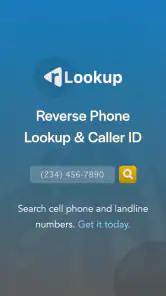
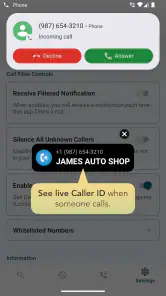
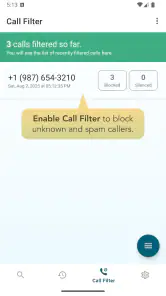
Reverse Phone Lookup — rLookup is a communication app developed by Wios. Its main purpose is to help you look up unfamiliar numbers and view incoming Caller ID, with a tool for blocking spam callers. The app is free to download, and it has a 4.0 average rating from around 4,100 ratings, which can offer a general sense of user feedback.
What is Reverse Phone Lookup — rLookup used for?
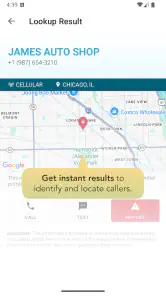
Reverse Phone Lookup — rLookup is designed to help users investigate unfamiliar phone numbers. You can enter a number to look for publicly available details, such as a possible owner name, location, carrier, or user-reported information. It can be useful for screening unknown callers, checking suspicious messages, or identifying businesses, although results depend on the number and the available public data.
Does Reverse Phone Lookup — rLookup reveal the exact identity of every caller?
No. The app cannot guarantee an exact identification for every phone number. Mobile numbers, recently issued numbers, private listings, internet-based numbers, and numbers with little public activity may return limited or no information. Any result should be treated as a clue rather than definitive proof, especially when making decisions about personal safety, payments, employment, or possible fraud.
Is Reverse Phone Lookup — rLookup free to use?
The app is free to download, but in-app purchases are listed at $3.99 per item. The availability of free searches, detailed reports, advertisements, or premium features can vary depending on the app version, platform, and region. Before completing a search, review the pricing information shown inside the application and in the official store listing. If subscriptions or in-app purchases are offered, check the renewal terms carefully so you understand the total cost and cancellation process.
Pros
- Quickly identifies callers using a phone number search.
- Simple interface makes basic lookups easy to perform.
- Can help recognize potential spam or unknown callers.
- Useful for checking a number before returning a call.
- Search results may include names
- locations
- or related details.
Cons
- Results can be incomplete or outdated for some numbers.
- Mobile and private numbers may return little information.
- Some features or detailed reports may require payment.
- Accuracy depends on the availability of public data sources.
- Privacy policies should be reviewed before submitting phone numbers.

- Category
- Communication
- Version
- 1.3.6











