Remove Background From Video
- 197.00
- 3.5
- Installs
- 500.00K
- Price
- Free

Screenshots

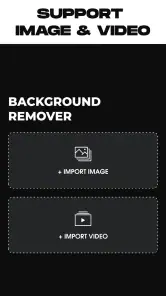

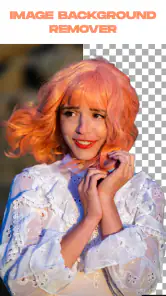
Analysis by Reviewed
I’d treat Remove Background From Video as a focused editing helper rather than a complete video studio. Its purpose is to separate a person or other subject from a clip so the scene behind them can be changed or removed. That makes it useful for quick social posts, simple product demonstrations, and playful edits, especially when opening a larger editing program would feel like too much work.
The app is free and comes from HUG APPS. It sits in the beauty category, though its appeal is really about the look of a finished photo or video: isolating a subject can make a clip feel cleaner or more deliberate without rebuilding the whole scene. Its current version is 3.0, and it has been available since February 28, 2022. The audience is broad, with an Everyone content rating, and it has passed 500,000 installs. Its average rating is 3.5 from around 7,000 ratings, which suggests a tool people may find handy but should approach with realistic expectations.
A practical tool for small edits
In everyday use, background removal is most convincing when the subject is easy to distinguish from the surroundings. A person standing apart from a fairly calm background gives the app a clearer editing task than hair blending into a busy wall or a moving subject crossing similar colors. Before importing a clip, I’d choose a well-lit take, keep the subject in frame, and avoid unnecessary motion. Those small choices can matter more than trying to rescue a difficult shot afterward.
For example, if I wanted to record a short greeting at home, I could film near a plain wall, remove the room, and place the subject over a more suitable setting in a separate editing workflow. That can also help a small seller make a simple product clip look less tied to a cluttered table. I would still inspect the edges around hair, hands, and fast movement before sharing; these are the places where cutouts tend to look least natural.
Where it fits among editing options
Compared with a full mobile video editor, this app is appealing when the main job is separating the foreground and the learning curve needs to stay short. A full editor is a better choice when I want detailed timeline control, layered effects, careful color adjustments, or a complete soundtrack-and-captions workflow. A physical green screen can also be more dependable for repeated shoots, but it requires planning and a suitable setup. This app is the convenient middle ground for occasional edits, not a replacement for every production tool.
I’d also keep expectations modest about challenging footage. Busy backgrounds, low contrast, motion blur, and fine details can all make clean separation harder. A useful habit is to make a short test with the kind of footage I actually plan to use before committing to a longer project. If the result looks rough, changing the lighting or recording angle may be quicker than repeatedly processing the same clip.
Unleashing Your Creativity
With the Remove Background From Video app, you can say goodbye to the hassle of green screens or complex editing software. This app brings simplicity and efficiency right to your fingertips. Whether you’re filming a quick vlog, creating content for your brand, or just having fun with friends, this app provides an intuitive interface that even a novice can navigate without breaking a sweat.
More From Our News Desk

Clash of Clans Is Won Between the Battles

Android Auto Makes the Case for Quieter Car Software

MobiOffice: Transforming Mobile Productivity with Seamless Integration

EA SPORTS FC™ Mobile Soccer: Redefining Mobile Sports Gaming

How Microsoft OneDrive Became a Mobile Productivity Giant

How Google Translate Breaks Language Barriers Effortlessly
How It Works
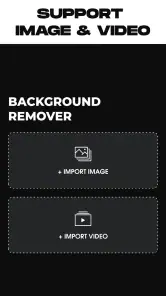
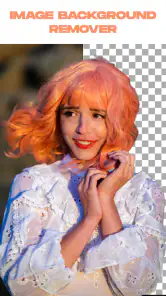
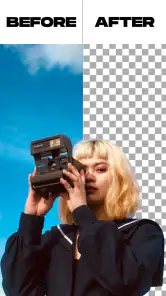
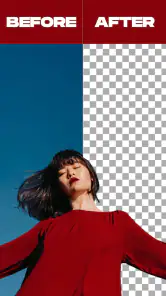
So, how does it work? The app uses advanced AI technology to detect and separate the subject from the background. You simply upload your video, and the app does the heavy lifting. Within moments, you have a video with the background magically erased, ready to be replaced or left transparent. It’s like having your own personal video editor in your pocket!
What’s even cooler is the app’s ability to handle various backgrounds, whether it’s a cluttered room or a busy street. The AI is smart enough to differentiate between the subject and the surroundings, ensuring a clean cut every time. And if you’re worried about the quality, rest assured, the app maintains high resolution, so your videos come out looking crisp and professional.
User Experience
One of the standout features of this app is its user-friendly design. The developers have done a fantastic job of keeping things sleek and simple. There are no unnecessary bells and whistles, just the tools you need to get the job done. Plus, the app offers a seamless experience across both Android and iOS platforms, so no one is left out of the fun.
Let’s talk about speed. The processing time is incredibly fast, meaning you won’t be stuck waiting around for your video to render. This is perfect for those spontaneous moments when you need to whip up a quick edit on the go. And if you’re anything like me, you’ll appreciate the ability to preview changes in real-time, ensuring everything looks just right before you hit save.
What I’d check before relying on it
For a recurring workflow, I’d make one short sample and check it at the size where people will actually see it: a phone screen can hide small edge flaws that become obvious on a larger display. I’d also keep the original clip until I’ve checked the finished export, so I can adjust the framing or choose another take without having to recreate the scene. That simple habit makes a quick tool safer to use for a client post or a time-sensitive announcement.
One practical question is whether it suits someone who has never edited video. The basic idea is approachable: choose a clip and let the app separate its subject. But a clean result still depends on the footage, and placing the cutout into a polished final composition may call for another editor. If I only need a one-off cutout, this focused approach is attractive; if I need captions, several scenes, or precise timing, I’d start in a fuller editing app instead.
Who should give it a try
I’d recommend it to casual creators who want to experiment with a subject cutout, make a quick social clip, or tidy up a simple product shot without learning a complicated desktop workflow. It is less suited to someone who needs dependable, studio-quality edges across difficult movement or wants all production steps in one place. The best results are likely to come from treating background removal as one useful stage, then reviewing the clip carefully before publishing.
What to watch as it evolves
Version 3.0 is the current release, so existing users can judge the app by what it does now rather than assuming a future change will solve a particular editing problem. If you already use it, the most useful check is whether your own typical footage separates cleanly and whether the finished file fits the next step in your workflow. I’d watch for improvements to difficult edges and for a smoother handoff into editing, but those are hopes, not promises.
Final Thoughts
In a world where content is king, Remove Background From Video offers an invaluable tool for creators and casual users alike. It combines advanced technology with user-friendly features, making video editing accessible to everyone. Whether you’re a seasoned pro or just getting started, this app is sure to become a staple in your digital toolkit.
So, if you’re ready to take your video content to the next level, give it a try. It’s not just an app; it’s a ticket to unlocking a whole new realm of creative possibilities. Trust me, once you start using it, you’ll wonder how you ever managed without it!
Remove Background From Video Frequently Asked Questions
What devices can run Remove Background From Video?
Remove Background From Video is an app in the Beauty category from HUG APPS. It requires Android 5.0 or later, so check your device’s operating system before downloading. The app is listed as suitable for Everyone, and its focus is removing or changing video backgrounds, with photo background removal also mentioned in its store summary.
Is Remove Background From Video free to download?
Yes, Remove Background From Video is listed as free to download. You can try its background-removal purpose without paying an upfront download price. Before starting an edit, check the app’s current options and any prompts shown in the app so you understand what is available to you. The app is developed by HUG APPS and has a 3.5 average rating from around 7,000 ratings.
What does the 'Remove Background From Video' app do?
The 'Remove Background From Video' app is designed to help users easily eliminate backgrounds from their video footage without the need for complex editing skills. Whether you're looking to create professional-looking content or just want to have fun with creative video projects, this app provides an accessible solution for video background removal.
Is the 'Remove Background From Video' app beginner-friendly?
Yes, the app is designed with an intuitive interface that makes it easy for beginners to navigate and use. With its straightforward tools and guided steps, even those with no prior video editing experience can successfully remove video backgrounds and achieve the desired results.
What features does the 'Remove Background From Video' app offer?
The app offers a range of features including automatic background removal, customizable editing tools, and the ability to replace backgrounds with images or colors of your choice. It also supports various video formats and resolutions, ensuring compatibility with most devices and platforms.
Pros
- Easy and intuitive interface
- Supports multiple video formats
- Fast processing speed
- High-quality output
- No watermark on videos
Cons
- Limited free version features
- Requires internet connection
- Ads in free version
- Occasional app crashes
- No batch processing option
- Category
- Beauty
- Version
- 3.0