

Relias Learner
- 264.00
- 3.7
- Installs
- 100.00K
- Price
- Free

Screenshots

Analysis by Reviewed
Relias Learner is an education app built around one practical promise: letting people complete Relias training away from a desktop. I see it less as a general learning platform and more as a mobile doorway into an existing training program. That distinction matters. If your employer, school, or organization already uses Relias, the app can make required learning easier to fit into a busy day. If you are looking for a broad catalog of independent courses, it is probably not the kind of education app you want.
I tested it with that expectation in mind, paying particular attention to the central capability: continuing training when I am away from a computer. The experience is straightforward, but its value depends heavily on whether your organization has connected the right learning content to your account. The developer is Relias Mobile, and the app is free to install with an Everyone age rating. Its Android listing shows a 3.6 average from around 600 ratings, which suggests a useful but not universally smooth experience.
Mobile training is the point, not a side feature
The strongest idea in Relias Learner is portability. Instead of treating training as something that must happen at a workstation, it gives learners a way to reach assigned material through a phone or tablet. That can change the rhythm of compliance learning. A short gap before a shift, a quiet period during a break, or an evening at home can become usable study time.
That sounds simple, but it solves a real problem. Many workplace courses are not difficult because of the subject matter; they are difficult to schedule. Staff may work rotating shifts, move between locations, or share a computer with colleagues. A mobile learner can remove one of those barriers. I found the app most useful when I treated it as a continuation tool rather than as a place to browse casually.
The distinction also prevents disappointment. The app does not become a complete school simply because it sits in the education category. Its purpose is to help an existing Relias learner reach training assigned through the surrounding learning system. The content available to you is therefore tied to your account and organization. Before installing it, the key question is not whether the app is free; it is whether your training provider uses Relias and has given you access.
That account relationship is the first important trade-off. A person searching for language lessons, exam preparation, coding practice, or open courses will likely find more flexibility in a dedicated learning service. Relias Learner makes more sense when the course is already part of your professional responsibilities. In that situation, its narrow focus becomes an advantage because it avoids turning required work into a search exercise.
What the mobile format changes
On a larger screen, training often feels like a scheduled appointment. On a phone, it becomes easier to divide into smaller sessions. I would not assume that every course is designed for tiny study bursts, but the mobile format encourages a more flexible approach: review one section when time allows, return later, and keep the training connected to the same learner account.
More From Our News Desk

 Gmail
GmailGmail in a Busy Inbox: Who Benefits Most?
From first account to crowded workday, Gmail earns its place through dependable search and flexible sorting—but its best fit depends on how much inbox maintenance you can tolerate.

 Prime Video
Switching to Prime Video: What Changes in Your Viewing Routine
Prime Video can make a compelling second home for streaming, but switching means learning a different catalog, rental layer, and route from browsing to playback.

 Universal TV Remote Control
Universal TV Remote Control Works Best as a Reliable Backup
A phone remote earns its place through quick setup and reliable habits. Here is how to get more from Universal TV Remote Control—and where its limits show.

 Weather - By Xiaomi
Weather by Xiaomi Review: Clear at a Glance, Less Clear Up Close
Xiaomi’s weather app makes everyday forecasts quick to scan, but its calm surface can leave useful details and recovery paths harder to find than they should be.

 X
XX Under Pressure: Can It Recover When Posting Goes Wrong?
A resilience-focused review of X, examining setup, mistaken posts, interruptions, weak connections, and the gaps that matter when recovery needs to be dependable.

 Clash of Clans
Clash of Clans Is Won Between the Battles
Its raids are quick; its community is a long-term project of coordination, teaching, rivalry, and shared responsibility—with all the friction that entails.
Latest News



This is especially useful for people whose workday is fragmented. A care worker, for example, may have no reliable hour free at home but may find several short windows across a week. The app does not create extra time, yet it can make those windows practical. That is the real effect of its main capability: it reduces the distance between “I need to complete this” and “I can start it now.”
There is also a psychological benefit. When required learning is available on a familiar device, it can feel less like a separate administrative task. I was more likely to open a course when I did not need to locate a computer, remember a portal address, or reserve a workstation. That convenience is modest, but repeated small reductions in friction can make a difference when several assignments compete for attention.
How I would use it in practice
The sensible workflow starts before the app. I would first confirm that my employer or training provider has created a Relias learner account and that I know the correct sign-in details. Installing the app without that preparation may leave a new user wondering why there is no useful catalog to explore. This is not an app where the first launch necessarily tells you everything you need to know about your personal training path.
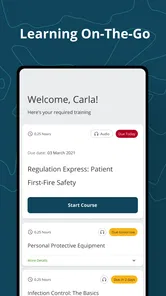
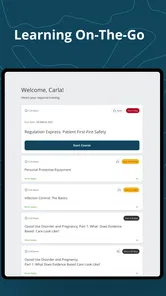
Once signed in, I would use the app as a task list for assigned learning rather than opening courses at random. My practical method would be to identify the course with the nearest deadline, check how much uninterrupted attention it needs, and then choose a realistic session. A short break may be suitable for reading or review, while a longer session is better for material that requires careful concentration.
One non-obvious advantage of this approach is that it separates convenience from haste. Mobile access can tempt learners to rush through a course simply because it is available everywhere. I would instead use the phone for access and continuity, not as permission to multitask. Training completed while distracted may satisfy a progress indicator without producing much understanding.
I would also keep a simple personal note of where I stopped, especially when moving between devices or work locations. Even when an account is intended to preserve progress, a brief note about the last topic reviewed can save time and reduce uncertainty when returning later. This is a useful habit for any assigned training, but it matters more on mobile because interruptions are common: calls, messages, shift changes, and low battery can all break concentration.
The app’s current Android version is 3.0.308793, and it requires Android 8.0 or later. That makes checking the phone’s operating system a sensible first step for anyone using an older device. A failed installation or an outdated phone can turn a convenient mobile option into another obstacle, particularly for workers who rely on a personal handset rather than a recently issued one.
A realistic workday example
Imagine a staff member who finishes an early shift and has a required Relias course still waiting. At work, the shared computer is occupied. At home, there is no guaranteed quiet period before family responsibilities begin. With the app already installed and the account working, the learner can open the assigned training during a calm part of the commute only if they are not driving, or during a scheduled break, then continue later at home.
The important detail is not that the whole course must be finished in one sitting. The value is being able to begin without waiting for ideal conditions. I would use the first available window to understand the course structure and complete a manageable portion, then reserve a quieter period for any assessment or section that deserves full attention. This workflow turns mobile access into a scheduling tool rather than merely a smaller version of a desktop portal.
For someone managing several assignments, I would avoid opening the app every few minutes just to check progress. Instead, I would set one or two planned study windows and use each session deliberately. That reduces the risk of confusing activity with learning. The app helps most when it supports a routine; it is less useful when it becomes another notification-driven interruption.
Questions about access and everyday use
A common question is whether the app is useful without an organization behind it. In my view, not much. Its role is tied to Relias training, so an individual looking for self-directed education should choose a platform designed for public enrollment and discovery. The free installation does not turn it into a free library of unrelated lessons.
Another practical question is whether a phone is enough for every course. I would say it depends on the material and on your concentration. A phone is excellent for access in places where a computer is unavailable, but a larger screen may still be more comfortable for lengthy reading or detailed work. I would not replace a desktop automatically; I would use the app when mobility solves a real scheduling problem.
Users may also wonder whether it suits shared or older devices. The Android requirement means compatibility should be checked before relying on it for a deadline. On a shared device, I would be especially careful to sign out when appropriate and avoid saving credentials where another person could access them. Those are sensible account habits, but they become important when training relates to employment.
Finally, I would not judge the app solely by how polished its mobile interface feels. If a course is mandatory, the quality of the content, the clarity of the instructions, and the way the organization manages assignments may matter more than the app’s appearance. Relias Learner is the access layer. A smooth app cannot compensate for confusing course instructions, poorly timed assignments, or an account that has not been configured correctly.
Where the convenience has limits
The biggest limitation is dependence on the Relias ecosystem. The app’s usefulness is not self-contained. A learner cannot simply install it and expect the same freedom offered by platforms that let anyone browse thousands of lessons. That makes the product highly relevant to one audience and almost irrelevant to another.
Mobile learning also introduces distractions that do not exist to the same degree on a dedicated work computer. Notifications, phone calls, limited screen space, and the temptation to switch apps can weaken attention. For serious professional training, I would choose a quiet setting and use a larger device when the lesson is dense. The mobile option is valuable, but portability should not be confused with ideal concentration.
There is a second trade-off between flexibility and accountability. Being able to study anywhere helps people with irregular schedules, yet it can also make training easier to postpone. A desktop appointment creates a visible commitment; a phone session can disappear among ordinary tasks. I recommend pairing the app with a calendar reminder or a personal deadline, especially when completion is tied to work requirements.
The rating of 3.6 indicates that the experience has not been perfect for everyone. I would interpret that carefully rather than treating it as a verdict. Enterprise learning apps are often judged through the combined experience of the software, an employer’s setup, account permissions, and course configuration. If something feels missing, the cause may not be the same for every learner. Still, the rating is a reminder to test sign-in and access well before a required completion date.
Compared with a standard web browser, the dedicated app’s advantage is convenience: it gives the learner a focused route into mobile training instead of asking them to manage a portal in a small browser window. Compared with broad education apps, its advantage is relevance for assigned professional learning, not variety. Compared with a desktop learning portal, its advantage is location and scheduling, while the desktop may remain better for extended sessions.
That comparison leads to a clear decision rule. Choose Relias Learner when your training already lives in Relias and your main obstacle is getting to it at the right time. Prefer another education app when you want to choose subjects independently, compare instructors, follow a long-term personal curriculum, or learn without an organizational account. Neither option is universally better; they solve different problems.
Three habits that make the app more effective
- Verify access before the deadline: sign in early, locate the assigned course, and make sure the account connects to the training you expect. This avoids discovering an account or organization issue during the final study window.
- Match the device to the lesson: use the phone for short sessions and convenient continuation, but move to a larger screen when reading becomes tiring or the topic demands sustained attention.
- Protect the learning session: silence avoidable notifications, avoid multitasking, and write down the last completed topic before stopping. This turns an interrupted mobile session into a planned continuation rather than a vague attempt to remember where you were.
These habits reveal an important nuance: the app is not the entire solution to training completion. It is a practical connector between the learner and the assigned material. The better the surrounding routine, the more value that connector provides.
Who benefits most from Relias Learner?
I would recommend it first to employees or students whose organization already uses Relias and who regularly struggle to reach training from a computer. Shift workers, traveling staff, people working across multiple sites, and learners with unpredictable home schedules are the strongest candidates. For them, the ability to continue training from a mobile device can remove a genuine logistical barrier.
It can also suit disciplined learners who prefer short, repeatable sessions. Someone who plans a few focused windows during the week may find the app more useful than a desktop-only routine. The benefit is not unlimited flexibility; it is the ability to use otherwise inconvenient moments without losing the connection to assigned learning.
I would be more cautious about recommending it to someone who has no Relias login, wants a broad personal study library, or expects a highly interactive consumer learning experience. It is also not my first choice for learners who know they need a large display to read comfortably or who are easily distracted by phone-based study. In those cases, the usual browser or desktop route may be the better tool, even if the mobile app remains available as a backup.
Relias Learner has passed the hundred-thousand-install mark, so it is clearly being used beyond a tiny specialist audience. It was released on October 18, 2022, and remains a focused education app rather than a general-purpose learning marketplace. I appreciate that focus. The product does not need to do everything; it needs to make assigned Relias training easier to reach.
My final view is positive but conditional. The app’s strongest feature is not flashy content or an expansive catalog. It is the practical ability to bring existing training into the parts of the day when a computer is unavailable. That can make professional learning more manageable, especially for people with changing schedules. At the same time, the account dependency, phone distractions, and possible need for a larger screen mean it should be treated as a flexible companion, not a universal replacement for desktop learning.
If your organization has placed Relias courses in your path, I think installing this free app is worthwhile. Start by confirming your login, test access before an assignment becomes urgent, and use the mobile format intentionally. For the right learner, its real strength is turning “I need a computer” into “I can continue when the day allows.”
Relias Learner Frequently Asked Questions
Is Relias Learner free to download, and what devices can install it?
Relias Learner is a free education app from Relias Mobile. It is rated for Everyone and requires Android 8.0 or later, making it suitable for compatible phones and tablets. Before installing, check that your device meets the operating system requirement and that you have enough connectivity to sign in and access your assigned learning. The app is intended to connect learners with training through the Relias platform.
What is Relias Learner, and who is it designed for?
Relias Learner is a mobile learning app connected to the Relias training platform. It is mainly designed for employees and organizations in healthcare, behavioral health, intellectual and developmental disabilities, and other care-focused industries. The app lets assigned learners access required courses, complete lessons, review training materials, and track progress from a supported mobile device, depending on the features enabled by their employer or institution.
Can I use Relias Learner without an employer or organization account?
In most cases, Relias Learner is not a standalone education app that anyone can freely use without an account. Access is generally provided through an employer, school, agency, or other organization that uses Relias for training and compliance management. Before downloading, confirm that your organization has enrolled you and ask for the correct login details, website address, or activation instructions required to connect the app to your learner profile.
What can I do inside the Relias Learner app?
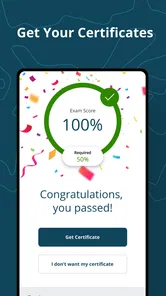
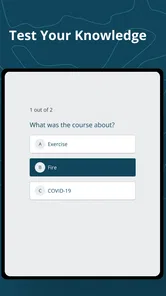
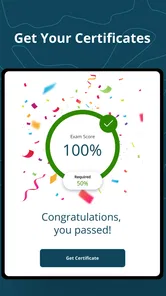
The available tools may vary according to your organization’s Relias setup, but the app commonly allows learners to view assigned training, start or resume courses, complete quizzes, and check their learning status. Some accounts may also provide access to certificates, due dates, notifications, and training history. Certain courses or activities may still require a web browser, especially when they include features not fully supported on mobile.
Does Relias Learner work offline, and what device permissions does it need?
Offline availability depends on the course and the version of the app. Some learning content may be available after it has been downloaded, while other activities require an active internet connection to load media, submit answers, or synchronize completion data. The app may request permissions related to notifications, storage, or device functions used for learning. Review these requests carefully and keep the app updated for the most reliable experience.
Pros
- Works on both Android and iOS devices for flexible learning.
- Progress tracking helps learners monitor completed courses and requirements.
- Course reminders can support timely completion of assigned training.
- Centralized access to required education in one mobile app.
- Useful for organizations managing structured employee training programs.
Cons
- Access may depend on an employer or institution-provided Relias account.
- Some courses require a stable internet connection to load properly.
- The app is less useful for users without assigned Relias training.
- Notifications may become distracting when several courses are assigned.
- Performance and available features can vary by organization settings.












