

Record Scanner for Vinyl & CD
- 381.00
- 4.7
- Installs
- 100.00K
- Price
- Free
Screenshots
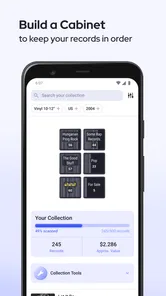
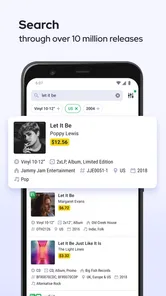
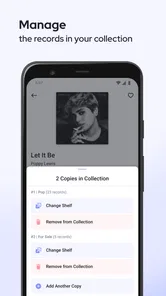
Analysis by Reviewed
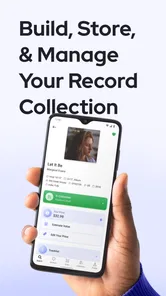
I use music apps for two very different jobs: listening and organizing. Record Scanner for Vinyl & CD is aimed at the second one. It is a free Music & Audio app from Great Music Apps that helps identify physical records, detect what is in front of the camera, and check prices while building an album collection. That makes it more interesting than a simple barcode reader, especially if your shelves are becoming difficult to manage.
My first impression is that this is a practical tool rather than a replacement for a full music service. It does not try to become my player, streaming library, or social network. Instead, it focuses on the moment when I pick up an LP or CD and want to know exactly what edition it is, what it may be worth, or whether I already own it. Its real appeal is turning a physical collection into something easier to recognize and evaluate.
How the current app fits into a collector’s routine
The app is currently at version 1.12.5 and supports devices running Android 7.0 or later. That broad compatibility is useful if you keep an older phone as a dedicated cataloging device, although the experience will naturally depend on the camera and performance of the handset. It has passed the early-experiment stage as well: the app has more than 100 thousand installs, a 4.7 average from about 6.8 thousand ratings, and 381 written reviews.
Those numbers do not tell me whether every scan will be perfect, but they do suggest that the basic idea is working for a meaningful group of users. In everyday use, I would treat the camera as a fast starting point, not as an invisible expert who can identify every pressing, regional edition, or damaged sleeve without help.
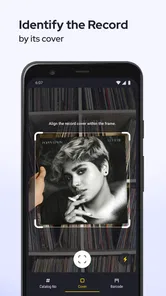
The workflow makes the most sense when I am standing in front of a shelf. I can take a record, scan it, check the identification, and decide whether to add it to my collection or keep looking. That is much more convenient than typing an artist and album title into a general search engine, then sorting through several similarly named releases.
It also suits record shopping. At a market or second-hand store, I can use the scanner to investigate an unfamiliar album before buying it. The useful question is not only “what is this?” but also “is this the version I think it is?” Physical music often has multiple releases with similar artwork, and a quick identification step can prevent an unnecessary duplicate.
Identification is more useful than simple title searching
A normal music search usually assumes that I already know what I am looking for. That is not always true with physical media. I may recognize the cover but not remember the artist, see a catalog number without knowing its meaning, or find a CD with an unfamiliar design in a charity shop. A scanner changes the starting point from memory to the object itself.
More From Our News Desk

 Gmail
GmailGmail in a Busy Inbox: Who Benefits Most?
From first account to crowded workday, Gmail earns its place through dependable search and flexible sorting—but its best fit depends on how much inbox maintenance you can tolerate.

 Prime Video
Switching to Prime Video: What Changes in Your Viewing Routine
Prime Video can make a compelling second home for streaming, but switching means learning a different catalog, rental layer, and route from browsing to playback.

 Universal TV Remote Control
Universal TV Remote Control Works Best as a Reliable Backup
A phone remote earns its place through quick setup and reliable habits. Here is how to get more from Universal TV Remote Control—and where its limits show.

 Weather - By Xiaomi
Weather by Xiaomi Review: Clear at a Glance, Less Clear Up Close
Xiaomi’s weather app makes everyday forecasts quick to scan, but its calm surface can leave useful details and recovery paths harder to find than they should be.

 X
XX Under Pressure: Can It Recover When Posting Goes Wrong?
A resilience-focused review of X, examining setup, mistaken posts, interruptions, weak connections, and the gaps that matter when recovery needs to be dependable.

 Clash of Clans
Clash of Clans Is Won Between the Battles
Its raids are quick; its community is a long-term project of coordination, teaching, rivalry, and shared responsibility—with all the friction that entails.
Latest News



That difference matters for collections built over time. I can imagine using the app while unpacking boxes after a move, sorting inherited albums, or preparing a list before selling part of a collection. The app’s value increases when the collection is messy, because manual entry becomes tiring very quickly.
There is also a useful distinction between identifying an album and confirming an edition. The first is often enough for casual listening, but collectors care about pressing details, formats, and variations. I would still inspect the physical label, sleeve, matrix information, and condition before making a serious buying decision. The scanner can reduce the search, but it should not replace careful verification.
Price checking needs a cautious workflow
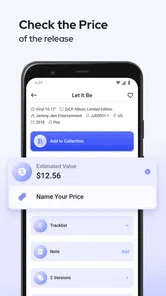
The price-checking angle is helpful, but I would use it as a reference rather than a promise. A displayed value can be affected by condition, completeness, demand, country, pressing, and whether a copy is sealed or heavily worn. Two records with the same cover can have very different practical values.
My preferred routine would be to scan first, compare the identified release with the item in my hand, and then look closely at the physical clues. If the app identifies only the broad album, I would not treat that result as enough evidence to pay a premium. This is one of the most important trade-offs: convenience is excellent at the beginning of the process, while human inspection remains essential at the end.
For sellers, that makes the app useful for triage. I could quickly separate common items from records worth researching more carefully. For buyers, it can help decide which albums deserve a second look. For someone expecting a definitive appraisal, however, it is not the right tool by itself.
Building an album collection without making it feel like office work
The collection feature gives the app a longer-term purpose. Instead of scanning only when curiosity strikes, I can use it to create a personal inventory. That is particularly handy for avoiding duplicate purchases, remembering which format I own, and keeping track of albums stored in different rooms.
A practical approach is to catalog in small batches. I would start with one shelf, scan the records that are easy to identify, and leave unusual editions for a later review. Trying to process an entire collection in one sitting is likely to turn a pleasant hobby into repetitive administration. The app works better when it supports the hobby rather than taking it over.
One non-obvious benefit is decision-making before a shopping trip. If my collection is recorded, I can check whether a familiar title is already present before buying another copy. This is more valuable than it sounds, because duplicates often happen with albums bought in different places or stored away from the main shelf.
I would also use the collection as a rough insurance and moving aid, while keeping expectations realistic. A digital list can help me remember what I own, but I would still want photographs and detailed notes for rare or expensive items. Identification alone does not document sleeve condition, inserts, signatures, or damage.
What the app’s development means for current users
Great Music Apps released the app on October 8, 2018, and the current version number shows that it has continued beyond its initial launch. That history is relevant because a scanner has to deal with a wide range of physical objects, camera conditions, and identification cases. A maintained product is more reassuring than an abandoned experiment, even though a version number by itself does not guarantee that every edge case is solved.
For existing users, the most important effect of ongoing development is continuity. A collection takes time to build, so the app becomes more valuable when it remains usable across ordinary phone upgrades and repeated cataloging sessions. I would still keep my expectations measured: continued updates can improve the experience, but they do not change the basic need to check questionable matches manually.
The current release also makes the app easier to judge as a focused utility. It is not trying to compete with a streaming platform’s enormous listening features. Its identity is clearer: scan physical music, investigate it, and organize what you own. I prefer that narrow purpose because it reduces clutter and makes the app easier to open when I have a specific task.
There is an important platform detail for iPhone shoppers, though. The confirmed technical requirement here is Android 7.0 or later, so I would look for the appropriate current platform listing before assuming the same release and behavior on iOS. The app is best understood through its Android availability and requirements rather than through general expectations about every mobile platform.
What the free price really means
The app is free to download, which lowers the barrier for someone who wants to test scanning on a small collection. It also contains in-app purchases ranging from $0.99 to $199.99 per item. That is a wide range, so I would pay attention to the purchase screen and understand what each option unlocks before confirming anything.
This matters especially for casual users. If I only need to identify a few records during a weekend clear-out, I would first see how far the free experience takes me. A serious collector may find paid options worthwhile if they support a larger or more regular cataloging workflow, but the value depends on the actual limits and benefits presented inside the app.
I would not choose the app solely because it is free, nor reject it solely because purchases exist. The sensible approach is to begin with a small, low-risk test: scan records whose identity I already know, compare the results, and decide whether the workflow saves enough time for my collection. That test tells me more than a feature list.
Where the scanner can struggle in real life
Camera-based recognition is affected by the object and the environment. Glare on shrink-wrap, dark artwork, bent sleeves, low light, and cluttered backgrounds can all make scanning less comfortable. I would place the album flat, use even light, and keep the camera steady rather than waving the phone over a crowded shelf.
Older CDs and vinyl releases can also be visually similar. A cover may identify the album but not the exact pressing. If I am checking value, I would compare the app’s result against the catalog number, label design, track listing, country information, and physical condition. That extra step is not a failure of the app; it is simply part of responsible record collecting.
Another limitation is that cataloging takes discipline. The scanner can speed up entry, but I still have to decide whether a result belongs in my collection, whether a duplicate is intentional, and how I want to handle uncertain matches. People who dislike maintaining inventories may lose interest after the novelty of scanning wears off.
For listening, I would choose a conventional music player or streaming app instead. Record Scanner for Vinyl & CD is not the natural choice when I want playlists, offline playback, recommendations, or a polished audio library. Its strength begins with physical media, so a listener who owns no records or CDs has little reason to install it.
Three smart ways I would use it
- Before buying a used record: scan the item, compare the identified release with its label and catalog details, then judge the condition yourself. This helps prevent paying for the wrong edition.
- During a home inventory: work shelf by shelf, mark uncertain matches for later inspection, and use the collection to spot duplicates before another shopping trip.
- When sorting an inherited collection: use quick scans to create an initial map of the albums, then research unusual or potentially valuable copies separately instead of treating every result as a final valuation.
These workflows reveal a useful trade-off. The faster I want the first identification, the more willing I must be to review questionable results afterward. The app is strongest as a filter that tells me where to spend attention, not as a substitute for collector knowledge.
Who should install it, and who should skip it?
I would recommend it to vinyl and CD owners who regularly buy used music, maintain a sizable shelf, or keep forgetting which albums they already have. It is also a good fit for someone starting a collection and wanting a more organized habit from the beginning. The Teen content rating makes it broadly suitable for older teenagers and adults interested in the subject.
I would be more cautious if my collection is tiny, if I only stream music, or if I expect professional-grade valuations. A general barcode tool may be enough for occasional identification, while a dedicated collector database may suit someone who needs deep edition-level records and detailed condition notes. The right choice depends on whether speed or precision is the priority.
Privacy-conscious users should also make their own comfort decision before scanning personal collections. An album inventory can reveal a lot about someone’s tastes, so I would avoid cataloging sensitive information on a shared device and would review the app’s current permissions and account behavior before committing to a large library. That is sensible practice for any collection app.
What I would watch in future releases
For future development, I would pay attention to how reliably the app distinguishes similar pressings, how easily users can correct an incorrect match, and whether large collections remain comfortable to manage. Those details matter more to me than adding decorative features, because they determine whether the app remains useful after the first few scans.
I would also like to see a clear balance between the free experience and the in-app purchase options. Since purchases can reach a substantial amount, transparent explanations of limits and benefits would help users decide without guesswork. A collector should know exactly what a paid choice changes before putting time into a full inventory.
My overall view is positive, with one firm condition: I use the app as an assistant. It makes the first step of identifying and organizing physical music quicker, and its collection angle gives repeated scans a purpose. But I would never let a scan alone determine the value or exact identity of a rare record.
Record Scanner for Vinyl & CD is worth trying if your music life still includes shelves, sleeves, and second-hand finds. Great Music Apps has kept the product focused, and the current version gives it a credible place in a collector’s routine. Just approach price results carefully, verify unusual editions by hand, and choose a traditional music app instead if your main goal is listening rather than cataloging.
Record Scanner for Vinyl & CD Frequently Asked Questions
Does Record Scanner for Vinyl & CD need an internet connection?
Record Scanner for Vinyl & CD is intended to search music information after you capture a record or CD, so an internet connection may be needed to look up and compare a scan with available database entries. If you plan to use it while browsing a shop or sorting a collection, having a reliable connection should make the lookup process smoother. You can also keep the album details available to enter manually if a scan does not return a useful match.
Is Record Scanner for Vinyl & CD available on my device, and is it free?
The app is free to download and is listed for devices running Android 7.0 or later. It also offers in-app purchases, with listed items ranging from $0.99 to $199.99, so check the purchase options before committing to anything inside the app. It has a Teen content rating. These basics can help you decide whether the app is suitable for your device and whether its purchase model fits your expectations.
What is Record Scanner for Vinyl & CD, and how does it work?
Record Scanner for Vinyl & CD is designed to help you identify physical music releases by scanning or photographing album artwork, barcodes, and related details. After capturing an image, the app compares the information with its available music databases and presents possible matches, such as the artist, album title, release format, and catalog information. Results can vary depending on image quality and database coverage.
Can Record Scanner identify every vinyl record or CD accurately?
No identification app can guarantee a perfect match for every record or CD. Results are usually more reliable for popular releases, clear barcodes, and editions that are well represented in online music databases. Rare pressings, regional releases, damaged covers, bootlegs, reissues, and albums with similar artwork may be harder to recognize. It is a good idea to check the returned details manually before buying, selling, or cataloging an item.
What should I do to get the best scanning results?
For the most dependable results, place the record sleeve or CD case on a flat, well-lit surface and keep the camera steady while capturing the image. Avoid reflections, shadows, glare, and heavily worn artwork. If the app supports barcode scanning, make sure the entire barcode is visible and in focus. When automatic recognition fails, entering the artist or album name manually may help narrow down the correct release.
Pros
- Quickly identifies many vinyl records and CDs using cover artwork.
- Useful for cataloging a personal music collection on the go.
- Displays release details such as artist
- title
- label
- and year.
- Saves scanned items
- making it easier to track owned albums.
- Simple interface that is easy for beginners to navigate.
Cons
- Recognition can fail with damaged
- rare
- or poorly photographed covers.
- Accurate scanning requires a steady camera and good lighting.
- Some catalog details may be incomplete or occasionally incorrect.
- Large collections can take considerable time to scan individually.
- Advanced features or full access may require in-app purchases.











