realestate.com.au - Property
- 148.00
- 4.5
- Installs
- 5.00M
- Price
- Free

Screenshots



Analysis by Reviewed
When I weigh a property app, I care about more than how quickly it can show me homes. It also matters what I can inspect before deciding to contact an agent, and whether the app helps me keep a search manageable rather than turning every spare moment into another scroll. realestate.com.au - Property is an Australian homes and rentals app from realestate.com.au, and its 4.5 average from around 73,000 ratings suggests that many people find it useful. I see its strongest role as a practical starting point for exploring the market, not a substitute for checking a property in person or asking careful questions.
Trust begins with choices I can check
When I install a property app, I separate what I can see and control from assumptions about how the service handles information. I can check the permissions requested on my phone, decide whether to create or use an account if prompted, and pay attention to the choices presented during a particular task. Those checks are more useful than treating a familiar name or a large audience as proof of a privacy practice. If a permission request appears, I would consider whether it makes sense for what I am trying to do at that moment before accepting it.
That distinction matters because browsing homes can reveal personal plans even when I am not ready to make contact. A search around one suburb might simply be curiosity; repeated searches across locations and budgets might reflect a real move. I would therefore keep the search focused on what I need to compare, avoid adding personal details just to browse, and make a conscious decision before taking any step that shares information with another party.
What trust looks like while browsing
Property searches can involve sensitive decisions: where I might live, what I can afford, and when I may be ready to move. I prefer to treat any search app as a discovery tool and make deliberate choices about what I share. The app is free to download, is rated for Everyone, and has been available since 2011; those facts make it approachable, but they are not by themselves a reason to assume anything about privacy or data handling. I would review the permissions and account choices shown on my own device, and only provide details when they are needed for a task I actually want to complete.
Use alerts without letting them run the search
Notifications can help when timing matters, but I would begin with a narrow search and a small number of useful alerts. That makes it easier to tell whether a new property genuinely fits my needs instead of reacting to every change. If I am only browsing casually, I would leave alerts off or limit them; if I am actively comparing places, I would check that the area and price boundaries still reflect my plans. This is a simple way to keep control of attention while using the app’s update features.
There is a practical difference between an alert that helps me act and one that just makes me reopen the app. For a move with a firm timeframe, I would choose criteria that reflect genuine deal-breakers, then review whether incoming results are relevant after a few days. If they are mostly poor matches, I would adjust one boundary at a time rather than widening everything. That keeps the search useful and makes it easier to understand which compromise actually increases the number of suitable options.
When property details deserve a second look
Photos, descriptions, floor plans, and virtual tours where available can help me rule out unsuitable homes before arranging a visit. I would still treat them as a first screen, not proof that a property will feel right: images cannot tell me how noisy a street is at the time I would be home, and a layout can be difficult to judge without seeing how rooms connect in person. Before contacting someone, I would note the questions the listing leaves open, then use a viewing or direct conversation to fill those gaps. That makes the app more useful without asking it to answer things a listing cannot.
More From Our News Desk

 Instagram
’s Power Comes From Its Place in Your Phone
A close look at how Instagram turns Meta’s reach, recommendation systems and everyday camera habits into durable platform power—and what that costs users.

 Gmail
Gmail in a Busy Inbox: Who Benefits Most?
From first account to crowded workday, Gmail earns its place through dependable search and flexible sorting—but its best fit depends on how much inbox maintenance you can tolerate.

 Prime Video
Switching to Prime Video: What Changes in Your Viewing Routine
Prime Video can make a compelling second home for streaming, but switching means learning a different catalog, rental layer, and route from browsing to playback.

 Universal TV Remote Control
 Works Best as a Reliable Backup
A phone remote earns its place through quick setup and reliable habits. Here is how to get more from Universal TV Remote Control—and where its limits show.

 Weather - By Xiaomi
Weather by Xiaomi Review: Clear at a Glance, Less Clear Up Close
Xiaomi’s weather app makes everyday forecasts quick to scan, but its calm surface can leave useful details and recovery paths harder to find than they should be.

 X
X Under Pressure: Can It Recover When Posting Goes Wrong?
A resilience-focused review of X, examining setup, mistaken posts, interruptions, weak connections, and the gaps that matter when recovery needs to be dependable.
Latest News



A small workflow improvement is to compare a listing against the same short checklist each time: commute or travel needs, room arrangement, storage, likely day-to-day comfort, and details that need confirmation. This is more reliable than letting polished photography set the order of importance. I would also distinguish between a feature that is clearly shown and one I am inferring from an image or description. That habit helps me avoid treating an attractive presentation as a promise about practical suitability.
Browsing Made Easy
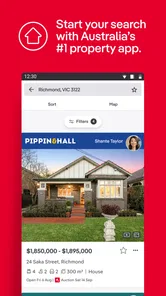
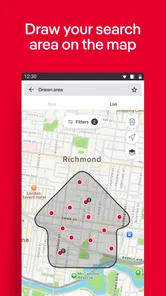
One of the standout features of realestate.com.au - Property is its seamless browsing experience. With a few taps, you can dive into a world of properties that suit your needs and preferences. Whether you’re looking for a cozy apartment in the city or a sprawling house in the suburbs, this app's comprehensive filter options make it a breeze to find what you're looking for. It’s like having a personalized real estate agent who knows exactly what you want.
Detailed Property Listings
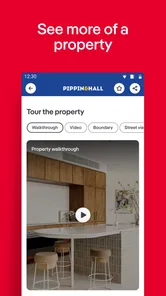
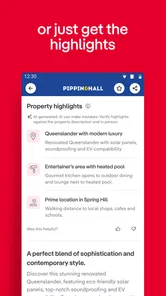
Each property listing is like a mini adventure. You'll find high-quality images, detailed descriptions, floor plans, and even virtual tours in some cases. This level of detail helps you visualize the space and make informed decisions without ever leaving your couch. It’s perfect for those who want to explore multiple options before making a move.
For me, the most useful role of those listing materials is narrowing the field, not making a final choice. A floor plan can expose awkward room connections that photos hide, while a virtual tour, when available, can help me judge whether the rooms feel connected or chopped up. I would still check what matters in person: the approach to the home, the surrounding street, and whether the space works at the times I would actually use it. If an online listing has enough detail to rule a property out, it has already saved me effort even if I never book a viewing.
Stay Updated with Notifications
The app’s notification system ensures you’re always in the loop. Set up alerts for new listings in your desired area, price drops, or open house announcements. It’s like having your finger on the pulse of the property market, ensuring you never miss out on a great opportunity. This feature is a game-changer for serious buyers and renters who want to stay ahead of the curve.
User-Friendly Interface
Let’s talk about the user interface. It’s clean, intuitive, and designed with the user in mind. Navigating through the app is straightforward, with everything you need just a tap or swipe away. The search function is particularly impressive, allowing you to refine your search with various criteria such as location, price range, and property type. It’s almost like the app knows exactly what you’re thinking!
Easy navigation does not remove the need to keep a search disciplined. I would start with location and budget, then add other preferences once I understand the shape of the results. If I set too many limits at the outset, I may exclude a place that could work with one reasonable compromise; if I set almost none, I can end up sorting through a noisy list. The useful middle ground is to separate must-haves from preferences and use that distinction when refining the search.
A search routine that works in real life
For a couple renting while planning a move, I’d use the filters first to agree on a realistic shortlist, then compare listings rather than opening every result. A useful trick is to keep the search criteria stable for a few days: changing several filters at once makes it hard to tell whether the results improved because of the area, budget, or property type. When a promising listing appears, I’d save the practical questions for follow-up—such as what is included and whether the layout suits everyday routines—instead of deciding from the lead photo.
A realistic weekday example shows why that routine helps. Suppose I have a few minutes between errands and want to check whether suitable rentals are appearing. I can scan a defined area and price range, save only the options that meet the essentials, and leave questions for a proper review later. In the evening, I can compare those saved candidates calmly, rather than making a rushed decision because a notification appeared. The app supports discovery, but the pace and standard of the decision remain mine.
For a buyer who is still learning an area, I would use the same approach differently: keep one search broad enough to explore, and another focused on the places that genuinely meet current needs. Comparing the two can show whether the wish list is too restrictive or whether a location is producing few plausible choices. The trade-off is that a broader search takes more attention, so I would not treat every result as a serious contender. A shortlist is valuable precisely because it keeps exploration from becoming endless browsing.
Compared with general classifieds or an agent’s own website, a dedicated property marketplace is more convenient for broad browsing across areas and property types in one place. The trade-off is that a large selection can create more noise, while an individual agent’s page may provide a more focused view of a particular property or process. I would use this app to discover and compare options, then confirm important details directly before making plans. It is especially useful for renters and buyers who are still narrowing down where and what to look for; someone who already has a specific property and needs transaction guidance may be better served by speaking with the relevant agent.
Where a marketplace helps—and where it doesn’t
The distinction between discovery and follow-through is important. A broad marketplace is handy when I want to compare different parts of Australia or get a feel for the kinds of homes appearing in an area. A direct conversation with an agent is more appropriate when I need an answer about a particular listing, a viewing, or the next step in a real transaction. I would not expect a search interface to settle questions that depend on current property circumstances or personal advice.
Likewise, people who prefer to browse a small, handpicked set may find a large marketplace less comfortable than a focused agent page or a conversation with someone who knows the property. Someone outside the Australian market should look for a service built around their own location. This app is at its best when the task is finding and comparing possibilities in Australia, not when the task is managing every part of a move.
Who will get the most from it
The app makes sense for people exploring Australian homes, comparing rentals, or keeping an eye on a possible move before they are ready to act. It is less suited to someone outside that market, or to anyone expecting a listing app to replace inspections, financial advice, or direct conversations. Its current version is 5.334.0, and the app has over five million installs; optional in-app purchases are listed at $18.99 per item. I would check the purchase prompt carefully before confirming anything, especially if I only intended to browse, and remember that the core app is free.
For someone deciding whether to try it, the key question is what kind of help they want. If the goal is to explore locations, compare homes, and keep an eye on listings, the free app is an accessible place to begin. If the goal is a professional assessment of affordability, a detailed inspection, or certainty about an individual listing, I would use the app only as one small part of a broader process. The Everyone age rating also makes it broadly accessible, but it does not change the need for an adult to handle financial or contractual decisions carefully.
On the account and purchase side, I would pause at any prompt and read what action it is asking me to take before proceeding. An optional purchase should not be confused with a requirement to search, and I would avoid confirming a payment simply to dismiss a screen quickly. If I decide to use an account or provide contact details for a specific purpose, I would make that choice deliberately and review the controls visible in the app and on my device. That is a practical way to preserve agency without guessing at policies or permissions I have not checked.
Another useful boundary is to decide in advance what would make me contact someone. I might require a listing to match my essential location and budget needs, and to have enough information to justify a question or visit. That avoids sharing contact details in response to every appealing photo. It also makes follow-up more productive: I can ask about the exact uncertainty that stopped me from deciding, rather than sending a vague enquiry before I have worked out what I need to know.
With a 4.5 average and a large established audience, the app clearly appeals to many property searchers, but popularity is not the same as a guarantee that every listing will suit my circumstances. I would use the ratings as background context, then judge the experience by whether its search results, listing information, and visible choices work for my own task. The developer is realestate.com.au, and the app remains a marketplace tool: useful for finding leads, while the important decisions still call for careful checking.
In conclusion, realestate.com.au - Property is more than just an app; it’s a gateway to finding your dream home or investment property in Australia. Whether you’re a first-time homebuyer, an investor, or just someone dreaming about their next move, this app provides all the tools you need. With its detailed listings, real-time notifications, and user-friendly interface, it’s a must-have for anyone serious about property hunting. So, why not give it a try and see where your next adventure leads?
realestate.com.au - Property Frequently Asked Questions
Can I search by suburb or location in the app?
Location is central to a property search, so the app is useful for exploring homes in areas that interest you. You can look for listings by entering a place or area, then review the results and open individual listings for more detail. Before making plans around a property, check its current listing information and confirm important details with the agent.
Who is the app designed for?
The app is aimed at people exploring property, whether they are buying, selling, renting, or researching the market. Its property-search focus can help you browse listings and assess options in one place. It is developed by realestate.com.au, and its Everyone age rating makes it suitable for a broad audience. Your experience will depend on the information and listings relevant to your search.
Can I save properties and return to them later?
Saving properties can make a home search easier to manage, especially when you are comparing several places or browsing over multiple sessions. Check the app’s available account and saved-property options to keep track of listings that catch your eye. Before relying on a saved listing, open it again to review its current details and availability.
What is realestate.com.au - Property app?
The realestate.com.au - Property app is a comprehensive tool for buyers, sellers, and renters in the real estate market. It allows users to search for properties, view detailed listings, and connect with real estate agents. The app provides up-to-date listings, photos, and important information about properties, making it easier for users to find their dream home or investment property.
Is the realestate.com.au app free to use?
Yes, the realestate.com.au - Property app is free to download and use. Users can access a wide range of features without any charges, including browsing property listings and viewing photos. However, certain premium features or services may require in-app purchases or additional fees, so review any purchase details before proceeding. The app is rated for Everyone, making it suitable for a broad audience.
Pros
- Comprehensive property listings.
- User-friendly interface.
- Detailed property information.
- Real-time notifications.
- Customizable search filters.
Cons
- Limited international listings.
- In-app ads can be intrusive.
- Requires a stable internet connection.
- Some features behind paywall.
- Occasional app crashes.