Readict Fiction
- 123.00
- 4.7
- Installs
- 50.00K
- Price
- Free

Screenshots


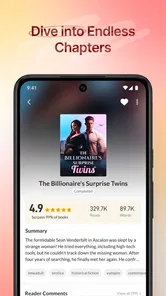
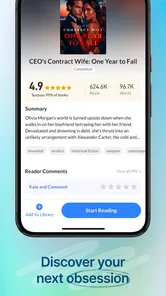

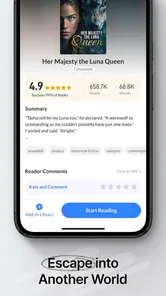
Analysis by Reviewed
I approached Readict Fiction as a reading app rather than as a replacement for a traditional library. Its purpose is straightforward: it brings a varied selection of fiction novels into an online reading experience, with the convenience of opening a story whenever I have a few spare minutes. That sounds simple, but the difference between enjoying it and abandoning it often comes down to how well the app fits your reading habits.
My first impression is that it is best suited to readers who like discovering ongoing or unfamiliar fiction without committing to a single physical book. It belongs in the Books & Reference category, and VitalTek, Inc. has kept the central idea focused on browsing and reading rather than turning the app into a general-purpose bookstore. The app is free to install, although optional in-app purchases range from $0.49 to $34.99 per item, so I would pay attention to any purchase prompts while exploring.
The app has a 4.7 average from around 658 ratings and has passed 50K+ installs, which suggests that it has found a real audience without being one of the huge mainstream reading platforms. It carries a Mature 17+ content rating, an important point for families and younger readers. I would not treat the age label as a minor detail: the fiction selection may be intended for mature readers, so I would check the tone of individual stories before handing the device to someone else.
Where the reading experience can become confusing
The most common source of friction with an app like this is not necessarily a broken installation. It is the difference between what a reader expects from a conventional ebook reader and what an online fiction catalog is designed to do. If you open Readict Fiction expecting to import a personal library, read every title offline, or manage books exactly as you would in a dedicated ebook app, the experience may feel less predictable.
I found it more useful to approach the app as a discovery stream for fiction. The practical question is not only “Which book do I want?” but also “How much time do I want to spend finding something?” If I have a long evening available, browsing can be part of the entertainment. If I have five minutes before an appointment, I want to identify a story quickly and return to it without repeatedly searching.
That distinction matters because online reading encourages a different workflow. A reader may start a novel because the premise is appealing, then decide after a few chapters that the pacing is not right. That is normal, but it means I would avoid treating the first selection as a serious commitment. The app works better when I keep an open mind and allow myself to sample fiction instead of forcing myself to finish every title I begin.
Another point worth understanding is the role of the free model. Free access lowers the barrier to trying the service, but optional purchases can change how you evaluate the experience. I would not assume that every part of a reading journey has the same conditions simply because the app itself costs nothing to install. Before confirming a purchase, I would read the wording on the screen carefully and decide whether the item is useful for my particular reading plan.
More From Our News Desk

Weather by Xiaomi Review: Clear at a Glance, Less Clear Up Close

X Under Pressure: Can It Recover When Posting Goes Wrong?

Clash of Clans Is Won Between the Battles

Android Auto Makes the Case for Quieter Car Software

MobiOffice: Transforming Mobile Productivity with Seamless Integration

EA SPORTS FC™ Mobile Soccer: Redefining Mobile Sports Gaming
This is also where the Mature 17+ rating affects expectations. Someone looking for children’s bedtime stories, school reading material, or a tightly controlled family catalog should choose a service built specifically around those needs. Readict Fiction makes more sense for an adult reader who is comfortable exploring fiction independently and checking individual story suitability.
What I check before blaming the app
When a reading app appears stuck, I start with the basics instead of immediately assuming that the account or catalog is damaged. I check whether the device is connected properly, whether other online apps are working, and whether the app has been allowed to finish opening. Since the service is centered on online fiction, an unstable connection can look like a catalog problem even when the installation itself is fine.
I also look at the device requirements. The current version is 5.9.1 and supports Android 6.0 or later. That makes compatibility a useful first check on older phones and tablets. If the operating system is below that requirement, changing reading settings or reinstalling the app is unlikely to solve the underlying issue. On a supported device, I would still make sure there is enough free storage for normal app operation and that the operating system is not behaving erratically because the device is overloaded.
A simple restart is underrated. I close the app, restart the phone, and open it again before trying more disruptive steps. If the problem only appears on one network, I compare that behavior with another trusted connection. This does not prove that the app is at fault, but it helps separate a service issue from a local connectivity problem without risking saved reading information.
I am cautious with clearing app data. Clearing temporary cache can sometimes help with a display or loading problem, but clearing full app storage may sign me out or remove local information. For a reading app, that matters because a reader may lose track of where they were or have to rebuild their personal setup. I would only use a stronger reset after noting the account details and accepting the possibility of starting the session again.
Notifications and battery restrictions can also make a reader think the app is unreliable. If the app opens normally but does not behave as expected after sitting in the background, I check whether the phone is aggressively limiting background activity. I would not change every system permission at random. Instead, I would make one adjustment at a time and test the reading workflow after each change.
A calmer way to recover a disrupted reading session
My preferred recovery method is deliberately conservative. First, I note the title and chapter I was reading, if they are visible. Then I close and reopen the app, confirm that the same account or session is active, and search for the story again if necessary. This is less frustrating than repeatedly tapping a screen that appears frozen, and it gives me a clear point at which to decide whether the issue is temporary.
If the story opens but the reading position seems wrong, I avoid rapidly changing pages. I pause, let the content finish loading, and then move through a small number of pages manually. A slow response can become worse when several taps are queued at once. This is one of those small habits that prevents a minor delay from turning into a confusing jump through the book.
I also recommend keeping a personal note of the title and chapter for any story that matters to you. That may sound old-fashioned, but it is useful when switching devices, recovering from a sign-in problem, or trying to find a story again after browsing elsewhere. A short note in a phone’s basic notes app is enough; it does not require a complicated tracking system.
For readers who move between short sessions, I would create a simple routine: finish a chapter or stop at a clear paragraph, then record the title before leaving. This is more reliable than assuming every online reading session will always return to exactly the same place. It also makes the app easier to use during commutes, lunch breaks, or waiting rooms, when attention is already divided.
If a purchase screen appears during recovery, I would not tap through it simply to get past a loading delay. Readict Fiction is free to install, but optional items can cost between $0.49 and $34.99. I would first close the prompt, return to the reading screen if possible, and decide separately whether the purchase is relevant. Separating troubleshooting from buying prevents an accidental decision made under pressure.
There is a useful trade-off here. A dedicated ebook reader may offer a more predictable library structure, while Readict Fiction can be more inviting when I want to browse beyond books I already know. If my priority is precise collection management, I would favor the dedicated reader. If my priority is finding a new fiction story without buying a complete book first, this app has a stronger case.
When the app is not the cause
Not every missing story, slow screen, or interrupted session points to a defect in the application. Network congestion, an older device, restricted background activity, or a temporary account problem can produce similar symptoms. I try to identify the pattern: does everything fail, or only one title? Does the problem happen on one connection, or everywhere? Does restarting the device change anything? These observations are more useful than repeatedly reinstalling the app.
Reinstallation should be a later step, not the first one. It can remove local state and creates extra work if the issue is actually caused by the network or the phone’s operating system. Before reinstalling, I would make sure I know how I normally access the app and keep track of the fiction I was reading. That preparation is especially valuable for anyone who uses reading as a daily habit and does not want a technical problem to erase the evening’s progress.
Device age deserves honest attention too. The minimum operating system is Android 6.0, but technically meeting a requirement does not guarantee a smooth experience on every older handset. Limited memory, a crowded storage drive, or a heavily customized system can affect loading and responsiveness. If other modern apps are also slow, I would investigate the phone before concluding that Readict Fiction is uniquely responsible.
There is also a difference between a content preference and a technical problem. If the available fiction does not match your taste, the app may be working exactly as intended while still being the wrong choice for you. Readers who want academic references, public-domain classics, comics, audiobooks, or a tightly organized purchased library should look at services designed around those formats. This app is more appropriate for casual fiction discovery than for every kind of reading.
The age rating creates another clear boundary. I would skip it for a child’s device unless an adult has reviewed the experience and is comfortable with the mature classification. Likewise, readers who need books for school assignments may prefer a catalog with dependable editions, citation tools, and educational organization. Readict Fiction is not the app I would choose when accuracy of a specific textbook or reference work matters more than variety.
Privacy and purchase habits should shape the decision as well. I would use the app with the same care I apply to any free service that offers optional paid items: review prompts, avoid rushing through checkout screens, and keep purchases intentional. That is not a criticism unique to this app; it is simply good practice when a free download includes optional spending.
Small habits that make browsing more useful
My first practical tip is to judge a story by a manageable sample rather than by its cover or opening sentence alone. I read enough to notice the voice, pacing, and general tone, then decide whether it deserves a place in my current rotation. This reduces the temptation to collect several titles and finish none of them.
My second tip is to separate “discovery time” from “reading time.” When I am tired, I do not browse endlessly. I choose one story from a short list and read for a fixed personal session. On another day, I may explore more widely. This simple split makes the app feel less like a feed that demands constant attention and more like a shelf from which I can choose.
My third tip is to use a two-story rotation when a novel’s pacing is uneven. I keep one story for focused reading and another for shorter breaks. If the first becomes too demanding or loses momentum, I can switch without abandoning reading altogether. This is particularly helpful with a broad fiction catalog because not every story will suit every mood.
A less obvious trade-off is that variety can make commitment harder. Having many possible stories is exciting, but it can also encourage constant switching. I would set a personal rule, such as giving a promising story a fair session before moving on. The app supplies choice; the reader still needs a little discipline to turn that choice into a finished reading habit.
For a realistic everyday example, imagine waiting for a medical appointment with fifteen minutes available. I would open the app, choose a story I have already identified, read without trying to reorganize my entire library, and record the stopping point before the appointment begins. If the connection is poor, I would not spend the whole wait troubleshooting. I would switch to another offline activity and return later, because forcing an online reading app to work in a weak-signal environment is usually a poor use of time.
How it compares with familiar reading alternatives
Compared with a physical book, Readict Fiction is more convenient when I want to carry several possible novels without adding weight to my bag. The compromise is that the experience depends on a phone or tablet and an online reading flow rather than the permanence and simplicity of paper. A physical book also avoids the distraction of notifications, which may matter to readers who want deep, uninterrupted reading.
Compared with a standard ebook store, this app feels more discovery-oriented. A store is often better when I already know the exact title, author, edition, or price I want. Readict Fiction is more appealing when I want to browse fiction and try something unfamiliar. The right choice depends on whether certainty or exploration is the main goal.
Compared with a library app, the important difference is the surrounding system. Library services can be excellent for borrowing known titles, managing due dates, and accessing a local collection. Readict Fiction is easier to view as a dedicated fiction-reading destination rather than as a complete public-library replacement. I would use the two for different purposes if I regularly borrow books but also enjoy discovering new online stories.
Compared with a minimalist ebook reader, Readict Fiction offers a more catalog-centered experience, while the minimalist option may be better for reading files I already own. Readers who care about typography controls, file organization, annotations, or a carefully managed personal archive should compare those capabilities closely before choosing. I would not install this app expecting it to become the central manager for every book on my device.
Who should install it and who should pass
I recommend giving it a try if you enjoy fiction discovery, prefer reading on a phone or tablet, and like the idea of sampling stories without beginning with a traditional purchase. It is especially suitable for casual readers who read in short bursts and do not mind an online-first experience. The free installation makes experimentation easy, provided you remain aware of optional purchases.
I would be more cautious if you need children’s content, offline certainty, advanced study tools, or a precise personal-library workflow. The Mature 17+ rating alone makes it unsuitable as an automatic family recommendation. I would also look elsewhere if you already have a large ebook collection and want one app to import, sort, annotate, and preserve everything in a structured way.
VitalTek, Inc. has kept the idea recognizable: a fiction app for reading and discovering novels online. Its current version, 5.9.1, supports devices running Android 6.0 or later, so compatibility should be checked before installation on an older phone. The app’s established audience and 4.7 average are encouraging, but they should not override your own requirements around content, connectivity, and reading controls.
My practical verdict after using it
I see Readict Fiction as a useful companion for readers who want accessible fiction discovery rather than a complete digital-library system. Its strongest quality is the low-pressure invitation to browse and begin reading. I can imagine returning to it during short breaks, travel downtime, or evenings when I want a new story without deciding on a single expensive purchase first.
Its weaknesses are tied to that same model. Online reading can be inconvenient with unreliable connectivity, browsing can become distracting, and the Mature 17+ classification limits who should use it. Optional purchases also mean that “free” should be understood as free to install, not as a promise that every possible item or reading path has identical conditions.
My advice is to install it with a clear expectation: use it as a fiction discovery and reading app, test it on your normal network, keep track of stories you care about, and treat purchase prompts deliberately. If that matches the way you read, the best reason to try Readict Fiction is its combination of easy access and room for exploration. If you need a stable offline library, children’s material, or serious reference features, a different reading tool will serve you better.
Readict Fiction Frequently Asked Questions
What devices and operating systems can run Readict Fiction?
Readict Fiction is a mobile app for reading fiction on a compatible device. It supports Android devices running version 6.0 or later, so checking your operating system before downloading can help avoid installation problems. The app is listed for Android and iOS, and the experience is intended for reading novels and chapters on a phone or tablet.
What is Readict Fiction, and what kind of content can I find in it?
Readict Fiction is a mobile reading app focused primarily on serialized fiction and entertaining stories. After exploring the app, readers can browse different genres, discover ongoing or completed novels, and read chapters directly on their Android or iOS device. The catalog may include romance, drama, fantasy, mystery, and other popular categories, although availability and story selection can change over time.
Is Readict Fiction free to download and use?
Readict Fiction can generally be downloaded without paying an upfront purchase price, allowing users to install the app and explore its library. However, free access may be supported by advertisements, limited reading options, virtual rewards, or in-app purchases. Some chapters, premium stories, or faster access to content may require payment, so it is worth checking the app’s current pricing and purchase conditions before spending money. Optional in-app purchases range from $0.49 to $34.99 per item.
Does Readict Fiction require an account or an internet connection?
The app may allow users to browse or begin reading without completing a lengthy registration process, but creating an account can be useful for saving progress, synchronizing reading activity, and accessing the same library across devices. An internet connection is normally needed to load stories, advertisements, and new chapters. Offline reading availability can vary by title, account status, and the app version installed.
Are there advertisements or in-app purchases in Readict Fiction?
Users should expect that Readict Fiction may include advertising and optional in-app purchases. Advertisements can appear while navigating the application or unlocking additional reading opportunities, while purchases may provide coins, credits, premium chapters, or other benefits. The exact system can differ between regions and updates. Parents should also review device purchase controls if children might use the app.
Pros
- Large catalog of serialized fiction across romance
- fantasy
- and mystery.
- Personalized recommendations help surface stories matching your reading interests.
- Offline reading makes selected chapters accessible without a constant connection.
- Simple interface supports comfortable reading on phones and smaller screens.
- Frequent chapter updates keep ongoing stories engaging for regular readers.
Cons
- Many stories require coins or in-app purchases to unlock later chapters.
- The reading experience can be interrupted by frequent advertisements.
- Story quality varies considerably between authors and titles.
- Some books may end abruptly or remain unfinished for long periods.
- Privacy and account features may require permissions some users find excessive.













