Rapchat: Music Maker Studio
- 8.52K
- 4.7
- Installs
- 5.00M
- Price
- Free
Screenshots
Analysis by Reviewed
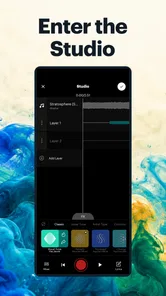
If you’re opening a music app for the first time, the hardest part is often getting past the blank-page feeling. Rapchat: Music Maker Studio makes that first step less intimidating by putting beat-based rap recording at the center of the experience. I’d treat it as a quick way to test ideas and build confidence, rather than expecting a phone app to replace every part of a dedicated recording setup.
What to expect from a pocket rap studio
Rapchat is a free music and audio app from Rapchat, Inc. Its focus is specific: writing and recording rap over beats, with vocal tuning and other tools to shape a take. It has a 4.6 average from around 88,000 ratings, and more than 5 million installs, so it is a well-established option for people curious about making tracks on a phone. The app is rated Teen and offers in-app purchases, so some options may involve spending rather than being part of a free session.
The main appeal is lowering the barrier between an idea and a rough recording. If you have a line in your head during a commute or a break, you can capture it against a beat instead of waiting until you have access to a larger setup. That convenience is also the trade-off: a phone is well suited to sketches and quick experiments, while careful vocal editing and detailed mixing are more comfortable in dedicated recording software.
Getting ready without overthinking setup
When you first open it, I’d keep the goal small: choose a beat that suits the mood of your words, then get ready to record a short verse. You don’t need a polished concept before you begin. A simple hook or a few lines are enough to learn how the recording flow feels and whether the beat leaves room for your voice.
Before recording, find a quiet spot and decide whether you want to use vocal tuning or keep the take closer to your natural voice. That choice can change the character of a performance, so I’d try the same short passage both ways rather than piling on effects immediately. If you already have lyrics, keep them nearby; if you’re starting from scratch, use the writing tools as a place to collect phrases before trying to perform them.
Your first useful recording
A practical first session is a short, unfinished demo, not a full song. Record a few lines, listen back, and notice whether your delivery lands in time with the beat. If it feels crowded, try a simpler rhythm or leave more space between phrases. This small check is more useful than endlessly adjusting effects before you know what the vocal needs.
For a realistic everyday use, imagine getting a lyric idea while waiting for a friend. You can note the lines, pick a beat that fits their energy, and record a quick draft before the thought disappears. Later, you can revisit it with fresh ears. I find that workflow especially helpful for capturing momentum; it is less suited to a session where quiet monitoring, precise editing, or a carefully controlled recording environment matters most.
More From Our News Desk

 Gmail
Gmail in a Busy Inbox: Who Benefits Most?
From first account to crowded workday, Gmail earns its place through dependable search and flexible sorting—but its best fit depends on how much inbox maintenance you can tolerate.

 Prime Video
Switching to Prime Video: What Changes in Your Viewing Routine
Prime Video can make a compelling second home for streaming, but switching means learning a different catalog, rental layer, and route from browsing to playback.

 Universal TV Remote Control
 Works Best as a Reliable Backup
A phone remote earns its place through quick setup and reliable habits. Here is how to get more from Universal TV Remote Control—and where its limits show.

 Weather - By Xiaomi
Weather by Xiaomi Review: Clear at a Glance, Less Clear Up Close
Xiaomi’s weather app makes everyday forecasts quick to scan, but its calm surface can leave useful details and recovery paths harder to find than they should be.

 X
X Under Pressure: Can It Recover When Posting Goes Wrong?
A resilience-focused review of X, examining setup, mistaken posts, interruptions, weak connections, and the gaps that matter when recovery needs to be dependable.

 Clash of Clans
 Is Won Between the Battles
Its raids are quick; its community is a long-term project of coordination, teaching, rivalry, and shared responsibility—with all the friction that entails.
Latest News



The Beat of the App
Rapchat isn’t just another music app; it’s a full-fledged music creation platform designed for budding and experienced rappers alike. As soon as you open the app, you're greeted with a sleek interface that’s surprisingly easy to navigate. Whether you're laying down your first track or your fiftieth, the user-friendly design ensures you won’t get lost along the way.
Recording Your Masterpiece
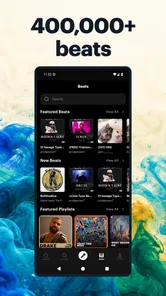
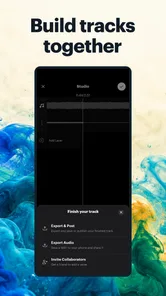
The recording feature is where this app truly shines. You can choose from a vast library of beats or even upload your own, making it super simple to start creating. Once you've got your beat, just hit record and let your creativity flow. The app provides basic editing tools to tweak your track, helping you polish it to perfection.
Community Vibes
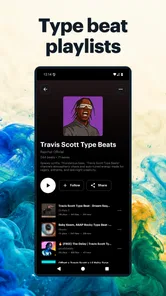
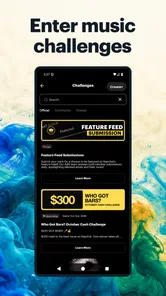
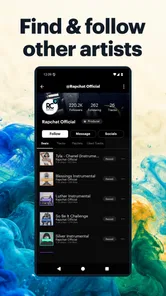
One of the standout features of Rapchat is its vibrant community. You can share your tracks with other users, get feedback, and even collaborate with fellow artists. It’s like having a built-in audience and support group that’s always there to cheer you on. Plus, with the ability to follow other artists, you can draw inspiration from their work and see what’s trending in the rap community.
Tools for Success
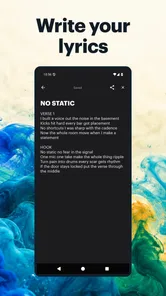
Apart from recording, Rapchat offers a variety of tools to enhance your music-making experience. From auto-tune options to lyrics writing help, the app equips you with everything you need to craft your next hit. The lyrics feature is especially handy, allowing you to jot down lyrics on the go and even find rhymes with ease.
If you’re someone who loves to experiment with their sound, the app’s built-in effects and adjustable settings give you the freedom to tweak your tracks until they sound just right. Whether you want to add a little echo or crank up the bass, the possibilities are endless.
Choosing how far to take a track
The social side changes the experience from a private notebook into a place where other listeners can react. I’d share a draft when I’m ready for outside ears, but keep early experiments private until I know what kind of feedback I want. A specific question—such as whether the hook is clear—is more useful than simply hoping people will tell me what to fix. Sharing can encourage you to finish ideas, though it may not suit anyone who wants a strictly offline, personal workspace.
Compared with a general voice recorder, Rapchat gives a rap idea more musical context: a beat, vocal effects, and tools aimed at lyrics. Compared with a full digital audio workstation, it is easier to approach for a quick performance, but less appropriate when a project calls for detailed track arrangement or a highly controlled mix. I’d choose it for momentum and experimentation, then move a serious production to a more specialized tool if the work outgrows a mobile sketch.
Small choices that make a session smoother
One useful habit is to save the unembellished idea before spending time on effects. A dry or lightly treated take gives you a clearer sense of timing and delivery; effects can then support the performance instead of disguising problems in it. I’d also keep each first attempt short. A compact verse is easier to compare across beats and vocal settings than a whole song, and it makes experimentation feel less costly.
Another trade-off is the beat itself. A beat can spark a lyric, but it can also steer the writing toward a flow that does not feel natural. If you find yourself forcing every line to fit, try a different instrumental rather than assuming you need a more complicated vocal treatment. That simple switch can help you decide whether the issue is the performance or the musical foundation.
Who will enjoy it—and who may want another tool
I’d recommend it to first-time rappers, casual writers who want to hear their words over a beat, and experienced artists who need a fast place to sketch a hook. The social features may also appeal if you enjoy sharing work and learning from other creators. Someone who mainly wants to record spoken notes, make polished multi-part productions, or work without a community layer may be better served by a basic recorder or a desktop-focused music program.
The app is free to start, with in-app purchases ranging from about $3.89 to $49.99 per item. I’d explore the core workflow before paying for anything: first see whether recording, writing, and revisiting drafts fit your routine. Rapchat is currently at version 8.6.1 and requires Android 8.0 or later, details worth checking against your device before installing. Its rating is a useful sign of broad interest, but your own test recording will tell you more about whether the controls and sound suit you.
Working around the first-session stumbling blocks
It’s easy to mistake a rough first take for evidence that you can’t rap or that the app isn’t working for you. I’d separate the performance from the setup: replay the beat, listen for its pulse, and try speaking the verse rhythmically before recording it again. If the words keep colliding with the instrumental, trim a phrase or shift where you breathe. This is a practical writing adjustment, not a problem that another effect will necessarily solve.
Room sound can also shape your impression. A quiet corner and a phone held consistently are better starting conditions than recording beside conversation or moving around mid-take. You don’t need to turn the process into a studio ritual, but repeating the same short passage from the same position makes it easier to judge whether a change in tuning or delivery actually helped. Headphones can help you focus on playback, while a quick listen on the phone speaker gives a different, everyday check of how the draft comes across.
Making feedback useful rather than noisy
If you decide to share, I’d treat the first post as a request for one kind of feedback, not a vote on your future as an artist. Ask whether the words are understandable, whether the beat suits the verse, or where the energy drops. That keeps responses actionable and makes it easier to decide what to change. Community reactions can be motivating, but a personal draft may need another private pass before it is ready for an audience.
There is also a useful boundary between inspiration and comparison. Listening to other artists can give you ideas about pacing or mood, but copying a sound too closely can make your own rough sketches feel worse than they are. I’d use the community to discover approaches, then return to a beat and lyric choice that feels natural to me. If you prefer not to put unfinished work in front of other people, the recording and writing workflow can still be valuable as a private idea notebook.
When a different recording approach makes more sense
For spoken reminders, interviews, or a quick voice memo, a standard recorder is simpler because it does not ask you to choose a beat or shape a musical performance. For a song with many carefully arranged layers, repeated edits, or exact control over a final mix, a full desktop workstation is the stronger fit. Rapchat sits between those uses: it gives a rap sketch enough musical structure to feel like a song idea without making a beginner solve a complicated production session first.
That middle ground matters most when speed is more valuable than precision. A songwriter can capture a hook before it fades, a beginner can practice fitting words to rhythm, and an experienced rapper can test a delivery on a phone before deciding whether it deserves a larger production. If you already know that you need detailed engineering tools, though, the quick-start convenience may become a limitation rather than a benefit.
A sensible path from sketch to next take
After the first draft, I’d avoid trying to fix everything at once. Choose one thing to improve: make the opening line clearer, leave a pause before the hook, or try a beat with more breathing room. Record another short pass and compare it with the first. This keeps progress visible and teaches you which changes genuinely improve the idea instead of merely making the session longer.
Once the core performance works, effects can become a creative choice rather than a rescue plan. A little tuning may suit a deliberate stylized sound, while a more natural take may communicate the words better. The right result depends on the track, so I wouldn’t treat one setting as the correct default. Keeping the lyric and rhythm at the center is a reliable way to make those choices with intention.
Final Thoughts
In a world where music creation can often feel daunting, Rapchat: Music Maker Studio breaks down those barriers, making it accessible and fun for everyone. Whether you’re a seasoned artist or just starting out, this app provides all the tools you need to unleash your creativity.
So, if you’ve ever found yourself scribbling lyrics on napkins or dreaming of recording your own tracks, give Rapchat a try. Who knows? You might just be the next big thing in the rap game!
Rapchat: Music Maker Studio Frequently Asked Questions
Can I make music in Rapchat without any recording experience?
Yes. Rapchat is designed to let users record songs, raps, and beats in a mobile recording studio, with lyrics and auto vocal tune among its tools. Its focus on making recording accessible can appeal to newcomers as well as people with more experience. You can start creating on your phone and explore the available tools as you become more comfortable.
Can I listen to other creators’ music before deciding whether Rapchat is right for me?
Rapchat is built around making and sharing music, and its community focus can give creators a place to discover other work alongside their own projects. If you enjoy hearing different approaches to rap and beat-making, that social element may be part of the appeal. The app is centered on creating, recording, and sharing tracks rather than functioning only as a conventional music player.
Is Rapchat suitable for younger users?
Rapchat has a Teen content rating, so parents and younger users should consider whether its creative and community-oriented environment is appropriate for them. The rating is worth checking before installation, especially if a child will use the app independently. As with any platform where users share creative work, families may also want to discuss responsible participation and what kinds of content are suitable.
Can I use Rapchat on my device?
Rapchat: Music Maker Studio is a music and audio app for phones and tablets running Android 8.0 or later. Before downloading, check that your device meets that requirement and has enough room for the app and any recordings you make. The app is rated Teen, so it may not be suitable for every younger user.
Does Rapchat include tools for beginners who have never recorded a song?
Yes. Rapchat is designed to let users record songs, raps, and beats in a mobile recording studio, with lyrics and auto vocal tune among its tools. Its focus on making recording accessible can appeal to newcomers as well as people with more experience. You can start creating on your phone and explore the available tools as you become more comfortable.
Pros
- User-friendly interface for beginners.
- Wide range of beats and instruments.
- Built-in collaboration features.
- Easy sharing to social media.
- Regular updates with new features.
Cons
- Limited free version features.
- Occasional app crashes reported.
- Some features require in-app purchases.
- Lack of advanced editing tools.
- Ads can interrupt the workflow.